How to Create a React Native Application in Minutes
Learn how to create react native application quickly with AI. A practical guide to setup, screen generation, navigation, and exporting production code.
By Sanket Sahu
27th Jan 2026
Last updated: 27th Jan 2026
Building a React Native app can be a real slog, especially when you're just trying to get a prototype off the ground. The traditional route is loaded with time-consuming setup before you can even write a single line of UI code. But what if you could skip all that?
This guide is for anyone—founders, product managers, designers, or developers—who needs to build and test a mobile app idea without getting bogged down in technical setup. We're going to walk through a modern, AI-first workflow. It’s a method that takes you from a simple text description of your app to a live, testable prototype on your phone in minutes.
Go From Idea to Live App in Record Time
Imagine just describing your app idea and then seeing it come to life on your phone almost instantly. That's the core promise here. Forget spending days wrestling with your local development environment. We'll jump straight into crafting simple text prompts to generate fully styled screens using NativeWind, wiring up navigation, and tweaking the design with a simple chat interface.
The goal is to build a functional prototype that you can actually test, share, and ultimately export into clean, production-ready code—all without having to write it yourself from scratch.
This workflow boils down to a super-efficient, three-step process.
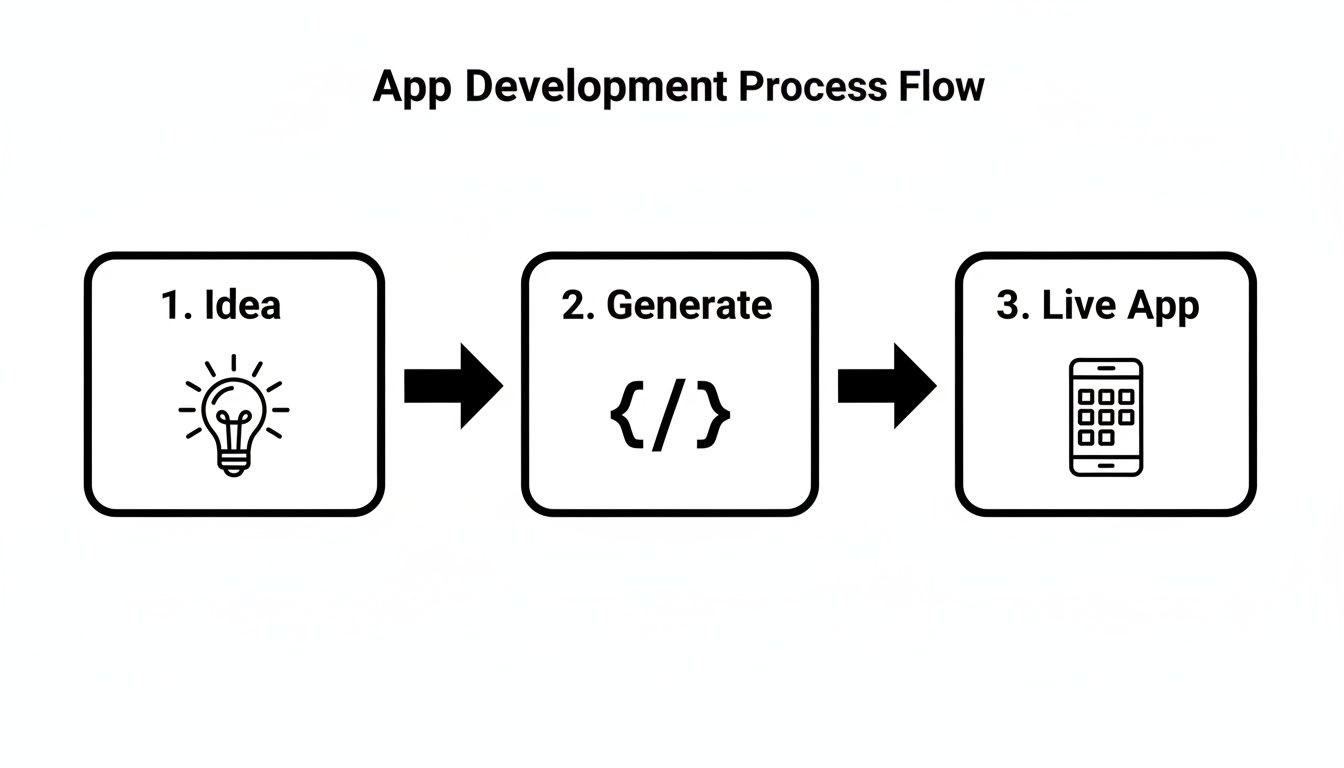
What really matters is the direct line it draws from a concept to a tangible app, effectively cutting out the tedious setup and boilerplate that so often stalls a project before it even starts.
Why a Prompt-First Approach Matters
Let’s be honest: traditional mobile development is slow. An idea typically crawls through wireframing, high-fidelity mockups, and then finally gets coded. Each stage has its own long feedback loop, and it can take weeks or months before you have anything working to show stakeholders or users.
An AI-driven, prompt-first workflow completely flips that script. By translating plain English directly into code, you unlock some serious advantages:
- Validate concepts instantly: You can see if an idea feels right both visually and functionally in minutes, not weeks.
- Get everyone on the same page: Designers, product managers, and developers can collaborate in real-time on a single, interactive prototype. No more misinterpretations between a static Figma file and the final code.
- Stop wasting time and money: Catch awkward user flows or design flaws right away, long before you’ve invested significant engineering resources.
This approach essentially collapses the design-to-code pipeline, letting you build and test at the speed you can think. It’s not about replacing developers; it’s about empowering the entire product team to build with more speed and clarity.
If you're eager to see this in action, you can learn more about how to prototype your mobile app idea fast and get a running start.
1. Launch Your Project with a Single Click
Let's be practical: the biggest hurdle to starting a new React Native app isn't the idea—it's the setup. Wrestling with development environments, chasing down dependencies, and making sure all your tools play nice together can burn hours, if not days. That initial friction is a real project killer.
An AI-powered builder like RapidNative lets you sidestep that entire mess. With literally one click, it spins up a complete, professional-grade tech stack for you. Forget complex installs or configuration files; you get to jump straight from your idea into building a functional app.

Why This Tech Stack Is the Gold Standard
If you're a founder or product manager, it's helpful to know why certain technologies get picked. The stack RapidNative provides isn't random; it’s what modern mobile development teams choose for building high-quality, scalable apps.
Here’s a quick rundown of what you get and why it matters:
- React Native: This is the core framework. It lets your team build for both iOS and Android from a single JavaScript codebase, which is a massive win for speed and budget.
- Expo: Think of Expo as a set of superpowers for React Native. It handles a ton of the tricky native stuff (like camera access or push notifications) and makes testing on a real phone as simple as scanning a QR code.
- TypeScript: This adds a crucial layer of safety to your code. TypeScript catches common errors before they ever make it to your users, making the app far more reliable and easier to maintain as it grows.
- NativeWind: For styling, NativeWind is a game-changer. It brings the speed of utility-first CSS from the web world to mobile, allowing for incredibly fast and consistent UI development without messy stylesheets.
This curated stack gives you a production-ready foundation from the very beginning. It’s the same setup that experienced dev teams spend days meticulously configuring, but you get it instantly. Your project starts on solid ground.
Building Our Travel Planner App: A Real Use Case
To make this practical, let’s build a simple "Travel Planner" app. The goal is an MVP with three main screens: a login screen, a dashboard showing upcoming trips, and a details screen for a specific trip.
That one-click setup in RapidNative immediately creates a new project with every file and configuration already in place. For any developer who's been through it, this means no more npm dependency hell and no more hunting for compatible library versions. What you get is a clean, organized, and ready-to-go codebase, just waiting for your first prompt.
This kind of automated foundation is more important than ever. The cross-platform app market is exploding and is expected to soar past $202 billion by 2031. React Native commands a huge 35% of that market, backed by a massive community and a new wave of AI tools that are making development faster than ever. Discover more insights on the latest React Native devtools and their impact.
2. Crafting UI Screens with Simple English Prompts
Alright, with our project foundation sorted, it's time for the fun part: actually building something. This is where our "Travel Planner" app idea stops being just an idea and starts looking like a real app on a screen. Forget the old-school routine of static wireframes and mockups. We're going to use simple, descriptive text prompts to generate fully functional UI components.
Think of it like having a conversation with a developer who instantly builds exactly what you describe. This approach lets product managers, designers, and founders jump straight from vision to interactive UI, cutting out a lot of the usual back-and-forth. The real skill here is learning how to write prompts that get the AI to build what you're imagining.
The Art of Prompting for UI
Prompting isn't just about asking for something; it’s about giving clear, detailed instructions. The quality of what you type in directly dictates the quality of what comes out. A vague prompt will give you a generic, cookie-cutter screen. A specific one? You'll get a polished interface that feels custom-built.
Let’s start with the first screen every app needs: the login page.
- A vague prompt would be something simple like: "Create a login screen."
- A better, more specific prompt: "Generate a login screen with a centered logo. Add email and password input fields with placeholder text, a primary login button styled in blue, and two links below for 'Forgot Password' and 'Sign Up'. Underneath that, include social login buttons for Google and Apple with their official logos."
See the difference? The detailed request gives the AI precise instructions on the components, layout, styling, and even the microcopy. The result is a screen that’s much closer to a finished product. For a deeper dive, check out our full guide on how to leverage prompts for UI design.
The goal of a good prompt is to leave as little to interpretation as possible. By specifying component names, colors, and layout hints, you take control of the creative process and ensure the generated UI aligns perfectly with your vision.
From Login to a Full-Fledged Dashboard
Now, let's apply this thinking to another key screen: the main dashboard. This is where users will see their upcoming trips, so it needs to be both functional and easy on the eyes. We’ll need a scrollable list of "trip cards," with each card showing essential information at a glance.
The table below shows just how much the specificity of your prompt can influence the final result.
Prompting for Better UI Generation
Getting the prompt right is the key to generating high-quality UI. A little extra detail goes a long way in turning a generic layout into a user-friendly design.
| UI Element | Vague Prompt Example | Better Prompt Example | Expected Outcome |
|---|---|---|---|
| Dashboard | "Make a screen with trip cards." | "Create a dashboard screen with the heading 'My Trips'. Below it, show a vertical list of trip cards. Each card needs a background image, the destination city in bold, the trip dates, and a small icon for the trip type (e.g., a plane for a flight)." | A well-structured dashboard with styled, informative trip cards ready for data. |
By being explicit about things like headings, icons, and even text formatting, you guide the AI to build a much richer, more intuitive interface. This is how you can quickly move from a simple login page to complex, data-driven screens in minutes—all by refining your prompts.
3. Connect Screens and Refine Your App with AI Chat
Individual screens are a great start, but they don't make an app. The magic happens when you weave those screens together into a cohesive user journey. This is where we shift from static mockups to a genuinely interactive prototype. The cool part? We can build out this entire flow using the same conversational prompts we used for the screens.

Think about our "Travel Planner" app. An app is more than just a folder of pretty views; it needs navigation to tie everything together. For users to get around, a bottom tab bar is a classic, intuitive choice.
Instead of wrestling with navigation libraries and boilerplate code, we can just tell the AI what we need.
A simple prompt does the trick: "Set up a bottom tab navigator with three tabs: 'Home' showing the main trip list, 'My Trips' for a list of saved itineraries, and a 'Profile' screen. Use appropriate icons for each tab."
That one sentence is enough to scaffold the entire navigation structure. It takes the screens we’ve already built and links them into a functional tab-based layout. This is a perfect example of how you can create a react native application’s foundational structure in literal seconds.
Iterating and Refining with Conversational AI
Here’s where the process really shines. Your first draft is never the final one, and the speed at which you can iterate is what turns a good idea into a great product. Forget tweaking a design in Figma, exporting assets, and waiting for a developer. You can now make changes in real-time, right from a chat interface.
This conversational back-and-forth shrinks the feedback loop from days to mere moments. You can test out new ideas as fast as you can type them.
- Want a new color? "Change the main button color on the login screen to a shade of blue."
- Need a layout change? "Add a search bar component above the trip list on the Home screen."
- Spotted a typo? "Change the heading on the dashboard from 'My Trips' to 'Upcoming Adventures'."
Each of these commands updates the live preview instantly. You see the impact of your decisions immediately, which helps you build confidence and move faster.
The immediacy is what's so powerful here. You’re no longer just describing what you want; you're actively sculpting the application through a simple conversation. It feels less like a handoff and more like a true collaboration.
This approach also opens the door for non-technical team members—founders, product managers, designers—to contribute directly to the build without writing a single line of code. For those moments when you need a bit of real-time guidance, tools offering AI chat assistance can be a lifesaver. You might check out something like supportgpt's AI chat assistance to see how this kind of technology works in practice.
By combining generated navigation with this iterative chat model, you can build, connect, and refine your app's entire user flow. What you end up with is a high-fidelity prototype that looks and feels just like the real thing.
4. Test Your Prototype and Export Production-Ready Code
So, you've generated your screens, wired them up, and tweaked the design until it's just right. At this point, you have a high-fidelity prototype that looks and feels like a real application. But a pretty picture isn't the end goal—getting it into users' hands is. This is where an AI-native workflow really shines, letting you bridge the gap from preview to on-device testing and finally, to a clean, developer-friendly codebase.
The whole point is to build something tangible you can validate right away, not just something that looks right on your monitor.
From Screen to Your Phone in Seconds
Forget fiddling with complex builds or clunky simulators. With an integrated tool like Expo Go, getting our "Travel Planner" app onto a physical device is as simple as scanning a QR code. This step is absolutely critical because it gives you instant, real-world feedback on how the app actually feels to use.
Once it's on your phone, you can immediately check things like:
- Touch Targets: Are the buttons and links actually easy to tap with a thumb?
- Performance: Do the screen transitions and scrolling feel snappy and smooth?
- Ergonomics: How does the layout feel when you're holding your phone naturally?
This on-device testing loop is incredibly fast. You can pass your phone to stakeholders, team members, or even potential users and get their honest reactions without any technical hurdles. Anyone can scan the code and experience the app firsthand, which is the best way to confirm your design decisions work in practice, not just in theory.
Exporting Your Code Without Vendor Lock-In
When you're happy with the prototype, it's time to export the source code. This is probably the single biggest advantage of an AI-native code generator over traditional no-code platforms. You get a standard, production-grade React Native project with no vendor lock-in. You aren't trapped in a proprietary system.
With one click, the entire application—all your screens, components, navigation, and styling—gets bundled into a downloadable zip file. What you get isn't a black box; it's clean, human-readable code.
Once you unzip the project, you’ll find a well-organized file structure that any React Native developer will instantly recognize. The code is modular, with reusable components and a clear separation of concerns. A developer can just open the project, run npm install, and get straight to work. This approach dramatically speeds up the initial development phase, which translates to real savings. In fact, choosing React Native can lead to significant 30-40% cost reductions compared to building separate native apps, which can save thousands on a typical project.
This ability to create a react native application with AI and then hand it off for further development shows that this process doesn’t replace developers—it empowers them. It automates the most tedious parts of UI development, freeing up your engineering team to focus on what really matters: the complex business logic and backend integrations that make your app powerful. To see this in action, you can learn more about exporting real React Native code and how it slots perfectly into a professional workflow.
Common Questions About Building React Native Apps with AI
Diving into AI-driven development naturally brings up some questions, whether you're a founder, a product manager, or a developer. It’s a new way to create a react native application, so let's walk through some of the most common things people ask.

Is the AI-Generated Code Actually Production-Ready?
Yes, it is. The code you get isn't some weird, proprietary output; it's clean, readable React Native code built with modern standards like TypeScript and Expo. Think of it as what a skilled developer would write.
Once you export the project, you can just run npm install and get straight to work in your own local environment. The AI acts as a massive accelerator, not a restrictive black box.
Can I Integrate Components into an Existing App?
Absolutely. One of the best parts is that the generated UI is completely component-based. This makes it incredibly easy to grab individual screens or even smaller components and drop them into an existing React Native project.
For example, if you wanted to add a new "Settings" screen to your current app, you could generate it with a prompt, export the code, and simply copy the SettingsScreen.tsx file into your project. It’s a fantastic way to add new features or redesign a section of a mature application without starting from scratch.
The key here is flexibility. You can use an AI builder for an entire MVP, or you can use it to quickly scaffold a single complex feature for an app that's already live. The code's modular nature supports both workflows perfectly.
How Is This Different From a No-Code Builder?
This is a really important distinction. Many no-code builders lock you into their ecosystem, using proprietary systems that are a nightmare to customize or export. An AI-native code generator is the polar opposite because it works with real, standard code.
The foundational principle is no lock-in. At any point, you can export the complete, human-readable source code and continue development on your own terms. You own the code—the platform doesn't.
What Kind of Apps Are Best Suited for This Process?
This approach shines brightest for UI-heavy applications where getting a polished prototype up and running quickly is a top priority. It's a perfect fit for projects like:
- Consumer-facing apps that demand a slick, intuitive user experience.
- Mobile clients for SaaS products where presenting data clearly and simplifying user workflows is everything.
- Internal tools that need to be built fast to solve a specific business problem.
- E-commerce platforms where the look, feel, and navigation flow have a direct impact on sales.
Its main strength is in collapsing the design-to-code cycle, which is a game-changer for teams focused on validating ideas and shipping an MVP. After all, React Native itself powers massive apps for companies like Meta, Shopify, and Microsoft, so you know the underlying technology is built for serious, scalable applications.
Ready to turn your idea into a working app in minutes? With RapidNative, you can generate screens, build navigation, and test a live prototype without writing a line of code. Start building your React Native app for free today!
Ready to build your app?
Turn your idea into a production-ready React Native app in minutes.
Free tools to get you started
Free AI PRD Generator
Generate a professional product requirements document in seconds. Describe your product idea and get a complete, structured PRD instantly.
Try it freeFree AI App Name Generator
Generate unique, brandable app name ideas with AI. Get creative name suggestions with taglines, brand colors, and monogram previews.
Try it freeFree AI App Icon Generator
Generate beautiful, professional app icons with AI. Describe your app and get multiple icon variations in different styles, ready for App Store and Google Play.
Try it freeFrequently asked questions
What is RapidNative?
RapidNative is an AI-powered mobile app builder. Describe the app you want in plain English and RapidNative generates real, production-ready React Native screens you can preview, edit, and publish to the App Store or Google Play.
Can I export the code?
Yes. RapidNative generates clean React Native and Expo code that you can export at any time. No lock-in, no proprietary format. Hand it to your developers or keep building inside RapidNative.
Is RapidNative free to use?
Yes. You can build apps on the free plan with no credit card required. Paid plans unlock unlimited AI generations, code export, and direct publishing to the App Store and Google Play.
Do I need to know how to code?
No. Most users build apps by describing what they want in plain English. Developers can drop into the code whenever they want more control, but coding is optional.
How long does it take to build an app?
Most users have a working first screen in under a minute. A full MVP usually takes a few hours instead of the weeks or months traditional development requires.