Your Practical Guide to AI-Powered Mobile Workflows
Discover how AI powered mobile workflows are revolutionizing app development. This guide shows you how to build and prototype React Native apps in minutes.
By Sanket Sahu
27th Dec 2025
Last updated: 27th Dec 2025
Imagine describing a mobile app screen in plain English and watching it appear, fully coded, in seconds. That's the practical reality of AI-powered mobile workflows. This guide is for product builders—founders, PMs, designers, and developers—who need to get from a great idea to a working mobile app faster, without the traditional bottlenecks.
If you've ever felt the frustration of trying to translate a design into code or waited weeks for a simple prototype, this new way of working is a game-changer. It offers a faster, more intuitive path from concept to reality.
The New Way to Build Mobile Apps
Let's be honest: the old way of building an app is slow and expensive. It’s a long journey from an idea, to wireframes, to mockups, and finally—weeks or months later—to actual code. This process is riddled with miscommunication, leading to costly revisions and painful delays.
The gap between what a non-technical founder imagines and what a developer builds can feel like a massive chasm.
That's changing. Modern AI-powered mobile workflows act as an intelligent co-pilot for your entire team. This isn't about replacing developers; it's about making everyone on the team more powerful and productive.
This new model introduces incredible speed by focusing on a few key principles:
- Translate Vision Directly: Turn plain-language prompts, rough whiteboard sketches, or even Figma designs into functional user interfaces.
- Empower the Whole Team: Founders, product managers, and designers can now create real React Native UIs without writing a line of code.
- Accelerate Development Cycles: Automate the tedious work of building initial UI, freeing up developers to focus on complex logic, backend integration, and performance.
This isn't a niche trend; it's a fundamental market shift. The global mobile AI market was valued at USD 19.42 billion in 2024 and is expected to explode to USD 84.97 billion by 2030. This growth shows just how quickly AI is turning coding marathons into smart, efficient sprints.
For teams using tools like RapidNative, this means turning a simple prompt into a production-ready UI screen in minutes, not weeks.
This approach fundamentally changes the question from "How long will this take to code?" to "What should we build next?" It makes sophisticated app development accessible to everyone, prioritizing efficiency and creative exploration.
By making the early stages of app creation faster and more collaborative, these workflows are completely reshaping how mobile products are imagined, prototyped, and launched. For a deeper dive, check out our guide on AI in mobile development.
So, how does AI actually turn a simple thought into a working mobile app screen? It might feel like magic, but under the hood, it’s a logical, structured process.
It’s less about a magic wand and more about having an expert co-pilot who’s fluent in both plain English and the technical details of mobile development. The AI takes your request and methodically breaks it down into concrete, actionable steps.
The process starts with a simple prompt. You could say, "Create a login screen with fields for email and password, plus a Google sign-in button." The AI parses that request, identifies the key UI components (two input fields, a primary button, a social login option), and generates the initial screen.
This diagram simplifies the journey, showing how you can go from a basic concept to a real, tangible prototype, and finally to clean code that’s ready for a developer.
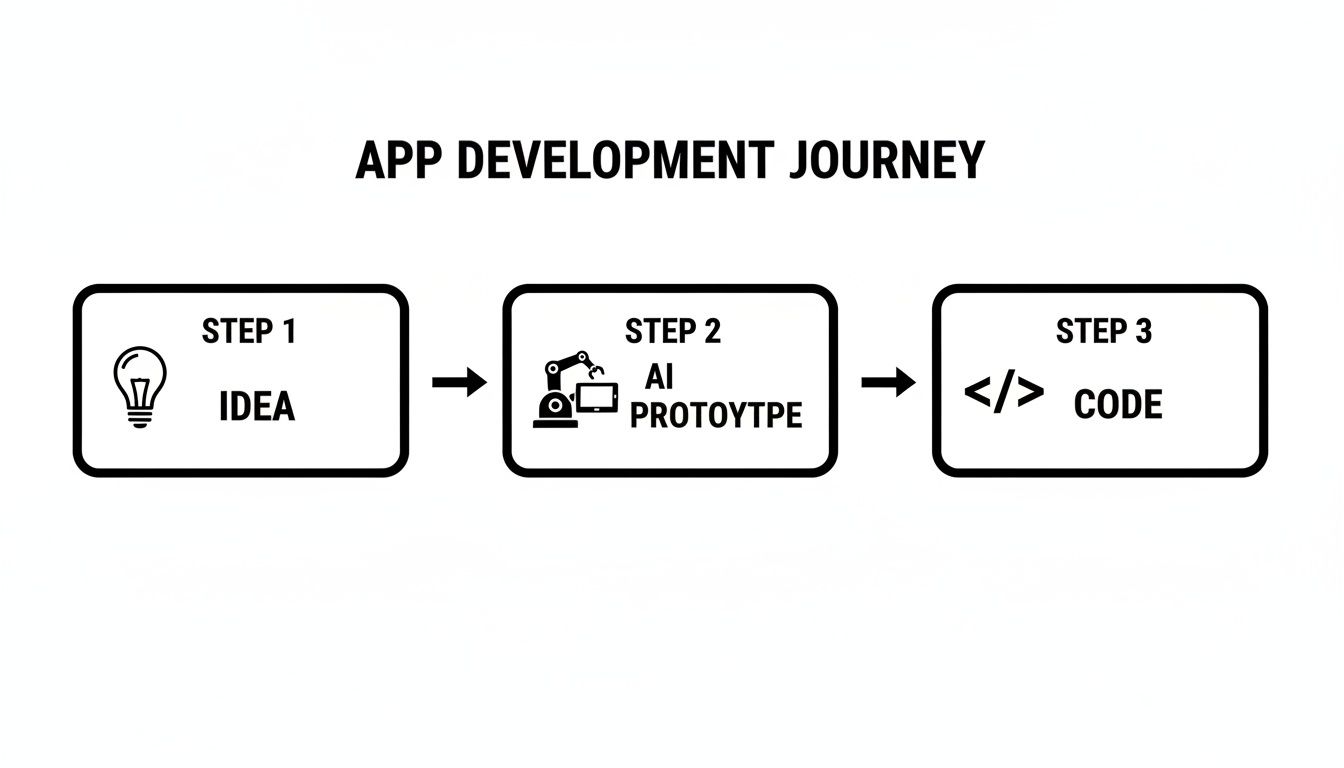
What's really important here is how this completely short-circuits the traditional, static prototyping phase. You can see and feel your ideas as a working UI almost instantly.
Iterating And Refining With Chat
Of course, the first draft is rarely the final one. This is where the real power of an AI-driven workflow comes in: chat-based iteration. Instead of firing up a design tool or editing code, you just keep the conversation going.
You can throw commands at it like, "Make the main login button rounder and change its color to purple."
The AI understands and modifies the existing code on the fly, updating the visual preview instantly. This back-and-forth conversational style means anyone on the team—founders, product managers, designers—can make precise adjustments without writing a single line of code. It tightens the feedback loop and makes the process of getting from app design to code ridiculously fast.
The Technology Behind The Scenes
While the experience feels simple and conversational, the technology powering it is robust and developer-approved. Tools like RapidNative are built on established frameworks. When you ask for a mobile screen, you’re not getting a proprietary file format—you’re getting high-quality, production-ready code.
Here's a quick look at the tech stack:
- React Native: One of the most popular frameworks for building native iOS and Android apps from a single codebase. This means the AI-generated code is immediately useful and ready for the real world.
- NativeWind: A utility-first CSS framework that keeps your design consistent. When the AI generates components, NativeWind ensures the styling—buttons, text, spacing—is cohesive across the entire app without manual tweaking.
This solid foundation ensures you're not just building a pretty picture. You're building a scalable, maintainable product from day one.
The goal is to demystify the process and build trust. This isn't a "black box" that spits out mystery code. It's a reliable system that generates clean, readable code based on industry standards, making it valuable for both quick prototypes and as a starting point for complex applications.
Exporting Developer-Ready Code
Once you’ve tweaked the screen until it feels just right, you reach the most critical step: exporting the source code. This is where AI workflows diverge sharply from no-code platforms, which often lock you into their ecosystem.
With an AI-powered mobile workflow, you get clean, modular code that any developer can immediately understand. They can drop it into an existing project or use it as the foundation for a new one. The output is well-organized, follows best practices, and is ready for a professional development environment.
This empowers teams to get the best of both worlds: the incredible speed of AI for initial creation and the total control and flexibility of custom code for finishing and scaling.
To see the difference clearly, let's compare the old way of doing things with this new AI-powered approach.
Traditional Mobile Workflow vs AI Powered Mobile Workflow
| Phase | Traditional Workflow | AI-Powered Workflow |
|---|---|---|
| 1. Ideation | Brainstorming, whiteboarding, and creating static wireframes in tools like Figma or Sketch. Can take days to weeks. | Describe the idea in plain English. Get an interactive prototype in minutes. |
| 2. Prototyping | Designers create high-fidelity mockups. Any changes require going back to the design file, exporting assets, and waiting for feedback. | Iterate on the prototype in real-time via chat. Non-technical users can make changes directly. |
| 3. Handoff | Designers prepare detailed spec sheets, style guides, and asset packages for developers. Prone to misinterpretation. | No formal handoff needed. The prototype is the spec. |
| 4. Development | Developers manually translate static designs into code, component by component. This is often the longest phase. | Export production-ready code for the UI. Developers can focus on logic and integration. |
| 5. Feedback Loop | Slow and disconnected. Feedback goes from stakeholder to PM to designer to developer, often with delays and lost context. | Instant and direct. See changes as you request them, closing the loop in seconds. |
The table makes it obvious: the AI-powered workflow doesn't just speed up individual steps; it fundamentally changes the dynamic of how teams collaborate to build mobile apps.
Building Real Apps with AI Prompts
Let's move past the theory and see how this works in the real world. The value of AI-powered mobile workflows becomes clear when you see them solving the kinds of problems product teams face every day.
To make this concrete, we'll walk through a few practical scenarios.
Let’s follow three different people using AI prompts to get their work done faster: a founder building a fitness app MVP, a UX designer testing onboarding flows, and a product manager adding a new feature.
Founder Building a Fitness App MVP
Imagine a solo founder with a great idea for a fitness app. She has the vision but lacks a big budget for a full development team. Her goal is to build a solid MVP to show investors and secure funding. She needs something functional, fast.
She starts with a simple text prompt:
Initial Prompt: "Create a dashboard screen for a fitness app. It should show today's steps, calories burned, and active minutes in cards at the top. Below that, include a list of recent workouts with the date and duration."
In seconds, the AI generates a clean, functional screen. It's a great start, but she immediately sees a way to improve it. She just continues the conversation.
- Iteration 1: "Add a circular progress bar around the steps card to show the daily goal."
- Iteration 2: "Change the color of the progress bar to a vibrant green. Make the workout list items tappable."
- Iteration 3: "Add a floating action button in the bottom right corner with a plus icon to log a new workout."
In less time than it takes to drink a cup of coffee, she has a polished, interactive dashboard. She exports the React Native code, giving her a tangible asset for her pitch deck and a ready-made foundation for a developer. What would have been a week-long design and coding sprint just became a 15-minute task.
UX Designer A/B Testing Onboarding Flows
Next, a UX designer wants to improve user activation. Her hypothesis is that the app's three-screen onboarding is too long. She wants to test five different single-screen variations to see what works best.
The old way would mean creating five sets of mockups in Figma, then waiting for a developer to code each one—a process that could take weeks. Instead, she uses an AI workflow. She starts by uploading a photo of a whiteboard sketch.
Initial Prompt: "Generate an onboarding flow from this image. It should be a single screen with a welcome message, a field for the user's name, and a button that says 'Get Started'."
The AI instantly turns her sketch into a working screen. Now she can spin up variations just by chatting.
- Flow A (Control): The initial screen generated from her sketch.
- Flow B (Social Proof): "Add a small section below the welcome message with logos of partner companies."
- Flow C (Benefit-Oriented): "Change the main header to 'Unlock Your Potential' and add three bullet points with icons explaining the app's core benefits."
- Flow D (Minimalist): "Remove everything except the welcome message and the 'Get Started' button."
- Flow E (Personalized): "Add a question: 'What is your main goal?' with three selectable options: 'Lose Weight,' 'Build Muscle,' 'Improve Endurance'."
She creates all five interactive versions in under an hour. By exporting the code for each, her team can immediately set up A/B tests and start collecting real user data. This is a massive shortcut. For a deeper look at this process, check out our guide on how to go directly from prompt to a fully-formed app.
Product Manager Adding an E-commerce Feature
Our final example is a product manager at an e-commerce company. He needs to add a "Wishlist" feature, but the engineering team is swamped. He wants to get the UI and UX validated before it lands on a developer's plate.
He kicks things off with a detailed prompt to generate the main screen.
Initial Prompt: "Create a 'My Wishlist' screen. It should have a grid view of products. Each product card needs an image, product name, price, and a 'Remove' icon."
The AI builds the screen instantly. Now, as feedback rolls in from stakeholders, he can make changes himself.
- Iteration 1: "Add a 'Move to Cart' button on each product card."
- Iteration 2: "Let's change the layout to a list view instead of a grid."
- Iteration 3: "Add a 'Share Wishlist' button in the top right corner of the header."
He can walk into the next sprint planning meeting with a fully interactive prototype that everyone can click through. The development team sees exactly what to build, eliminating ambiguity. When they’re ready to work on it, they can use the exported code as their starting point, saving significant time.
These examples make it clear: AI-powered workflows aren't just a gimmick. They are practical tools that smash through real bottlenecks, letting teams build, test, and ship ideas at a speed that simply wasn't possible before.
Why Chat Driven Iteration Is a Game Changer
The real magic in today's AI-powered mobile workflows isn't just generating the first screen. The breakthrough is the ability to tweak, refine, and perfect that screen through simple conversation. This is chat-driven iteration, and it’s fundamentally changing how mobile products are built.
Imagine you could just talk to your app's blueprint. Instead of filing tickets, updating Figma mockups, and waiting for changes, you just tell the AI what you want, and it happens instantly. That immediate feedback loop is a massive unlock for the entire product team.
This conversational style is quickly becoming the norm. In 2024, AI chatbot apps exploded with 112% year-over-year growth, leaving every other app category in the dust. This reflects a massive user shift toward conversational interfaces. It's the same trend powering tools like RapidNative, where a chat prompt becomes a fully coded React Native screen. You can dig into more of this data with these mobile development statistics.
Empowering Non-Technical Visionaries
For founders, product managers, and designers, chat-driven iteration removes the technical hurdles between a great idea and a working prototype. You no longer need to know CSS or React Native to get the visuals just right.
You can steer the AI with plain English and see the results immediately. This hands-on control closes the gap between vision and execution, cutting down on the "lost in translation" moments that plague traditional handoffs.
Consider these everyday adjustments:
- A founder wants to test a new button color: Instead of waiting for a designer, they can type, "Change the main button to our brand's shade of blue." Done.
- A PM needs to adjust spacing: A simple request like, "Add 8 more pixels of space between the header and the list items," is all it takes.
- A designer feels the font is off: They can say, "Make all the headings a heavier font weight," and see it live.
This isn't about replacing designers or developers. It's about letting the entire team participate in the design process, making it more fluid, creative, and collaborative.
Automating the Tedious Work for Developers
Developers win big here, too. Chat-driven iteration automates the repetitive tasks that eat up a sprint. Nudging padding by a few pixels, tweaking hex codes, or reordering elements is necessary but rarely fulfilling work.
By offloading these minor tweaks to an AI, developers get their time and mental energy back to focus on what really matters:
- Complex Business Logic: Building the engine that makes the app work.
- Backend Integration: Connecting the UI to APIs and data sources.
- Performance Optimization: Ensuring the app is fast, smooth, and reliable.
This frees up your engineering talent to solve the hard problems an AI can't touch. The AI becomes the perfect assistant, handling the boilerplate so developers can focus on high-impact engineering.
Accelerating Validation and Collaboration
When you boil it down, the biggest advantage of chat-driven iteration is pure speed. The cycle between having an idea, seeing it built, and getting feedback shrinks from weeks or days to minutes.
This fast loop means teams can test assumptions sooner, get feedback earlier, and make smarter decisions with more confidence. When a stakeholder can see their suggested change come to life during the meeting, collaboration becomes incredibly tight and effective. It’s all about getting a real, interactive product in front of users faster than ever before—and that’s how you win in mobile.
Beyond No-Code: Why Owning Your Code is Non-Negotiable
Many product builders are wary of getting locked into a proprietary platform, and for good reason. We’ve all heard the stories: you build on a new tool, only to hit a hard ceiling when you need a critical custom feature or have to scale. This is where we need to draw a clear line between old-school no-code tools and the new wave of AI-powered mobile workflows that provide real, usable source code.
The debate boils down to one word: control. True innovation demands flexibility. While no-code platforms are great for simple websites or internal dashboards, they often become a bottleneck for ambitious mobile apps. Your product's future shouldn't be held hostage by another company's roadmap or pricing changes.
From Black Box to Launch Pad
Think of traditional no-code tools as a "black box." You drag and drop pieces into place, but you never see or touch the underlying code. If you need a feature the platform doesn't support, you're stuck. It's a model that can trap your IP and stunt your growth.
AI-powered code generators work differently. They're more like a launch pad. The AI handles the heavy lifting on the initial, often repetitive, parts of development.
The point isn't to replace your dev team—it's to give them superpowers. You get clean, modular code that you own outright. It's a company asset, not a monthly rental.
This approach offers the best of both worlds: the incredible speed of AI-assisted creation combined with the total freedom of a standard, maintainable codebase.
Why Exporting Clean Code Actually Matters
Owning your source code isn't just a technical detail; it’s a massive strategic advantage. When a tool like RapidNative gives you production-ready React Native files, it opens up a world of possibilities that are locked away in closed no-code systems.
Here’s what that looks like in practice:
- Unlimited Customization: Your dev team can take the AI-generated foundation and build anything on top of it. Need to integrate a niche SDK, create a complex custom animation, or connect to a legacy backend? No problem.
- Real Scalability: As your app grows, you're in control. You can optimize performance, manage infrastructure, and ensure everything runs smoothly under load. You aren’t limited by the architecture of a third-party platform.
- Long-Term Viability: Platforms can disappear or change their pricing overnight. When you own the code, your app is yours, period. Any React Native developer can maintain it and keep the project moving forward.
- A Workflow Developers Respect: Clean, well-structured code is the bedrock of professional development. It simplifies debugging, improves team collaboration, and fits right into established best practices like CI/CD pipelines.
This is the fundamental difference that separates a temporary prototyping gadget from a true development accelerator. Instead of boxing you in, it creates an open-ended workflow that respects the need for professional engineering and ultimate control. Your team gets a huge head start without ever sacrificing the freedom to build exactly what your users need.
How to Get Your Team Started with AI Workflows
Bringing AI-powered mobile workflows into your team is about more than just adopting a new tool. It’s a shift in how you think about building products. The goal is to move faster, collaborate more effectively, and get a real product in front of users in a fraction of the time it used to take.
The best way to start is to just start experimenting. When you give everyone on the team the power to build, the entire process becomes more creative, efficient, and honestly, more fun.
A Practical Playbook for Every Role
For these new workflows to stick, everyone needs to see what’s in it for them. When a tool solves a real problem in someone's daily work, adoption happens naturally.
Here’s how different roles can get hands-on right away.
- For Founders: Your job is to sell the vision. Instead of a slide deck, imagine handing an investor an interactive prototype they can tap through on their phone. AI tools let you build that functional MVP, proving your concept and making it easier to secure early funding.
- For Product Managers: Validate a new feature idea within a single afternoon. Forget waiting weeks for mockups and dev time. Now you can generate a new user flow, show it to stakeholders, and get immediate feedback. Your validation cycle shrinks from weeks to hours.
- For Designers: Turn your static Figma designs into interactive prototypes for user testing almost instantly. Imagine generating five different UI variations from one concept and getting them onto a real device in minutes. You can iterate based on real-world feedback, not just guesswork.
This approach tears down the old walls between roles. A product manager can tweak a button, a founder can mock up a new screen—suddenly, the entire team is gathered around a tangible product everyone can touch and improve.
Building a Culture of "Just Try It"
To make this change last, encourage a culture of rapid prototyping. The barrier to creating a working UI has nearly vanished, which means more ideas can get a fair shot without burning through your engineering budget. It frees the team to be more dynamic and take more creative risks.
My advice? Start small. Pick one simple screen or a single user flow and challenge the team to build it using a tool like RapidNative. That moment when they see a text prompt turn into a functional app screen in minutes is the "aha!" that makes it all click.
The biggest change isn't speed; it's collaboration. These workflows pull everyone together around a live, evolving prototype. App development stops being a rigid, linear handoff and becomes a fluid, creative conversation.
When building a UI is something anyone can do, your team can finally focus on what really matters: solving real user problems and shipping an amazing product. The gains here aren't just small wins—they're a genuine advantage for any team building mobile apps.
A Few Common Questions, Answered
If you're considering bringing AI into your mobile development process, you probably have a few questions. Let's tackle some of the most common ones we hear from product teams.
Is The Code Generated By AI Actually Production-Ready?
Yes. Modern AI tools are designed to generate clean, modular, and production-quality code using industry-standard frameworks like React Native.
This means what you get is maintainable and scalable. It’s not a black box; it’s real code that your development team can take and build on directly without having to start from scratch.
Do I Need To Be A Developer To Use These Tools?
No, and that’s the point. These platforms are built for the entire product team. Founders, PMs, and designers can use simple, plain-English prompts to create and iterate on user interfaces.
Meanwhile, developers can use the same environment to get a head start, automating tedious setup and boilerplate work. It creates a shared space where everyone can contribute effectively.
How Is This Different From a No-Code Platform?
The biggest difference comes down to ownership and flexibility.
Most no-code platforms lock you into their ecosystem. You’re building on their turf, which can create major headaches if you need to customize deeply or move your app elsewhere later.
AI code generators, on the other hand, give you the source code. You own it completely. That freedom is critical—it means you can modify, extend, and host your application wherever you want, ensuring a healthy path for long-term growth.
Ready to see how RapidNative can turn your ideas into interactive prototypes and real code in just minutes? Start building for free.
Ready to build your app?
Turn your idea into a production-ready React Native app in minutes.
Free tools to get you started
Free AI PRD Generator
Generate a professional product requirements document in seconds. Describe your product idea and get a complete, structured PRD instantly.
Try it freeFree AI App Name Generator
Generate unique, brandable app name ideas with AI. Get creative name suggestions with taglines, brand colors, and monogram previews.
Try it freeFree AI App Icon Generator
Generate beautiful, professional app icons with AI. Describe your app and get multiple icon variations in different styles, ready for App Store and Google Play.
Try it freeFrequently asked questions
What is RapidNative?
RapidNative is an AI-powered mobile app builder. Describe the app you want in plain English and RapidNative generates real, production-ready React Native screens you can preview, edit, and publish to the App Store or Google Play.
Can I export the code?
Yes. RapidNative generates clean React Native and Expo code that you can export at any time. No lock-in, no proprietary format. Hand it to your developers or keep building inside RapidNative.
Is RapidNative free to use?
Yes. You can build apps on the free plan with no credit card required. Paid plans unlock unlimited AI generations, code export, and direct publishing to the App Store and Google Play.
Do I need to know how to code?
No. Most users build apps by describing what they want in plain English. Developers can drop into the code whenever they want more control, but coding is optional.
How long does it take to build an app?
Most users have a working first screen in under a minute. A full MVP usually takes a few hours instead of the weeks or months traditional development requires.