A Practical Guide to AI Mobile Development
Discover AI mobile development and see how modern tools turn ideas into production-ready code. Our guide explains how to build and ship apps faster.
By Paridhi
25th Dec 2025
Last updated: 17th Feb 2026
Ever sketched an app idea on a napkin and wished you could just poof it into existence? That's no longer science fiction. We're now in the era of AI mobile development, where the journey from a simple idea to a functional mobile screen can happen in minutes.
This changes the game for product teams, shifting app creation from a long, manual coding slog to a fast, collaborative process. It’s all about closing the gap between a great idea and a real, working product you can test and ship.
A New Way to Build Mobile Apps
For decades, the path to building a mobile app was set in stone: idea, wireframe, design, and then a long, often expensive, coding phase. This rigid structure created a huge bottleneck, a frustrating delay between a product manager's vision and what the engineers could actually build. Founders, PMs, and designers often had to wait weeks just to see a static version of their concept.
AI mobile development completely flips that script.
Instead of meticulously writing code line-by-line, your team can now describe a user interface in plain English. An AI then takes that description and generates the foundational code for you. This isn't about replacing developers; it's about empowering the entire product team to build, test, and iterate faster than ever before. To really get a feel for how this works, it helps to understand the fundamental nature of AI-generated content, which is exactly what these new tools produce.
From Manual Labor to Creative Collaboration
Think of the old way of developing like building a house brick by brick. It’s precise, but painfully slow. AI-powered development is more like using high-quality, prefabricated modules. You can assemble and customize them with simple instructions, letting you build the structure in a fraction of the time.
This new approach unlocks some pretty powerful advantages for any product team:
- Speed Up Prototyping: Got an idea for a user flow? You can turn it into an interactive prototype in hours, not weeks, getting real feedback almost immediately.
- Empower Non-Coders: Founders and designers can now jump directly into the creation process. They can build the first versions of screens themselves, without writing a single line of code.
- Reduce Boilerplate Work: Developers get to skip the tedious, repetitive setup of common screens like login forms, settings pages, and list views. This frees them up to focus on the hard stuff—the complex business logic and unique features that make your app stand out.
And this isn't some niche trend; it's quickly becoming the new standard. A recent Gartner analysis predicts that by 2025, a massive 70% of new applications will be built using low-code or no-code technologies, many of which are fueled by AI. This movement is making app creation more accessible for everyone and seriously speeding up the pace of innovation.
How AI Turns Your Prompts into Real Code
The jump from writing code by hand to using AI for mobile development can seem like a bit of black magic. But it's actually a straightforward process that gives product teams a huge advantage.
Imagine a traditional developer as a master craftsman, meticulously laying every single brick to build a house from a detailed blueprint. An AI tool, on the other hand, is like a cutting-edge prefabrication factory. You give it a high-level concept—say, "a modern login screen with Google and Apple sign-in options"—and it instantly generates the precise, ready-to-assemble components.
This is the essence of prompt-to-UI generation. You feed the AI a simple instruction, whether it's plain text or a rough sketch from a whiteboard, and it translates that idea into structured, tangible code. It’s a direct conversation between your vision and the machine’s ability to build.
This workflow drastically shortens the distance between a great idea and a working prototype.
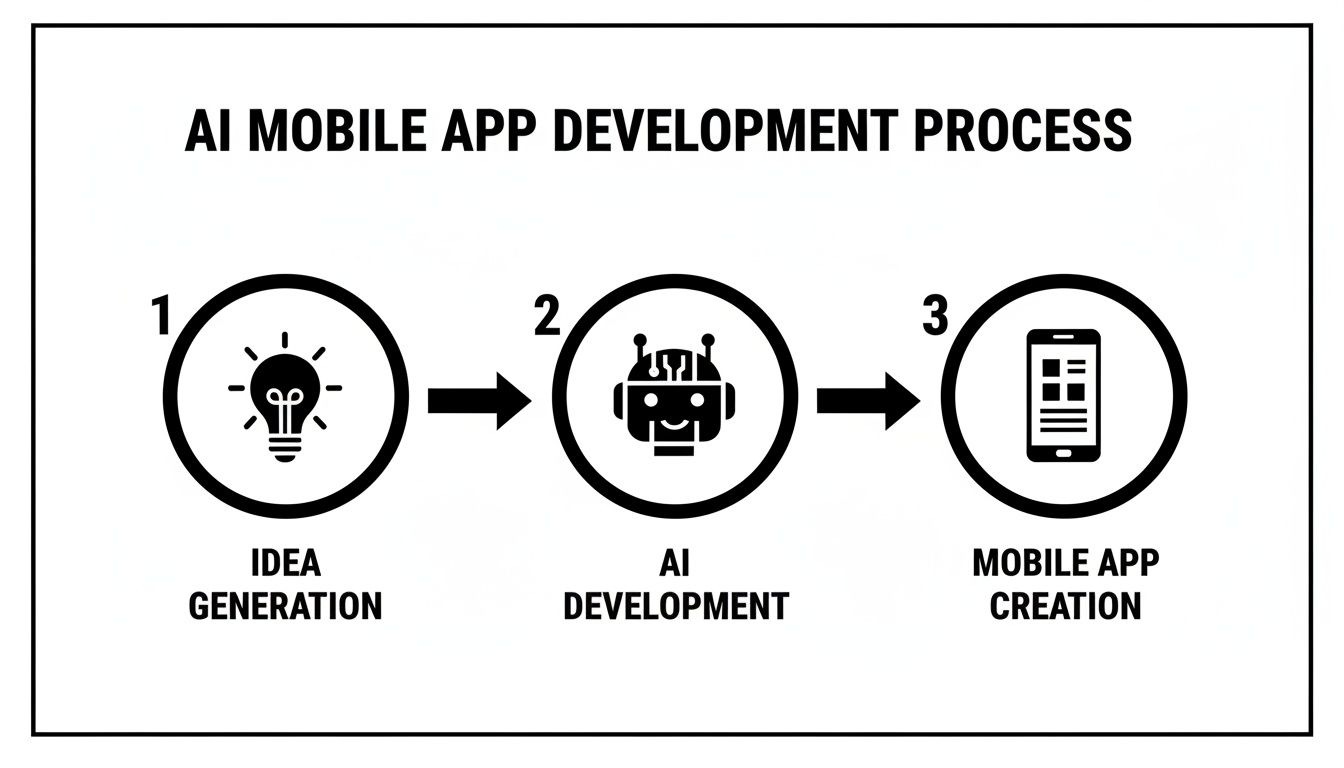
As you can see, the core value is speed. It’s about getting from concept to creation in a fraction of the time, allowing you to validate ideas faster.
The Brains Behind the Operation
So, how does an AI magically know what a login screen or a product feed should look like? It's not inventing code out of thin air. These systems have been trained on absolutely massive datasets of existing code and design patterns.
At its core, prompt-to-UI generation is a pattern-matching machine. The AI has seen millions of lines of code from open-source projects, component libraries, and design systems. It has learned what good, clean code and effective UI look like.
It understands the fundamental building blocks of mobile apps because it has analyzed them countless times. When you ask for a "user profile screen," the AI taps into its vast knowledge of thousands of existing profile screens to generate a high-quality, conventional layout that works.
The Building Blocks of AI-Generated Code
For a tool like RapidNative, the AI isn't just trained on any old code. It's specifically trained on a modern, high-quality tech stack. This is key because it ensures the output isn't just functional, but also clean, maintainable, and ready for a real development team to pick up and run with.
Here are the key ingredients it uses to build your app's UI:
- React Native and Expo: The AI generates code for this incredibly popular framework, which lets you build true native apps for both iOS and Android from a single codebase.
- TypeScript: By using TypeScript, the code comes with type safety baked in. This helps catch errors early and makes the codebase much easier for developers to understand and expand upon.
- Component Libraries: The AI doesn't create random buttons from scratch. It uses established, well-architected component libraries to ensure every element is consistent, accessible, and high-quality.
- Styling Frameworks (like NativeWind): To handle the visual design, the AI relies on utility-first styling frameworks. This allows it to apply consistent colors, spacing, and typography based on a theme that you can easily customize later.
From Initial Prompt to Polished Screen
The magic doesn't stop after the first pass. This is where chat-driven iteration completely changes the game. Once the initial screen is generated, you can refine it using simple, conversational commands. For a deeper dive, you can learn more about getting the most from a prompt to app workflow.
Imagine you just generated a login screen, but the main button is the wrong color. Instead of cracking open a code editor, a product manager can just type:
"Change the sign-in button's color to our primary brand color."
Or maybe the spacing feels a little tight:
"Add more vertical space between the password field and the login button."
Each command tells the AI to modify the underlying code, and you see the changes happen live. This iterative loop allows product managers, designers, and founders to make meaningful UI tweaks themselves, freeing up developer time for more complex, logic-heavy tasks. It turns the entire process into a collaborative conversation, making it faster and more accessible for everyone on the team.
The Modern AI-Powered Mobile Development Stack
Every AI tool for mobile development runs on a specific technology stack—the combination of languages, frameworks, and libraries that actually build the app. The point isn't just to spit out code; it’s to generate good code. The kind of code a real development team can take over and confidently build upon. This means starting with a modern, reliable, and widely-used foundation.
The shift toward AI in development workflows is happening fast. According to the 2025 Stack Overflow Developer Survey, a staggering 84% of developers are either using or planning to use AI tools, and 51% are already using them every day. Why the sudden rush? It's all about efficiency. These tools are saving enterprise users a solid 40-60 minutes per day by automating tasks like code generation.
So, what does this trusted, modern stack actually look like for AI-to-UI generators?
React Native and Expo
At the heart of it all is React Native. This is the framework that lets you build true native apps for both iOS and Android from a single JavaScript codebase. It's a critical choice because it produces apps that feel fast and smooth on a device, not just a clunky webpage crammed into an app shell.
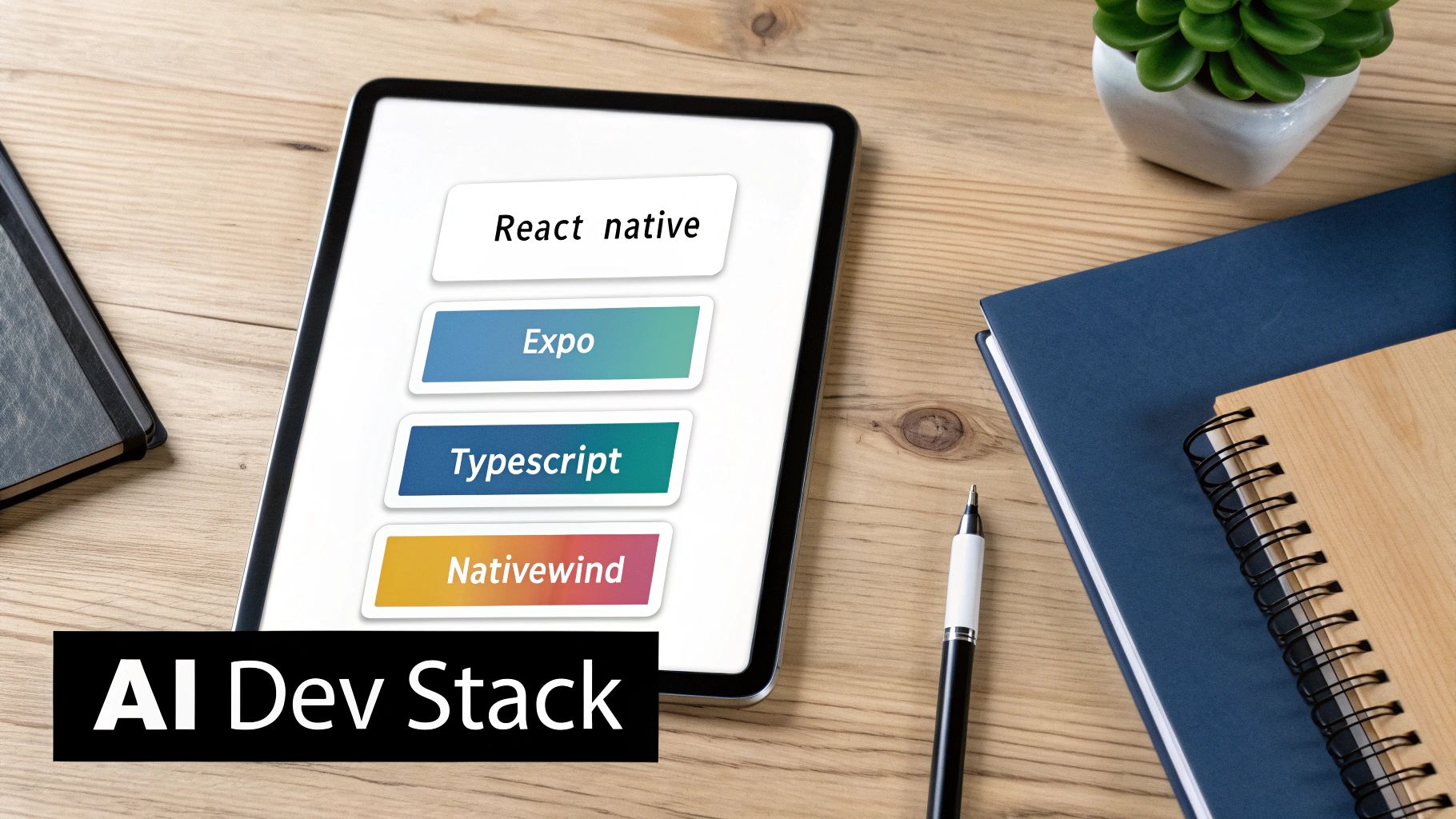
Starting with React Native ensures the code generated by an AI isn't a dead end. Instead, it’s the beginning of a genuine, production-ready application. When you pair it with Expo—a platform that streamlines everything from setup to deployment—the whole process gets even easier.
TypeScript and NativeWind
To keep the generated code clean, scalable, and easy for humans to work with, TypeScript is a must. It’s basically JavaScript with an added layer of safety, catching common errors before the code ever runs. For developers, this means fewer bugs and a codebase that’s far easier to understand and maintain—especially when you’re inheriting it from an AI.
For styling, NativeWind brings the power of utility-first CSS (think Tailwind CSS, but for mobile) to React Native. This lets the AI apply consistent, theme-based designs across the app. Instead of hard-coding colors and fonts everywhere, it uses design tokens. This is huge, because it means a designer or developer can update the entire app's look and feel by changing just one central theme file. Our guide to AI product development tools shows how this stack plugs into a bigger product-building ecosystem.
How This Stack Compares
This specific tech stack is what sets AI mobile development apart from the old ways of doing things. It carves out a sweet spot between traditional coding and no-code platforms, giving you the speed of no-code without sacrificing the control of custom development.
The real game-changer here is code ownership. When an AI tool generates actual React Native code, you aren't trapped in a proprietary system. You can export the source code anytime, add your own custom features, and plug it into any existing project.
This flexibility is a massive win for any serious product team. This table helps visualize where AI-assisted development fits in.
Comparing Mobile App Development Approaches
This table contrasts the traditional coding, no-code, and AI-assisted development models across key decision-making criteria for product teams.
| Feature | Traditional Development | No-Code Platforms | AI Mobile Development |
|---|---|---|---|
| Speed to Prototype | Slow (weeks to months) | Very Fast (hours to days) | Extremely Fast (minutes to hours) |
| Code Ownership | Full ownership | None (platform dependency) | Full ownership of exported code |
| Extensibility | Unlimited | Highly limited | Unlimited (it's real code) |
| Performance | High (native) | Varies (often web-based) | High (native components) |
| Developer Handoff | N/A (is the process) | Difficult or impossible | Seamless (generates clean code) |
| Target User | Developers | Non-technical users | Founders, PMs, Designers, Devs |
Ultimately, this modern stack unlocks a new, more collaborative way of working. It empowers non-technical folks to bring the initial UI to life, all while producing a high-quality, scalable codebase that developers are genuinely happy to receive. This blend of speed and control is what makes AI-powered development such a powerful strategy for building mobile products today.
Real-World Use Cases for Your Product Team
Let's move from theory to practice. Seeing how AI actually works in the hands of a real product team is where the lightbulb really goes on. These abstract ideas of "prompt-to-UI" suddenly become powerful tools for solving day-to-day problems.
Let's walk through a few scenarios to see how different people can use AI to build better apps, faster.
The growth here is staggering. Forecasts are pointing to a mobile app market that could top $1 trillion by 2034, with a mind-boggling 299 billion downloads expected in 2025 alone. And with over 60% of mobile users already interacting with AI chatbots every month, the demand for smarter, more efficient development is only going to grow.
Use Case 1: The Founder Prototyping a Fitness App
Imagine a startup founder with a brilliant idea for a new fitness app. Before she goes all-in and hires a team, she needs to see if the core onboarding flow even makes sense to potential users. Her goal: get an interactive prototype in people's hands by the end of the day.
The Initial Prompt: She starts with a simple, high-level command:
"Create a 3-step onboarding flow for a fitness app. Step 1 asks for the user's name. Step 2 asks for their primary fitness goal (lose weight, build muscle, improve endurance). Step 3 is a success screen."
Just like that, the AI generates three connected screens with basic navigation, input fields, and buttons. It's a solid start.
Iterating with Chat: Now, she refines it using plain English:
- "On step 2, can we use tappable cards instead of that dropdown list?"
- "Change the 'Continue' button to a solid purple with white text."
- "For the success screen, add a big checkmark icon and change the text to 'You're all set! Let's get started.'"
In less than an hour, she has a fully interactive React Native prototype. She can run it on her phone, show it to investors, and start getting real feedback—all without touching a line of code.
Use Case 2: The Designer Bringing a Figma Mockup to Life
A UX designer has just perfected a gorgeous, high-fidelity mockup in Figma for a new social feed. The PM is anxious to know how it feels on a real device. Is the scrolling smooth? Are the buttons easy to tap?
The Initial Prompt: Instead of typing, the designer simply uploads an image of the Figma frame. The AI’s image-to-code model gets to work.
It immediately recognizes the structure: a header, a list of posts, a bottom tab bar. It even identifies the repeating "post card" component with its avatar, name, image, and action buttons.
A moment later, it generates the React Native code needed to build that exact layout.
Iterating with Chat: The structure is perfect, but the details need to match the brand guide. The designer continues the conversation:
- "The username font needs to be bold and size 16."
- "Let's add a subtle grey border around each post card."
- "Make the 'like' icon a heart, and make it turn red when tapped."
This completely bridges the gap between a static picture and a live, interactive component. The designer can instantly feel the UI on a phone, catching small interaction hiccups that are impossible to see in a design tool.
Use Case 3: The Developer Generating Boilerplate Code
A developer needs to build a standard settings screen. We've all been there—it's a lot of repetitive work creating rows, labels, icons, and toggle switches. It’s necessary, but it’s not exactly thrilling. This kind of AI assistance is also incredibly useful for more niche platforms, like in Wear OS app development.
The Initial Prompt: To skip the grunt work, the developer gives a precise command:
"Create a settings screen with the title 'Settings'. It needs three sections. The first is 'Account' with rows for 'Edit Profile' and 'Change Password'. The second is 'Notifications' with a 'Push Notifications' row that has a toggle switch. The third section is 'Support' with rows for 'Help Center' and 'Contact Us'."
The AI spits out the complete React Native screen, fully structured with placeholder navigation.
Export and Build: The developer now has clean, human-readable TypeScript. He exports it directly into his codebase.
The AI just saved him an hour of tedious UI coding. Instead of fiddling with rows and switches, he can jump straight into the interesting part: wiring the "Change Password" button to the auth API and implementing the real logic behind that notification toggle.
In every case, the AI acts as a collaborator. It handles the repetitive, foundational tasks, freeing up founders, designers, and developers to focus on what humans do best: solving problems, perfecting experiences, and building truly great software.
Best Practices for Weaving AI into Your Workflow
Bringing any new technology into your process requires a smart approach, and AI mobile development is no different. The trick is to view these tools not as a magic wand that replaces people, but as a powerful assistant that amplifies your team's talent. It’s all about finding the right balance.
You have to be realistic about what AI is great at today versus where it still needs work. These tools are fantastic for quickly scaffolding UI, generating standard components, and speeding up prototyping. They are not, however, ready to tackle complex backend logic, native module integrations, or detailed performance optimization. Understanding this line in the sand is the first step to using them well.
Treat AI as a Starting Point, Not a Final Product
The teams who are really succeeding with AI see its output as an excellent first draft. Imagine getting the first 80% of your UI work done in a matter of seconds. The AI provides a clean, well-structured foundation, leaving your developers to add the final layers of polish, business logic, and unique complexity.
This mindset turns AI into a massive productivity booster. Instead of burning hours on repetitive work like building yet another login form or settings screen, your developers can focus their brainpower on the high-impact problems that actually make your product stand out.
The goal is to augment your development process, not fully automate it. Use AI to generate the skeleton, then hand it off to your skilled developers to add the muscle and brains. This frees them up for the creative problem-solving that humans do best.
This collaborative model respects the craft of software engineering while capitalizing on the incredible speed AI brings to the table.
Shorten Feedback Loops with Rapid Prototyping
One of the biggest drags in traditional mobile development is the long delay between having an idea and getting a working prototype into someone's hands. AI-powered tools can shrink that gap from weeks down to just a few hours. This means you can put real, interactive screens in front of users, stakeholders, and designers almost instantly.
- For Product Managers: You can validate user flows and feature concepts with something people can actually tap through, not just static mockups.
- For Designers: You get to test the feel and responsiveness of a design on an actual device, catching awkward interactions early on.
- For Founders: You can quickly build a compelling MVP to show investors and gather early user feedback without a huge upfront engineering cost.
By pulling AI into the early discovery and design phases, you can iterate much faster, make smarter decisions, and be more confident you're building the right thing before you sink a ton of development resources into it. It’s about failing faster so you can succeed sooner.
Master the Art of the Prompt
The quality of what you get out is a direct reflection of the quality of what you put in. Learning to clearly communicate your vision to the AI is a crucial skill. This isn’t about being a technical wizard; it's about being clear and specific.
A vague prompt like "make a profile screen" will give you a generic result. A much better prompt would be: "Create a user profile screen with a circular avatar at the top, followed by the user's full name and username. Below that, include a list of stats: Posts, Followers, and Following. Finally, add a grid of the user's photos."
To really level up your results, check out our guide on prompt engineering tips. The more detail you provide, the closer the AI's first attempt will be to your final vision, saving you a ton of time on revisions.
The Future of AI-Driven App Building
What we're seeing right now with AI in mobile development is really just the first inning. The tools that can spin up high-quality UI code from a simple prompt or a wireframe are impressive, but they’re also laying the foundation for something much bigger. The line between idea, design, and a functioning app is getting blurrier by the day.
The immediate future is pointed directly at a far more integrated and intelligent workflow. We're on the cusp of a reality where AI doesn't just build isolated screens, but actually understands and generates entire user flows. Think about connecting UI elements to real data sources or backend logic with a simple, conversational command. The end game here is to give small, scrappy teams the power to build complex apps that can go head-to-head with software built by huge corporations.
The Next Frontier: Figma to Full-Stack
The next big leap is already starting to take shape, and it’s all about deeper integration and creating things end-to-end. This change will dramatically speed up how mobile products get made, smoothing out the bumps for everyone on the team.
Here are a few key advancements we can expect to see soon:
- Direct Figma-to-Code Integrations: Imagine an AI that doesn’t just look at a static screenshot of your design. Instead, it plugs right into your Figma file. It would instantly grasp your design system, your reusable components, and your interactive prototypes, then translate all of it into production-ready code that’s a perfect match for your source of truth.
- Intelligent Backend Connectors: Before long, you’ll be able to tell an AI, "Hook this user list up to our Firebase database," and it will just generate the data-fetching logic for you. This closes the gap between the front-end UI and the back-end services, automating a huge portion of what is currently tedious, manual work for developers.
The future of mobile development is collaborative, fast, and accessible. AI is the key that unlocks this potential, turning what used to be a complex, siloed process into a unified, creative workflow for everyone involved.
Whether you're a founder trying to get an MVP off the ground, a PM validating a new feature, or a developer just trying to build faster, now is the time to lean into this new way of working. The best way to understand it is to try it. Take a tool like RapidNative for a spin and see for yourself how quickly your ideas can become real, tangible products.
A Few Common Questions About AI in Mobile Development
As more teams start looking into AI for mobile development, the same handful of questions tend to pop up. Getting a clear handle on how these tools really work, where they fit into your workflow, and what makes them different is key to using them effectively. Let's tackle some of the most common ones.
Is AI Going to Replace Mobile Developers?
Not a chance. It’s far more accurate to think of these tools as a hyper-efficient junior developer or a powerful co-pilot. They’re brilliant at handling the grunt work—the tedious, repetitive task of churning out boilerplate UI and scaffolding components.
This actually frees up your senior developers to pour their energy into the things AI can't touch: wrestling with complex business logic, architecting backend integrations, fine-tuning performance, and building out unique native features. The AI generates real, extensible code that’s meant to be handed off, making it a collaborator, not a replacement.
How Is This Any Different From a No-Code Builder?
This is a big one, and the answer comes down to two words: code ownership. No-code platforms are walled gardens. You build inside their ecosystem, but you can never access, modify, or export the underlying source code. When you hit a wall or outgrow the platform, you're stuck.
AI code generation is the polar opposite. Tools like RapidNative give you production-ready React Native source code that you own, outright. You can take it, extend it, integrate it with any backend, and host it anywhere you want. You get the initial speed of no-code without the crippling vendor lock-in.
What Kinds of Apps Can I Actually Build With This?
These AI tools are incredibly flexible for building the front-end structure for a huge range of mobile apps. They truly excel at generating the standard screens and user flows that make up the bulk of most applications.
In just a few minutes, you can generate the UI for things like:
- E-commerce Apps: Think product grids, detail pages, shopping carts, and checkout flows.
- Social Media Apps: User profiles, activity feeds, and direct messaging interfaces.
- Wellness Apps: Onboarding flows, workout trackers, and progress dashboards.
- Productivity Tools: Login screens, settings pages, and task lists.
From there, a developer takes the clean, AI-generated UI and wires it up to a backend to handle the data, authentication, and all the other heavy lifting.
Ready to see how AI can give your mobile development process a serious boost? With RapidNative, you can go from a simple idea to high-quality, production-ready React Native code in minutes. It’s time to build smarter, not harder. Try RapidNative for free
Ready to build your app?
Turn your idea into a production-ready React Native app in minutes.
Free tools to get you started
Free AI PRD Generator
Generate a professional product requirements document in seconds. Describe your product idea and get a complete, structured PRD instantly.
Try it freeFree AI App Name Generator
Generate unique, brandable app name ideas with AI. Get creative name suggestions with taglines, brand colors, and monogram previews.
Try it freeFree AI App Icon Generator
Generate beautiful, professional app icons with AI. Describe your app and get multiple icon variations in different styles, ready for App Store and Google Play.
Try it freeFrequently asked questions
What is RapidNative?
RapidNative is an AI-powered mobile app builder. Describe the app you want in plain English and RapidNative generates real, production-ready React Native screens you can preview, edit, and publish to the App Store or Google Play.
Can I export the code?
Yes. RapidNative generates clean React Native and Expo code that you can export at any time. No lock-in, no proprietary format. Hand it to your developers or keep building inside RapidNative.
Is RapidNative free to use?
Yes. You can build apps on the free plan with no credit card required. Paid plans unlock unlimited AI generations, code export, and direct publishing to the App Store and Google Play.
Do I need to know how to code?
No. Most users build apps by describing what they want in plain English. Developers can drop into the code whenever they want more control, but coding is optional.
How long does it take to build an app?
Most users have a working first screen in under a minute. A full MVP usually takes a few hours instead of the weeks or months traditional development requires.