How to Build an App Without Coding Using AI
A practical guide to build an app without coding. Learn how to turn your ideas into production-ready mobile apps using AI-powered tools and real-world examples.
By Sanket Sahu
2nd Jan 2026
Last updated: 2nd Jan 2026
Ever had a great app idea but felt stuck because you couldn't code? The good news is, you can now build an app without coding a single line. We're not talking about clunky website builders. Modern AI tools can take a simple text description—or even a photo of a whiteboard sketch—and generate high-quality, production-ready code for your mobile app.
For founders, product managers, and designers, this is a game-changer. You're not just getting a static mockup; you're getting a real, functional UI that your development team can immediately use and build upon.
The Shift from No-Code Platforms to AI Code Generation
For years, "no-code" platforms promised a world where anyone could build an app. The reality was often a rigid, template-based tool. They were fine for a simple proof-of-concept, but you'd inevitably hit a wall. Your creation was trapped in their proprietary system, making it impossible to scale, customize, or add complex features. If your app outgrew the platform, your only option was to hire a dev team and start over from scratch.
That era is over. We're moving past restrictive "no-code" platforms and into an era of genuine AI-assisted creation. The new breed of tools doesn't lock you in. Instead, it generates the actual building blocks for you.
Imagine describing your app’s login screen in a sentence. A few minutes later, you have clean, functional React Native code ready to hand off to a developer.
From Idea to Usable Code, Instantly
Here’s the fundamental difference: modern AI tools act like a hyper-efficient junior developer, not a restrictive black box. They handle the tedious, time-consuming work of building UI screens and components. This frees up your product team to focus on strategy and your engineers to focus on the hard stuff—the business logic, backend integrations, and features that truly make your app unique.
For example, a product manager can now build an interactive prototype for a new feature, test it with users, and validate the flow before a single developer hour is spent. This isn't just a fleeting trend. We're seeing AI make complex domains more accessible across the board, and there's a lot to learn from the growing role of AI and automation in empowering non-technical users in other fields.
The market numbers back this up. The global low-code development platform market is projected to skyrocket from $10 billion in 2019 to an incredible $187 billion by 2030. What's more, Gartner predicts that by 2025, a staggering 70% of new applications will be built using these technologies—a huge leap from less than 25% in 2020. You can discover more insights on low-code adoption to see just how fast this is moving.
Comparing Traditional No-Code with Modern AI Builders
To really understand this shift, it helps to see a direct comparison. The old "no-code" platforms and the new AI-powered code generators are fundamentally different tools for different jobs.
| Feature | Traditional No-Code Builders | Modern AI-Powered Builders |
|---|---|---|
| Output | A locked, proprietary app that runs only on their platform. | Clean, production-ready code (e.g., React Native). |
| Flexibility | Limited to pre-built templates and components. | Fully customizable and extendable by any developer. |
| Scalability | Often hits a performance or feature ceiling. | Unlimited. The generated code is the starting point, not the end. |
| Developer Handoff | Not possible. You have to rebuild from scratch. | Seamless. Developers can immediately start working with the code. |
| Primary Use Case | Simple websites, internal tools, or basic MVPs. | High-fidelity prototypes and the actual UI foundation for real apps. |
This table makes it clear: traditional no-code is for creating a finished (but limited) product without a developer. Modern AI builders empower non-technical team members to start the development process, creating a solid foundation that professionals can then take over the finish line.
For founders, product managers, and designers, this is huge. You can finally build and test high-fidelity, native-feeling prototypes on your own. You're no longer stuck handing over static mockups; you’re generating the actual UI codebase your development team will use.
This new workflow empowers you to bring an idea to life. You can take a concept and turn it into something tangible and interactive, all without writing a single line of code yourself. To see this in action, it's worth exploring what a modern AI native app builder is capable of.
Ultimately, this process shatters the old barriers of time, cost, and technical knowledge, making app creation more accessible than it has ever been.
Turning Your App Idea into an Interactive UI
This is where the magic happens. Your idea stops being just a concept on paper and starts to feel like a real app you can hold in your hand. This leap from abstract to tangible is probably the most rewarding part of building an app without knowing how to code. It all begins by focusing on a single, clear user flow.
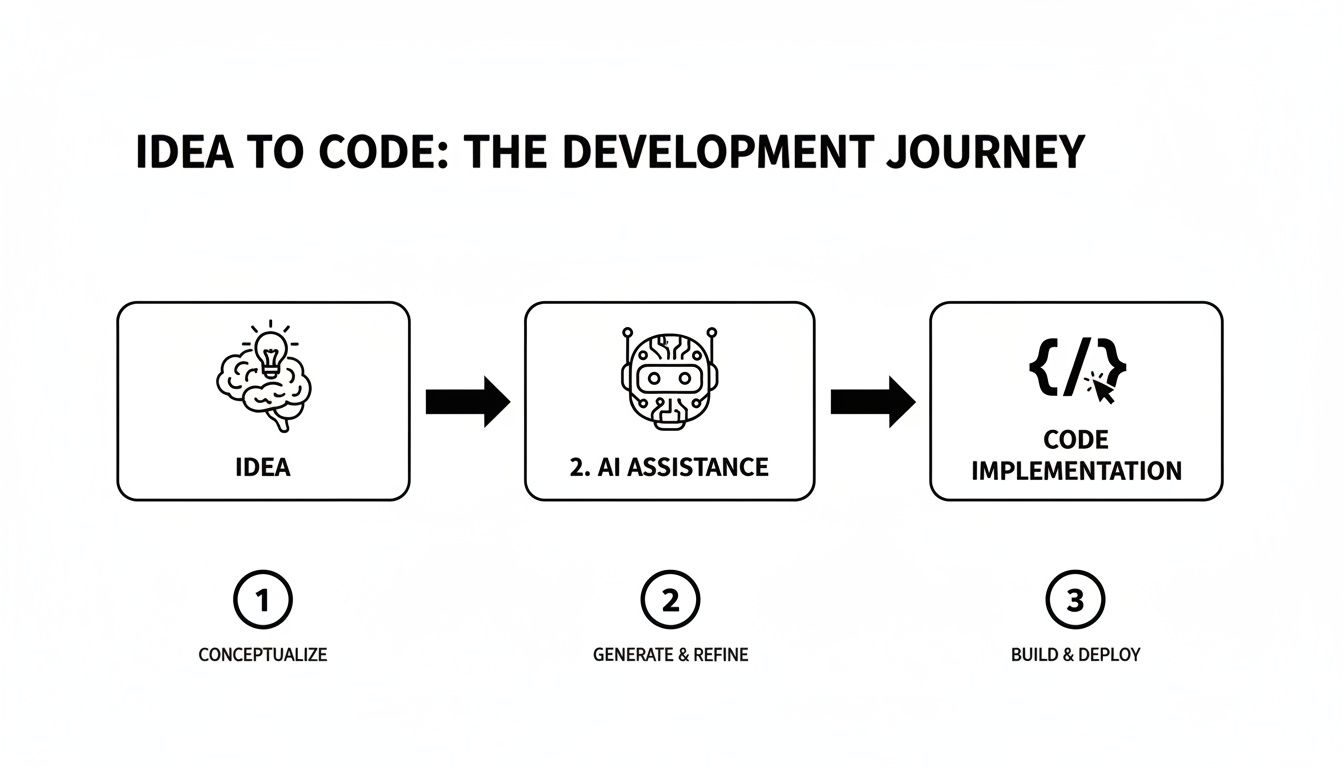
Let's say you're building a simple fitness app. The trick is to avoid boiling the ocean—don't try to generate the entire application at once. Instead, pick one core piece of the puzzle, like the user signup process. A well-written prompt is your key to getting started.
From Simple Text to Working Screens
You don't need to speak like a developer to get this right. A great prompt is just a plain English description of what you want the user to see and do, laid out logically.
For our fitness app, a solid prompt might be:
"Create a user onboarding flow with three screens. The first is a welcome screen with our logo and a 'Sign Up' button. The second screen lets users pick their fitness goals from a list. The third screen is a simple profile setup with fields for name and age."
When you feed this into an AI-powered tool, it gets to work, scaffolding the actual React Native screens. This isn't about creating a flat picture; it generates the real component files and connects the navigation. So, when you tap that "Sign Up" button, it actually takes you to the goals screen.
If you want to get better at writing these kinds of instructions, we have a whole guide on the prompt-to-app workflow that breaks it down even further.
Translating Sketches into Functional UI
But what if your idea isn't in words? What if it’s a sketch from a whiteboard meeting or a doodle in your notebook? Many of the best app ideas start this way, and modern AI builders can handle that, too.
The process is surprisingly direct.
- Sketch Your Flow: Draw out the key screens for your app. Don't worry about being an artist—simple boxes for buttons, lines for text fields, and circles for images work perfectly.
- Take a Photo: Grab your phone and snap a clear picture of the drawing.
- Upload the Image: Feed that image directly into the AI tool.
The AI looks at the visual layout of your sketch, figuring out what's a button, what's an input field, and what's a header. It then converts that visual blueprint into a real UI skeleton built with actual components.
This approach gives you an incredibly fast track from a brainstorming session to a clickable prototype you can actually test on a device. You get to skip the whole traditional dance of a designer creating polished mockups in Figma and then a developer slowly recreating them in code. You get a real, functional starting point in just a few minutes.
Fine-Tuning Your App with Simple, Real-Time Edits
Think of your first AI-generated version as a solid first draft—it’s the foundation, but the real magic happens next. When you build an app without coding, the power isn't just in the initial creation; it's in the ability to refine and iterate on your UI with incredible speed. Forget digging into code or fumbling with complex design software. Now, you can just ask for changes in plain English.
This conversational approach feels more like directing a design assistant than actual development. You can make adjustments on the fly, and the prototype updates instantly. It’s this immediate feedback that empowers non-technical founders and product managers to experiment freely and dial in the user experience.
From Simple Commands to Instant UI Changes
Let's say you're looking at the onboarding flow you just generated. That main call-to-action button feels a bit flat, and the welcome text is too small. In a typical setup, that’s a new ticket for a designer, then one for a developer, followed by a whole lot of waiting. Now, you just type what you want.
Here are a few commands that work wonders:
- "Change the 'Get Started' button to a vibrant orange."
- "Make all the screen titles bigger, say 24 points."
- "Put a user avatar icon next to each item in the settings list."
- "The welcome screen background is too stark. Change it to a subtle light gray."
Each command triggers an immediate visual update. And this isn't just skin deep. The AI is smart enough to understand the app's structure. For instance, when you change a primary button color, that style can ripple through the entire app's design system, keeping everything consistent without you having to hunt down every single instance.
Some people call this "vibe coding." It’s a great term for it. You’re shaping the app's look and feel based on intuition and what you see right in front of you, not by following rigid technical specs. It collapses the time between spotting a problem and actually fixing it.
Refining Layouts and User Flows on the Fly
These conversational edits go way beyond just tweaking colors and fonts. You can completely restructure screens. Maybe you realize the login form desperately needs a "Sign in with Google" button, or that the profile setup flow is missing a crucial field for the user’s location.
You can simply tell the AI:
- Add a new button below the password field. Call it "Sign in with Google" and give it a white background and a blue border.
- Insert a text input for 'Location' between the name and age fields on the profile page.
- Reorder the settings menu. I want "Notifications" moved to the very top.
This back-and-forth process is a game-changer for anyone who needs to test different layouts and flows quickly. You can mock up multiple variations in a single afternoon, show them to your team for feedback, and land on a design that clicks—all before a single line of production code is written. This radically speeds up the validation phase, helping you build what users actually want, much, much faster.
How to Get Real Code You Can Actually Use
The true test of any app builder isn't just what you can create inside it; it's what you can do with your creation afterward. I’ve seen countless projects get stuck on older no-code platforms. You build something that looks great, but the moment you need a custom feature or want to scale, you hit a wall. Your only option is to start over from scratch with a real developer, which completely defeats the purpose.
Modern AI builders are changing this dynamic by offering a real exit strategy: clean, human-readable source code. You’re not just making a pretty picture; you’re generating the actual frontend of your application. This is a massive leap forward because it gives you total ownership and freedom.
What's Actually in the Code Export?
When you hit "export," you get a complete, production-ready React Native project. It’s not some weird, proprietary format. It’s the same tech stack that teams at major companies are using, so there’s absolutely no vendor lock-in.
Think of it as a starter kit that a professional developer would build, but done in minutes. Your code package comes with everything you need to keep building:
- Modular Components: Every button, card, and input field is its own reusable component written in TypeScript. This keeps things clean and easy to manage.
- Screen Files: Each screen you designed is neatly organized into its own file. No more hunting through a giant, confusing codebase.
- Navigation Structure: The entire user flow is already wired up using Expo Router, so all your screens are connected and work as you designed them.
- Styling System: We use NativeWind to handle all the styling, making it incredibly simple for a developer to update colors, fonts, and themes across the entire app.
This is a world away from the messy, tangled HTML you might get from other tools. What you receive is a professional codebase that any React Native developer can pick up and immediately start working on. Our guide on how to export real React Native code gets into all the technical details if you're curious.
The ability to export developer-ready code is the bridge between your vision and a real, scalable product. It allows non-technical founders to create a solid UI foundation to hand off, while developers can skip hundreds of hours of tedious setup and front-end coding.
The Real-World Impact on Timelines and Budgets
This approach completely changes the math for getting a product to market. The UI implementation, which can often take weeks or even months, can be knocked out in a matter of hours. That speed translates directly into huge cost savings.
In fact, teams that adopt modern no-code methods report up to a 70% cost reduction and build their apps 90% faster than with traditional development. If you want to see the numbers, you can read the full research on no-code cost savings and see how it breaks down.
For a startup founder, this means your runway just got a lot longer. You can build a high-fidelity, interactive prototype to show users and investors before you even think about hiring an engineering team. For a developer, it’s a dream come true. You get to skip the boring part and jump straight into the fun stuff: connecting the backend, writing business logic, and shipping features that customers actually care about.
Common Mistakes to Avoid When Building Your App
AI makes building an app feel incredibly accessible, but a few common missteps can quickly send your project sideways. It’s easy to get excited and jump in too fast when you realize you can build an app without coding. But trust me, taking a moment to think through your approach will save you hours of frustration down the road.
The most frequent mistake I see is starting with a vague idea instead of a clearly defined user flow. A prompt like "build me a social media app" is just too broad for any AI to handle well. What you’ll get back is a generic, disjointed mess of screens that don’t really do anything useful.
Start Small and Be Specific
A much better way to go is to focus on one core feature at a time. Think in terms of specific user journeys. What exactly is someone trying to accomplish? Are they logging in? Editing their profile? Viewing a product?
When you narrow your focus, you give the AI the rich, detailed context it needs to deliver something great. So, instead of that vague request, try something more precise:
- "Create a three-screen login flow: a main screen with email/password fields and a 'Forgot Password' link, a second screen for password reset, and a third screen confirming the reset was successful."
It all comes down to the classic "garbage in, garbage out" principle. High-quality, specific prompts give you high-quality, usable UI. Vague prompts just lead to messy results you'll end up throwing away.
My personal rule is this: if I can't describe the user flow in two or three clear sentences, I haven't thought about it enough. I go back to the whiteboard and map out the exact steps before I even think about writing a prompt.
Know When to Hand Off the Code
Another critical lesson is understanding the tool’s boundaries. AI-powered builders like RapidNative are designed to generate the entire front-end UI—the screens, the components, the navigation. They are not built to handle backend logic, database connections, or payment processing.
Trying to force the AI to build these complex server-side features is a common pitfall. You'll just waste time and end up with code that’s broken. The smart workflow involves a clear handoff point where the AI's job ends and a developer's begins.
Here’s a quick checklist to know when it’s time to export the code and bring in some help:
- UI is validated: You have a clickable prototype that feels right and, ideally, has been tested with a few potential users.
- Core flows are complete: All the major user journeys (like onboarding, checkout, or posting content) are visually built out.
- You need real data: The app needs to pull information from an API, connect to a database like Firebase, or talk to any other backend service.
Recognizing this boundary is key. Use the AI to nail the user experience and visual design, then export the clean React Native code. This lets a developer step in and wire up the complex integrations, building upon the solid foundation you’ve already created.
Frequently Asked Questions About AI App Building
Whenever you're exploring new tech, a lot of questions pop up. And when it comes to using AI to build an app without coding, it's smart to ask about the practical stuff—like who owns the code, what the technical limits are, and what it really takes to get going. Let's walk through some of the most common things founders, designers, and PMs ask.
Do I Own the Code the AI Generates?
Yes, you get full ownership. This is a massive departure from older no-code platforms and one of the most important things to understand.
When you're done designing and you export the project, you're not getting a locked-down package. You're getting the complete React Native source code. It’s all yours. You can take it, modify it, host it anywhere, and scale it however you see fit. There are no proprietary strings attached, which is a game-changer.
Can I Connect My App to a Backend or Database?
Absolutely. The AI builder is laser-focused on what it does best: crafting the front-end user interface (UI) and all the navigation flows. Think of it as your UI specialist, creating every screen and component your users will see and touch.
Once you export that clean React Native code, a developer can then step in and wire it up to any backend you need. It doesn't matter if you're using Firebase, AWS, or a custom-built API—the process is the same as it would be for any hand-coded app. The AI handles the face of the app, and your developers handle the brain and the data.
What Skills Do I Need to Start Building?
You don't need to be a developer. The only real prerequisite is having a clear idea of what you want your app to do and how you want users to move through it. If you can describe that user flow in plain English or even sketch it out, you have everything you need to start.
This whole approach is designed for the product people—the creators, designers, and entrepreneurs—to bring the visual side of their app to life on their own.
It's all part of a bigger trend called citizen development, which is exploding right now. In fact, by 2026, a staggering 80% of low-code users will come from outside of IT departments. The demand for new apps from the business side is growing five times faster than traditional IT teams can keep up. You can learn more about the rise of citizen developers to see just how much this is changing the game.
This method is perfect for building out the entire UI for even really complex applications. It's incredibly good at generating screens, components, and user flows. A developer just comes in at the end to hook up the business logic and backend, saving them literally hundreds of hours of tedious UI work.
Ready to turn your idea into an interactive app without touching a line of code? With RapidNative, you can generate production-ready React Native code from simple text prompts, fine-tune it with chat, and get a rock-solid foundation for your project in minutes.
Ready to build your app?
Turn your idea into a production-ready React Native app in minutes.
Free tools to get you started
Free AI PRD Generator
Generate a professional product requirements document in seconds. Describe your product idea and get a complete, structured PRD instantly.
Try it freeFree AI App Name Generator
Generate unique, brandable app name ideas with AI. Get creative name suggestions with taglines, brand colors, and monogram previews.
Try it freeFree AI App Icon Generator
Generate beautiful, professional app icons with AI. Describe your app and get multiple icon variations in different styles, ready for App Store and Google Play.
Try it freeFrequently asked questions
What is RapidNative?
RapidNative is an AI-powered mobile app builder. Describe the app you want in plain English and RapidNative generates real, production-ready React Native screens you can preview, edit, and publish to the App Store or Google Play.
Can I export the code?
Yes. RapidNative generates clean React Native and Expo code that you can export at any time. No lock-in, no proprietary format. Hand it to your developers or keep building inside RapidNative.
Is RapidNative free to use?
Yes. You can build apps on the free plan with no credit card required. Paid plans unlock unlimited AI generations, code export, and direct publishing to the App Store and Google Play.
Do I need to know how to code?
No. Most users build apps by describing what they want in plain English. Developers can drop into the code whenever they want more control, but coding is optional.
How long does it take to build an app?
Most users have a working first screen in under a minute. A full MVP usually takes a few hours instead of the weeks or months traditional development requires.