What Is an AI Native App Builder?
Discover how an AI native app builder turns ideas into real code. This guide explains the process, use cases, and how to choose the right tool for your project.
By Sanket Sahu
29th Nov 2025
Last updated: 29th Nov 2025
Imagine describing your app idea in a simple conversation and then watching a fully functional user interface spring to life on your screen—complete with all the code. That’s the magic of an AI native app builder. It’s a huge leap from older no-code tools, using conversational AI to turn your vision into a real product and shrinking the gap between idea and prototype from weeks to just a few minutes.
The New Way to Build Apps with AI
For a long time, if you wanted to build an app, you had two choices: write thousands of lines of code by hand or wrestle with a drag-and-drop no-code builder. While no-code platforms opened the door for many, they often felt like building with a limited set of Lego bricks. You could only create what the platform’s tools allowed, which often led to generic-looking apps and code you couldn't take with you.
An AI native app builder flips that entire model on its head. Instead of handing you a toolbox of pre-made parts, it becomes your creative co-pilot.
For example: You're a product manager sketching out a new feature. You tell the AI, "I need a modern living room with a huge window, a comfy grey sofa, and a minimalist coffee table," and poof—a photorealistic 3D model appears. Then you can tweak it on the fly: "Actually, let's make that sofa blue," and the model updates right away.
That back-and-forth, conversational flow is exactly how an AI native app builder works. You simply describe the screens and features you need, and the AI takes care of all the grunt work—structuring the layout, applying solid design principles, and writing clean, usable code.
From Manual Assembly to AI Collaboration
This move from manual drag-and-drop to AI-powered creation is more than just a convenience. It completely changes how products get made. It's a big reason why venture capital AI investing trends show a massive influx of funding into practical AI tools that accelerate development.
This technology empowers product teams to:
- Validate ideas in hours, not weeks. A founder can build a working prototype and get it in front of real users in a single afternoon.
- Close the communication gap. Designers can see their visions come to life instantly, while developers get a high-quality codebase to hit the ground running.
- Focus on what really matters. By automating the repetitive UI code, engineering teams can pour their time and energy into the complex backend logic and unique features that actually make a product stand out.
AI Native vs. Traditional App Builders: What's the Real Difference?
To get a clear picture, let's compare the two approaches side-by-side. The table below breaks down the fundamental shift in how you build.
| Feature | Traditional No-Code/Low-Code Builder | AI Native App Builder |
|---|---|---|
| Primary Input | Manual drag-and-drop of components | Natural language prompts and conversation |
| Creation Speed | Hours to days | Minutes to hours |
| Flexibility | Limited to pre-built templates & components | Highly flexible; adapts to unique design requests |
| Code Output | Often platform-locked or no-code at all | Production-ready, exportable (e.g., React Native) |
| Workflow | Assembling pre-made blocks | Collaborating with an AI to generate from scratch |
| Best For | Simple internal tools, landing pages | Rapid prototyping, MVPs, and foundational UI code |
As you can see, it's a completely different mindset. One is about assembly, and the other is about creation.
A Different Kind of Builder
Unlike traditional tools that trap you in their ecosystem, the whole point of a modern AI native app builder is to set you free. It gives you a massive head start by generating production-ready code using open-source technologies like React Native. Once the initial version is generated, you can export the entire project. It's yours. You own it completely and can hand it off to your development team to build on.
This new workflow gives non-technical founders the power to bring their ideas to life, while also giving developers a clean, scalable foundation they actually want to work with. This technology isn't just about building apps faster; it’s about creating a smarter, more collaborative way to innovate.
How AI Turns Simple Prompts into Real Code
It can feel like straight-up magic watching a simple English sentence transform into a fully functional user interface. But what’s happening under the hood is a highly logical process. Think of an AI native app builder as an expert translator, taking your plain-language ideas and converting them into the structured, machine-readable code that powers an app.
Let's pull back the curtain and see exactly what happens when you feed the AI a command.
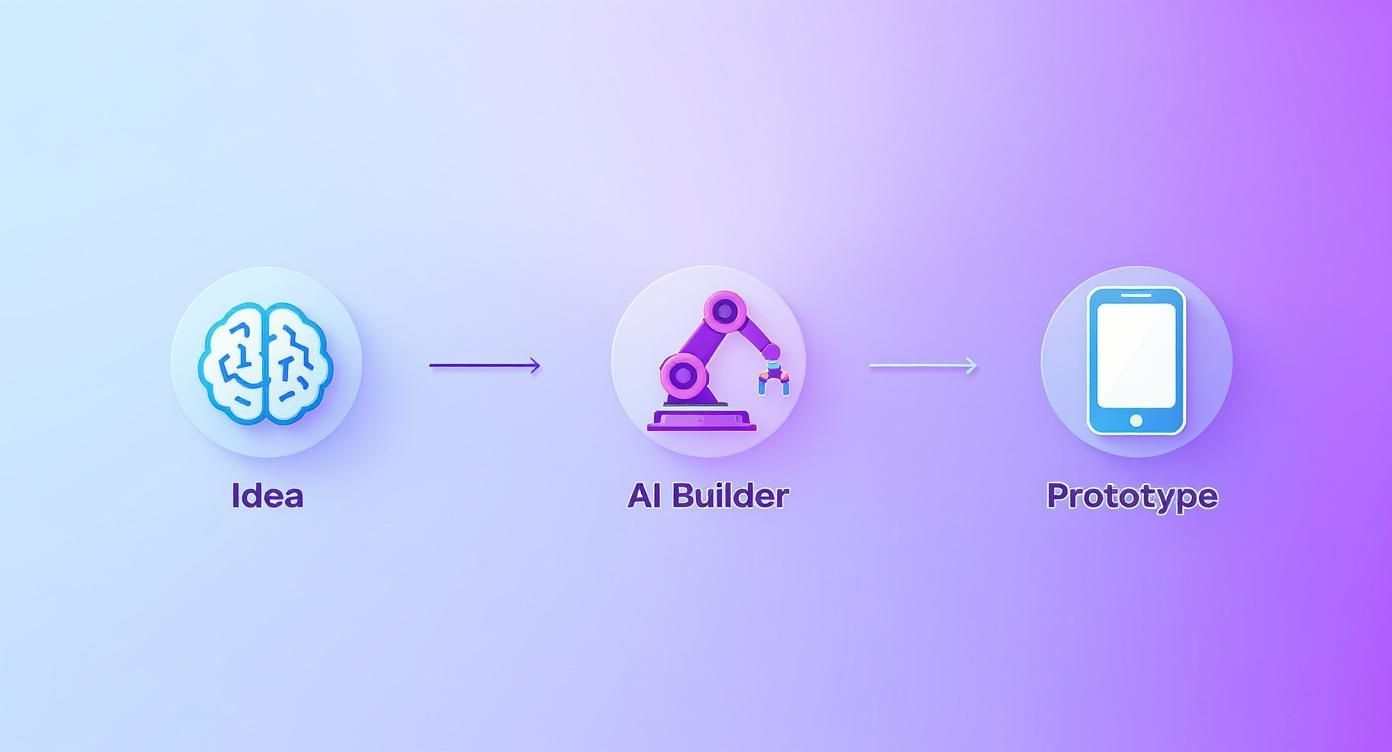
This diagram nails the high-level flow: an idea in your head becomes a working prototype on a screen, with the AI acting as the bridge. It’s this direct link from concept to interactive output that completely changes the speed of development.
Breaking Down Your Prompt
First, the AI model has to understand what you actually want. It parses your prompt to identify the key pieces. Let's say you type:
"Create a user profile screen with a profile picture, name, bio, and a follow button."
The AI doesn't just read those words. It dissects them to figure out the entities and how they relate to each other. Here’s a peek into its "thought" process:
- Identify the Core Subject: The main goal is a "user profile screen." This immediately sets the context for the entire layout.
- Extract UI Elements: Next, it pulls out all the components you mentioned: an image ("profile picture"), a couple of text fields ("name" and "bio"), and a clickable element ("follow button").
- Infer Structure and Hierarchy: This is where the AI’s training really shines. It has analyzed millions of app designs, so it knows a profile picture usually goes up top, followed by the user's name, then their bio. It also knows that a primary action like a "follow button" needs to be easy to spot.
This initial breakdown turns your casual request into a structured blueprint, not unlike how a developer would sketch a wireframe before diving into the code. If you want to get better at writing instructions for the AI, our guide on going from prompt to app has some great examples.
Generating the Visuals and Code
With a solid plan in place, the AI starts the generation phase. This happens on two tracks at the same time.
First, it creates the visual you see in the preview window—a direct rendering of the UI you described.
Second, and this is the crucial part, it writes the code that powers that visual. For a tool like RapidNative, this means generating clean React Native components using TypeScript for solid type safety and NativeWind for styling.
This isn’t just a static image; it's a pixel-perfect representation of real, exportable code. The AI is designed to write code that developers can actually work with—it’s clean, modular, and ready for you to build upon. This jump to producing human-quality code is what makes today's tools so powerful. For more on this, it's interesting to see how Large Language Models (LLMs) are used in coding interviews and what that implies for code quality.
The Power of Iteration
Here’s where an AI native app builder really flexes its muscles: conversational iteration. You’re never stuck with the first draft. You can just keep the conversation going to tweak and refine the design.
- "Make the follow button blue and larger."
- "Add a follower count next to the name."
- "Put the bio right under the profile picture."
With every new prompt, the AI intelligently modifies the existing design and code—it doesn’t start over. This lets you sculpt the final product at an incredible pace. This tight feedback loop between your idea, the visual preview, and the underlying code is what makes this approach so effective for getting products built and tested fast.
Integrating AI into Your Product Workflow
So, how does an AI native app builder actually slot into a real team’s day-to-day? It’s not about replacing developers or designers. Instead, it creates a much faster, more collaborative loop between the initial idea, the visual design, and the final code.
Think of it as a shared workbench where the product manager can sketch out user flows with words, the designer can dial in the aesthetics, and the developer can wire up the advanced mechanics. The AI builder is the workbench itself, translating everyone's instructions into a tangible product that the whole team can see and interact with instantly.
This completely changes the dynamic from a slow, linear series of handoffs into a live, parallel workflow. Everyone is contributing to the same prototype, which cuts down on the misunderstandings that plague traditional development cycles.
From Founder Vision to Tangible Prototype
It all usually starts with a founder or a product manager. They have a brilliant idea but often lack the deep technical chops to build it themselves. Before, this meant getting bogged down in dense spec documents, static wireframes, or paying a small fortune for a clunky, slow-to-build prototype.
With an AI native app builder, the process becomes immediate. A founder can just describe their vision in plain English.
- "Create a two-tab app. The first tab is a home feed, and the second is for user settings."
- "On the home feed, show a scrollable list of cards. Each card needs an image, a title, a short description, and a 'like' button."
- "Now, build out the settings screen with options for 'Edit Profile,' 'Notifications,' and 'Log Out.'"
In a matter of minutes, they have an interactive prototype. This isn't just a flat image; it's a real UI they can click through on a device. That initial build becomes the foundation for every conversation that follows, making it incredibly easy to get early feedback from investors or stakeholders without anyone having to write a single line of code.
The Designer Steps in for Refinement
Once that basic structure is in place, a designer can jump in to polish the user interface. They aren't starting from scratch or trying to explain visual concepts in a long document. They can give the AI direct, specific commands to refine the prototype.
This iterative process is a complete game-changer. It shifts design from a static, document-based task into a dynamic, hands-on creation session. The designer effectively becomes a creative director, guiding the AI to build the exact visual experience they have in mind.
Using conversational prompts, they can quickly align the UI with the brand’s design system:
- "Change the primary button color to our brand's hex code: #4A90E2."
- "Make the font for all headings 'Inter Bold' and set the size to 24px."
- "Add more padding around the cards in the feed to give them more breathing room."
This allows the designer to test variations on the fly, perfect spacing, and ensure visual consistency across the entire app—all without waiting for a developer to implement the changes. The feedback loop is instant.
The Developer Gets a Head Start
Finally, the project gets handed off to a developer, but it’s a totally different kind of handoff. They don’t just get a static Figma file and a list of requirements. They get a link to a working prototype and, most importantly, access to its complete source code.
Because a true AI native app builder like RapidNative generates clean, production-ready code—using standard tools like React Native, TypeScript, and NativeWind—the developer gets a massive head start. They aren't dealing with a black box of messy, proprietary code; they're getting a well-structured project with modular components.
This lets developers skip the most tedious parts of their job: the repetitive, time-consuming grunt work of building UI from scratch. They can immediately dive into the complex, high-value tasks that truly require their expertise.
- Integrating APIs to pull in live data.
- Building out the backend logic and connecting to databases.
- Implementing complex state management and performance optimizations.
The AI handles the "what it looks like," so the developer can focus entirely on the "how it works." This collaborative model saves hundreds of hours, slashes miscommunication, and lets the entire team ship a better product, faster.
Putting AI App Builders to Work: Real-World Use Cases
Alright, let's get practical. An AI native app builder isn't just a cool theory; it's a tool that solves real problems for product teams every day. Its biggest value is simple: it slashes the time and grunt work required to build user interfaces. This frees up your team to spend their brainpower on what really matters—the core business logic and creating something users genuinely love.
This isn't happening in a vacuum. User expectations are shifting fast. For context, ChatGPT was the fastest app ever to hit 1 billion global downloads, showing a huge audience ready for smarter, AI-driven software. If you're curious, SensorTower's 2025 State of AI Apps Report has some great data on this trend.
So, where do these builders actually make a difference? Here are three real-world scenarios where they're changing the game.
Use Case 1: Rapid Prototyping for Founders
The Goal: A founder needs a functional prototype to show investors and early users—fast.
The Old Way: Spend weeks and thousands of dollars with an agency or freelancer, or struggle with a clunky drag-and-drop tool that produces dead-end code.
The AI Native Way: The founder builds the entire UI for their MVP in a single afternoon.
- Prompt 1: "Create a home screen with a search bar at the top and a horizontally scrolling list of restaurant categories like 'Pizza,' 'Sushi,' and 'Burgers.' Below that, show a vertical list of featured restaurants, each with a large image, name, rating, and delivery time."
- Prompt 2: "Now build the restaurant detail screen. It should display the restaurant's header image, name, and a list of menu items. Each menu item needs a name, price, and an 'Add to Cart' button."
- Prompt 3: "Generate a simple shopping cart screen that lists the selected items with their quantities and a total price at the bottom, next to a 'Checkout' button."
In under an hour, they have a clickable prototype that looks and feels like a real app. When you're trying to secure funding, that's infinitely more compelling than a PowerPoint deck. You can dive deeper into this process in our guide on how to use an AI MVP builder to get to market faster.
Use Case 2: Accelerating Developer Workflows
The Goal: A developer on an e-commerce team needs to build a new, multi-section user settings page.
The Old Way: Spend a full day manually coding the layout, styling components, and ensuring responsiveness—all before even touching the logic.
The AI Native Way: The developer uses the AI as a pair programmer for the UI.
They describe the layout conversationally, and the AI spits out clean, structured React Native code in minutes. The developer then exports that code and plugs it right into their existing project. They've saved a day of tedious work.
This doesn't replace the developer—it makes them way more productive. By handing off the repetitive UI tasks, the AI lets them focus on the tougher problems, like handling user data securely or connecting the new screen to the backend APIs.
Use Case 3: Testing Design Systems Instantly
The Goal: A design team wants to see how a new button style would look across dozens of existing screens.
The Old Way: A designer manually updates every single mockup in a tool like Figma. It's time-consuming and easy to miss things.
The AI Native Way: The team tests the idea across the entire app almost instantly. They just tell the AI, "Update all primary buttons across the app to use a solid background with our brand's primary color and white text."
The AI regenerates every relevant screen with the new style in seconds. This lets the team:
- Ensure visual consistency across the whole application.
- Get immediate visual feedback on how the changes affect different layouts.
- Present a live, interactive prototype to stakeholders for approval.
This workflow transforms design system validation from a multi-day chore into a quick, iterative conversation. The result is a more cohesive and polished app, built faster.
Knowing the Current Limitations
While an AI native app builder feels like a massive leap forward, we need to be realistic about what these tools can and can't do right now. They aren't magic wands that conjure a complex, market-ready app with a single click.
It’s better to think of them as incredibly powerful accelerators for a specific—and often the most tedious—part of development: building the user interface.
These tools are brilliant at generating your app's front end. They can lay out screens, create components, apply styles, and set up basic navigation at a speed that’s hard to comprehend. But they stop short of the deep, complex logic that makes an app truly work.
The Last 20% Challenge
There's a well-known idea in software development called the "last 20%." It's the part where the final polish, bug fixes, and tricky integrations take up a huge chunk of the total effort. AI builders are fantastic for blitzing through the first 80% of UI development, but you absolutely still need a human developer to get the project over the finish line.
Here’s a quick rundown of what’s currently outside the scope of most AI native app builders:
- Complex Backend Logic: The AI isn't going to set up your server, design database schemas, or write the critical business logic for things like user authentication or data processing.
- Database Setup and Management: It won't connect to a database like PostgreSQL or Firebase, manage data migrations, or handle complex queries.
- Advanced API Integrations: While it can build the UI to show data from an API, a developer still needs to write the code to securely fetch, handle, and send that data back and forth.
Having this balanced perspective helps everyone set the right expectations. The point isn’t to replace your engineers, but to give them a massive boost.
An AI native app builder is a front-end specialist. It delivers a high-quality, production-ready UI codebase, freeing your developers to focus their expertise on the backend architecture, security, and unique features that differentiate your product.
Not a Replacement for Engineering Expertise
At the end of the day, this tool is a partner in the process, not a replacement for a skilled developer. The developer's job simply shifts. Instead of manually coding every last button and screen, they can focus on architecting the systems that make the app tick.
You still need their expertise for crucial tasks like performance tuning, managing the app's state, implementing custom animations, and writing the native modules that tap into a phone's hardware.
By understanding these boundaries, your team can use an AI native app builder for what it’s best at: dramatically shortening the path from a simple idea to a beautiful, functional, and developer-ready user interface. It’s a massive head start that lets everyone focus on higher-value work, ensuring the final product is not only built faster but built better.
Choosing the Right AI App Builder for Your Team
Let’s be honest, not all AI app builders are the same. The market is getting crowded, and picking the wrong tool can lead your team down a frustrating path that ends in a dead end, not a finished product. The right platform should feel like a genuine partner, helping everyone from the founder sketching out a napkin idea to the developer who has to build and maintain it.
The key is to look past the slick demos and focus on what really matters: the quality of the output and how it fits into your actual workflow. You’re looking for a launchpad that speeds things up without forcing you into a walled garden or compromising on code quality.

An Actionable Evaluation Checklist
So, how do you separate the contenders from the pretenders? It comes down to asking the right questions—ones that cut straight to the technical and practical realities of building an app.
Before you commit to any platform, use this checklist to compare your options. It's designed to help you see if a tool truly aligns with your team's standards and long-term goals.
Evaluation Checklist for AI App Builders
| Evaluation Criteria | Key Questions to Ask | Why It Matters |
|---|---|---|
| Code Quality | Can I see a sample of the generated code? Is it well-structured, commented, and readable? Or is it a tangled mess? | Messy code creates instant technical debt. It makes debugging, maintenance, and handoffs to developers a nightmare, negating any time saved. |
| Tech Stack | What technologies does it use? Is it a modern, open-source stack like React Native + Expo + TypeScript? | Using standard, popular technologies ensures you can find developers, use existing libraries, and won't get stuck with an obsolete or niche framework. |
| Code Ownership & Export | Can I export 100% of the source code? Am I locked into the platform for hosting or future updates? | True ownership means you can take your code and run. Avoid any tool that holds your codebase hostage, forcing you to stay on their platform. |
| Iterative AI Capabilities | How does the AI handle changes? Can I ask it to "make the buttons rounder" or "change the color scheme to blue" and see smart updates? | A good AI understands context. It should modify existing components intelligently, not just regenerate everything from scratch with every small tweak. |
| UI Component Library | Does it use a standard, well-documented component library like NativeWind or is it a proprietary, black-box system? | A known library makes it easy for developers to extend the app. Proprietary components mean a steep learning curve and zero community support. |
| Workflow Integration | Does this tool fit into my existing design-to-development workflow, or does it force me to adopt a whole new process? | The best tools act as accelerators within a professional workflow. They shouldn't require your team to abandon best practices or familiar tools. |
Making a thoughtful decision here pays off massively down the road. The goal is to find a tool that genuinely slots into your team's process and produces code that developers are happy to work with.
For a deeper dive into specific tools, check out our guide to the best AI app builders currently available.
Frequently Asked Questions About AI Native App Builders
Whenever a new technology promises to speed things up, smart questions follow. Founders, product managers, and developers are all trying to figure out where tools like an AI native app builder fit into their real-world process. Let's tackle some of the most common questions we hear.
Can I build a complete, production-ready app with just an AI builder?
The short answer is no, not entirely. But that's intentional. These tools are designed to generate the entire user-facing side of your app—the screens, the buttons, the navigation—saving you hundreds of hours of tedious UI coding. They get the front-end done, fast.
Your developers will still need to handle the backend logic, set up databases, and integrate complex APIs. Think of it like this: the AI takes care of what the app looks like, so your engineers can pour all their brainpower into how it works.
Is the code it generates actually any good?
This is probably the most important question, and it's what separates modern AI tools from the no-code builders of the past. The best AI native app builders produce clean, readable code based on popular, open-source tech stacks like React Native, TypeScript, and Expo.
The code isn't a jumbled mess or a proprietary black box. It's written to be easily understood, maintained, and extended by any developer who joins your team. It's a professional-grade foundation, ready for your team to take over.
The goal here is to give your project a massive running start with quality code, not lock you into a walled garden. The output is meant to accelerate a real development workflow, not create a throwaway prototype that has to be rebuilt from scratch.
How is this different from just using a UI kit or template?
It’s a totally different approach. A UI kit is like getting a box of generic, pre-made Lego bricks. You get a set of components—buttons, cards, forms—and you have to manually assemble everything, piece by piece. You're stuck with whatever parts are in the box.
An AI native app builder is more like having a master carpenter on call. You describe a unique screen with custom features, and the AI builds it for you, from the ground up, in seconds. It’s the difference between manual assembly and genuine, on-demand creation.
Will I get locked into the platform?
Absolutely not. If a tool doesn't let you leave, it's a red flag. The best builders operate on an export-first principle. The entire point is to generate high-quality code that you can download and own completely.
Once you export your project, you're free. You can open it in your favorite code editor, host it anywhere, and continue development without ever touching the AI builder again. It’s a launchpad, not a cage. This gives you the speed of AI generation without sacrificing the long-term control you get with a traditional codebase.
Ready to see this in action? Turn your app ideas into clean, exportable React Native code in minutes. With RapidNative, you can describe your app and watch as our AI builds a production-ready UI that your developers will actually love working with.
Ready to build your app?
Turn your idea into a production-ready React Native app in minutes.
Free tools to get you started
Free AI PRD Generator
Generate a professional product requirements document in seconds. Describe your product idea and get a complete, structured PRD instantly.
Try it freeFree AI App Name Generator
Generate unique, brandable app name ideas with AI. Get creative name suggestions with taglines, brand colors, and monogram previews.
Try it freeFree AI App Icon Generator
Generate beautiful, professional app icons with AI. Describe your app and get multiple icon variations in different styles, ready for App Store and Google Play.
Try it freeFrequently asked questions
What is RapidNative?
RapidNative is an AI-powered mobile app builder. Describe the app you want in plain English and RapidNative generates real, production-ready React Native screens you can preview, edit, and publish to the App Store or Google Play.
Can I export the code?
Yes. RapidNative generates clean React Native and Expo code that you can export at any time. No lock-in, no proprietary format. Hand it to your developers or keep building inside RapidNative.
Is RapidNative free to use?
Yes. You can build apps on the free plan with no credit card required. Paid plans unlock unlimited AI generations, code export, and direct publishing to the App Store and Google Play.
Do I need to know how to code?
No. Most users build apps by describing what they want in plain English. Developers can drop into the code whenever they want more control, but coding is optional.
How long does it take to build an app?
Most users have a working first screen in under a minute. A full MVP usually takes a few hours instead of the weeks or months traditional development requires.