Your New Co-pilot: How a React Native AI Builder Accelerates App Development
Discover how the react native ai builder accelerates app development with AI-powered components, faster prototyping, and smarter UX.
By Suraj Ahmed
12th Dec 2025
Last updated: 12th Dec 2025
Imagine describing your app idea in a few sentences and, moments later, interacting with a working prototype on your phone. This isn't science fiction; it's the new reality powered by a React Native AI builder. These tools translate simple English prompts into real, production-ready mobile app code, closing the gap between a great idea and a tangible product for your entire team.
From Whiteboard Sketch to Working App in Minutes
The traditional path to building a mobile app was a long and expensive marathon. It started with sketches, moved to polished designs in Figma, and finally landed in a developer's queue for weeks or months of coding. This process created a massive delay between a brilliant concept and the first time anyone could actually tap a button.
A React Native AI builder flips that script. It acts as a direct bridge from your prompt to a working application, allowing your team to move at the speed of thought.
How This Changes the Game for Your Team
Forget static design files. Now, you can generate live, interactive screens just by describing what you want. This is a game-changer, especially for non-technical team members who can now directly contribute to the build.
Here’s how it helps everyone on the product team:
- For Founders: Need a clickable prototype for an investor pitch tomorrow? You can build one yourself that demonstrates the core user journey in a real app, not just a slideshow.
- For Product Managers: Validate a new feature idea by building a functional version and getting user feedback in hours, not weeks. This dramatically shortens your iteration cycles.
- For Designers: Instantly see how your static mockup feels on an actual device, closing the frustrating gap between visual design and real-world user experience.
- For Developers: Skip the tedious task of writing boilerplate UI code. Instead, you can focus on what matters: complex business logic, performance, and backend integrations.
This accelerated, AI-driven process means you can build, test, and iterate faster than ever. It makes app development a practical tool for everyone on the product team, regardless of their coding skills.
This Isn't a Throwaway Mockup
It's crucial to understand this: the output from a React Native AI builder isn't just a pretty picture or a disposable prototype. It’s real, exportable source code.
The generated code can be handed directly to your engineering team to build upon. You can see this process in action and learn more about how to build a React Native app with AI. The code is clean, well-structured, and based on modern standards, so it slots right into a professional development workflow. This ability to go from an idea to high-quality code is what makes these tools so powerful.
How a React Native AI Builder Actually Works
It’s easy to think of these tools as magic, but what’s happening under the hood is a sophisticated partnership between an AI interpreter and a code generation engine. You provide the vision in plain English, and it translates that into a detailed, usable blueprint—the code for your mobile app.
The first piece is an advanced AI, typically a Large Language Model (LLM). This is the part that understands what you mean when you type, "Create a login screen with fields for email and password, a 'Log In' button, and a link for forgotten passwords." The LLM parses your request to identify every key element and how it should look.
The second piece is a powerful code generation engine. Once the LLM figures out what you want, the generation engine figures out how to build it. This engine is specifically trained on React Native best practices and modern libraries. It takes the AI's interpretation and writes the actual UI components, navigation logic, and styling rules.
The Two-Step Translation Process
The entire workflow boils down to a simple, two-step process that repeats every time you give it a command.
-
Intent Interpretation: First, the AI model analyzes your natural language prompt. It identifies UI elements (like buttons and input fields), structural components (lists, grids), and styling instructions (colors, fonts). It's smart enough to understand conversational language.
-
Code Synthesis: Next, the generation engine synthesizes real code. It constructs components using established frameworks like Expo, adds type safety with TypeScript, and ensures consistent styling with a tool like NativeWind. The result is organized, maintainable code.
This new approach is making a huge difference. AI tools are boosting developer productivity by 2x to 5x by taking over 30-40% of repetitive tasks like building out screens and generating basic layouts.
You're Getting Real Code, Not Just a Picture
This is a critical point: the output from a React Native AI builder is fundamentally different from what a design tool gives you. You aren’t getting a static image or an interactive mockup locked into a proprietary platform. You are getting clean, exportable source code.
The generated code is designed to be understood, modified, and extended by a human developer. It’s not a black box; it’s a massive head start that fits directly into a professional engineering workflow.
This means a product manager can quickly prototype a new user flow and then hand the generated code straight to an engineer to integrate. This seamless handoff eliminates the time-consuming (and often expensive) process of translating visual designs into functional code. This is a core feature we explain in our guide to the AI native app builder.
To really get what’s happening, it helps to understand the broader impact of AI in software development and how it’s changing everything from DevOps to team collaboration. Ultimately, this technology makes the creation process more accessible and dramatically shortens the path from a great idea to a real app running on a device.
Turning Prompts and Chats into Usable UI
A React Native AI builder comes to life the moment you start talking to it, turning abstract ideas into tangible, tappable screens. The process feels less like coding and more like a creative conversation. There are two main ways to interact, and each fits perfectly into different stages of building a product.
These methods make app creation incredibly intuitive. Suddenly, anyone on the team—not just developers—can jump in and contribute directly to the build. Whether you have a crystal-clear vision or just a rough sketch, the AI gives you a way to turn it into a working interface.
The Direct Command: Prompt-to-UI
The fastest way to get a screen built is with Prompt-to-UI. Think of it as giving a clear, specific instruction to a senior developer who can build exactly what you asked for, instantly. You just describe the screen you want in plain English, and the AI builds it in seconds.
For example, a product manager could write a prompt like this:
"Create a user profile screen for a fitness app. It needs a big circular avatar at the top, with the user's name and their current workout streak right below it. Under that, I want a section with three stats in a row: 'Workouts Completed,' 'Calories Burned,' and 'Active Minutes.' Finish it off with a list of their recent activity."
The AI builder takes this request, breaks it down into all the necessary pieces—images, text, containers, lists—and outputs a fully formed React Native screen. This is a game-changer for getting prototypes out quickly and scaffolding standard app screens without manual coding.
- Speed: Go from a written requirement to a functional screen in under a minute.
- Clarity: It forces you to define the core elements of a screen from the start.
- Efficiency: Perfect for building common UI patterns like login forms, settings pages, or dashboards without reinventing the wheel.
The Creative Flow: Chat-Driven Development
While Prompt-to-UI is great for generating a single screen, Chat-Driven Development is where the real collaborative power shines. This approach is more like an ongoing conversation where you refine and build upon an initial idea. It’s like sitting shoulder-to-shoulder with a developer and giving them real-time feedback.
You can start with something simple, like "Generate a product detail screen," and then guide the AI with follow-up commands. This conversational workflow is perfect for making small tweaks and exploring ideas.
Here’s how a quick back-and-forth might play out for a designer or PM:
- You: "Create a basic product detail screen with a large image at the top."
- You: "Okay, now add the product title and price below the image. Make the title bold and use a larger font for the price."
- You: "Add a bright green 'Add to Cart' button at the bottom of the screen."
- You: "Can you stick a quantity selector right next to the 'Add to Cart' button?"
- You: "Last thing—change the background color of the whole screen to a light gray."
This iterative process is ideal for designers who want to experiment with layouts or for founders who are still shaping their product vision. It closes the feedback loop, letting you iterate on the fly. We explore this concept more deeply in our guide on how to turn a prompt into a full app.
How AI Builders Stack Up Against Traditional Development
To appreciate what a React Native AI builder brings to the table, it helps to look at how we’ve been building apps until now. Teams were stuck choosing between the slow, powerful route of traditional coding or the fast, but often restrictive, world of no-code platforms.
It was always a trade-off: speed or control. But now, a new hybrid approach is changing that dynamic, blending the rapid iteration of visual tools with the solid, exportable code that real-world projects demand.
The Old Debate: Traditional vs. No-Code
For years, the choice was simple. If you needed a totally custom, scalable, and powerful app, you’d hire a development team and start coding from scratch. This gives you complete freedom, but it's also slow and expensive. The traditional mobile app development process involves many complex stages, which puts the speed of an AI builder into perspective.
On the other end were no-code platforms. These tools are great for spinning up simple apps with drag-and-drop interfaces. But that convenience comes with a major catch: you often hit a wall with customization, run into performance issues, and face vendor lock-in—where your app is stuck on their platform forever.
AI builders use a more fluid input system, taking direction from both direct commands and ongoing conversation to generate UI components.
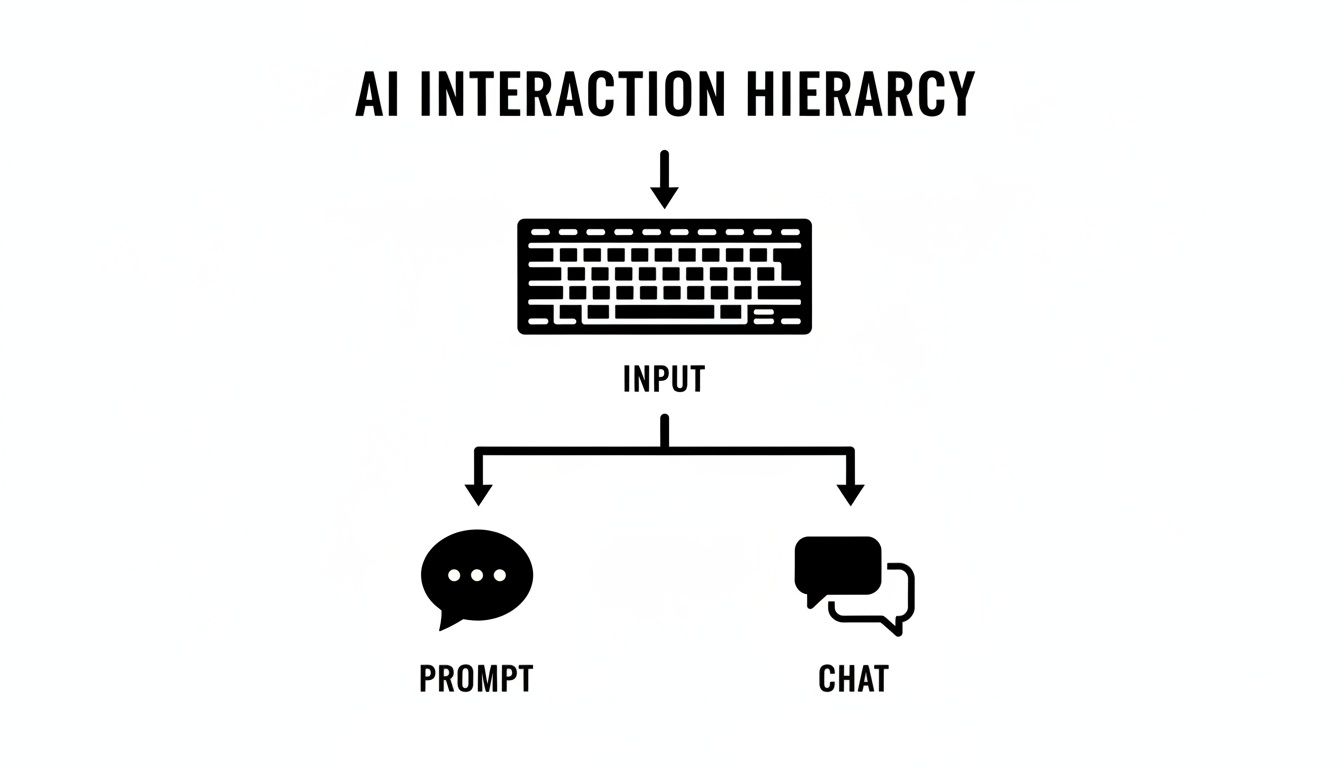
This dual approach means you can generate a screen in one shot with a precise prompt or refine it piece-by-piece through a natural chat.
The New Middle Ground: A Hybrid Powerhouse
A React Native AI builder doesn't replace developers or act like a limited no-code tool. Instead, it carves out a new space in the middle. Think of it as an accelerator that automates the most time-consuming parts of UI development while producing clean, production-ready code.
It becomes the ultimate collaborator for your entire product team.
- For Founders & PMs: You get the lightning-fast speed of no-code to mock up and test ideas. But here's the key difference: what you build isn't a throwaway prototype. It's the actual foundation of your production app.
- For Developers: You can finally skip the tedious task of building UI from scratch. The AI handles the boilerplate, giving you a clean, maintainable codebase you can take over and extend immediately.
This table breaks down how the three approaches compare on the factors that matter most.
Development Approach Comparison
| Factor | React Native AI Builder | Traditional Development | No-Code Platforms |
|---|---|---|---|
| Speed | Very High (Hours/Days) | Low (Weeks/Months) | High (Days/Weeks) |
| Cost | Low to Medium | High | Low to Medium |
| Flexibility | High (Exportable Code) | Very High (Unlimited) | Low (Platform-bound) |
| Code Ownership | Full (100% yours) | Full | None (Vendor lock-in) |
| Scalability | High (Native code) | Very High | Low to Medium |
| Technical Skill | Low to start, Medium to extend | High | Very Low |
As you can see, AI builders create a unique balance, offering the speed and accessibility of no-code tools without sacrificing the ownership and flexibility that only real code can provide.
This hybrid model solves the classic dilemma of speed versus quality. It creates a workflow where product managers and designers can lay the groundwork, and developers can step in to handle the complex logic and final polish. This seamless handoff dramatically shortens the journey from idea to a fully functional, market-ready app.
Practical Use Cases for Your Product Team
A React Native AI builder isn't just a developer toy. It's a central hub where your entire product team can collaborate to build, test, and iterate. It breaks down the traditional walls between design, product, and engineering, letting everyone get their hands dirty and contribute directly.
This creates a far more efficient workflow. Instead of slow handoffs and miscommunications, ideas become interactive screens in minutes. Let's look at how each person on your team can use this tool to solve real problems and ship faster.
Founders and Product Managers
As a founder or PM, your biggest challenge is often getting your vision out of your head and into something people can interact with. An AI builder solves this by turning ideas into tangible, clickable prototypes without needing to pull in an engineer.
For example, imagine you have a big investor pitch tomorrow. Instead of static slides, you can use the AI builder to create a prototype that actually works. Let investors tap through the core user flow and feel the app. This makes your vision credible and real.
This speed is just as crucial for user feedback. When you have a new feature idea, you can build a functional version and get it in front of users the same day. This shrinks your feedback loop from weeks to hours, ensuring you’re building something people want before sinking development resources into it.
Designers
Designers know the frustration of seeing their beautiful Figma mockups lose something when translated to code. An AI builder acts as the ultimate bridge, converting visual concepts into live, interactive components almost instantly.
You can take a wireframe, describe it to the builder, and watch as it generates the corresponding React Native screen. This lets you immediately test the experience on a real device. How do the tap targets feel? Is the navigation intuitive? You get answers right away.
This workflow empowers designers to iterate on the functional aspects of their designs in real-time. If a layout feels off, you can issue a simple chat command to adjust it and see the change reflected in the live app instantly.
This sidesteps the "lost in translation" problem that plagues developer handoffs. The output isn't just a picture of the app; it's the actual code developers will use, ensuring what you designed is what gets built.
Developers
For developers, the biggest win is simple: no more soul-crushing boilerplate. Every project starts with grunt work—setting up navigation, building login forms, creating list views, and styling components. An AI builder handles all of that for you.
Instead of spending the first week of a project on basic scaffolding, you can generate entire features, like an authentication flow or a complex settings screen, in seconds. This lets you jump straight to the interesting parts: writing the core business logic, integrating APIs, and solving the unique technical challenges that make your app special.
The impact is real. One app built with a React Native AI builder grew to 500,000 users in months by automating 60% of its lead qualification process, boosting conversions by 32%. This approach also slashed development costs by 60% compared to a traditional build. It’s a clear example of how a React Native AI builder can directly fuel business growth. You can dive deeper into these kinds of results with these real-world React Native examples.
Best Practices for Using AI-Generated Code

A React Native AI builder produces code that looks great, but can you ship it directly to production? The realistic answer is that it's an incredible head start, not the finish line. Thinking of AI-generated code as a final draft is a recipe for trouble. The magic happens when you treat it as a powerful assistant.
The best way to think about it is this: the AI is like an incredibly fast junior developer. It can build screens, components, and navigation in a flash, but it still needs a senior developer's oversight to ensure the final product is high-quality, maintainable, and performs well.
Treat the AI as a Collaborator
To get real value, you have to work with the AI, not just give it orders. That means adopting a few key habits.
- Provide Clear, Component-Based Prompts: A vague request like "build a profile page" will get you generic code. Be specific. Try something like, "Create a user profile screen with a header component, an avatar component, and a list component for user posts." Breaking down the request guides the AI to create modular, reusable code that fits your architecture.
- Use AI for Scaffolding, Not Complex Logic: Let the AI handle the repetitive UI work. It's a rockstar at creating layouts, styling components, and setting up basic navigation. Save your team’s brainpower for the tricky stuff: complex state management, custom API integrations, and the unique business logic that only a human can implement.
The most effective workflow is a true partnership. The AI lays the visual foundation, and a human developer comes in to wire everything up and implement the sophisticated functionality. This approach gives you maximum speed without cutting corners on quality.
Implement a Human-in-the-Loop Workflow
This is non-negotiable: AI-generated code should never go straight to production without a human looking at it first. A mandatory code review is the bridge between the AI's output and your professional codebase.
This review process is where you ensure the new components fit into your project's existing architecture and adhere to your team’s coding standards. A senior developer can quickly spot opportunities for a refactor, a performance tweak, or a smarter way to handle state. The goal is to blend the AI’s raw speed with a developer's strategic oversight, resulting in code that's both robust and scalable.
The mobile app world is expanding fast, with a projected 21.55% CAGR from 2025-2034, largely because tools are emerging that drastically reduce development friction. By pairing AI-generated code with disciplined human review, your team can get ahead of the curve. To dig deeper, check out this great read on the future of React Native and how AI is shaping it.
Frequently Asked Questions
Whenever a new tool promises to speed things up as much as a React Native AI builder, it's natural to have questions about code quality, security, and how it fits into a real-world workflow. Let’s tackle some of the most common questions product teams ask.
The idea isn't to sell you a magic box, but to give you straight answers so you can see where AI can give your team a massive boost and where your developers' expertise remains essential.
Can I Customize the AI-Generated Code?
Yes, and you absolutely should. The code you get from a React Native AI builder isn't a black box. It’s clean, readable source code built on familiar tech like TypeScript and Expo. It's intentionally designed to be handed off to a developer.
Think of the AI's output as an incredibly detailed first draft. Once you export the code, your team can:
- Tweak UI components: Adjust the layout, fine-tune the styling with NativeWind, or drop in new elements.
- Wire up business logic: This is the big one. Your developers will connect the UI to your backend APIs and manage the app's state.
- Refactor to fit your standards: You can easily adapt the code to match your team’s existing architecture and coding conventions.
How Does This Handle Complex State Management?
This is a perfect example of where human developers take over. An AI builder is fantastic at generating the visual layer of your app—the UI components, screens, and basic navigation. It doesn’t try to guess how your data should flow or manage complex state with libraries like Redux or Zustand.
The AI builds the scaffolding for the user interface, but your development team is still in charge of wiring everything together. This is a good thing. It lets the AI handle the repetitive UI work while your engineers focus on the core architecture that makes an app stable and scalable.
Is the Code Secure and Production-Ready?
The generated code itself is as secure as any typical React Native starter project. It uses standard, well-vetted libraries, so it doesn’t introduce new security holes on its own. But being "production-ready" is about more than just the UI code.
Getting an app truly ready for launch still requires a developer to perform a full code review, add solid error handling, write tests, and connect the frontend to a secure backend. The AI gives you a massive head start, but the final responsibility for security and stability always lies with your engineering team. It’s a human-in-the-loop process that ensures you ship a professional, high-quality product.
Ready to see this in action? With RapidNative, you can turn your ideas into functional app screens in minutes and get high-quality, exportable React Native code from a simple prompt. Stop building from scratch and start iterating faster than ever. Learn more at RapidNative.com.
Ready to build your app?
Turn your idea into a production-ready React Native app in minutes.
Free tools to get you started
Free AI PRD Generator
Generate a professional product requirements document in seconds. Describe your product idea and get a complete, structured PRD instantly.
Try it freeFree AI App Name Generator
Generate unique, brandable app name ideas with AI. Get creative name suggestions with taglines, brand colors, and monogram previews.
Try it freeFree AI App Icon Generator
Generate beautiful, professional app icons with AI. Describe your app and get multiple icon variations in different styles, ready for App Store and Google Play.
Try it freeFrequently asked questions
What is RapidNative?
RapidNative is an AI-powered mobile app builder. Describe the app you want in plain English and RapidNative generates real, production-ready React Native screens you can preview, edit, and publish to the App Store or Google Play.
Can I export the code?
Yes. RapidNative generates clean React Native and Expo code that you can export at any time. No lock-in, no proprietary format. Hand it to your developers or keep building inside RapidNative.
Is RapidNative free to use?
Yes. You can build apps on the free plan with no credit card required. Paid plans unlock unlimited AI generations, code export, and direct publishing to the App Store and Google Play.
Do I need to know how to code?
No. Most users build apps by describing what they want in plain English. Developers can drop into the code whenever they want more control, but coding is optional.
How long does it take to build an app?
Most users have a working first screen in under a minute. A full MVP usually takes a few hours instead of the weeks or months traditional development requires.