How an AI App Builder for React Native Can 10x Your Team's Speed
Learn how ai app builder for react native speeds development, reduces costs, and turns ideas into production-ready apps.
By Sanket Sahu
15th Dec 2025
Last updated: 15th Dec 2025
What if you could sketch an app idea on a whiteboard Monday morning and have a working React Native prototype to show stakeholders by Tuesday afternoon? This isn’t a far-off dream. It's what’s happening right now, thanks to the AI app builder for React Native—a new class of tool that radically shrinks the gap between concept and code. This isn't just about moving a little faster; it’s a fundamentally new way for product teams to build mobile apps.
The New Way to Build Mobile Apps

Anyone who's lived through the traditional app development cycle knows the pain points. Founders, product managers, and designers struggle to translate their vision into something tangible for the engineering team. The slow, expensive process often means missing a market window or shelving a great idea before it even starts. And that classic disconnect between a polished Figma mockup and the final coded product? It almost always leads to a painful cycle of revisions.
This old way of working is siloed and slow. An idea moves from a PM's document to a designer's mockup, then gets tossed over the wall to engineering, where it's manually rebuilt from scratch. Each step is a potential point of failure and delay.
Smashing Through Old Roadblocks
An AI app builder for React Native completely breaks down these walls. Instead of a developer manually coding every single button, screen, and component, these tools intelligently translate your team's ideas into clean, ready-to-use code.
The real game-changer is how it accepts input. It's built for the entire product team, not just developers.
- For Product Managers: Simply describe the feature you want in plain English. For example, "Create a login screen with fields for email and password, a 'Sign In' button, and a link for password recovery." The AI builds it.
- For Brainstorming Sessions: Snap a picture of a whiteboard sketch. The AI analyzes the layout and generates the corresponding code.
- For Designers: Connect your polished designs from Figma and convert them directly into pixel-perfect React Native components, completely killing the tedious manual handoff process.
This isn’t about a minor time-shave; it’s a fundamental shift. Industry projections show that by 2025, as React Native powers 70% of new mobile app builds, AI builders are expected to cut development time by 40% and costs by 30%. You can find more analysis on the future of React Native to see where the industry is heading.
The core value is speed and collaboration. It empowers non-technical team members to participate directly in the creation process, ensuring the app that gets built is the one everyone actually envisioned from the start.
Ultimately, these tools help teams build better products, faster. The slow, linear process of the past is being replaced by a rapid, iterative, and deeply collaborative approach.
How AI Turns Your Ideas Into Code
So, how does an AI app builder for React Native actually bring your vision to life? It feels like magic, but it's really about intelligent automation. Think of it as a super-fast, hyper-efficient partner for your development team. You're the architect holding the blueprint—your prompt or design—and the AI is the master builder, framing out the UI structure in seconds.
The process kicks off the moment you provide an input. The AI model, trained on millions of design patterns and code examples, analyzes your request. It's not just seeing a picture or reading text; it’s recognizing UI patterns like buttons, input fields, headers, and product cards that it has seen countless times before.
From Blueprint to Building Blocks
Once the AI understands the layout and components, it translates those concepts into clean, high-quality code. This isn't a messy, black-box output. It generates well-organized React Native components using TypeScript for type safety and NativeWind for a consistent, utility-first styling system that developers love.
This methodical translation means the output is readable, modular, and ready for your engineers to work with. They can take these generated files, drop them into an existing project, and immediately start working on the complex business logic that makes your app valuable, instead of rebuilding UI from scratch.
The core idea is that an AI app builder is a massive accelerator. It automates the tedious, time-consuming job of building the UI, letting your engineers focus on the features that actually deliver value to your users.
The Power of Iteration
It's not a one-shot deal, either. A great AI app builder for React Native allows for conversational refinement. After the initial build, you can give follow-up instructions like, "Make the main button blue," or "Add a search icon to the header." With each command, the AI tweaks the code, making the gap between idea and reality practically nonexistent.
This AI-assisted workflow can turn even complex ideas into functional starting points, like building sophisticated AI-powered shopping assistants that offer a truly personal touch. To get better at providing these inputs, check out our guide on turning prompts into a fully-fledged app.
At the end of the day, this technology builds a much-needed bridge between design and development. A designer's mockup or a product manager's wireframe becomes the direct source for production-ready code, cutting down on the endless back-and-forth and revision cycles that plague most projects.
Comparing Your Development Options
Choosing how to build your app is one of the most critical decisions a product team can make. It impacts everything: your timeline, budget, and how easily you can adapt and scale in the future.
For years, this choice felt like a compromise. On one side, you have traditional, manual coding. This route offers total freedom and control, but it's a huge investment of time and money. On the other, you have no-code platforms. They're incredibly fast for launching a V1, but you often get trapped in their ecosystem with limited flexibility and no real code to call your own.
Finding the Powerful Middle Ground
This is precisely where an AI app builder for React Native creates a new path. It offers the best of both worlds: the lightning speed of a no-code tool combined with the professional-grade control and code ownership of traditional development.
It’s a simple, powerful workflow: start with an idea, let the AI generate the UI, and export clean, production-ready code that your developers can own and extend.
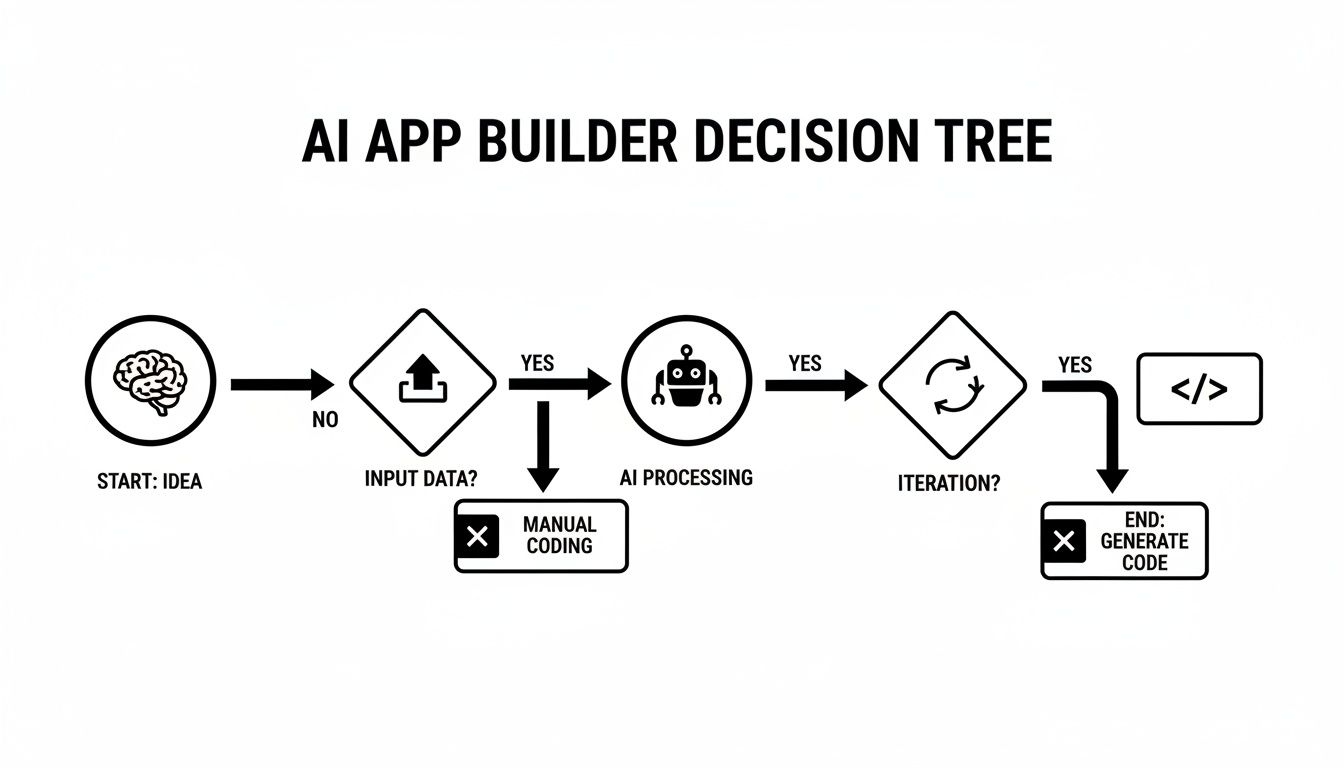
The magic is that the AI handles the most tedious part of development—hand-coding the UI—without sacrificing the quality of the final product.
Head-to-Head Comparison
To see the difference clearly, let’s compare these three approaches on the criteria that matter most to product teams.
Development Approach Comparison
Here's a quick breakdown to help you visualize where each method shines and where it falls short.
| Feature | Traditional Development | No-Code Platforms | AI App Builder (React Native) |
|---|---|---|---|
| Initial Speed | Slow | Very Fast | Very Fast |
| Code Ownership | Full Ownership | None (Platform Lock-in) | Full Ownership (Exportable Code) |
| Customization | Unlimited | Limited by Platform | Unlimited (Extendable Code) |
| Scalability | High | Low to Medium | High |
| Developer-Friendly | Yes (Core Workflow) | No (Often Resisted) | Yes (Accelerates Boilerplate) |
| Team Accessibility | Low (Engineers Only) | High (Non-technical Friendly) | High (All Roles Can Participate) |
This table makes one thing clear: no-code's speed comes at the massive cost of flexibility and ownership. You often hit a wall and have to start over from scratch when it's time to scale. We explore this dead-end in our guide on no-code vs real code.
The AI-assisted route completely avoids that trap. In 2025, AI app builders for React Native are letting teams generate production-ready UI code up to 10x faster. Some tools are already powering over 10,000 apps with a combined 2 million downloads and a 92% user satisfaction rate—a huge reason why React Native leads mobile development.
An AI app builder isn't a replacement for your developers; it's a force multiplier for your entire product team. It automates the grunt work, freeing up your engineers to solve the hard problems that actually drive your business forward.
Ultimately, this modern approach helps your team ship faster, collaborate more effectively, and build high-quality, scalable apps without compromise.
Real-World Scenarios for Your Team

The true value of an AI app builder for React Native isn't just the technology; it's how it solves the practical, everyday problems your team faces. Let's move past the abstract and look at concrete examples of how this changes the game for different roles on your team.
For the Product Manager: Getting Stakeholder Buy-In Instantly
The Old Way: A PM walks into a stakeholder meeting with a slide deck of static wireframes. Feedback is vague ("I'm not sure I like the feel of this"), and turning it into actionable engineering tickets is a nightmare.
The New Way: Right before the meeting, the PM uploads those same wireframes into an AI builder. In minutes, they have a fully interactive React Native prototype running on a phone. Stakeholders can tap through the screens, feel the user flow, and give specific, meaningful feedback ("This button should take me here instead"). A conversation that used to take weeks of back-and-forth can now get a green light in a single meeting.
For the Founder: Validating an Idea on a Budget
The Old Way: A founder has a great idea but faces a classic dilemma: burn through limited seed money hiring a dev team for a risky MVP, or do nothing?
The New Way: An AI app builder for React Native offers a third path. The founder can spend a weekend turning their napkin sketches and feature lists into a functional prototype. They can generate the entire UI and navigation themselves, then hand off clean code to a freelance developer just to wire up the backend. This means getting a real product in front of early users for a fraction of the cost, validating the idea before going all-in.
An AI builder democratizes the creation process. It empowers the people with the vision—founders, PMs, and designers—to build tangible, testable assets without being blocked by engineering resources.
For the Design and Engineering Teams: Eliminating Handoff Friction
The Old Way: The design-to-engineering handoff is a notorious bottleneck. Designers polish every pixel in Figma, only for developers to spend weeks painstakingly recreating it in code, inevitably introducing small but frustrating inconsistencies.
The New Way: An AI builder acts as a direct bridge.
- Designers can instantly convert their Figma designs into live, interactive components. It’s the ultimate "what you see is what you get," ensuring their vision is executed precisely.
- Engineering leads can use the tool to scaffold entire features, generating all the boilerplate for screens and components in minutes. This can save dozens of hours per feature, freeing up senior developers to focus on what really matters—the complex business logic, API integrations, and performance tuning.
Your First Project With an AI App builder

The best way to understand the power of an AI app builder for React Native is to see it in action. Let’s walk through building a common feature—a user profile screen—to show just how fast and intuitive this process is for anyone on the team.
This practical example will show how you can go from a simple idea to working code in minutes, whether you're a founder with a vision, a designer with a mockup, or a developer looking to move faster.
Step 1: Start with a Simple Prompt
Everything begins with your idea. You don't need to know any code to describe what you want to build. The first step is to simply tell the AI what to create in plain English.
Think of it like briefing a super-fast junior developer. For our profile screen, a good starting prompt would be:
"Create a user profile screen. It should have a large circular avatar at the top, followed by the user's name in a bold heading. Below that, include list items for 'Account Settings,' 'Notifications,' and 'Help Center.' Add a prominent 'Log Out' button at the bottom."
The AI parses this description, identifies the key UI elements, and generates the initial screen layout. This process of automating design to code turns simple text into real, tangible components almost instantly.
Step 2: Use a Sketch or Wireframe Instead
What if you're more visual? No problem. An AI app builder for React Native excels at this. You can upload a picture of a rough whiteboard sketch or a simple wireframe you mocked up.
Using computer vision, the AI analyzes your image, recognizes the shapes and layout, and builds the component structure to match. This is a game-changer for teams that love to brainstorm visually, creating a direct path from a creative session to a working prototype without manual translation.
Step 3: Refine and Iterate with Follow-up Commands
The first draft is rarely the final version. This is where the conversational nature of the AI shines. Once the initial screen is generated, you can tweak it with simple follow-up commands.
- Prompt: "Make the avatar larger and add a thin gray border."
- Prompt: "Change the 'Log Out' button to have a red background and white text."
- Prompt: "Add a chevron icon to the right of each list item."
Each command updates the design—and the underlying code—in real-time. You can polish the UI to perfection without switching tools or writing a line of code yourself.
When you're happy, you just export the entire screen as clean, production-ready React Native code. The output is well-organized, readable, and ready for a developer to wire up the logic and ship.
Choosing the Right AI App Builder for Your Project
With new tools emerging, picking the right AI app builder for React Native is critical to avoid future headaches. A flashy demo can be impressive, but the real test is how the tool performs in a real-world workflow. To see past the marketing hype, your team needs a practical checklist to vet these platforms.
The goal is to find a tool that genuinely accelerates your team without introducing new problems. You're not just adopting a feature; you're integrating a new step into your core development process.
Your Evaluation Checklist
Before committing to any AI app builder, run it through these key questions. The answers will reveal whether you've found a true workflow accelerator or a hidden trap.
-
What's the code quality like? This is non-negotiable. Ask to see a sample of the generated code. Is it clean, readable, and maintainable TypeScript that follows modern best practices? Or is it a tangled mess that your developers will have to refactor anyway?
-
Can you export your code without lock-in? This is a deal-breaker. You must be able to export a standard Expo project with no strings attached. Any tool that traps you on its platform is just a no-code builder in disguise and should be avoided.
-
How accurate is the design-to-code conversion? Test it yourself. Upload one of your team's actual Figma designs or a detailed wireframe. How close does the generated UI get to the input? Pixel-perfect accuracy is what separates a gimmick from a tool that saves real engineering hours.
-
Is it built on a modern, open tech stack? An AI builder that uses popular, well-supported libraries like NativeWind for styling is a huge plus. It means your developers are working with familiar tools that integrate seamlessly with the React Native ecosystem, not some proprietary, black-box system.
The best AI app builder for React Native feels less like a magic box and more like a highly skilled junior developer. It should handle the repetitive boilerplate with precision, delivering clean code that your team can immediately build upon.
Ultimately, the right tool respects your team's existing standards and workflows. It should empower non-technical members to contribute prototypes while allowing developers to accelerate the actual build, all while producing professional-grade code you can confidently ship to production.
Frequently Asked Questions About AI App Builders
Whenever a new type of tool appears, it's natural for teams to have questions. Most product managers and founders I talk to are curious about code ownership, quality, and where exactly these tools fit into their existing software development process. Let's address some of the most common questions about AI app builders for React Native.
A primary concern is always about the code itself: Do you actually own it? And is it production-quality? The answer is a definitive yes. Unlike traditional no-code platforms that lock you into their ecosystem, a proper AI app builder generates clean, exportable code. The output is 100% yours to own, modify, and integrate into any project, with zero vendor lock-in.
Wait, Isn't This Just Another No-Code Platform?
That's an excellent question, as it highlights the most important distinction. No-code tools are great for building simple, standalone apps, but they almost always hit a hard limit when you need custom functionality or need to scale.
An AI app builder is a fundamentally different tool. Its sole purpose is to generate professional-grade source code that a developer can take over and extend indefinitely.
Think of it less as a replacement for developers and more as an incredibly powerful assistant. It automates the tedious work of building UI boilerplate, producing well-structured React Native code that your team can immediately build upon. The goal isn't to eliminate code; it's to get to the important code faster.
The sweet spot for an AI builder is rapidly prototyping and building out your app's user interface. This frees up your engineers to pour their brainpower into the tricky stuff—like backend logic, API integrations, and the core business features that actually make you money.
Ready to see how an AI co-pilot can speed up your team? Try RapidNative and go from a simple prompt to production-ready React Native code in minutes. Get started at the RapidNative website.
Ready to build your app?
Turn your idea into a production-ready React Native app in minutes.
Free tools to get you started
Free AI PRD Generator
Generate a professional product requirements document in seconds. Describe your product idea and get a complete, structured PRD instantly.
Try it freeFree AI App Name Generator
Generate unique, brandable app name ideas with AI. Get creative name suggestions with taglines, brand colors, and monogram previews.
Try it freeFree AI App Icon Generator
Generate beautiful, professional app icons with AI. Describe your app and get multiple icon variations in different styles, ready for App Store and Google Play.
Try it freeFrequently asked questions
What is RapidNative?
RapidNative is an AI-powered mobile app builder. Describe the app you want in plain English and RapidNative generates real, production-ready React Native screens you can preview, edit, and publish to the App Store or Google Play.
Can I export the code?
Yes. RapidNative generates clean React Native and Expo code that you can export at any time. No lock-in, no proprietary format. Hand it to your developers or keep building inside RapidNative.
Is RapidNative free to use?
Yes. You can build apps on the free plan with no credit card required. Paid plans unlock unlimited AI generations, code export, and direct publishing to the App Store and Google Play.
Do I need to know how to code?
No. Most users build apps by describing what they want in plain English. Developers can drop into the code whenever they want more control, but coding is optional.
How long does it take to build an app?
Most users have a working first screen in under a minute. A full MVP usually takes a few hours instead of the weeks or months traditional development requires.