How an AI Prototype Builder Turns Your Idea into a Real App in Minutes
Discover how ai prototype builder turns your ideas into working app prototypes, streamlines workflows, and delivers real code.
By Damini
9th Jan 2026
Last updated: 9th Jan 2026
Picture this: you have an idea for a mobile app. Instead of spending weeks on mockups and design handoffs, you describe it in a single sentence and get a working, interactive prototype in minutes. That’s the reality of an AI prototype builder. These tools are not about creating static images; they generate functional app screens with real, native code, instantly closing the gap between a napkin sketch and a testable product.
For anyone who has been through the traditional app development cycle, this is a massive leap forward.
From Napkin Sketch to Native App Instantly
For years, building a mobile app prototype has been a slow, fragmented process. An idea starts on a whiteboard, moves to static wireframes in one tool, then to high-fidelity mockups in another. After weeks of back-and-forth, it finally lands in a developer's lap to write the first lines of code. Each step is a potential point of failure, causing delays and miscommunication.
An AI prototype builder flattens this process into a single, seamless step. It’s like having a senior developer and a UI designer on standby, ready to build a working model the moment you describe your vision. You ask for a user login screen, and the AI doesn't just give you a picture—it generates the actual native components and the code behind them.
To see just how different the workflows are, let's compare them side-by-side.
Traditional Prototyping vs AI Prototype Builder Workflow
| Stage | Traditional Workflow | AI Prototype Builder Workflow |
|---|---|---|
| 1. Ideation | Brainstorming on whiteboards, napkin sketches | Describe the app concept in a text prompt |
| 2. Wireframing | Create low-fidelity static layouts (e.g., Balsamiq) | AI generates initial interactive wireframes instantly |
| 3. UI Design | Design high-fidelity mockups (e.g., Figma, Sketch) | AI generates high-fidelity UI and components |
| 4. Prototyping | Manually link static screens to create a "clickable" feel | The generated output is already interactive and functional |
| 5. Handoff | Export design specs, assets, and redlines for developers | Export production-ready native code (e.g., React Native) |
| Time | Weeks to Months | Minutes to Hours |
| Output | Static design files, design specs | Interactive prototype, native UI code |
As you can see, the AI approach removes entire stages of manual work, dramatically cutting down the time it takes to get from an idea to a tangible product.
The Shift From Static to Interactive
The real game-changer here is the output. Traditional design tools like Figma are fantastic for creating beautiful, pixel-perfect images of an app. But they’re still just images. An AI prototype builder creates a real, interactive experience.
This difference is everything for a mobile product team.
- True User Feedback: You can give users a genuinely interactive prototype to test the actual flow and feel, not just the look.
- Faster Validation: Founders and product managers can validate an entire app concept in an afternoon, not a month.
- Developer Alignment: The output is clean, usable code, which means the gap between design and engineering is closed from day one.
This new class of tools is riding a massive wave of innovation in generative AI. The global generative AI market is expected to rocket from $40.71 billion to $890.59 billion by 2032. This isn't just hype; it reflects a fundamental change in how teams work. We now expect AI to handle the first draft and cut down on tedious tasks, a trend that's now reshaping how we build mobile apps. You can dig into the numbers yourself in this in-depth generative AI market analysis.
An AI prototype builder isn't just a faster design tool; it’s an idea accelerator. It closes the gap between imagination and a tangible, testable product, allowing teams to build, test, and learn at a speed that was impossible before.
Why This Matters for Your Team
For a non-technical founder, this means you can bring an idea to life without writing a line of code. For a designer, it’s a chance to iterate on real user experiences instead of getting bogged down in static screens. And for developers, it means skipping the boring part of building boilerplate UI to focus on the complex logic that really matters.
If you want to see how this works in practice, check out our guide on how to make a prototype that truly gets your vision across. At the end of the day, this is all about making the process of creating mobile products more efficient, collaborative, and open to everyone on the team.
How AI Turns Your Idea Into Real App Code
Ever wonder how an AI prototype builder can take a simple sentence like, "Create a login screen with Google and Apple sign-in options," and spit out a fully coded app screen? It's not magic, but it’s a brilliant process that translates everyday language into machine-ready code. Let's peel back the layers without getting lost in the technical weeds.
Think of the AI as a master developer who has studied millions of top-tier app designs. It knows the patterns, best practices, and component structures that make for a great user experience. When you give it a prompt, the AI works through three main stages: first, it figures out what you actually mean, then it generates the UI building blocks, and finally, it assembles the final code.
From Prompt To Pixels: The Interpretation Stage
The first step is all about understanding your request. This is where Natural Language Understanding (NLU) comes in. The AI model carefully analyzes your prompt—whether it’s a quick text description or a rough sketch—to pick out the key elements, layouts, and intended actions. It's essentially acting as a translator, turning your creative vision into a technical blueprint.
- It spots the building blocks: The AI identifies nouns like "button," "list," "image," and "input field."
- It understands the goal: It figures out the verbs, like "sign in," "add to cart," or "display user profile."
- It sees the structure: It infers the layout you have in mind, such as a "two-column grid," a "header with a back button," or a "bottom tab bar."
So, if you type "A user profile screen with a large profile picture at the top, followed by the user's name, and a list of their recent posts," the AI deconstructs that sentence into a clear hierarchy of components and where they should go. This interpretation is the foundation for everything that follows.
Generating Native UI Components
Once the AI knows what you want, it starts building. This is where the underlying technology really matters. A top-notch AI prototype builder doesn’t just create a generic, web-based mockup; it generates real, native code.
At its core, an AI prototype builder is a "design-to-code" engine. It doesn't just draw a picture of a button; it writes the actual
Buttoncomponent code that a developer would use in a real project.
RapidNative, for instance, is built on a modern, production-ready stack designed for this very purpose:
- React Native: This ensures your prototype is a true native app, giving you the performance and feel users expect on both iOS and Android.
- TypeScript: This adds a layer of reliability by catching errors early, which leads to more stable and maintainable code down the road.
- NativeWind: This uses the principles of Tailwind CSS to style components, making it incredibly easy to create consistent and themeable designs.
By using these technologies, the AI generates clean, modular components that are not just visually on-point but also structurally sound. The code you get is far more valuable than a static image—it's the first real version of your product.
This approach is a massive leap forward from the slow, traditional workflows we're used to. The visual below shows just how much simpler the journey from concept to code becomes.
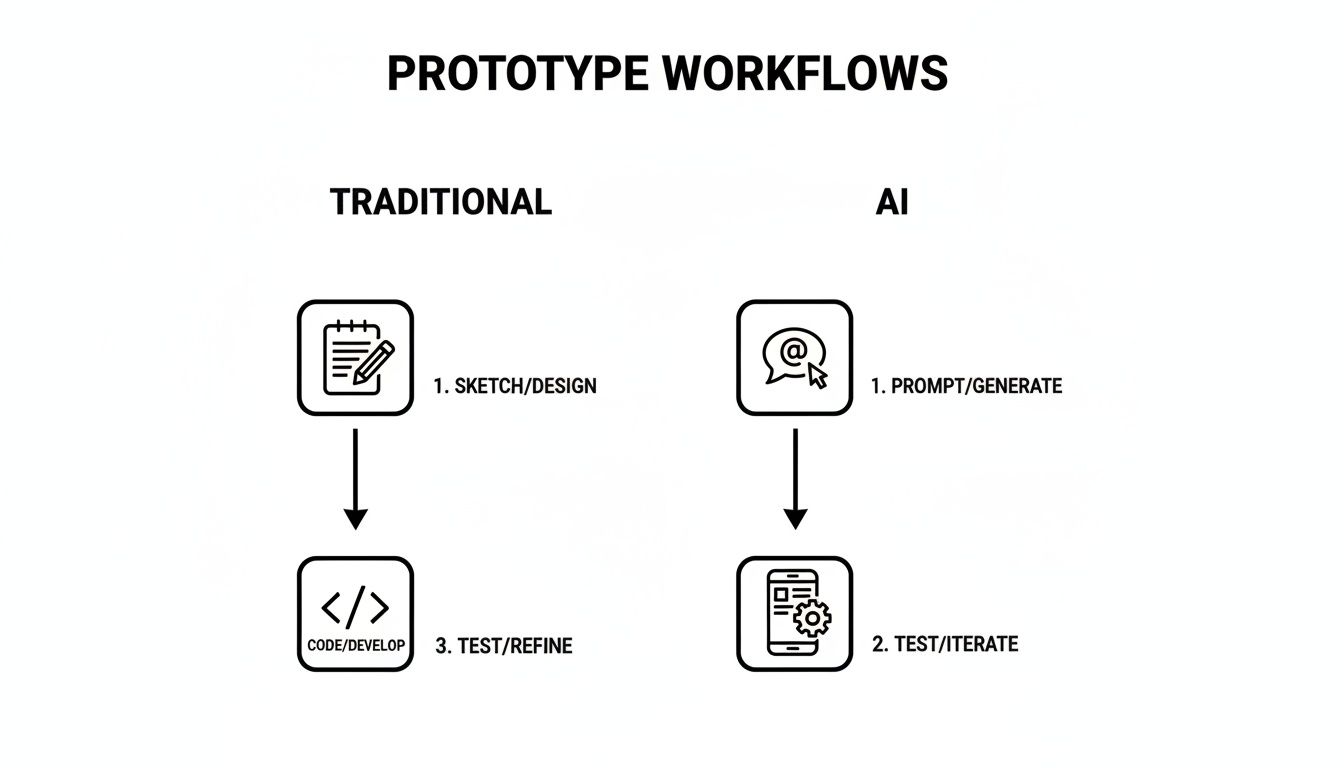
As you can see, the AI collapses multiple manual stages—like wireframing, UI design, and developer handoff—into a single, automated step. This is what makes the process so much faster.
Assembling Production-Ready Code
In the final step, the AI puts all those individual components together to form a complete screen. It intelligently organizes the code, sets up the navigation, and makes sure everything is connected properly. What you get is a well-structured file that a developer can open, immediately understand, and start building on.
This isn’t some black box spitting out messy, unusable code. The whole point is to produce a clean, human-readable foundation that plugs right into a professional development environment.
By understanding this process, you can be confident that the output isn't just a temporary placeholder. It's a genuine asset that significantly speeds up your path to a finished product. To get into the nitty-gritty, you can explore more about how an AI React Native generator works to create this high-quality code.
Practical Workflows for Your Mobile Product Team
Knowing what an AI prototype builder does is one thing, but seeing how it solves your team’s day-to-day problems is where it really clicks. These tools are a force multiplier for everyone involved in building a mobile app. From the founder sketching an idea to the developer writing production code, here’s how your team can use this tech to move faster.
Let’s walk through four real-world scenarios showing how different team members can put an AI prototype builder to work.
For the Founder: Validate an MVP Idea in One Afternoon
As a founder, your top priority is validating your core idea without burning through cash and time. You need to get something real in front of potential users, but the traditional development cycle can take months. An AI prototype builder is your secret weapon.
Imagine you have an idea for a new fitness app. Instead of writing a massive product spec, you give the AI a simple, one-paragraph prompt:
"Create a three-screen onboarding flow for a fitness app. Screen 1 is a welcome screen with a logo and 'Get Started' button. Screen 2 asks the user for their fitness goal: 'Lose Weight', 'Build Muscle', or 'Improve Endurance'. Screen 3 asks them to connect their health app to track activity."
In minutes, you have a fully interactive, clickable prototype. You can test it on your phone, send the link to potential customers for feedback, and show investors a working concept instead of a slide deck. This shrinks your idea validation cycle from months to a single afternoon.
For the Product Manager: Test a New Feature Before Writing Specs
Product managers live and breathe validation and iteration. A great feature idea might come up in a meeting, but getting that whiteboard sketch into a testable format usually means waiting on design and engineering.
With an AI prototype builder, that wait is over. Just snap a photo of the whiteboard sketch, upload it, and watch the AI turn your drawing into a functional UI. From there, you can use simple chat commands to polish it: "Change the primary button color to blue" or "Add an icon next to each list item."
This transforms how you validate ideas:
- Instant Feedback: Get input from stakeholders and users on a working model, not just a static image.
- Reduced Risk: Spot usability problems long before a single line of production code gets written.
- Clearer Communication: A tangible prototype acts as the single source of truth, aligning design, engineering, and business.
This speed means you can test five feature ideas in the time it used to take to spec out one, dramatically increasing your chances of building something customers actually want.
For the Designer: Iterate on Real Experiences, Not Static Pictures
Designers are masters of crafting pixel-perfect experiences, but what looks good in a static tool like Figma can feel completely different on a live device. Spacing, touch targets, and animations often don't translate perfectly.
An AI prototype builder lets designers work directly with interactive, native components from the start. After the AI generates a base screen, a designer can jump in and fine-tune the details in real-time with simple text commands.
"Make the header font bold and increase its size to 24px. Add 16 pixels of padding around the main content container. Change the theme's primary color to #5A67D8."
This conversational approach to design makes it incredibly fast to explore different layouts, color palettes, and component styles. Best of all, you're editing a real native app, so what you see is truly what you get. It closes the gap between static design mockups and the final coded product.
For the Developer: Eliminate Boilerplate UI Code
Developers spend too much time writing repetitive boilerplate code for standard UI screens—think settings pages, user profiles, or login forms. It's necessary work, but it’s low-impact and pulls them away from building the core logic that makes an app special.
An AI prototype builder automates this grunt work. A developer can tell the AI what they need: "Create a settings screen with sections for 'Account', 'Notifications', and 'Appearance'. Include toggle switches for push notifications and a dark mode option."
In seconds, the AI generates the complete, clean, and production-ready React Native code for that screen. The developer can then export it straight into their project, saving hours of tedious typing. This frees them up to focus on the hard problems, like state management, performance, and API integrations. Beyond prototyping, you can also discover other affordable AI tools to boost your workflow that take care of similar repetitive tasks.
Why Getting Real Code Output Is a Game Changer
Let’s be honest, one of the biggest fears with many no-code or low-code tools is getting trapped. You pour hours into building your vision, and then you hit a wall. The platform can't handle a critical feature, or worse, you can't export your work in a way that developers can actually use. Your project is stuck in a proprietary sandbox.
This is where a modern AI prototype builder completely flips the script. The point isn't just to create a pretty, clickable mockup. It's to deliver clean, human-readable, and production-ready code—specifically, the kind of React Native code that your development team already knows and trusts.
From Locked Box to Open Platform
Traditional no-code tools often give you proprietary files or messy, bundled web code that's nearly impossible for a developer to pick up and customize. If you outgrow the platform’s limitations, you have one option: start over from scratch. All that progress you made? Gone.
An AI prototype builder that exports real code changes this dynamic entirely. It's not a locked box; it's a launchpad.
The most critical difference is ownership. When you get real source code as the output, you own your project's future. You're free to take that code, extend it, and plug it into professional developer workflows without any strings attached.
This shift means your prototype is no longer a dead end. It becomes the first official version—the V1—of your actual app. Every minute you spend tweaking the UI in the builder is a direct investment in the final product, not just a temporary visual aid that gets thrown away.
Building with Modular Components Developers Love
So, what makes this generated code so valuable? It’s not just a single, massive file of jumbled code. A truly useful AI prototype builder, like RapidNative, generates modular components.
Think of it like building with LEGOs instead of Play-Doh. With Play-Doh, everything is mashed together. With LEGOs, each brick is a distinct, reusable piece. You can easily swap a red brick for a blue one or add a new section.
This is exactly how professional developers build software. The AI generates clean, individual components for things like:
- Buttons: Standardized buttons with defined styles and actions.
- Input Fields: Text inputs for forms, search bars, and login screens.
- Cards: Reusable containers to display information like user profiles or products.
- Navigation Bars: The headers and tab bars that give your app its structure.
When a developer opens this code, they see a clean, organized project full of components they can instantly understand and work with. They can take the AI's foundation for a settings screen and focus their energy on hooking up the backend logic instead of painstakingly recreating the UI from a static image.
Accelerating the Path to a Real Product
This code-first approach has a huge impact on your timeline and budget. By generating a solid codebase right from the start, you practically eliminate the entire "design handoff" phase, a process that’s notorious for misinterpretations and delays. Developers don't have to guess at spacing, fonts, or colors because it's all right there in the code.
Ultimately, getting real code means you’re not just building a prototype. You’re building the real thing, just a whole lot faster. It bridges the gap between a great idea and a shippable product, letting your team move forward with confidence and speed.
How to Choose the Right AI Prototype Builder
With new AI tools popping up every week, picking the right AI prototype builder can feel like a shot in the dark. Not all of these tools are created equal, and the wrong choice can lead to wasted time and a prototype that goes nowhere.
To make a smart decision, you have to look past the flashy marketing and ask a few tough questions about what the tool actually produces. Here's a practical checklist to help you evaluate your options.
Does It Generate Real Native Code or a Web Wrapper?
This is the most important question you can ask. Many tools churn out prototypes that are just mini-websites dressed up to look like a mobile app. These "web wrappers" are fine for a simple click-through demo, but they don't give you the true performance or feel of a native application.
A professional AI prototype builder generates genuine React Native code. This means your prototype isn't a simulation; it's the first version of your real iOS and Android app. This ensures the user experience you're testing is authentic, and the code you get is something your developers can actually use.
How Good Is the Code Quality?
Just getting code isn't enough. It has to be clean, modular, and human-readable. A tool that spits out a single, messy file of spaghetti code is almost as useless as getting no code at all. Your developers will either spend hours untangling it or throw it away and start from scratch.
Look for a builder that creates:
- Reusable Components: Does it generate distinct, modular pieces for things like buttons, cards, and input fields?
- Organized Structure: Is the code logically structured in a way that makes sense to a developer?
- Maintainable Styling: Does it use a modern styling system, like NativeWind, that makes it easy to apply and update a consistent design theme?
How Easy Is It to Iterate and Make Changes?
The whole point of rapid prototyping is speed. Your chosen tool should make iterating feel effortless. The best platforms let you refine your designs conversationally.
An effective AI prototype builder should feel like a collaborative partner. You should be able to say, "Make the header text bolder and change the primary button to blue," and watch it happen instantly.
This ability to iterate with simple text prompts is what separates a gimmick from a game-changer. It’s crucial for moving quickly from a rough idea to a polished design.
Understanding the Limitations
Finally, be realistic about what these tools are for. An AI prototype builder is an expert at creating the user interface (UI) and user experience (UX) of your app—the screens, the navigation, the interactive elements.
It is not designed to build complex backend logic, manage databases, or handle user authentication. That part still requires a developer. A trustworthy tool is transparent about this. It positions itself as a UI accelerator, not a magical, one-click app factory. This clarity helps you set the right expectations and integrate the tool into a professional workflow where it can do the most good.
Create Your First AI-Generated Prototype Today
The best way to understand how these tools work is to build something yourself. You can get started in just a few minutes, going from a simple idea to an interactive screen without writing a single line of code.

Here are the exact steps to go from a simple thought to a tangible, interactive app screen.
Step 1: Write an Effective Prompt
Think of your prompt as the blueprint you give to the AI. The more specific you are, the better the first draft will be. A vague request like "make a profile screen" leads to a generic result. Instead, describe the key components and their placement.
For example, a solid prompt looks something like this:
"Create a user profile screen for a music app. It should have a large circular profile image at the top, followed by the user's name and handle in bold text. Below that, add a grid of their favorite album covers."
This gives the AI clear instructions and a solid structure to build from, getting you much closer to your vision on the very first try.
Step 2: Make Quick Edits with Chat
The first version is rarely the final one. Now you can tweak and refine the design using simple, conversational chat commands. No design tools, no code—just plain English.
Think of it like you're directing a designer sitting next to you. You could say things like:
- "Change the background color to a dark gray."
- "Add a 'Follow' button next to the user's handle."
- "Increase the spacing between the album covers in the grid."
This back-and-forth makes iteration incredibly fast and intuitive. You can test out different ideas in seconds.
Step 3: Export the Code
Once the screen looks right, it's time to bring it into your project. With a top-tier AI prototype builder like RapidNative, you can export clean, production-ready React Native code. This isn't a static image or a locked-in file; it's a real code component your developers can grab and use immediately.
This is the final, crucial step that bridges the gap between a visual idea and a real, functional mobile app. Adopting this workflow isn't just a novelty; it gives your team a real edge, helping you build and ship better products faster.
Frequently Asked Questions
Whenever a new tool enters the scene, it’s natural to have questions. Here are answers to some of the most common questions from mobile product teams about AI prototype builders.
Is an AI Prototype Builder Just Another No-Code Tool?
No. While both make building faster, they operate on completely different philosophies. A traditional no-code platform is usually a closed system—you build your app inside their world, and that’s where it has to stay.
An AI prototype builder is a springboard for a real, code-first development process. The goal isn't to lock you in or replace your developers. It’s to give your team a massive head start by generating clean, exportable, production-grade code (like React Native) that your engineers can take and run with. It’s a launchpad, not a walled garden.
Is the Generated Code Actually Production-Ready?
Yes, for the user interface. The code is clean, well-structured, and follows best practices, creating a perfect foundation for your app's frontend. A developer can grab the AI-generated UI for a complex settings screen and immediately get to work wiring up the backend logic.
The code is production-ready for the UI layer. It’s designed to save developers from writing boilerplate, not to replace the complex work of database management, state logic, or API integrations.
So, the AI handles the "what it looks like" part, freeing up your developers to focus on the much harder "how it works" part.
What Kinds of Mobile Apps Are Best Suited for This?
AI prototype builders excel when building apps where the user interface and experience are front and center. That covers a huge range of applications.
Teams have found massive success building:
- E-commerce Apps: Product grids, shopping carts, and checkout flows built in a fraction of the time.
- Social and Content Platforms: User profiles, news feeds, and discovery screens generated almost instantly.
- Fitness and Wellness Apps: Prototyping dashboards, workout trackers, and progress charts becomes incredibly fast.
- Educational and SaaS Apps: Perfect for designing onboarding tutorials, lesson modules, and settings pages.
Basically, if your app is built around standard native UI components and common user flows, an AI prototype builder can give you an incredible speed advantage.
Ready to see how this can change your mobile development workflow? With RapidNative, you can take your ideas from a simple prompt to an interactive, native prototype—complete with production-ready code—in just a few minutes.
Ready to build your app?
Turn your idea into a production-ready React Native app in minutes.
Free tools to get you started
Free AI PRD Generator
Generate a professional product requirements document in seconds. Describe your product idea and get a complete, structured PRD instantly.
Try it freeFree AI App Name Generator
Generate unique, brandable app name ideas with AI. Get creative name suggestions with taglines, brand colors, and monogram previews.
Try it freeFree AI App Icon Generator
Generate beautiful, professional app icons with AI. Describe your app and get multiple icon variations in different styles, ready for App Store and Google Play.
Try it freeFrequently asked questions
What is RapidNative?
RapidNative is an AI-powered mobile app builder. Describe the app you want in plain English and RapidNative generates real, production-ready React Native screens you can preview, edit, and publish to the App Store or Google Play.
Can I export the code?
Yes. RapidNative generates clean React Native and Expo code that you can export at any time. No lock-in, no proprietary format. Hand it to your developers or keep building inside RapidNative.
Is RapidNative free to use?
Yes. You can build apps on the free plan with no credit card required. Paid plans unlock unlimited AI generations, code export, and direct publishing to the App Store and Google Play.
Do I need to know how to code?
No. Most users build apps by describing what they want in plain English. Developers can drop into the code whenever they want more control, but coding is optional.
How long does it take to build an app?
Most users have a working first screen in under a minute. A full MVP usually takes a few hours instead of the weeks or months traditional development requires.