Choosing the Right App Creation Software for Your Startup
A founder's guide to app creation software. Compare no-code, low-code, AI, and traditional dev to find the best fit for your team and build your MVP faster.
By Parth
21st Jan 2026
Last updated: 21st Jan 2026
Picking the right app creation software is a foundational decision that can make or break your project. For founders, product managers, and designers, the choice isn't about learning to code—it’s about understanding the four main paths you can take: No-Code, Low-Code, AI Code Generation, and Traditional Development. Each path offers a different trade-off between speed, control, and customization. Get it right, and you're on a fast track. Get it wrong, and you'll be fighting your tools every step of the way.
Understanding Your App Creation Software Options
Making a smart choice starts with a realistic look at what each type of software actually delivers. This is a fork in the road, much like the decision between Custom Software vs Off-the-Shelf Software. Are you trying to get a quick prototype out the door to see if an idea has legs? Or are you building the bedrock of a product you plan to scale for years? Your answer points you to the right tool.
This isn't just a technical choice; it's a core business strategy. The software you pick will dictate your team's workflow, your budget, and the technical debt you'll have to deal with down the line. Let's break down the playing field.

The Core Trade-Offs
Think of every app-building approach as a point on a spectrum. At one end, you have pure speed and simplicity, but it usually comes at the expense of control. On the other end, you get total creative freedom, but it costs a ton of time and requires serious technical skill.
The real question isn't, "Which tool is the best?" It’s, "Which tool is the best for what we need to do right now?" The perfect platform for a weekend MVP is almost never the right choice for a company that just raised its Series A.
Getting this balance right is everything. Here’s a quick breakdown to help you match your project’s needs with the right category of app creation software.
| Development Approach | Best For | Key Trade-Off | Non-Technical Friendly? |
|---|---|---|---|
| No-Code | Validating ideas, building simple internal tools, and banging out prototypes fast. | Speed over Scalability: You can get started in a flash, but you'll eventually hit a wall set by the platform's limits. | Very high |
| Low-Code | Automating business workflows and creating internal apps that need a bit of custom logic. | Efficiency over Uniqueness: It's way faster than coding from scratch, but you're often tied to pre-built modules that can't handle truly unique features. | Moderate |
| AI Code Generation | Prototyping UI/UX at lightning speed and building production-ready MVPs. | Acceleration over Complexity: It generates real, usable code quickly, but you'll still need a developer to handle complex backend logic and integrations. | High (for UI) |
| Traditional Development | Building complex, scalable, and one-of-a-kind applications meant for a mass audience. | Control over Speed: You have complete freedom to build anything, but it’s by far the most time-consuming and expensive route. | Low |
A Practical Comparison of Development Approaches

Choosing how to build your app isn't about finding the one "best" tool. It’s about matching the right approach to your project, your team, and where you are in your business journey. The market for these tools is exploding. Valued at roughly $1,564 million in 2025, it’s set to grow at a 7.7% CAGR through 2033, driven by a huge shift toward tools that empower more than just seasoned developers. For a deeper dive, market research on mobile app development software highlights this trend.
Instead of just listing pros and cons, let's break down the four main types of app creation software—no-code, low-code, AI code generators, and traditional development—from the perspective of what actually matters to product teams.
Iteration Speed and Time to Market
How fast can you get a working idea in front of real users? For startups and teams testing new features, this is everything.
-
No-Code Platforms: When it comes to raw speed for a first draft, no-code is king. A founder or designer can often stitch together a clickable prototype in a weekend. The drag-and-drop interface is perfect for validating an idea before writing a single line of code.
-
Traditional Development: This is the marathon, not the sprint. Building from scratch is methodical and slow, demanding careful planning, coding, and testing for even basic features. That heavy upfront investment makes it a poor fit for quick experiments.
-
AI Code Generators: Here’s where things get interesting. Tools like RapidNative offer a compelling middle ground. You can generate a functional UI from a simple text prompt in minutes, giving you the speed of no-code but with real, usable code as the result. Iterations are as simple as chatting with the AI, which collapses the feedback loop between design and development.
Customization Potential and Scalability
Your app will need to grow. The path you choose today dictates how much freedom you'll have to add unique features and handle more users down the road.
No-code tools are the most rigid. You're stuck with the platform’s built-in components and workflows. This is often why successful prototypes built on no-code eventually hit a wall and require a complete, from-scratch rebuild.
The real trap with many visual builders is vendor lock-in. You're building inside their walled garden. If you outgrow it, you can't just pack up your work and leave. You have to start over with real code.
At the other end of the spectrum, traditional development offers infinite flexibility. If you can dream it, a good developer can build it. This total control is crucial for complex, one-of-a-kind apps, but that freedom comes with a hefty price tag in time and money.
AI-native tools bridge this gap by generating standard, exportable code. With RapidNative, you get clean React Native components that aren't tied to the platform. This means you can get started incredibly fast, then hand off production-ready code to your engineering team to extend and scale without hitting a hard ceiling. If you're weighing these trade-offs, our guide on no-code vs. real code explores the long-term impacts.
Developer Dependency and Maintenance
Who do you need on your team to build and maintain the app? The answer directly shapes your operational costs and team structure.
-
No-code platforms are built to remove developers from the equation. They let founders, PMs, and designers build and update simple apps on their own. The catch? Maintenance is entirely in the hands of the platform provider. If they have an outage or change a feature, you're at their mercy.
-
Traditional development leans entirely on developers. You need a dedicated engineering team not just for the initial build but for every update, bug fix, and server issue. It’s the most resource-intensive model by a long shot.
-
Low-code platforms aim for a balance. They reduce the initial dependency, but you'll almost always need a developer for tricky integrations or custom logic. Maintaining them can get complicated, as you're juggling both custom code and the platform's proprietary bits.
-
AI code generators completely change this dynamic. Non-technical folks can create and iterate on the UI, taking a huge load off the engineering team. This frees up developers to focus on what they do best: building robust backend logic. And because the output is clean code, maintenance follows standard development practices, avoiding the "black box" problems of proprietary platforms.
App Creation Software Decision Matrix
To pull this all together, here’s a matrix that maps these different approaches to the project requirements that product teams care about most.
| Criteria | No-Code Platforms | Low-Code Platforms | AI Code Generators (RapidNative) | Traditional Development |
|---|---|---|---|---|
| Iteration Speed | Very High | High | Very High | Low |
| Scalability | Low | Moderate | High | Very High |
| Customization | Low | Moderate | High | Very High |
| Developer Dependency | Very Low | Moderate | Low (for UI), High (for backend) | Very High |
| Maintenance Overhead | Low (Platform-managed) | Moderate (Mixed) | Moderate (Standard code) | High (Team-managed) |
Ultimately, this table helps visualize the trade-offs. The right choice depends entirely on your priorities—whether that's maximum speed for an MVP, total control for a complex enterprise app, or a balanced approach that blends speed with scalability.
Which Tool for Which Job? Real-World Scenarios

Choosing the right app creation software can feel theoretical until you’re staring down a real deadline with a tight budget. Let's ground this discussion in reality by walking through three common situations that product teams face. Looking at each scenario helps us see which tool doesn't just solve the problem at hand but also positions you for success down the road.
This isn't just an academic exercise. The app development market is booming, projected to hit USD 264.96 billion in 2025 and rocket to USD 543.13 billion by 2030. Cloud-based platforms are driving much of this growth, making up 58% of the market because they deliver the speed and agility modern teams need. You can dive deeper into these app development market trends to get a feel for where things are headed.
Scenario 1: The Founder Chasing a Seed Round
Imagine a founder with a brilliant product vision and a set of Figma designs. Their problem? They have no engineering team and a shoestring budget. The immediate goal is to create a high-fidelity, interactive prototype to show investors and secure that critical first round of funding—and they need it in weeks, not months.
- Best Tool: A no-code platform or an AI code generator like RapidNative.
- Why: No-code tools offer the absolute fastest way to get from a static design to a clickable prototype, which is a huge plus. The founder can often build it themselves. However, an AI-native tool like RapidNative has a killer advantage: it generates real, high-quality code. This means the demo isn't just impressive; it's a tangible technical asset, which gives investors more confidence than a throwaway mock-up.
- Pitfall to Avoid: Going the traditional development route. It's far too slow and expensive for this stage. You’d burn through your precious capital and time before you even got in front of the first investor.
Scenario 2: The PM Testing a New Feature
A product manager at an established company has an idea for a new feature. They need to validate it with a small group of beta users before committing to a full build. The main application is complex, and slotting this experiment into the existing codebase would swallow up engineering resources and throw the product roadmap off course.
The real challenge for product managers isn't a lack of ideas—it's finding a low-friction way to test them. The more you can de-risk a feature before you commit engineering resources, the healthier your product roadmap will be.
- Best Tool: A low-code platform or an AI code generator.
- Why: A low-code tool could work here, letting the PM quickly assemble a standalone mini-app for the feature test, especially if it needs some basic logic. But an AI tool like RapidNative is often a better fit. The PM or a designer can generate a functional UI from a simple prompt or their existing design files, get a shareable link out to beta testers, and start gathering feedback in days.
- Pitfall to Avoid: Building the feature directly into the production app. This is a classic trap. It commits the team to something before it's proven valuable, leading to code bloat and wasted sprints if the idea doesn't pan out.
Scenario 3: The Designer-to-Engineer Handoff
A UX/UI designer has just put the finishing touches on the designs for a new mobile app. The old way of doing things was painful: exporting static assets, writing up massive spec documents, and sitting through endless meetings to explain interactions to developers, who then had to rebuild everything from scratch.
- Best Tool: An AI code generator like RapidNative.
- Why: This is the exact problem AI-native tools were built to solve. The designer can use RapidNative to convert their Figma designs directly into clean, production-ready React Native components. Instead of handing off flat images and a PDF, they give developers a link to a working prototype and a repository of code they can use immediately. This move practically eliminates rework and ensures the final product is pixel-perfect. Our guide on the MVP app builder shows exactly how this accelerated workflow operates.
- Pitfall to Avoid: Relying on no-code tools for this. While fantastic for prototyping, their output is usually stuck inside their own ecosystem. The code they generate (if you can even export it) is rarely something a professional engineering team can use, forcing a complete rebuild from the ground up and defeating the entire purpose of a smooth handoff.
How AI Speeds Up Your Real-World Workflow
AI-native tools aren't just about writing code faster; they fundamentally change how teams turn ideas into real products. Forget the old, rigid assembly line of design, prototype, code, and test. AI creates a single, collaborative space where these phases happen all at once. This cuts out the friction and "lost in translation" moments between team members.
Let's walk through a practical example of how modern app creation software takes a simple concept and transforms it into a working React Native app you can hold in your hand.
From Text Prompt to Your First Screens
It all starts with something incredibly simple: a text prompt. A founder or product manager can just describe the app's core function in plain English.
- Example Prompt: "Create a mobile app for a local coffee shop. It needs a home screen with featured drinks, a full menu screen with categories, an order screen with a simple checkout, and a user profile page."
Within a few minutes, an AI-native tool like RapidNative spins up the initial screens, already wired up with basic navigation and placeholder elements. This isn't just a flat mockup; it's a live React Native app running on a device. That immediate feedback is a game-changer. Your idea is no longer just a paragraph in a spec doc—it’s an interactive starting point the whole team can react to right away.
From Whiteboard Sketch to an Interactive UI
Of course, not every great idea starts as text. More often, the best ones are born from messy sketches on a whiteboard. Today's AI workflows can take those visual sparks and run with them. Just snap a photo of the sketch and upload it. The AI gets to work, identifying UI elements like buttons and text fields, and converts them into a fully interactive interface.
Here’s a glimpse of how the RapidNative platform can interpret a simple drawing and generate a user interface from it.
This visual-to-code process closes the chasm between brainstorming and building. You can go straight from a raw idea to a functional UI without the traditional detour through polished design files.
Real-Time Tweaks with Chat Commands
Once you have that initial UI, the real acceleration kicks in. Instead of writing up feedback notes and sending them back to a designer or developer, anyone on the team can make changes with simple chat commands.
The real magic here is the death of the handoff. When a designer can type, "Change the primary button color to our brand's blue and increase the corner radius to 8px," and see it happen instantly, the cycle of design, feedback, and implementation shrinks from days to seconds.
This conversational style opens up the creation process to everyone. It feels less like old-school development and more like you're talking to a super-efficient teammate who executes your requests on the spot. To get the most out of these tools, it's worth exploring specialized training, and things like AI Engineer Professional certifications can give your team a serious edge.
The Best Part: No Lock-In and Clean, Exportable Code
Perhaps the most important feature of a true AI-native tool is what happens when you're done iterating. Unlike closed-off, no-code platforms, the goal isn't to trap you in a proprietary ecosystem. At any point, your engineers can export the entire application as clean, human-readable, and well-structured React Native code.
- What this actually means for your team:
- No Vendor Lock-In: You own every line of code. If you decide to part ways with the AI tool, all your hard work comes with you.
- A Clean Handoff: Developers aren't handed a black box. They get a well-organized codebase built on modern standards like React Native, Expo, and NativeWind.
- Built for Scale: The exported code is the perfect foundation for building out complex backend logic, plugging in APIs, and getting your app ready for production.
This workflow finally bridges the gap between rapid prototyping and serious engineering. It gives the whole team the power to contribute to the initial build while producing an asset that developers can confidently own and expand upon. To see more of this in action, check out our deep dive into AI-powered mobile workflows.
How to Make the Right Choice for Your Team
After looking at all the options, picking the right app creation software really boils down to being brutally honest about your team's situation. The "best" tool is simply the one that fits your immediate needs and doesn't box you in later. To sidestep the classic mistake of choosing a platform you'll outgrow in six months, you need to ask some direct questions.
Key Questions to Guide Your Decision
Before you sign up for anything, get your founders, product managers, designers, and engineers in a room. Hashing out these points will make the right path pretty obvious.
-
What are we really trying to do right now? Is the goal to mock something up over a weekend to get investors excited? Or are you building a real MVP meant to handle your first 10,000 users? The answer completely changes whether you need raw speed or a stable foundation.
-
What skills do we actually have on the team? Take a realistic inventory. Do you have a bench of experienced React Native developers, or is your team mostly designers and business folks who can't code?
-
What’s our budget in both time and money? Don't just look at subscription fees. Think about developer hours. A traditional build might seem cheap if your devs are on salary, but the cost of missing a market window can be astronomical.
-
Where do we see this app in 12 months? Fast forward a year. Will you need complex business logic, slick custom animations, or tricky API integrations? A restrictive platform will become a major roadblock.
This isn't just a technical decision; it's a strategic one. The mobile app market is expected to hit $1.1 trillion by 2034. We're also seeing huge shifts, like a 112% jump in AI chatbot app downloads. The tool you pick has to let you adapt. If you want a deeper dive, you can explore more mobile app development statistics to see where things are headed.
Situational Recommendations
Once you have honest answers, you'll start to see a clear fit.
For the non-technical founder who needs to validate an idea this weekend, a no-code tool is the only way to go. Nothing beats its speed for creating a functional prototype when you have zero coding background.
But, if you're a small startup building a real MVP that needs to scale, an AI-native tool like RapidNative strikes the perfect balance. You get the incredible speed needed to launch fast, but it generates high-quality code you can actually own and build on. You get the best of both worlds without getting trapped.
This workflow shows exactly how an AI-first process turns a simple idea into real code.
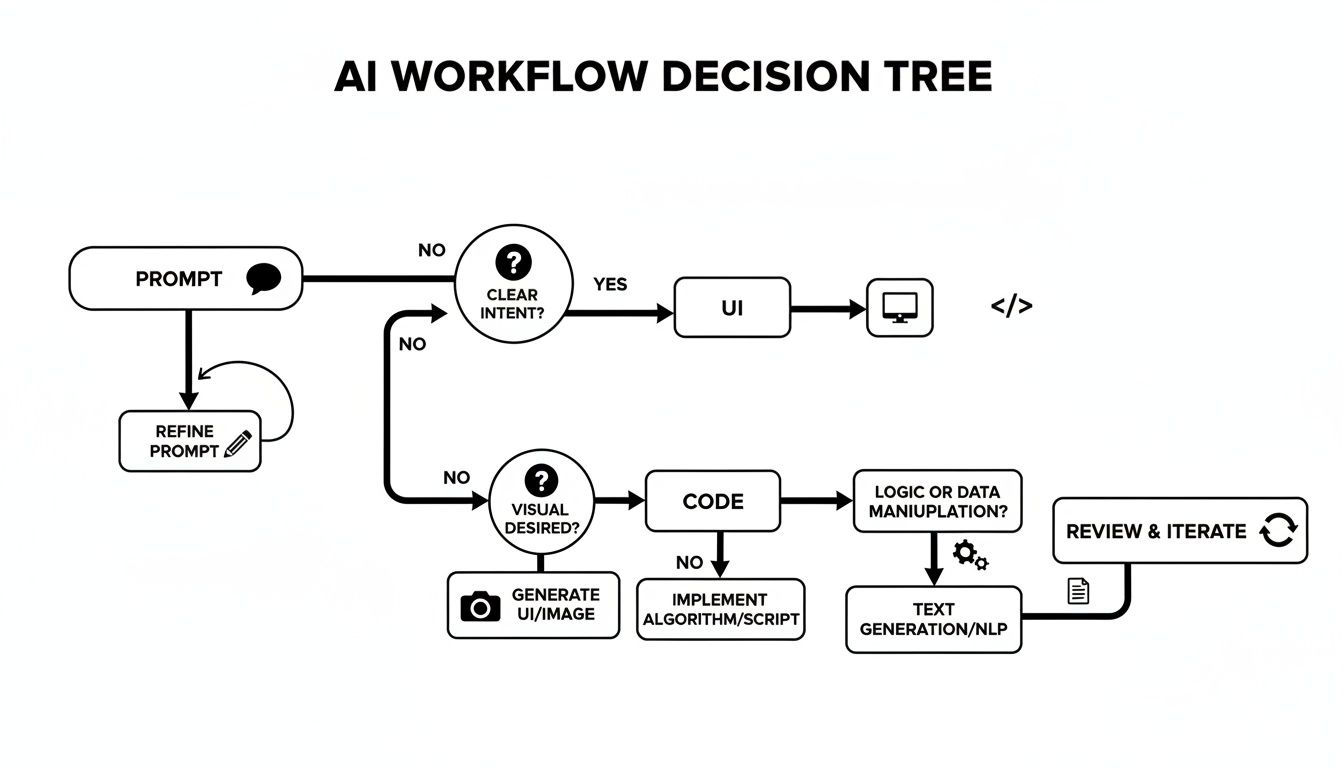
This is a much more direct path from concept to code, cutting out a ton of the back-and-forth that plagues traditional development.
Finally, if you’re a large company with a dedicated engineering team building a complex, mission-critical app, traditional development still offers the total control you need. When customization is everything and you have the resources, this approach gives you a blank canvas.
Answering Your Key Questions
Choosing the right app creation software brings up some tough, practical questions. Getting clear answers is the difference between a smooth launch and a costly dead end. Let's dig into the big concerns that founders, PMs, and designers run into all the time.
Can I Build a Scalable Business on No-Code?
The short answer? It's risky. While no-code platforms like Bubble or Adalo are brilliant for whipping up prototypes and simple internal tools at lightning speed, they come with a hidden ceiling.
When you’re talking about building a real, scalable business, you will almost certainly hit that ceiling. These platforms are closed ecosystems, which means custom business logic, high-performance database queries, and handling tens of thousands of simultaneous users are usually out of reach. The moment your app's needs outgrow the platform's pre-built blocks, you’re stuck. The only way out is to start over from scratch with actual code. Think of it as a fantastic launchpad, but it's not the rocket that gets you to orbit.
How Is an AI Code Generator Different From Low-Code?
This is a critical distinction, and it all comes down to ownership and flexibility. A low-code tool helps you build faster, but it does so with proprietary, pre-packaged components. The catch is that your app becomes fundamentally tied to that platform—a classic case of vendor lock-in.
An AI code generator like RapidNative works completely differently. It doesn't trap you with proprietary blocks. Instead, it writes standard, human-readable React Native code that you can actually use.
The core difference is ownership. With low-code, you're renting building blocks. With an AI code generator, you're creating a tangible asset—clean code that belongs entirely to you. You can take it anywhere, give it to any developer, and build on it without being tied to a single vendor.
This means you get the speed without giving up control or getting stuck in a walled garden. Your project is yours, period.
What Does an AI-to-Engineer Handoff Look like?
This is where the whole process gets a lot less painful. The handoff from an AI tool to an engineering team eliminates a massive bottleneck that has plagued product teams for years. Forget about pixel-perfecting static design files and writing endless spec documents. The handoff becomes simple, direct, and shockingly efficient.
Here's how it usually goes:
- Export the Codebase: The designer or PM exports the entire UI straight from the AI tool. With RapidNative, this gives you a clean, well-structured React Native project.
- Share the Repository: You share the code through a standard Git repository, just like any other software project. No weird formats or proprietary files to deal with.
- Developer Integration: An engineer can immediately pull down the project, run it locally, and see a working app that perfectly matches the prototype. Because the code is component-based and uses familiar libraries, it plugs right into their existing workflow.
This seamless transition means developers can get straight to work on the hard stuff—building backend logic and complex features—instead of wasting weeks just rebuilding the UI. The handoff is no longer a point of friction; it's a launch point.
Ready to bridge the gap between your idea and production-ready code? RapidNative helps your team build and iterate on mobile apps faster than ever before. Get started for free at rapidnative.com and turn your vision into a real app in minutes.
Ready to build your app?
Turn your idea into a production-ready React Native app in minutes.
Free tools to get you started
Free AI PRD Generator
Generate a professional product requirements document in seconds. Describe your product idea and get a complete, structured PRD instantly.
Try it freeFree AI App Name Generator
Generate unique, brandable app name ideas with AI. Get creative name suggestions with taglines, brand colors, and monogram previews.
Try it freeFree AI App Icon Generator
Generate beautiful, professional app icons with AI. Describe your app and get multiple icon variations in different styles, ready for App Store and Google Play.
Try it freeFrequently asked questions
What is RapidNative?
RapidNative is an AI-powered mobile app builder. Describe the app you want in plain English and RapidNative generates real, production-ready React Native screens you can preview, edit, and publish to the App Store or Google Play.
Can I export the code?
Yes. RapidNative generates clean React Native and Expo code that you can export at any time. No lock-in, no proprietary format. Hand it to your developers or keep building inside RapidNative.
Is RapidNative free to use?
Yes. You can build apps on the free plan with no credit card required. Paid plans unlock unlimited AI generations, code export, and direct publishing to the App Store and Google Play.
Do I need to know how to code?
No. Most users build apps by describing what they want in plain English. Developers can drop into the code whenever they want more control, but coding is optional.
How long does it take to build an app?
Most users have a working first screen in under a minute. A full MVP usually takes a few hours instead of the weeks or months traditional development requires.