How to Collaborate in Real Time and Ship Your Mobile App Faster
Learn how to collaborate in real time to streamline mobile app development with practical tools, workflows, and faster results.
By Sanket Sahu
30th Jan 2026
Last updated: 30th Jan 2026
When your team needs to collaborate in real time, it's about more than just being in the same video call. It's about fundamentally changing how you build, moving from a slow, sequential assembly line to a dynamic, live workshop where everyone contributes at once.
Think of it as the difference between passing a project file from one person to the next—and all the delays that come with it—and having your product manager, designer, and developer in a shared digital space, building a feature together, live. This approach creates a single, living source of truth for your entire mobile app project, eliminating the confusion that kills momentum.
Why Real-Time Collaboration Matters for Mobile App Teams
If you've ever built a mobile app, the traditional handoff model is painfully familiar. The product manager writes a spec, emails it to the designer, who creates a mockup in Figma, who then exports assets for a developer. Each handoff is a potential point of failure, packed with delays, misinterpretations, and frustrating rework cycles.
Real-time collaboration completely flips this on its head. Instead of tossing static files over the wall, the entire team—PM, designer, and developer—can build, test, and iterate on a live prototype together. This synchronous workflow closes the communication gaps that kill momentum and create friction in mobile app projects.
The Shift to Synchronous Workflows
The move to remote and hybrid work has made this shift essential. When you can't just walk over to a colleague's desk, live collaboration tools become the glue that holds a productive team together. It's no surprise that 83% of employees feel more effective when working with flexible, modern tools.
This trend exploded after 2020. Collaboration among immediate teammates jumped by 16%, as teams relied on digital platforms to stay connected and productive. You can dig deeper into these trends in recent workplace collaboration statistics.
To see just how different this approach is, let's compare the old way with the new.
Old Workflows vs. Real-Time Collaboration
| Aspect | Traditional (Asynchronous) | Real-Time (Synchronous) |
|---|---|---|
| Communication | Sequential handoffs, emails, static files | Live chat, shared canvas, co-editing |
| Feedback Loop | Days or weeks | Instantaneous, happening in minutes |
| Source of Truth | Multiple versions of docs & mockups | A single, live, shared prototype |
| Rework Risk | High; issues are found late in the process | Low; misalignments are caught on the fly |
| Pace | Slow, linear, prone to bottlenecks | Fast, iterative, and parallel |
This table makes it clear: for mobile app teams, the new model isn't just a minor improvement; it's a completely different way of building.
For your product team, the advantages are impossible to ignore:
- Instantaneous Feedback: A designer can see their UI choices come to life in code right away, and a developer can flag a technical constraint before it derails the sprint. It’s immediate cause and effect.
- Perfect Alignment: Everyone is looking at and working on the exact same live prototype. It’s the ultimate source of truth, leaving no room for ambiguity. What you see is what your users will get.
- Dramatically Reduced Rework: When you spot misalignments as they happen, you fix them in minutes. That saves countless hours and budget that would have been wasted fixing problems discovered weeks later.
By enabling teams to build and iterate together, real-time collaboration collapses the feedback loop from weeks or days down to mere minutes. This speed is a critical advantage in getting your mobile product to market faster.
Ultimately, to collaborate in real time is to foster a more fluid, creative, and efficient development process. It empowers your team to solve problems together, experiment with ideas on the fly, and build a far better product because everyone is perfectly in sync from the very first screen. This isn't just about adopting a new tool; it's a fundamental change in how modern teams build great mobile applications.
The Hidden Costs of Disconnected App Development
When your app development workflow is fragmented, you’re paying a hidden "collaboration tax." This isn't just about a few wasted hours; it’s the slow, painful bleed of productivity from constant context switching, endless clarification meetings, and fixing mistakes that should have never happened.
Every time a designer has to pause to ask a developer a question or a product manager waits on feedback, momentum stalls. This tax shows up most clearly in one place: your calendar.
The Problem of Meeting Overload
For many mobile teams, especially in a hybrid world, meetings have become the default solution for misalignment. But they often create more problems than they solve.
Since early 2020, weekly meeting time has exploded by a staggering 252%. According to recent workplace collaboration statistics, the average employee now spends 60% of their time not on deep work, but on meetings, email, and chat. When you can’t collaborate in real time on the app itself, you end up talking about the work instead—and that’s a huge waste of time.
This kicks off a vicious cycle. Progress gets measured by meetings attended, not features shipped. The actual creative and coding work gets crammed into the small gaps between status updates and syncs.
A Real-World Scenario: The Delayed Feature
Let’s walk through a common example—building a new onboarding flow for an app—to see how these costs spiral out of control.
-
Step 1: The Misinterpreted Spec. The product manager writes a detailed product requirements document (PRD) and hands it off. The designer, working in a silo, misunderstands a key interaction and spends a week creating beautiful mockups in Figma that are fundamentally wrong.
-
Step 2: The Feedback Lag. The mockups are shared over email. It takes the PM two days to find time to review them. A long, confusing email thread follows to clarify the original vision, burning another day.
-
Step 3: The Late-Stage Technical Hurdle. Finally, the approved designs land on a developer’s plate. They start coding, only to discover a critical technical limitation in an API that makes the proposed animation impossible. This was a complete blind spot because the developer wasn’t part of the initial conversation.
The result? A two-week delay, a frustrated team, and a feature that has to be watered down. The real cost wasn't just the lost time; it was the opportunity cost of what that team could have built instead.
This kind of story is all too common for app teams. When your feedback loops are measured in days instead of minutes, small misunderstandings inevitably snowball into major setbacks. Fixing a mistake at the eleventh hour is exponentially more expensive than catching it on the spot.
By failing to collaborate in real time, the team paid a steep price in lost productivity, morale, and speed. This is exactly why a more integrated way to build mobile products is essential.
How Real-Time Collaboration Unlocks Faster Prototyping
After seeing how much time and money are lost to disconnected workflows, it’s clear that a better way to build is needed. Instead of accepting delays as part of the process, teams can adopt a live, synchronous model to build mobile app features in a fraction of the time. This isn't just theory—it's a practical shift that completely changes the prototyping game.
Imagine hammering out a key app feature in a single, focused session. This is where you really start to collaborate in real time. You can go from a vague idea to a working, shareable prototype without all the back-and-forth emails and messages that kill momentum. It swaps those slow, disjointed feedback loops for immediate, in-context iteration.
From Prompt to Prototype in One Session
So what does this actually look like in practice? Let's say your product team needs to build a new user profile screen. In a real-time collaborative tool, the workflow is fluid and everyone works in parallel, not in a rigid, linear handoff sequence.
-
The PM Kicks It Off: The Product Manager starts with a simple text prompt: "Create a user profile screen with a profile picture, name, username, bio, and a grid of the user's posts." Instantly, a functional screen materializes on the shared canvas for the whole team to see.
-
The Designer Jumps In: Next, the Designer starts refining the UI—not in a separate Figma file, but by iterating directly on the live prototype. They can type commands like, "Change the layout to a two-column grid" or "Make the profile picture circular and add a 2px blue border." The design updates on the spot, allowing for quick visual experiments.
-
The Developer Inspects the Code: At the same time, the Developer isn't just waiting for a handoff. They have a live view of the production-ready React Native code as it's generated. They can add technical comments or flag a component that might be tricky to implement later, heading off surprises before they become problems.
This kind of workflow, where multiple roles contribute at once, is the heart of modern product development. It often starts on a shared visual space, like a collaborative whiteboarding canvas, which acts as the single source of truth for the entire team.
The image here shows this unified workspace perfectly. You’ve got the mobile UI, the code behind it, and the team’s chat all in one view, which leaves very little room for misinterpretation.
The Impact on Your MVP Timeline
This tight integration does more than just speed up one feature; it changes how you build an entire mobile product. When you can build and validate ideas this quickly, you can dramatically accelerate your timeline. For more on this, see our practical guide on how to build a prototype that gets you to market faster.
By collapsing the entire feedback cycle into a single session, teams can go from initial concept to a developer-ready prototype in hours, not weeks. This speed is a game-changer for validating ideas and shipping your MVP.
This approach ensures everyone is on the same page from the very beginning. When the whole team builds together, the final prototype isn't a watered-down compromise between different visions; it's a shared creation that reflects the combined expertise of the PM, designer, and developer.
A Step-by-Step Guide to Your First Collaborative Session
Theory is one thing, but seeing how it works in practice is what really makes it click. Let's walk through what a live app-building session actually looks like, showing exactly how a team can collaborate in real time to take an idea and turn it into a working prototype.
For this example, we’ll follow a standard mobile product team: a product manager (PM), a UI/UX designer, and a developer. Their shared goal is to build out a new user profile feature in a single, focused session, completely skipping the usual delays and handoffs.
Step 1: The PM Kicks Things Off
The session starts with the product manager. Instead of spending hours writing a dense spec document that someone will inevitably misinterpret, the PM gets right to the point.
They can drop in a simple text prompt, upload a rough sketch to the shared canvas, or just link to a project brief. The idea is to establish the core requirements immediately, giving the initial build a solid, clear direction.
For instance, the PM might just type: "Create a user profile page with an avatar, username, follower counts, and a tabbed view for posts and saved items."
Step 2: The First Screens Appear
Using the PM's prompt as a starting point, the whole team watches as the initial screens and navigation pop up on the shared digital canvas. This isn't just a static image—it's a live, interactive foundation that everyone can see and start working with.
This immediate visual feedback gets everyone on the same page from the get-go. There’s no ambiguity, which is one of the biggest problems with siloed workflows. Getting started is easy, but it helps to review different ways you can build a prototype to find the right approach for your team.
The infographic below really captures this fluid, interconnected process.
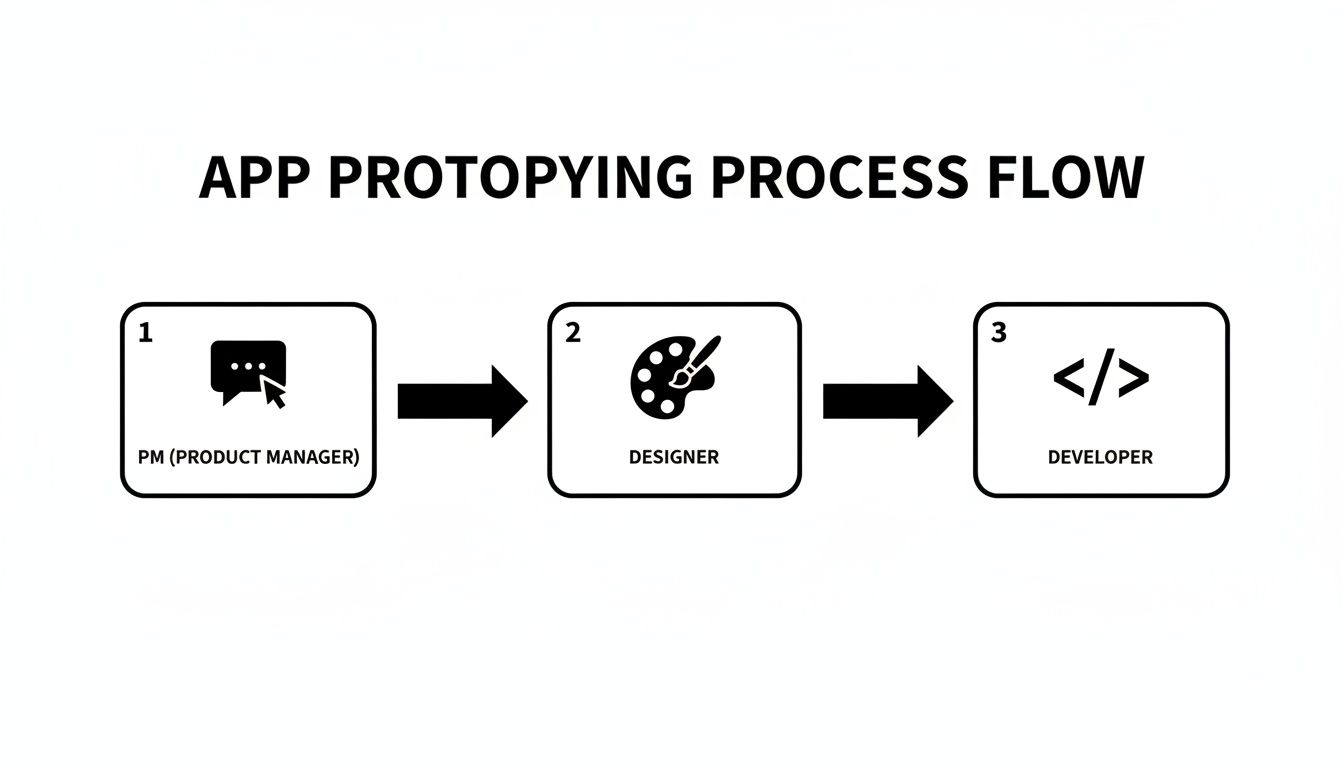
As you can see, real-time collaboration isn't a rigid, linear sequence. It’s a dynamic loop where roles overlap to get things done faster.
Step 3: The Designer Jumps In to Refine the UI
Now it’s the designer’s turn. They can immediately start tweaking the user interface, either by using simple text prompts or by editing elements directly on the canvas.
Here are a few prompts a designer might use to make quick changes:
- "Change the primary button color to a vibrant blue and use a rounded corner style."
- "Arrange the follower counts horizontally and add icons next to each number."
- "Apply a minimalist font style to all text elements on the screen."
This allows for incredibly fast experimentation. The whole team sees the visual updates as they happen, so they can give instant feedback on what’s working and what isn’t.
Step 4: The Developer Adds Technical Context
While the designer is polishing the visuals, the developer isn't just sitting on the sidelines. They're right there, inspecting the clean, production-ready code that’s being generated alongside the UI changes.
This is a huge advantage. The developer can spot potential performance issues, suggest a better component, or confirm that the design is technically sound—all before anyone writes a single line of manual code.
Bringing developers into the process from the very beginning helps you avoid that dreaded "we can't actually build this" conversation that often happens weeks after a design has been approved. It closes the gap between design and engineering.
Step 5: The Team Gets Instant Feedback
With a solid first version of the prototype ready to go, the team can generate a live preview link. They can share this with stakeholders, beta testers, or even potential users to get their thoughts right away.
This final step closes the loop, turning a single collaborative session into a powerful way to validate ideas and iterate quickly.
Best Practices for Effective Team Collaboration
Having powerful tools is just one piece of the puzzle. The real magic happens when your team knows how to use them effectively. Without some clear ground rules, even the best platform can lead to chaos and frustration. To truly collaborate in real time, your team needs a shared understanding of how to work together.
This goes beyond just sending a meeting invite. It’s about being intentional. A little planning goes a long way in making sure every session is productive, focused, and respectful of everyone's contribution.
Set Clear Goals and Roles
Before jumping into any live session, everyone involved should know the answers to two questions: "Why are we here?" and "What's my job?" A session without a clear objective can quickly turn into a directionless brainstorming free-for-all where nothing gets done.
Start every collaborative build with a specific, measurable goal. Are you trying to nail down the UI for the login screen? Or solving a tricky technical bug in the navigation flow? Define what "done" looks like before you even start.
Next, assign roles to keep the session on track. This doesn't have to be rigid, but having a designated leader can prevent the "too many cooks in the kitchen" scenario.
- The Driver: This is the person steering the ship, keeping everyone focused on the main goal. This is often the Product Manager.
- The Contributor: These are your designers, developers, and other experts who are actively building and giving feedback.
- The Observer: Sometimes, a stakeholder just needs to see what's happening without jumping into the fray. Defining this role upfront helps avoid unnecessary interruptions.
Establish Communication Etiquette
Live collaboration sessions can get noisy and chaotic. To stop people from talking over each other or wandering off on tangents, it helps to set a few simple communication rules.
Things like using a "hands-up" feature in your video call, keeping side conversations in threaded comments, or just agreeing to let one person finish their thought can make a world of difference.
When you collaborate in real time, you’re blending creative energy with focused execution. The goal is to find a rhythm where everyone can contribute without creating noise, ensuring the session stays productive from start to finish.
For more ideas on managing group dynamics, check out these excellent tips for running effective virtual mastermind groups. While the format is a bit different, the core principles of clear communication and structured interaction are spot-on. By setting these ground rules, you create a space where your team feels safe, efficient, and ready to build your best product.
Measuring the Business Impact of Real-Time Collaboration
Let's be honest: adopting a new workflow only makes sense if it delivers real business results. For founders and product managers, the decision to collaborate in real time isn't just about team morale—it's about tying new processes directly to the outcomes that matter, like shipping faster and staying on budget. The good news? The impact is clear, measurable, and goes straight to your bottom line.
When you cut out the friction from traditional handoffs between design, product, and engineering, you see an almost immediate jump in key development metrics. A single, transparent source of truth for everyone boosts accountability and fosters a shared sense of ownership that keeps the entire project moving forward.
From Better Teamwork to Stronger Metrics
The biggest wins almost always show up in three core areas for mobile app teams: speed, quality, and efficiency. You can track and quantify each one, which helps build a rock-solid business case for working this way.
Here’s where real-time collaboration really moves the needle:
- Faster Time-to-MVP: When you shrink feedback loops from days down to minutes, you get a minimum viable product into your users' hands that much faster. That means quicker validation for your core idea and a much shorter path to generating revenue.
- Fewer Bugs from Miscommunication: When developers, designers, and PMs are literally building together, misunderstandings get caught on the spot, not weeks later in QA. This alone drastically cuts down the number of bugs that stem from a misinterpreted spec, saving countless hours of rework.
- Higher Development Velocity: Teams that are truly in sync spend less time in meetings trying to clarify specs and more time actually building features. That sustained momentum allows them to ship more per sprint and consistently increase their output.
Quantifying the Gains of Synchronous Work
Measuring the true impact of collaboration has become a serious focus for modern companies. The average business holds a staggering 40 meetings every month, highlighting the desperate need for more efficient ways to interact. This is exactly why 82% of leaders believe the next few years will be a turning point for AI-driven collaboration. In fact, AI-powered feedback has already been shown to slash project timelines by up to 40%.
This shift is a direct response to teams drowning in over 100 different apps, leading to fragmented conversations and costly breakdowns. You can dig into more data on how to measure collaboration effectively at Kadence.co.
At the end of the day, real-time collaboration isn't a "soft skill"—it's a hard strategic advantage. It directly cuts the wasted time and resources that bloat your budget, making a clear and direct impact on your overall project costs.
When you connect these improvements to your financial goals, the argument for change is hard to ignore. To learn more about how to budget for your project, check out our guide on understanding mobile app development costs. This link between efficient teamwork and financial health is precisely what makes real-time collaboration a non-negotiable strategy for any modern product team.
Ready to see how your team can build faster and smarter together? With RapidNative, you can turn ideas into shareable, production-ready React Native apps in minutes. Start building for free today.
Ready to build your app?
Turn your idea into a production-ready React Native app in minutes.
Free tools to get you started
Free AI PRD Generator
Generate a professional product requirements document in seconds. Describe your product idea and get a complete, structured PRD instantly.
Try it freeFree AI App Name Generator
Generate unique, brandable app name ideas with AI. Get creative name suggestions with taglines, brand colors, and monogram previews.
Try it freeFree AI App Icon Generator
Generate beautiful, professional app icons with AI. Describe your app and get multiple icon variations in different styles, ready for App Store and Google Play.
Try it freeFrequently asked questions
What is RapidNative?
RapidNative is an AI-powered mobile app builder. Describe the app you want in plain English and RapidNative generates real, production-ready React Native screens you can preview, edit, and publish to the App Store or Google Play.
Can I export the code?
Yes. RapidNative generates clean React Native and Expo code that you can export at any time. No lock-in, no proprietary format. Hand it to your developers or keep building inside RapidNative.
Is RapidNative free to use?
Yes. You can build apps on the free plan with no credit card required. Paid plans unlock unlimited AI generations, code export, and direct publishing to the App Store and Google Play.
Do I need to know how to code?
No. Most users build apps by describing what they want in plain English. Developers can drop into the code whenever they want more control, but coding is optional.
How long does it take to build an app?
Most users have a working first screen in under a minute. A full MVP usually takes a few hours instead of the weeks or months traditional development requires.