Create an App Without Coding Using AI
Learn how to create an app without coding using powerful AI tools. This guide shows you how to turn simple text prompts into a functional, production-ready app.
By Rishav
6th Feb 2026
Last updated: 6th Feb 2026
Yes, you can now create an app without writing a single line of code. Modern AI-native builders turn simple text prompts into real, production-ready apps, letting you sidestep long development cycles and hefty costs. For founders, product managers, and designers, this means you can build and test your app idea in minutes, not months.
The New Way to Build an App Without Code
Not long ago, building an application was a monumental task walled off by complex programming languages, demanding big budgets and specialized development teams. For founders and product managers, this meant great ideas often died on the whiteboard, stuck behind a technical barrier that took months and thousands of dollars to even begin to crack.
That whole paradigm is being flipped on its head. We’ve moved past simple drag-and-drop website builders into a new era where tools generate genuine, high-quality code from plain English instructions. Imagine describing your app idea and watching a functional user interface appear on your screen, ready for you to click around and test.
From Idea To Interactive Prototype In Minutes
This isn't just about making things a little easier; it's about speed and accessibility. An AI-native app builder puts non-technical creators—founders, PMs, designers—firmly in the driver's seat during the critical early stages of product development.
Here’s what that actually looks like for your team:
- Instant Idea Validation: Instead of drafting a massive product requirements document (PRD) and waiting weeks for a developer to build a prototype, you can build a working model yourself in a single afternoon.
- Natural Language Iteration: Need a change? You just "talk" to the AI. A simple prompt like, "Change the login button to a brighter blue and add a 'Forgot Password' link," gets the job done instantly. No JIRA tickets, no waiting for the next sprint.
- Real, Usable Assets: The best part? The output isn't a locked-in project file. You get clean, exportable React Native code that developers can immediately pick up and expand on. This eliminates the painful handoff process where designs get rebuilt from scratch.
A Look at Traditional vs. AI-Powered Building
The difference in speed and effort between the old way and the new way is stark. This table breaks down just how much an AI builder can accelerate the early stages of getting your app off the ground.
| Metric | Traditional Coding | AI Prompt-Driven Builder |
|---|---|---|
| Initial Prototype Time | 2-4 weeks of developer time, minimum. | 15-30 minutes to generate the first version. |
| UI/UX Iteration | Days or weeks per cycle (design, code, review). | Seconds or minutes per change. |
| Cost to MVP | $15,000 - $50,000+ for a basic version. | A low monthly subscription for the tool. |
| Required Skillset | Requires a team (PM, Designer, Engineer). | Anyone who can write a clear sentence. |
| Code Handoff | Designs need to be translated into code. | Generates production-ready code directly. |
This isn't a niche trend; it’s a fundamental shift in how software is made.
Gartner predicts that by 2026, an incredible 75% of all new enterprise applications will be built using low-code or no-code technologies. This industry-wide change is backed by massive market growth, with projections showing the market ballooning from $37.39 billion in 2025 to an eye-watering $264.40 billion by 2032.
For a complete overview of this space, check out the Ultimate Guide To No Code And Low Code Development Platforms.
Crafting Your First Prompt to Build Your App
This is where the magic happens. Your first prompt is easily the most important step. Don't think of it like a quick Google search; treat it more like a detailed brief you'd hand off to a freelance developer. The AI can only build what you tell it to, so clarity and detail are your secret weapons. If you're vague, you'll get a vague, generic app. But a well-thought-out prompt gives the AI a solid blueprint to build something great from the get-go.
Let's walk through this with a real-world example. Imagine you're a product manager at a wellness company, and you've been tasked with building a simple social fitness app called "FitConnect." The goal is a clean, minimal app where users can log workouts and see what their friends are up to.
The Anatomy of a Powerful First Prompt
A great prompt doesn't have to be a novel, but it does need structure. You need to clearly lay out what the app is for, what screens it needs, and how a user gets from one screen to the next. This tells the AI not just what to build, but how it all should work together.
Think of it like a recipe. You need these key ingredients for a solid initial prompt:
- The Core Idea: One sentence that nails the app's purpose. For our example: "An app for users to log their daily workouts and view a social feed of their friends' activities." Simple and clear.
- The Screen Rundown: A bulleted list of every screen for version one. Be specific. Don't just say "user stuff." List out "Login Screen," "Sign Up Screen," "Main Dashboard," "Workout Log Screen," and "User Profile."
- The User Journey: Briefly explain how someone moves through the app. For instance: "After logging in, the user lands on the Main Dashboard. From there, a bottom navigation bar takes them to the Workout Log and their User Profile."
A great prompt is basically a mini Product Requirements Document (PRD). It gives the AI all the context, components, and connections it needs to generate a UI that actually makes sense right from the start.
From Simple to Specific Prompt Examples
Let's see this in action with our FitConnect idea. A lot of people start with something really basic.
A Basic Prompt:
Create a fitness app with a login, dashboard, and profile page.
Technically, the AI can work with this. But you're going to get something incredibly generic because it has to fill in all the blanks itself—layout, features, style, everything. To get a far better result, we need to inject those details we just talked about.
A Detailed, Effective Prompt:
Build a social fitness tracking app called "FitConnect" with a clean and modern design using a blue and dark gray color scheme.
The app needs these five screens:
**Login Screen:** Should have email and password fields, a "Login" button, and a link to the "Sign Up" screen.**Sign Up Screen:** Needs fields for the user's name, email, and a password.**Main Dashboard:** The main title should be "Activity Feed." It needs a scrolling list of cards, where each card shows a friend's name, their workout (like "Ran 3 miles"), and when they did it.**Workout Log Screen:** A simple form with a text box for "Workout Description" and a "Save Workout" button.**User Profile Screen:** This should show the user's name, a spot for a profile picture, and a grid view of their past workout logs.
Also, add a bottom tab navigator with icons for "Dashboard," "Log Workout," and "Profile."
See the difference? This detailed prompt paints a crystal-clear picture for the AI, which means the quality of your first build will be miles ahead. If you want to dive deeper into this technique, you can learn a lot by exploring the power of one-shot prompts in AI app development.
Refining Your App with Iterative Prompts
Okay, the AI has generated your first draft. That's a great start, but it's never going to be perfect right out of the gate. The real magic happens in the refinement process. Think of the AI less like a vending machine and more like a junior developer you can talk to.
This back-and-forth is where you'll sculpt the initial layout into something that actually feels like your app. As a founder or product manager, you can make precise UI adjustments on the fly without ever needing to write a JIRA ticket. This process of making small, continuous tweaks turns a basic concept into a polished, intuitive product.
From Vague Ideas to Specific Commands
Let's go back to our "FitConnect" fitness app. The first version works, but that dashboard is looking a little bland. A simple list just doesn’t cut it. We need something more visual, something that gives users a quick, satisfying snapshot of their daily progress.
This is where iterative prompting shines. Your follow-up prompts need to be direct and tell the AI exactly what to do. "Make the dashboard look better" is too vague and won't get you far. You have to give it a concrete instruction.
Here’s a much better prompt:
"Change the dashboard to a card-based layout. Each card should have a summary for 'Calories Burned,' 'Steps Taken,' and 'Active Minutes'."
This command is specific. It tells the AI the what (a card-based layout) and the why (to display specific data points). The tool can immediately understand the structural change and the new elements to add. You get an instant UI update you can see and react to, completely skipping the traditional design-to-dev handoff that can burn days, or even weeks.
This infographic breaks down the simple but powerful mental model for crafting effective prompts. It's the same logic you'll use for both the initial build and all your follow-up tweaks.
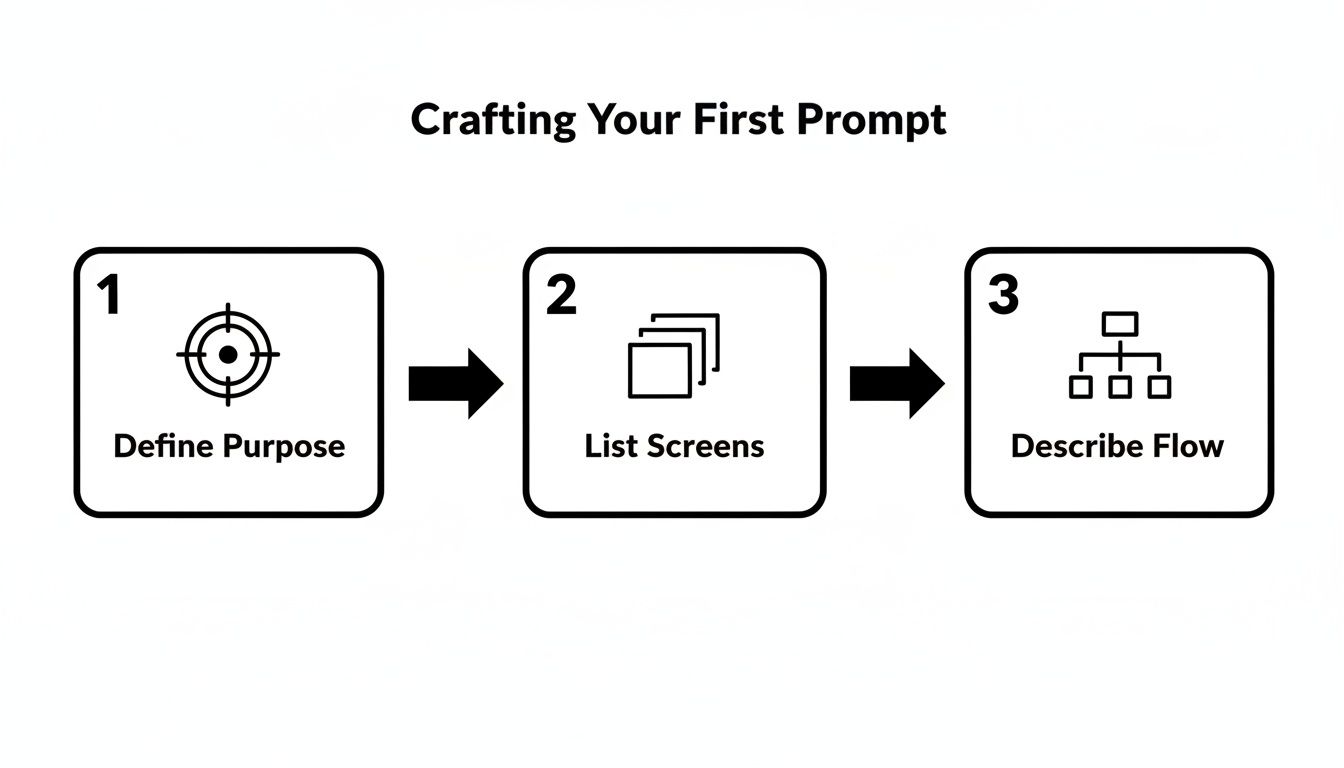
Defining the purpose, listing the components, and describing the flow—that’s your playbook for every single change you want to make.
Adding New Features and Components
Iteration isn't just about polishing what you've got; it's also about adding new functionality as you think of it. For example, maybe logging a new workout takes too many taps. Users have to navigate to a whole separate screen, and that friction can be a killer for engagement.
We can fix that with another quick prompt:
"Add a floating action button with a plus icon to the bottom-right corner of the Workout Log screen. When tapped, it should open a modal to create a new entry."
This conversational style of building feels more like you're art-directing a designer than coding. You're giving constant feedback and clear instructions, and the AI just executes. This lets you test out a dozen different ideas and user flows in the time it would normally take to just describe one of them to an engineer.
Being able to experiment this quickly is a huge advantage. Iterative design leads to better, more usable products. With an AI partner, the cost and time of each iteration basically drop to zero. You can try five different layouts for your profile page in ten minutes—something that would be totally absurd in a normal development cycle. This tight feedback loop is how you create an app without code that still feels professionally designed and built.
Here are a few more examples of powerful iterative prompts we could use on FitConnect:
- For styling: "Change the primary color scheme to a gradient of deep purple to dark blue and use a sans-serif font for all text."
- For layout adjustments: "On the User Profile screen, change the grid view of past workouts to a vertical timeline view."
- For adding elements: "Add a search bar at the top of the 'Activity Feed' dashboard to filter posts by friend's name."
Each prompt is a small, manageable step. But when you string them together, you’re able to build a surprisingly complex and polished UI, piece by piece, matching the vision in your head.
Bringing Your App to Life with Real Data
A slick UI is fantastic, but it's really just a pretty picture until it does something. This is usually the part where non-technical founders hit a dead end and need to hire a backend developer. But here’s the thing: you can get your app feeling fully functional and interactive long before you write a single line of backend code.
This is the secret to building a prototype that feels real enough for user testing and stakeholder demos. When people can actually tap a profile and see information pop up, or scroll through a list of realistic workouts, their feedback becomes infinitely more valuable. You’re no longer just showing them a drawing; you're letting them experience the app.
Connecting UI Elements to a Data Source
Let's go back to our "FitConnect" app. That User Profile screen we designed is just a template right now, filled with placeholders like "User Name." To make it real, we need to hook it up to some data. This is where an API (Application Programming Interface) comes in. Think of it simply as a messenger that lets different applications talk to each other and share information.
You don't need to be an API wizard to pull this off. Modern AI-native tools are built for this.
- Start with Mock APIs: In the early stages, you can use a "mock" API. It’s basically a spreadsheet of fake data living online. Services like Mockaroo or even a simple Google Sheet can work. For FitConnect, you could create a list of imaginary users with names, profile pictures, and workout histories.
- Link the Components: Inside a tool like RapidNative, you’d click on the "User Name" text on the Profile screen and tell it to pull data from the
namefield in your mock API. You'd do the same for the profile picture, linking the image component to aprofileImageUrlfield.
This simple mapping process tells the app where to get its information. Now, when the Profile screen loads, it automatically fetches and displays the data for a specific user, making the screen instantly dynamic.
By connecting your UI to a data source—even a fake one—you’re doing more than just design. You're testing the user experience. You'll quickly see if your layout breaks with longer names or if your image containers work with different aspect ratios, spotting usability problems early on.
Filling a List from an API
The exact same idea applies to dynamic content lists, like the "Activity Feed" on our FitConnect dashboard. A static list showing three identical cards doesn't really tell you anything. We need it to display a real, scrollable feed of workout entries.
The process is surprisingly straightforward:
- First, you define the data for your workouts. Your mock API might have fields like
userName,workoutType,duration, and atimestamp. - Next, you select the scrolling list element on your dashboard screen.
- Then, you just map the data. In the data connection panel, you link the list to your workout API endpoint. After that, you connect the individual pieces inside each card—the user's name text links to the
userNamefield, the description links toworkoutType, and so on.
As soon as you do this, the app will fetch the entire list of workouts and create a unique card for every single entry. Just like that, your static screen becomes a living, breathing feed. This step is a massive part of how you create an app without coding that actually has the look and feel of a finished product.
If you want to dive deeper into how different services can be connected, you can learn more about how no-code API integrations work.
Taking Your App from Prototype to Production-Ready Code
Let's talk about one of the biggest headaches with traditional no-code tools: vendor lock-in. You pour hours into building your app, and it’s stuck forever inside their ecosystem. An AI-native builder that generates real code is built on a totally different philosophy: you get full ownership and control. This is where we move from a slick prototype to something tangible that developers can actually use.
Getting Real-World Feedback, Fast
Once you’ve nailed the UI and hooked up your data, it’s time to get the app into people's hands. Watching you click through a demo on a Zoom call is one thing. The best feedback—the really honest stuff—comes when people can play with it on their own phones.
AI builders make this incredibly easy. You can generate a shareable link or a QR code in seconds. Send it off to your team, a few potential customers, or your friends. They can open a live, interactive version of the app right on their device. This kind of immediate, hands-on testing is gold for validating your user flow before you commit engineering resources.
The Developer Handoff That Doesn't Suck
Alright, you've gathered feedback, made your final tweaks, and now you're ready for the magic trick: exporting the code. This is where you see the massive difference between an AI that writes code versus one that just configures a closed system. With one click, the entire project gets bundled up, ready for your engineering team.
And what you get isn't some messy, proprietary blob of files. It’s a clean, professional-grade codebase.
- A sensible structure: The AI organizes everything logically, with clearly named React Native components, screens, and navigation files. No guesswork needed.
- A modern stack: The code is built with tools developers actually like and use every day, like Expo for the framework and NativeWind for styling. It just slots right into a modern workflow.
- Readable code: The generated components are modular and easy to understand. A developer can pop open any file and know exactly what’s going on without deciphering a mess.
This is the handoff every product manager dreams of. You’re not just giving your developers a Figma file they have to rebuild from the ground up. You’re handing them the actual foundation, saving them weeks of tedious UI coding.
This whole process proves that when you create an app without coding this way, you're not just making a throwaway prototype. You’re building the first real version of your product. All that’s left is for the developers to step in and wire up the heavy-duty business logic and backend functionality. It completely closes the gap between your vision and a real app that people will one day download from the app store.
Common Questions We Hear About Building Apps with AI
When you first dive into building an app with AI, a few questions always pop up. It's natural. The founders, product managers, and designers I talk to are always curious about where the magic ends and where the real-world limitations begin. Let's tackle the big ones head-on.
Can I Really Build a Complex App Without Any Code?
Yes, but it’s important to know what the AI is actually building for you. An AI-native builder is an absolute powerhouse for generating the part of your app that users see and touch—the frontend. You can describe sophisticated, multi-screen apps with intricate navigation flows and all the interactive bits, and the AI will generate the production-quality code for it.
When it comes to the "brains" of the operation—things like user authentication, databases, and payment processing—you'll connect the UI to specialized backend services (APIs). The code you get from the AI builder is set up specifically for a developer to plug into that backend infrastructure. This setup lets non-technical founders build out the entire user experience while engineers can laser-focus on the heavy backend lifting, radically speeding up your time to market.
What If the AI Can't Build Exactly What I Want?
This is where using a tool that generates actual code, instead of a locked-down traditional no-code platform, makes all the difference. You are never stuck.
Because the output is clean, human-readable React Native code, you have a permanent escape hatch. If you dream up a custom animation or complex feature the AI can't quite nail, you just export the project. A developer can take that code, open it in their usual tools, and build out any custom functionality you need.
The AI does 90% of the heavy lifting on the UI, freeing up your technical talent to add that final 10% of custom polish or tricky logic. It's a massive time and money saver.
This completely sidesteps the "throwaway prototype" problem. You’re not just making a pretty picture that has to be rebuilt from scratch. You're creating a real, extendable codebase that becomes the foundation of your final product.
How Is This Different from Other No-Code Tools?
The core difference is the final output and the philosophy behind it. Most no-code platforms keep you inside their walled garden. You build with their drag-and-drop editor, and your app is stuck living on their platform. Good luck getting the code out.
AI-native builders work directly with code. You're not just moving pre-made blocks around; you're literally telling an AI to write professional React Native code for you. The end result isn't some proprietary project file—it's a standard codebase using modern tools like Expo and NativeWind. This gives you the freedom and control you absolutely need for any serious project that plans to scale.
Ready to see this in action and turn your idea into a real app in minutes? With RapidNative, you can go from a simple prompt to a fully interactive React Native prototype. Start building for free and experience it yourself.
Ready to build your app?
Turn your idea into a production-ready React Native app in minutes.
Free tools to get you started
Free AI PRD Generator
Generate a professional product requirements document in seconds. Describe your product idea and get a complete, structured PRD instantly.
Try it freeFree AI App Name Generator
Generate unique, brandable app name ideas with AI. Get creative name suggestions with taglines, brand colors, and monogram previews.
Try it freeFree AI App Icon Generator
Generate beautiful, professional app icons with AI. Describe your app and get multiple icon variations in different styles, ready for App Store and Google Play.
Try it freeFrequently asked questions
What is RapidNative?
RapidNative is an AI-powered mobile app builder. Describe the app you want in plain English and RapidNative generates real, production-ready React Native screens you can preview, edit, and publish to the App Store or Google Play.
Can I export the code?
Yes. RapidNative generates clean React Native and Expo code that you can export at any time. No lock-in, no proprietary format. Hand it to your developers or keep building inside RapidNative.
Is RapidNative free to use?
Yes. You can build apps on the free plan with no credit card required. Paid plans unlock unlimited AI generations, code export, and direct publishing to the App Store and Google Play.
Do I need to know how to code?
No. Most users build apps by describing what they want in plain English. Developers can drop into the code whenever they want more control, but coding is optional.
How long does it take to build an app?
Most users have a working first screen in under a minute. A full MVP usually takes a few hours instead of the weeks or months traditional development requires.