How an API Integrations Platform Speeds Up Your Mobile App Development
Explore how a api integrations platform can supercharge mobile app development. A practical guide for founders and PMs on connecting apps without code.
By Riya
4th Feb 2026
Last updated: 4th Feb 2026

Think of an API integrations platform as the central nervous system for your mobile app. It's the hub that connects your app to all the different third-party services it relies on—things like payment gateways, user authentication, and marketing tools. The magic is in its pre-built connectors and workflows, which let your app’s features talk to external software without forcing you to write custom code for every single connection.
For anyone building a mobile product, this approach is a game-changer for development speed and makes ongoing maintenance infinitely simpler.
Why Your App Needs an API Integrations Platform
So, you’ve just launched your mobile app MVP. The interface is slick, and the core feature is something you know users will love. Great. But how do you actually plug it into all the services that make it a real, functioning business? This is where an API integrations platform becomes your most valuable player.
Imagine your new app is a beautiful, newly built house. It looks fantastic, but it's not ready to live in. You still need to connect the plumbing, electricity, and internet. An API integrations platform is that critical infrastructure, handling the messy, behind-the-scenes work to make everything just work.
Skip the Manual Labor of Custom Code
Without a platform, your developers are stuck writing, testing, and maintaining a unique piece of integration code for every single service. Need to process payments with Stripe? That’s one integration. Want to send new users a welcome email through Mailchimp? That's another. Need to sync customer data with Salesforce? You get the picture. It quickly becomes a tangled, unmanageable mess.
Each custom integration is a new point of failure, a new security risk, and a new piece of code that will eventually break or become outdated. This "integration debt" slows you down, making it harder to add features or pivot your strategy.
An API integrations platform lets you bypass this time-consuming and fragile process entirely. Instead of building every connection from scratch, your team can use pre-built connectors and visual tools to link services together in a fraction of the time.
Focus on What Truly Matters: Your Product
For founders, product managers, and designers building a mobile app, the payoff is immediate and clear. Your team's talent and energy should be poured into perfecting the user experience—not getting bogged down in backend plumbing. By handing this work off to a dedicated platform, you can:
- Launch and iterate faster: Roll out new features like in-app purchases or social logins in days, not months.
- Reduce development costs: Free up expensive engineering hours that would otherwise be spent building and fixing brittle, one-off integrations.
- Stay agile and responsive: Need to swap out one tool for another as your business grows? You can do it without a massive rewrite of your codebase.
Ultimately, an API integrations platform gets your whole team out of the weeds of complex backend development so you can move from idea to execution faster. You can learn more about the specific benefits of this approach and how it accelerates product timelines in our documentation.
What Exactly Is an API Integrations Platform?
Let's break down what these platforms actually do, in plain English. At its heart, an API integrations platform is like a universal translator and a central hub for all the different software your app needs to talk to.
Think about it: your mobile app needs to speak one language to process a payment with Stripe, a totally different one to log a customer interaction in Salesforce, and yet another to send a marketing email through Mailchimp.
Without a platform, your developers end up writing custom code for every single connection—a messy, time-consuming process that’s a nightmare to maintain. An integration platform steps into the middle of this chaos, managing all those conversations so your tools can work together seamlessly. You get all the benefits of connectivity without having to build the entire communications grid from the ground up.
This visual shows that concept perfectly. Your app is at the center, and the platform handles the connections to everything else it relies on.
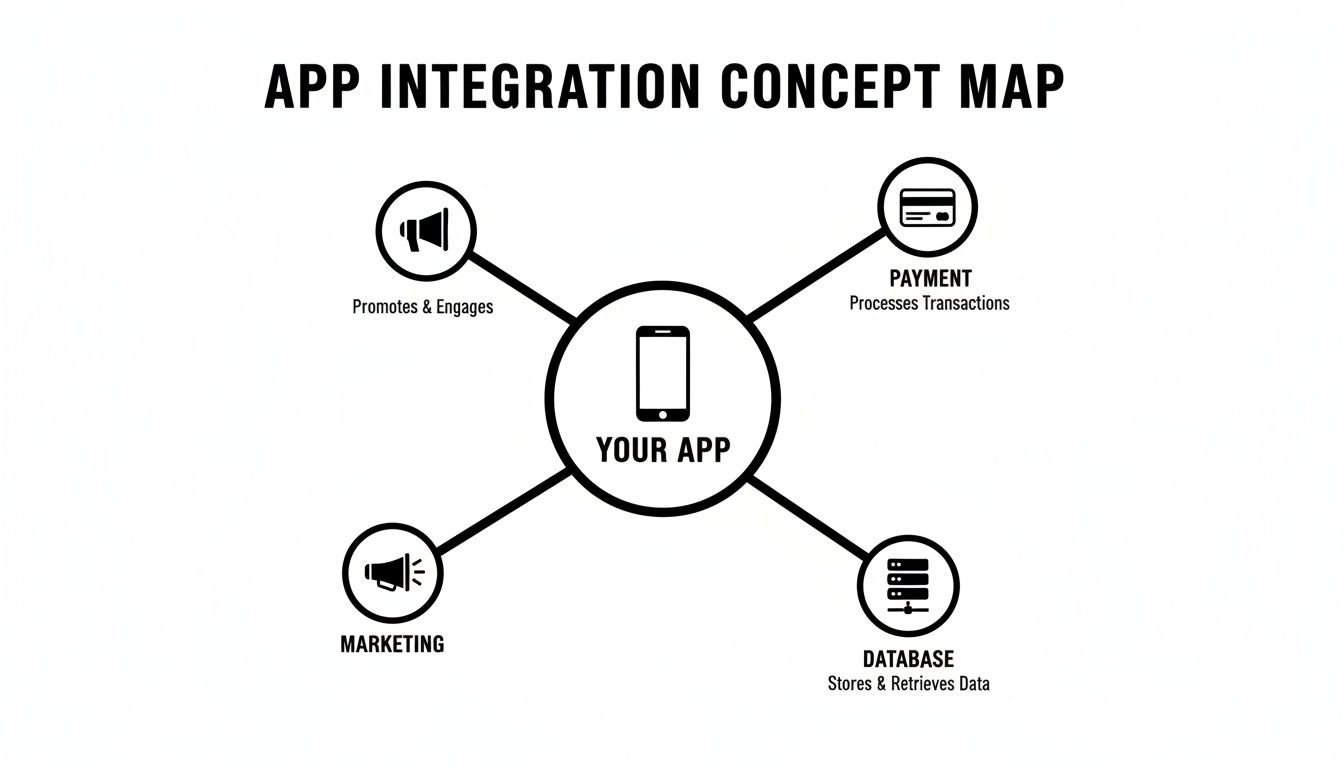
The big idea here is that the platform abstracts away all the nitty-gritty complexity of each API. It gives you one central place to manage how data moves between your app and the services that power it.
Breaking Down the Core Components
To make this a bit more tangible, let's look at the three key ingredients that make these platforms work.
-
Pre-Built Connectors (The Universal Adapters): Imagine you have a box of electronics with plugs from all over the world. Instead of trying to rewire everything, you’d just grab a universal travel adapter. That’s exactly what pre-built connectors do for software. They're ready-to-go "plugs" for popular services like Twilio or Shopify, saving your team from having to build every connection from scratch.
-
Data Mapping Tools (The Visual Switchboard): Once everything is plugged in, you need to tell the data where to go. Data mapping tools are like a drag-and-drop switchboard. You can visually connect the "User Email" field from your app's signup form directly to the "New Subscriber" field in your marketing automation tool. No code required.
-
Workflow Automation (The Rulebook): This is where you define the logic. It's the set of instructions that triggers actions based on events. For instance, you can set up a simple rule: "When a user completes a purchase, then send the transaction details to Stripe and add the customer to our "VIP" list in the CRM." This automates entire business processes that used to be manual and error-prone.
Put these three pieces together, and you have a system that fundamentally changes how your app interacts with the world. It shifts the burden from writing brittle, custom code to simply configuring visual workflows, making powerful integrations accessible to more than just your senior engineers.
Why This Matters for Growth
The need for this kind of connectivity isn't just a niche problem; it's a massive market. The global API Integration Platforms market was valued at $10,806.6 million in 2021 and is on track to hit $17,025.4 million by 2025.
This isn't just some abstract number. That explosive growth shows just how essential these platforms have become for any company that wants to build and scale efficiently. You can discover more insights about this market trend to see the bigger picture.
For a mobile product team, this is a strategic lever you can pull. By using an API integrations platform, you're essentially offloading a mountain of technical debt and ongoing maintenance. This frees up your development team to focus on what actually makes your product unique, not on building and fixing plumbing.
To see how this works in practice, you can look at the core features of a modern app builder to understand how these capabilities are surfaced. Adopting this approach helps you build a more robust, scalable, and adaptable app from day one.
What to Look For in an API Integration Platform
Picking an API integration platform isn't just a technical task—it's a core product strategy decision. The right platform can seriously speed up your roadmap. The wrong one? It becomes a bottleneck that grinds everything to a halt. When you’re evaluating options, everyone from the founders to the developers needs to be in the room.
Think of this as a practical checklist to make sure the platform you choose works for everyone, from your first prototype all the way to a production-ready mobile app.
For Founders and Product Managers
If you’re a non-technical leader, your world revolves around speed, visibility, and business logic. You need tools that let you design and understand how things work without having to dig into the code.
A visual workflow builder is absolutely essential. This is basically a drag-and-drop canvas where you can map out entire business processes. For example, you could visually chain together a sequence like, "When a new user signs up, create a contact in our CRM and then send them a welcome email through Twilio." This turns an abstract idea into something tangible that the whole team can see and understand.
Another must-have is a set of real-time monitoring dashboards. These give you a quick, at-a-glance view of how your integrations are performing—think API call volumes, error rates, and successes. This kind of transparency is gold for making smart decisions and catching problems before your users do.
A great API integration platform makes the complex simple. It should let a product manager visually map out a new user onboarding flow, connecting all the different services, and then pass it to a developer for the final polish.
To help you sort through the noise, here's a checklist that breaks down the must-haves from the nice-to-haves. Early on, focus on the essentials. As your app grows and your needs get more complex, you'll want to start looking at the advanced features.
Core Features Checklist for API Integration Platforms
| Feature Category | Essential Capability (Must-Have) | Advanced Capability (Nice-to-Have for Scale) |
|---|---|---|
| Workflow & Logic | Visual drag-and-drop workflow builder | Low-code functions for custom data transformations |
| Connectivity | A rich library of pre-built connectors (e.g., Stripe, Firebase) | Custom connector SDKs to build your own |
| Operations | Real-time monitoring and basic alerting | Granular, configurable retry logic and automated failover |
| Security | Role-Based Access Control (RBAC) | Detailed audit logs for SOC 2 or GDPR compliance |
| Developer Tools | API documentation and basic testing tools | Version control, staging environments, and CI/CD integration |
This table isn't exhaustive, but it's a solid starting point. It helps you prioritize what truly matters for your mobile app right now while keeping an eye on what you'll need as you scale up.
For Developers and Engineers
For the folks writing the code, the most important features are all about flexibility, control, and scalability. Visual builders are great for outlining the basic logic, but developers need the tools to handle the messy, complex scenarios that always pop up.
Here are the three big ones for your dev team:
-
A Deep Library of Pre-Built Connectors: Your engineers shouldn't be wasting time building authentication for common services like Firebase, Stripe, or Auth0 from scratch. A solid platform will have a wide range of ready-to-go connectors for the tools you're already using.
-
Custom Connector SDKs: Let's be real—no platform will have a connector for every single service you need, especially niche or internal ones. A software development kit (SDK) empowers your developers to build their own reusable connectors, making the platform truly adaptable to your tech stack.
-
Smart Error Handling and Retries: APIs fail. It's a fact of life. A mature platform won't just throw its hands up; it will provide sophisticated tools to automatically handle those failures. Look for configurable retry logic and smart alerting that tells your team about problems before they become catastrophes.
These features mean your engineering team isn't stuck in a rigid system. Instead, they get a powerful foundation they can build on, saving them from writing boilerplate code while giving them total control where it counts.
Security and Governance Features
Finally, something the entire team needs to rally around: security. An API integration platform will be touching sensitive user data, so top-notch security isn't optional. It's a requirement.
Look for platforms that offer role-based access control (RBAC), which lets you define exactly who on your team can create, view, or change integrations.
Comprehensive audit logs are also a must. These logs create a detailed, unchangeable record of every single action taken inside the platform. This is critical for troubleshooting and is often a hard requirement for meeting compliance standards like SOC 2 or GDPR. For a deeper dive, check out these 10 Mobile App Security Best Practices.
By looking at platforms through these different lenses—business logic for PMs, technical flexibility for developers, and security for everyone—your team can confidently pick a tool that will act as a stable and scalable backbone for your mobile app's future.
How Mobile App Teams Use Integrations to Build Faster
Theory is one thing, but seeing an API integrations platform in action is where its value really clicks. For mobile product teams, where speed and resourcefulness are everything, these platforms aren't just a nice-to-have—they're a core strategic advantage.
Let's walk through three real-world scenarios where teams use integrations to solve tough problems and ship features that would otherwise take months to build.
Use Case 1: The Fintech App Securely Connecting Payments
Imagine a new mobile fintech app designed to help users manage their finances. The core challenge is enormous: securely connecting to thousands of different banks and processing payments without spending years building the infrastructure from scratch.
Instead of trying to boil the ocean, the product team uses an integration platform to orchestrate the entire flow.
- The Workflow: When a user signs up, a workflow kicks off. It first calls the Plaid API to securely link the user's bank account. Once that's done, the platform passes an authenticated token over to Stripe to set up payment processing.
- The Outcome: The product team launched a complex, secure financial feature in a fraction of the time. This setup creates a seamless transaction experience for users, building trust while outsourcing the heavy lifting of data aggregation and payment processing to specialized, compliant services.
The platform acts as the secure middleman, ensuring sensitive data from Plaid is correctly and safely used to enable actions in Stripe. All this happens without the startup needing to build or maintain the fragile point-to-point connections themselves.
Use Case 2: The Wellness App Delivering Personalized Experiences
Next up, a wellness app that promises personalized fitness plans based on a user's daily activity. The big challenge here is grabbing data from all sorts of sources, authenticating users securely, and then actually using that information to make the app experience personal.
This is a perfect job for an integration platform, which can tie several different systems together.
- The Workflow: A user connects their wearable, like a Fitbit or Apple Watch. The platform pulls activity data from the device's API. At the same time, it uses Auth0 to handle secure login. When the user crushes a workout, the platform pushes that data into a CRM, tagging them for a personalized "Great job!" push notification.
- The Outcome: The app can deliver on its promise of personalization right out of the gate. By connecting wearables, authentication, and a CRM, the product team creates a powerful feedback loop that makes the app more valuable with every use, which is huge for engagement and retention.
The growth in this space is staggering. Integration Platform as a Service (iPaaS), a key type of API integration platform, is a market that's absolutely exploding. It was valued at $17.64 billion in 2025 and is projected to hit an incredible $292.9 billion by 2035, driven by exactly these kinds of real-time data needs.
Use Case 3: The E-commerce App Automating Its Operations
Finally, picture a team launching a mobile-first e-commerce brand. Their challenge is to connect the slick user-facing mobile app to all the backend systems that handle inventory, marketing, and shipping—without hiring a massive engineering team.
An integration platform becomes the central nervous system for their entire business.
- Inventory Sync: The app is connected to the Shopify API. When a customer makes a purchase, the platform instantly updates inventory levels in Shopify, preventing the dreaded oversell.
- Marketing Automation: That same purchase event kicks off another action. The platform sends the customer's details to Klaviyo, dropping them into a post-purchase email sequence. For a closer look at how these connections work, you can see how we handle integrating with tools like Intercom.
- Real-Time Shipping: Once the order is fulfilled, the platform snags the tracking number from a shipping provider's API and pushes it back to the user's profile in the app, triggering a "Your order has shipped!" notification.
This automated workflow lets a tiny team run a surprisingly sophisticated e-commerce operation. By using an API integrations platform, they eliminate manual data entry, slash errors, and create a smooth, professional customer experience that can go toe-to-toe with much larger brands.
How to Choose the Right Platform for Your Mobile App
Picking the right API integrations platform early on can save you from a world of hurt as your mobile app grows. It’s easy to get lost in feature lists, but what you really need is a solid framework for making a decision that fits where your product is heading. The goal is to find a partner that can grow with you, not one you’ll outgrow in six months.
This means you have to look past the marketing fluff and focus on what actually matters for your business. Can the platform handle a sudden jump from 100 users to a million? Is the pricing predictable, or are you going to get a nasty surprise bill after a successful launch? These are the kinds of questions that separate a good choice from a bad one.
Assess Your Team and Technical Needs
First thing's first: be honest about your team's skills. A platform that demands deep coding knowledge might be a perfect fit for a team of seasoned developers, but it’s a complete non-starter for founders and PMs who need to get things done with visual tools.
To simplify your search, think of the options in three main buckets:
- Simple Automators: Think of tools like Zapier. They're fantastic for connecting a few apps with simple, linear workflows. If you just need basic "if this, then that" logic for internal tasks or MVP features, these are your go-to.
- Workflow-Centric Platforms: This middle tier offers more sophisticated logic, conditional branching, and better tools for manipulating data. It's a great choice for teams that have outgrown the simple automators but aren't ready for the complexity of a full-blown enterprise solution.
- iPaaS Solutions: Integration Platform as a Service (iPaaS) is the big league. Platforms like Workato or Boomi are built for serious scale. They come with advanced developer tools, enterprise-grade security, and the muscle to handle hundreds of complex, mission-critical integrations.
Which bucket you choose from comes down to your product's complexity and how comfortable your team is with technical details.
Scrutinize Scalability and Pricing Models
For a mobile startup, scalability isn't some far-off concern—it’s a problem you need to solve now. Your platform has to be able to handle a sudden flood of users without crashing or costing you a fortune. You need to dig into how it handles increased API call volume and what kind of performance guarantees you can expect.
The pricing model is just as critical. A budget that blows up unexpectedly can kill a startup.
Look for a pricing structure that actually aligns with your growth. A consumption-based model might look cheap at first, but it can quickly spiral out of control. A tiered plan, while maybe a bit more expensive upfront, gives you the cost predictability you need to budget properly.
Prioritize Security and Compliance
When you're handling user data, security is not optional. Your evaluation has to include a deep dive into the platform’s security credentials. Does it have certifications like SOC 2? Does it provide features that help you stay compliant with regulations like GDPR?
Here are the security questions you absolutely must ask any potential vendor:
- What methods do you use for data encryption, both for data in transit and at rest?
- Do you offer role-based access control (RBAC) so I can limit what my team members can see and do?
- Are there detailed audit logs available so I can track every single change and activity on the platform?
Choosing an API integrations platform is a strategic move that affects your product roadmap, your budget, and your reputation. By focusing on your team's skills, scalability, and security from the start, you can make a choice that will actually support your startup's vision for the long haul.
Common Questions About API Integration Platforms
When you start looking at API integration platforms, a few key questions always come up. Getting straight answers is the only way to pick the right tool for your mobile app. Here are the questions we hear most often from founders, product managers, and developers trying to make that call.
When should we use a platform instead of building integrations in-house?
The age-old "build vs. buy" debate really boils down to three things: speed, cost, and focus. Building every integration from scratch gives you ultimate control, but it's a massive drain on resources. Your engineers will burn hundreds of hours writing, testing, and then constantly patching brittle code for every single connection.
An API integration platform is the right move when your main goal is shipping a fantastic product, not becoming an expert in maintaining a dozen third-party APIs. It lets you point your most precious resource—engineering time—back toward the features your users actually care about.
People often underestimate the long-term cost of in-house integrations. It's not just the initial build. Every time a service like Stripe updates its API, your team has to drop everything to fix the break. A good platform takes all of that maintenance work off your plate.
How secure are these platforms with sensitive data?
Security has to be the top priority, especially when user data is on the line. Any platform worth its salt is built with security as a foundation, not an afterthought. They typically use a defense-in-depth strategy to keep your data safe.
This usually looks like:
- Encryption: Data is locked down both when it's moving between systems (in transit) and when it's sitting in a database (at rest).
- Access Controls: Strict Role-Based Access Control (RBAC) means only the right people on your team can see or change specific integrations. No one gets a key to the whole kingdom.
- Compliance: Look for platforms that are certified for standards like SOC 2 and GDPR. These aren't just badges; they're auditable proof that a company follows rigorous security practices.
Can a non-developer really use an integrations platform?
Absolutely, though their role is a bit different. Modern platforms with low-code and no-code builders are a huge win for less technical team members. A product manager, for example, can visually map out an entire user onboarding flow by dragging and dropping connectors, all without writing a line of code.
But developers are still essential. They step in to handle tricky business logic, custom data transformations, or to build a new connector for a niche API the platform doesn't support yet. The platform becomes a shared workspace where PMs can design the "what," and developers can perfect the "how."
How is this different from an API gateway?
This is a really common mix-up, but the distinction is important. It helps to think of it with an analogy:
- An API Gateway is like the front door security for your own building. It checks IDs, manages how many people can come in at once (rate limiting), and directs them to the right office. It manages traffic coming to your own APIs.
- An API Integrations Platform is like a general contractor coordinating multiple specialized teams. It connects the plumber (your app's API), the electrician (Stripe's API), and the carpenter (Salesforce's API) to build a complete, functional system. It orchestrates workflows between many different APIs.
So, a gateway protects your front door, while an integration platform builds automated processes that connect your building to others all over town.
Ready to stop building integrations and start building your app? RapidNative is an AI-native mobile app builder that lets you turn ideas into real, production-ready React Native apps in minutes. Explore how you can build faster at RapidNative.
Ready to build your app?
Turn your idea into a production-ready React Native app in minutes.
Free tools to get you started
Free AI PRD Generator
Generate a professional product requirements document in seconds. Describe your product idea and get a complete, structured PRD instantly.
Try it freeFree AI App Name Generator
Generate unique, brandable app name ideas with AI. Get creative name suggestions with taglines, brand colors, and monogram previews.
Try it freeFree AI App Icon Generator
Generate beautiful, professional app icons with AI. Describe your app and get multiple icon variations in different styles, ready for App Store and Google Play.
Try it freeFrequently asked questions
What is RapidNative?
RapidNative is an AI-powered mobile app builder. Describe the app you want in plain English and RapidNative generates real, production-ready React Native screens you can preview, edit, and publish to the App Store or Google Play.
Can I export the code?
Yes. RapidNative generates clean React Native and Expo code that you can export at any time. No lock-in, no proprietary format. Hand it to your developers or keep building inside RapidNative.
Is RapidNative free to use?
Yes. You can build apps on the free plan with no credit card required. Paid plans unlock unlimited AI generations, code export, and direct publishing to the App Store and Google Play.
Do I need to know how to code?
No. Most users build apps by describing what they want in plain English. Developers can drop into the code whenever they want more control, but coding is optional.
How long does it take to build an app?
Most users have a working first screen in under a minute. A full MVP usually takes a few hours instead of the weeks or months traditional development requires.