Hybrid App Mobile Explained: Tradeoffs and When to Choose
Hybrid app mobile explained: how hybrid compares to native and cross-platform, the tech stacks, performance and security tradeoffs, and when to pick it.
By Suraj Ahmed
26th Oct 2026
Last updated: 26th Oct 2026
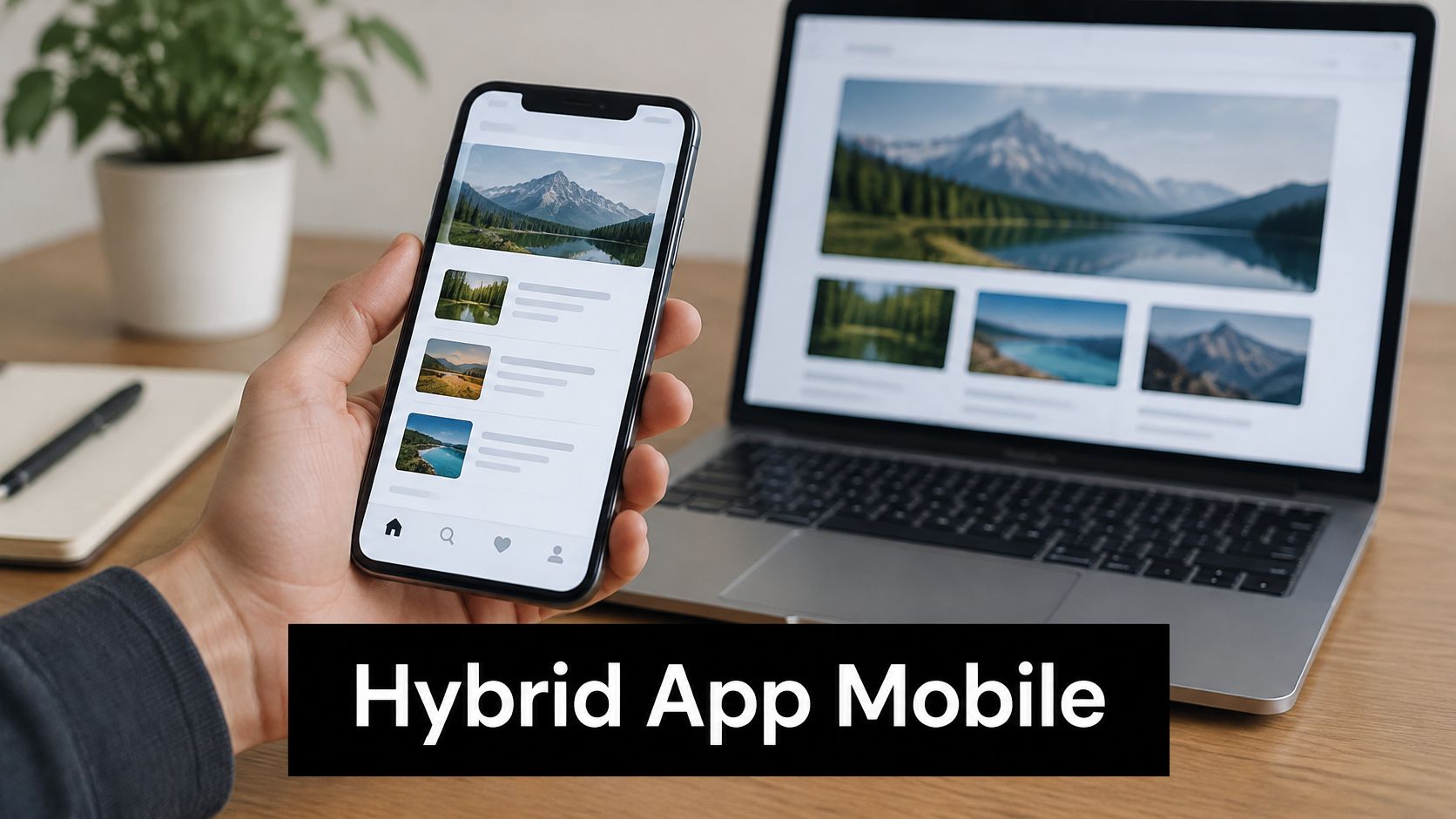
You've got a web team, a two-week deadline, and a mobile product to validate. The question is straightforward: must you build the app twice to reach iPhone and Android users? Before choosing a framework, decide where the interface runs, how it reaches device features, and who controls the data.
What a Hybrid App Is and Where It Came From
Think of a hybrid app as a food truck: the web menu is cooked inside a native shell that parks on the phone. The shell provides the app icon, the package submitted to app stores, and connections to the camera and permission system. The screens themselves use HTML, CSS, and JavaScript, just like a website.
A WebView is the embedded browser component that displays those screens. The bridge is the communication channel that lets web code request native device features, such as opening the camera.
Apache Cordova and Ionic became prominent between 2013 and 2016 as teams sought to avoid duplicating iOS and Android implementation, according to Expo's cross-platform development overview.
One product, different rendering choices
For a founder building an inspection app, this could mean reusing web form logic while adding photo capture and offline storage. That's useful reuse, but wrapping a desktop dashboard won't automatically produce a usable mobile experience. Navigation, keyboard behavior, loading states, and permission failures still need deliberate design.

Every hybrid app is cross-platform, but not every cross-platform app is technically hybrid. React Native draws native interface components rather than displaying a web page. Flutter uses its own rendering system.
Buy the architecture you need, not the label a vendor puts on it.
For founders comparing hybrid app mobile options, the working category is a shared codebase packaged for iOS and Android, with varying amounts of native access. Within that category, keep the narrower WebView definition distinct. Otherwise, a claim about React Native scrolling can easily become a misleading promise about a web screen inside Cordova.
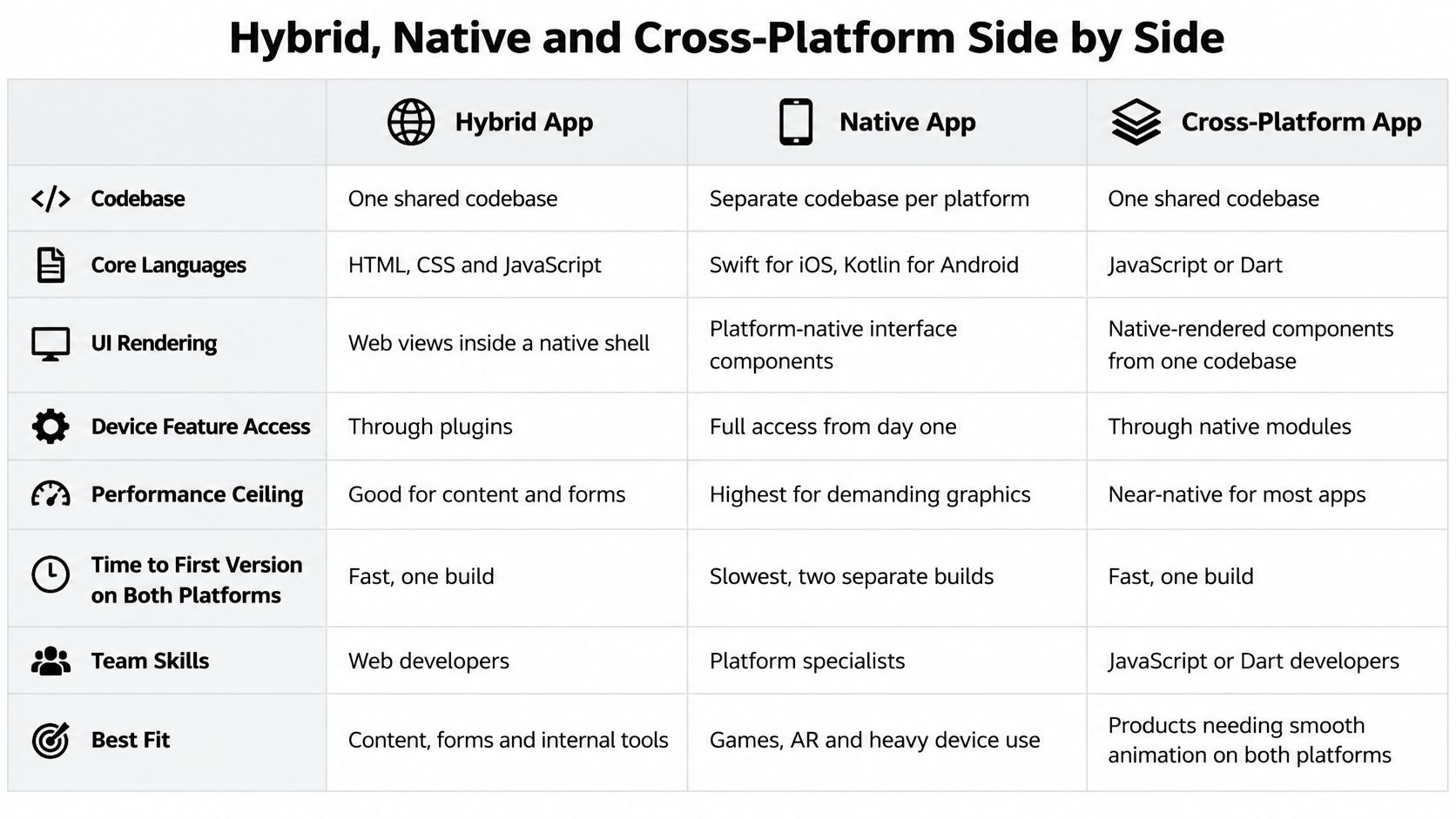
Hybrid, Native and Cross-Platform Side by Side
| Factor | Native | Hybrid (web in a shell) | Cross-platform (React Native, Flutter) |
|---|---|---|---|
| Codebase | Separate for iOS and Android | One shared | One shared |
| Core languages | Swift or Kotlin | HTML, CSS, JavaScript | JavaScript or TypeScript for React Native; Dart for Flutter |
| UI rendering | Platform-native components | Web views inside a native shell | Native components in React Native; own rendering engine in Flutter |
| Access to device features | Direct access when platform APIs ship | Through plugins that can trail OS updates | Native modules, with custom native code for gaps |
| Performance ceiling | Highest and most predictable | More constrained for animation-heavy screens or long lists | Close to native for most screens |
| Time to first version on both platforms | Longest, separate build tracks | Shortest for content and forms | Short, shared implementation track |
| Team skills needed | iOS and Android specialists | Web developers | JavaScript or Dart developers, with native help for edge cases |
| Best fit | Camera, AR, games, deep OS integration | Content apps, forms, internal tools | Consumer apps, MVPs, product teams |
The cost difference starts with duplicated implementation, not hourly rates. Native teams maintain platform-specific screens and integrations. Shared-code teams can reuse more product logic, but they still budget for signing, store submissions, platform behavior, and device testing.
The visual comparison makes the broad distinctions easier to discuss with nontechnical stakeholders.
Device access is a dependency decision
A plugin is maintained code that connects your application to a device capability. Before relying on one, check whether it supports your required permission behavior, background operation, and current operating-system targets. A camera demo proves capture works, not that interrupted uploads or denied permissions work.
Native developers can use newly released platform APIs directly. Hybrid and cross-platform teams may need to wait for an integration or write one themselves. Assign ownership for that gap before choosing the stack.
Distribution makes this decision commercially important: ZTABS' mobile statistics attributes approximately 71.8% of global mobile OS usage to Android and 27.6% to iOS in 2025, while US iOS usage was approximately 57%.
For a startup serving both ecosystems, shared code deserves consideration. The comparison explains implementation differences; your hardest user journey determines which trade-offs are acceptable.
Tech Stacks from Cordova to React Native and Expo
Start with the team you have and the interaction you need to prove. Moving through frameworks by popularity alone can leave you with familiar syntax but unfamiliar production responsibilities.
Web-first stacks
Apache Cordova packages HTML, CSS, and JavaScript inside a WebView. It's relevant when maintaining an existing hybrid application or shipping straightforward content with established plugins. For a new project, inspect plugin maintenance before committing to the surrounding architecture.
Ionic supplies mobile-oriented interface components and works with Angular, React, or Vue. Paired with Capacitor, the native runtime that hosts web content and connects it to device capabilities, it suits forms-heavy business products.
Say you're building a stock-checking tool. Ionic can make sense when the main tasks are selecting a location, entering quantities, and attaching a photo. Test scanner integration and offline synchronization immediately, because those features are more consequential than the form layout.
Native-rendered and managed options
React Native uses JavaScript or TypeScript to build interfaces from native components. A bare setup gives engineers direct control over native projects, useful when custom modules or platform-specific configuration dominate the roadmap. That control also means someone must own native build failures and dependency upgrades.
Expo adds a toolchain around React Native, including cloud builds, Expo Router for file-based navigation, and over-the-air delivery for eligible JavaScript updates. It's a sensible starting point for an MVP when supported libraries cover the required capabilities. Native changes still require an appropriate binary build, and update compatibility needs explicit management.
Use the Expo versus React Native comparison to separate toolchain decisions from framework decisions. Expo isn't a competing rendering engine.
NativeWind brings utility-class styling to React Native. It can help designers and developers describe spacing, typography, and reusable visual states consistently, but it doesn't replace component design or accessibility testing.
Flutter uses Dart and its own rendering engine. It suits teams that want a highly customized interface and are comfortable owning a Dart codebase rather than reusing JavaScript expertise.
A commercial adoption signal comes from Statista's October 2024 SDK revenue comparison: 790 apps using React Native generated between $10,000 and $100,000 in monthly revenue, compared with 727 using Flutter. Those counts show commercial use, not framework superiority.
Selection rule: Choose the stack your team can debug at its least convenient boundary, not just the one it can demo fastest.
Pros and Cons Product Teams Feel in Practice
Say a marketplace team puts checkout inside a WebView. It looks responsive in the simulator, but a budget Android phone hesitates when the keyboard opens and shipping options refresh. The demo proved the layout, not the purchase experience.
The strongest benefits come from reusing implementation and shortening feedback loops. They don't remove mobile engineering work.
What shared code gives you
- Less duplicated work: A shared validation rule or bug fix can serve both platforms instead of requiring separate implementations. That can roughly halve the duplicated portion of the work, not the entire project.
- Familiar hiring requirements: Web and JavaScript skills give an existing frontend team a practical starting point, although mobile release ownership remains a separate skill.
- Fast device prototypes: A narrow flow can reach real phones within hours when the toolchain and integrations are ready.
- Targeted updates: Eligible JavaScript fixes can ship over the air without waiting for another store review, subject to platform policies and binary compatibility.
What the first demo hides
- Integration delays: Plugins and native modules may lag new operating-system features.
- Different interaction behavior: Web screens can expose unfamiliar scrolling, keyboard, and gesture behavior.
- More debugging boundaries: A failed action may involve JavaScript, native code, networking, or the embedded browser.
- Repeated defects: A broken shared component can reproduce the same problem across platforms.
- Separate quality assurance: Shared source code doesn't eliminate platform-specific testing.
The expensive surprises usually involve exceptions: an interrupted payment sheet, a revoked permission, a very long list, or a resumed upload. Fixing those can require native expertise even when most screens remain shared.
Before approving a stack, name the features most likely to cross those boundaries. A product that depends on uninterrupted background processing deserves a different prototype from a product that mostly displays articles.
Performance Tradeoffs and the Numbers to Check
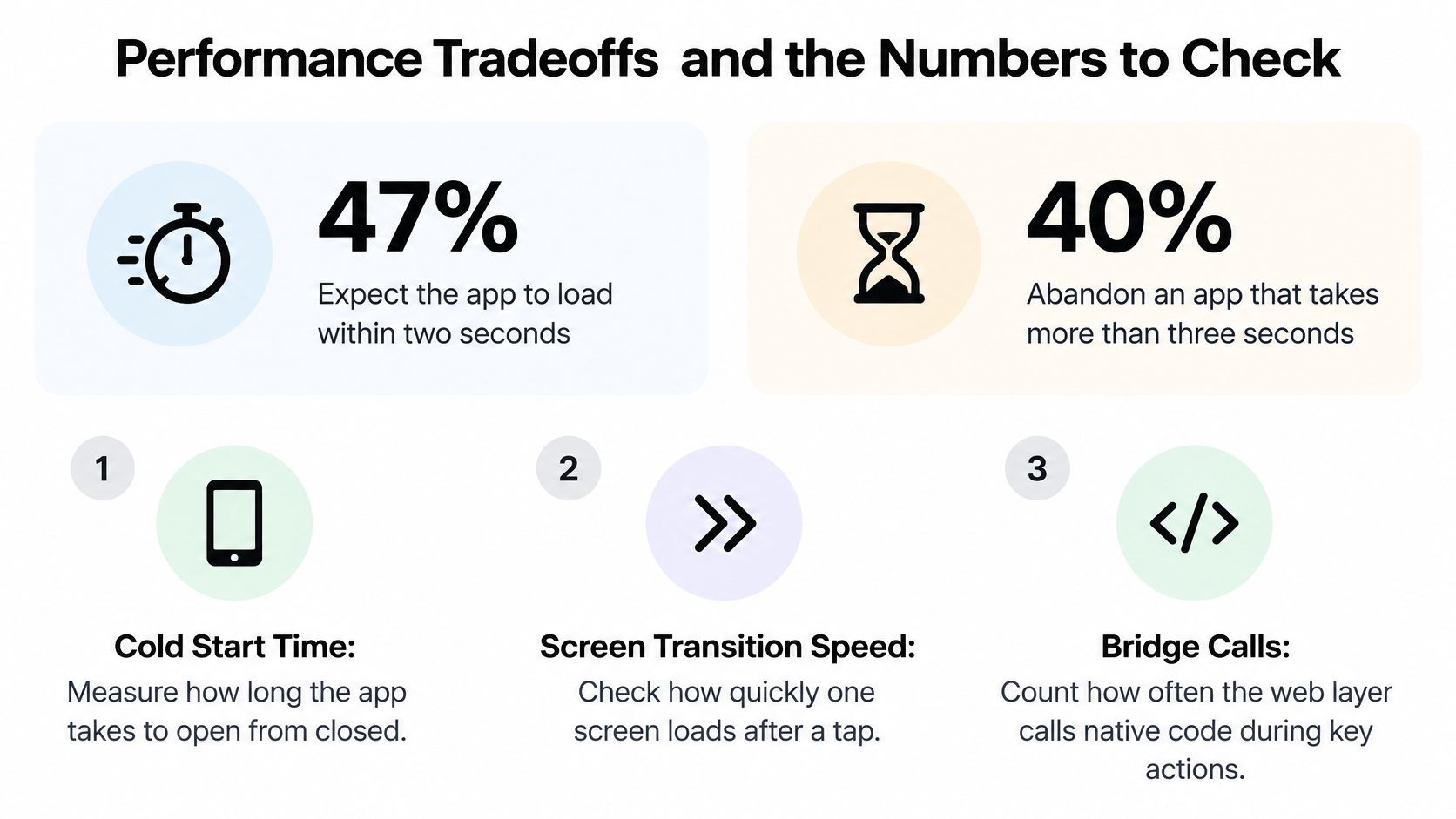
Set a business-facing threshold before discussing framework benchmarks. The performance guidance summarized by UXCam reports that 47% of users expect an app to load within two seconds, 40% abandon an app taking more than three seconds, and an additional second of delay can correspond to approximately 7% fewer conversions. Treat these as directional guidance, not a forecast for your particular checkout.
I would use under two seconds to the first usable screen as an initial acceptance target. Usable means the customer can begin the intended action, not merely see a splash screen.
These headline measures help align the product and engineering discussion.
Benchmark the workload, not the reputation
A controlled University of Twente study measured ten CPU-intensive benchmarks and found at least one framework implementation completed execution up to 83% faster than its native counterpart in five benchmarks; React Native had the highest aggregate overhead among the evaluated frameworks, yet used up to 96% less energy than the next-best framework implementation in an image-animation workload. These are workload-specific findings, not a ranking for your app.
React Native's JavaScript engine and native communication mechanism also matter. A comparative study of Hermes, JavaScriptCore, V8, and native communication architectures evaluated interaction time, memory, rendering, and execution, including the legacy bridge and JavaScript Interface, or JSI.
JSI changes how JavaScript interacts with native code, but it doesn't make excessive work free. Keep frequent gesture or sensor processing near the native implementation instead of repeatedly transferring large objects.
Performance checks for a hybrid prototype
Run these checks on a release build, not a development session with debugging overhead.
| Metric | Target | How to measure |
|---|---|---|
| Time to first usable screen | Under the initial load-time target | Time a cold start on a mid-range Android device over 4G |
| Tap response | Immediate visible acknowledgement without waiting for a network response | Record the tap and first visible change |
| Frame time during scroll or animation | Stay within the device's frame budget without repeated missed frames | Use platform frame-timing tools on the longest list |
| Bridge crossings per interaction | Few and batched for high-frequency events | Count calls during onboarding or checkout |
| JavaScript engine and architecture | Benchmark the shipped engine and JSI or bridge configuration | Run the same flow on each release configuration |
Separate startup, network waiting, and rendering in your recordings. Otherwise, a slow API can send the team into an unnecessary framework rewrite. Use this app performance guide to organize the investigation around observable bottlenecks.
Use the video alongside your own device recordings, not instead of profiling.
Security and Accessibility Gaps to Test Before Launch
Which capabilities run on the device, which run in the cloud, and how can your team audit the boundary? Answer that before sending identity documents, payment details, or private content through a prototype.
The DesignRush mobile development guidance emphasizes device-side processing where appropriate, protected storage, authenticated APIs, least-privilege permissions, and documented third-party data flows. Hybrid architecture is not less secure by nature, but loosely designed boundaries create avoidable exposure.
Map sensitive data to an owner
Give each boundary a concrete review task:
- WebView and bridge exposure: Restrict loaded content and callable native methods. Do not let untrusted pages invoke privileged functionality.
- Tokens and offline caches: Keep credentials out of ordinary web storage, minimize cached sensitive content, and verify logout cleanup.
- Analytics SDK timing: Check what initializes before consent and what events contain personal information.
- Deep links and notifications: Validate incoming parameters and avoid placing sensitive content in push payloads.
- Native permissions: Request only what the feature needs and provide a usable denial path.
Use an app security review checklist to assign owners and release blockers. Prototype code generated quickly still needs review, targeted rewrites where shortcuts touch authentication or persistence, and penetration testing matched to the product's risk before release.
Test accessibility across the complete journey
In ArcTouch's 2025 assessment of 50 mobile apps, 72% of user journeys contained barriers producing a poor or failing experience, and only two apps earned a Great grade. A reusable component can distribute an accessibility defect just as efficiently as a visual improvement.
Use the University of Arizona mobile accessibility roadmap to apply WCAG 2.1 AA to contrast, text scaling, and orientation across native screens, flows, WebViews, and hybrid content. Treat target size as platform design guidance rather than a WCAG minimum: Apple's Human Interface Guidelines drive the iOS row, and Material Design drives the Android row. The gesture checks follow Arizona State University's mobile testing guidance.
| Check | Requirement | Platform |
|---|---|---|
| Interactive target size | At least 44×44 points under Apple's Human Interface Guidelines | iOS |
| Interactive target size | At least 48×48 density-independent pixels under Material Design | Android |
| Text contrast | WCAG 2.1 AA: 4.5:1 for ordinary text; 3:1 for large text and UI components | iOS and Android |
| Font scaling | WCAG 2.1 AA: layout holds up to 200% text size | iOS and Android |
| Assistive technology | Full flow works with VoiceOver and Switch Control on iOS, TalkBack and Switch Access on Android | iOS and Android |
| Gestures | Tap alternative for every drag or multi-finger action | iOS and Android |
| Orientation | WCAG 2.1 AA: usable in portrait and landscape unless locking is required | iOS and Android |
Complete checkout with VoiceOver on iPhone and TalkBack on Android. Include validation errors, loading announcements, modal dismissal, and payment confirmation, not just the successful screen sequence.
Release gate: A control that looks correct but cannot be reached or understood with assistive technology is still a broken control.
Automated checks help catch missing labels and some contrast problems. A person must still verify focus order, understandable announcements, and whether the customer can finish the task.
Confirm Your Choice With a Two-Week Test
| Situation | Lean toward | Why |
|---|---|---|
| Validating an idea in one to three weeks | Cross-platform with Expo | Shared code, real-device preview, fast iteration |
| Content, forms, or internal tools | Hybrid with Ionic or Capacitor | Web skills and low device demands |
| Consumer app with lists, animation, and payments | React Native or Flutter | Near-native interfaces with a shared team |
| Camera, AR, Bluetooth, or heavy background work | Native, or cross-platform with native modules | Deep device control with fewer communication crossings |
| Health or payment data | Decide after security review | Data boundaries matter more than the framework label |
| Web team with no mobile hires | Hybrid or React Native | Existing skills provide a practical starting point |
These are starting recommendations, not guarantees. A camera-heavy product might work well with a supported native module, while an apparently simple internal tool might have a difficult offline synchronization requirement.
Treat the prototype as evidence
A fast prototype is a validation tool, not automatic production approval. Keep code that survives review; replace shortcuts involving authentication, persistence, error handling, and unsupported dependencies.
One option is RapidNative, an AI-native, collaborative builder that turns prompts, sketches, images, or product requirements documents into React Native code using Expo and NativeWind. Teams can preview through a link or QR code and export the project to their own repository for engineering review.
Budget for the decision as well as the build.

Run the test in a fixed order
- Days 1–3: Build onboarding or checkout in the chosen stack using realistic data. Preview it on a mid-range Android phone and an iPhone.
- Days 4–6: Run the performance checks on both devices. Record cold start and tap response, keeping build configuration and network conditions in the notes.
- Days 7–9: Complete the flow with VoiceOver and TalkBack. Check target sizes, text scaling, gesture alternatives, and focus behavior.
- Days 10–11: Audit token storage, offline data, and third-party SDKs. Confirm which capabilities execute locally and which send information elsewhere.
- Days 12–14: Decide against the acceptance criteria. Keep the stack if it passes; if frame timing or native communication fails, move heavy work into native modules or consider bare React Native before committing.
For usability feedback, Formbricks explains how to create effective in-app feedback surveys. Ask testers about the action they just attempted rather than whether they generally liked the app.
Finish with an explicit decision: proceed, change the architecture, or stop. Assign an owner to every unresolved release blocker so a successful demo doesn't quietly become permission to ship.
RapidNative turns product descriptions and visual starting points into editable React Native and Expo apps your team can preview and export. Visit RapidNative to build a testable onboarding or checkout flow, then use real-device performance, accessibility, and security checks to decide what's ready to keep.
Ready to build your app?
Turn your idea into a production-ready React Native app in minutes.
Free tools to get you started
Free AI PRD Generator
Generate a professional product requirements document in seconds. Describe your product idea and get a complete, structured PRD instantly.
Try it freeFree AI App Name Generator
Generate unique, brandable app name ideas with AI. Get creative name suggestions with taglines, brand colors, and monogram previews.
Try it freeFree AI App Icon Generator
Generate beautiful, professional app icons with AI. Describe your app and get multiple icon variations in different styles, ready for App Store and Google Play.
Try it freeFrequently asked questions
What is RapidNative?
RapidNative is an AI-powered mobile app builder. Describe the app you want in plain English and RapidNative generates real, production-ready React Native screens you can preview, edit, and publish to the App Store or Google Play.
Can I export the code?
Yes. RapidNative generates clean React Native and Expo code that you can export at any time. No lock-in, no proprietary format. Hand it to your developers or keep building inside RapidNative.
Is RapidNative free to use?
Yes. You can build apps on the free plan with no credit card required. Paid plans unlock unlimited AI generations, code export, and direct publishing to the App Store and Google Play.
Do I need to know how to code?
No. Most users build apps by describing what they want in plain English. Developers can drop into the code whenever they want more control, but coding is optional.
How long does it take to build an app?
Most users have a working first screen in under a minute. A full MVP usually takes a few hours instead of the weeks or months traditional development requires.