A Founder's Guide to Mobile Cross Platform Development
Discover how mobile cross platform development saves time and money for startups. This guide compares top frameworks and shows you when to choose this approach.
By Rishav
22nd Jan 2026
Last updated: 22nd Jan 2026
So, what exactly is mobile cross-platform development? At its core, it's about writing your app's code once and having it run beautifully on both iOS and Android from that single codebase.
Think of it like this: instead of hiring two different architects to design two separate houses (one for a hot climate, one for a cold one), you hire one architect who creates a brilliant, adaptable blueprint that works perfectly in both environments. This is a massive shift for product teams trying to get to market faster and smarter.
The Power of a Single Codebase
Let's picture the old way of building an app. You have a great idea. To build it "natively," you'd need two separate teams. One team would write in Swift for Apple's App Store, while the other would build in Kotlin for the Google Play Store. That's two codebases, two project plans, and twice the potential for bugs and maintenance headaches.
Cross-platform development changes the game. Your entire team focuses on one unified project instead of trying to keep two in sync. This simple shift sends positive ripples through your entire development cycle, from your first prototype to your hundredth update.
Launch Faster and Reach Everyone
The biggest and most obvious win here is speed. When you don't have to build every single feature twice, you can get your minimum viable product (MVP) into the hands of your entire audience at the same time.
- Go to Market Together: Forget the tough decision of launching on iOS or Android first. For example, the meditation app Calm used a cross-platform approach to launch on both platforms simultaneously, capturing a wider audience from day one. This maximizes launch impact and lets you gather feedback from a much wider pool of users.
- Slash Development Time: A single codebase means less code to write, test, and fix. This drastically shortens your timeline, helping you get from a concept on a whiteboard to a live app much faster than your native-first competitors.
- Deliver a Consistent Experience: With one set of code driving the app's design and logic, you guarantee that every user gets the same great experience. For a brand like Shopify, whose mobile app helps millions of merchants manage their stores, this consistency is non-negotiable.
A Smart Business Move
Choosing a cross-platform strategy is far more than just a technical decision—it's a calculated business move that lines up with major industry trends. The mobile app market is set to explode into a $1.1 trillion industry by 2034, and cross-platform frameworks are the engine driving much of that growth.
The numbers don't lie. This approach often leads to 30-40% faster development and can cut the effort required by 50-80% compared to building two separate native apps.
For founders and product managers, this is the key takeaway: cross-platform development significantly lowers the risk of your launch. It lets you validate your big idea with the biggest possible audience for the smallest upfront investment.
This incredible efficiency is precisely why frameworks like Flutter and React Native have caught on like wildfire. They aren't just about saving a few bucks; they're about finding product-market fit faster. For a deeper dive, this ultimate guide to mobile app cross-platform development breaks down all the core concepts.
Comparing The Top Cross-Platform Frameworks
Picking a framework is one of the first big technical calls you'll make, but it doesn't have to be a shot in the dark. This decision goes way beyond the code—it shapes who you can hire, how your product feels in your users' hands, and just how fast you can get to market. Let's break down the major players, not just for developers, but for the product managers and founders steering the ship.
Right now, the world of mobile cross-platform development is largely a two-horse race, though a few other specialized tools have carved out their own niches. The best choice almost always boils down to two things: what your team already knows and what your app absolutely needs to do.
To get your bearings, this simple decision tree can help you think through the initial high-level choice between cross-platform and native.
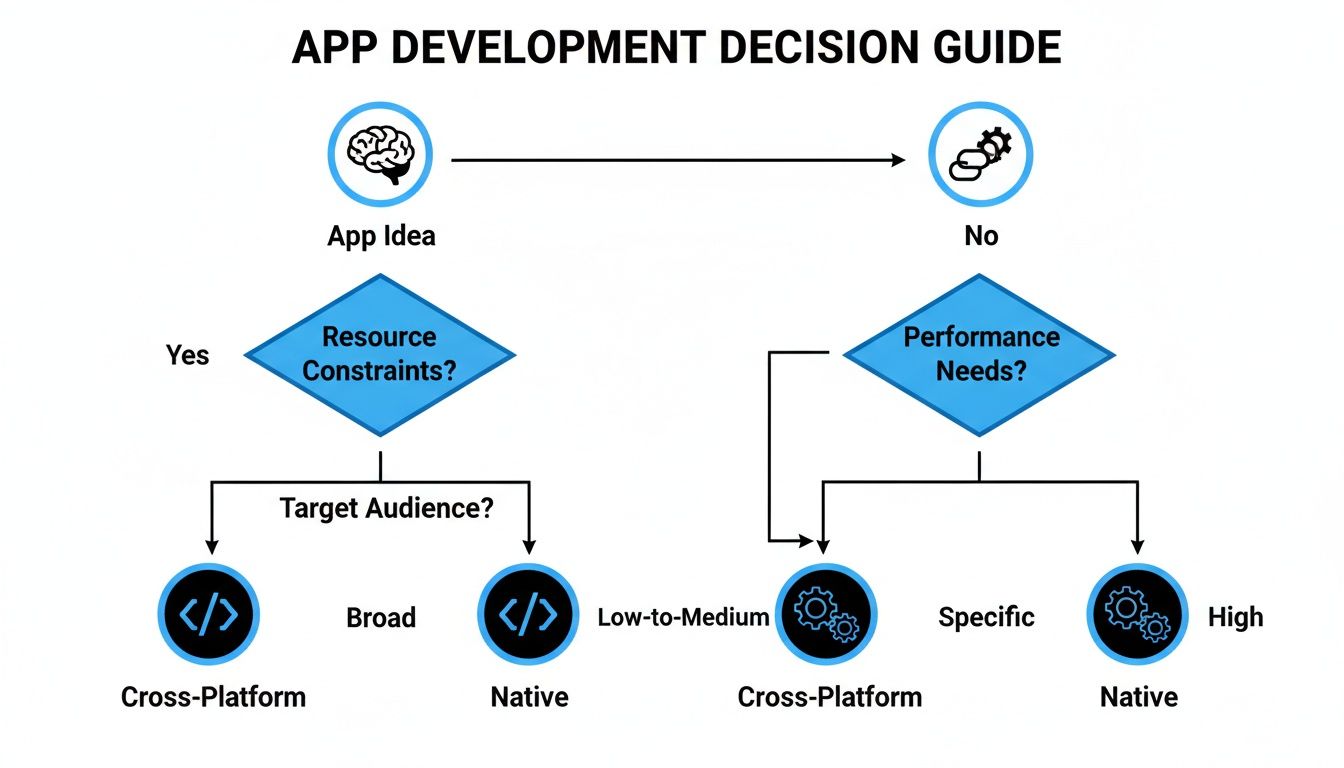
As you can see, the path you take hinges on your project's end goals. Are you aiming for the widest possible audience? Cross-platform is your friend. Do you need deep, complex hardware access? Native might be the way to go.
React Native: The Web Developer's Gateway to Mobile
If your team is already fluent in JavaScript and React, then React Native is your most direct route to building a mobile app. It was created by Meta with a simple, powerful idea: let web developers build for mobile without having to learn a whole new set of languages.
This is a game-changer. Instead of hiring specialized iOS and Android developers, your existing web team can hit the ground running. For startups and businesses that need to move fast, this massively expands the talent pool and shortens the learning curve. To see what this looks like in practice, you can dive deeper into our React Native app development guide.
Flutter: For Pixel-Perfect UI and Smooth Performance
Flutter is Google's contender in the cross-platform arena, and it's a favorite among designers and founders who refuse to compromise on visual polish. The secret sauce? Flutter doesn't rely on the phone's native UI components. It brings its own high-performance rendering engine to the party, drawing every single pixel on the screen itself.
What does this mean for your product? It means your app will look and feel exactly the same on a brand-new iPhone as it does on a three-year-old Android device. That kind of control is pure gold for design-led brands where consistency is everything.
The market has voted with its feet. The cross-platform development space is booming, with projections showing it could rocket past $546.7 billion by 2033. Flutter is a huge part of that story, with 46% adoption among mobile developers, while React Native sits at 32%. This makes them the undisputed kings, as hybrid frameworks now power over 40% of all apps.
This momentum makes Flutter a safe, powerful bet for ambitious projects that need to shine.
A Practical Look at the Top Frameworks
To make this even clearer, let's compare the frameworks from the perspective of a product team. This isn't about deep technical weeds; it's about what impacts your timeline, budget, and final product.
Cross-Platform Framework Comparison for Product Teams
| Framework | Best For | Performance Feel | UI Approach | Developer Pool |
|---|---|---|---|---|
| React Native | Teams with existing JavaScript/React skills. Faster time-to-market for MVPs. | Feels native because it uses native UI components. | Translates JavaScript into native UI elements for iOS/Android. | Massive. Taps into the huge community of web developers. |
| Flutter | Design-centric apps needing a pixel-perfect, consistent look on all devices. | Extremely smooth animations and high performance thanks to its own rendering engine. | Renders its own UI from scratch. Complete control over every pixel. | Growing very fast, but more specialized than React. |
| Ionic | Simple, content-driven apps, prototypes, and internal tools on a tight budget. | Feels like a high-quality web app inside a native "wrapper." | Uses standard web technologies (HTML, CSS, JS) via a WebView. | Large. Any web developer can pick it up quickly. |
| .NET MAUI | Enterprise apps built by teams already invested in the Microsoft C#/.NET ecosystem. | Good performance, compiles to native app packages. | Renders native UI controls but allows for custom UI drawing. | Focused. Primarily C# and .NET developers. |
| Kotlin Multiplatform | Apps needing 100% native UI performance but want to share business logic (API calls, data, etc.). | The best of both worlds: fully native UI performance with shared core logic. | Write the UI separately for iOS (Swift) and Android (Kotlin) for a true native feel. | Niche but growing. Requires both mobile and Kotlin skills. |
This table should help you match the right tool to your team's DNA and your product's vision.
Other Frameworks and Specialized Tools
While React Native and Flutter get most of the headlines, they aren't the only options. A few other tools are built for very specific, and very important, use cases.
Here are a few worth knowing:
- Kotlin Multiplatform (KMP): This is for teams that want it all: shared code and a completely native UI. You write the "brains" of your app (like user authentication and data models) once in Kotlin, then build the user interface separately for iOS with Swift and for Android with Jetpack Compose. It's the ultimate compromise for apps where performance and a native feel are non-negotiable.
- Ionic: Built on the web technologies you already know—HTML, CSS, and JavaScript—Ionic is fantastic for getting simple, content-focused apps out the door fast. It essentially puts your web app into a native container, making it a super cost-effective way to build prototypes or internal company tools.
- .NET MAUI: If your company runs on Microsoft technologies, this is for you. .NET MAUI lets C# developers build for iOS, Android, and desktop from a single project. It’s a powerful choice for enterprise companies that want to maintain consistency with their existing C# backend.
Choosing the right framework is about aligning your team’s strengths with your product’s needs and your long-term business goals. Once you understand the trade-offs, you can make a confident call that sets you up for a successful launch.
The Strategic Benefits for Startups and Product Teams
Deciding how to build your app is a massive business decision, not just a technical one. It directly impacts your budget, your timeline, and your shot at beating the competition. For startups and lean product teams, mobile cross platform development isn't just another option on the table—it's often the smartest way to get an idea off the ground and into the market.
It's about translating technical shortcuts into real business momentum. Instead of getting lost in the weeds of platform-specific code, your team gets to focus on what actually matters: building a fantastic product that solves a genuine problem for your users. This unified approach unlocks three core advantages that can spell the difference between a project that stalls and one that soars.
Launch Your MVP Everywhere at Once
If there’s one killer advantage to cross-platform development, it's speed. In today’s market, being first can be everything. A single codebase lets you launch your Minimum Viable Product (MVP) on both the Apple App Store and Google Play Store at the same time.
That parallel launch is a huge strategic win. You no longer have to make that painful choice of ignoring half your potential customers by launching on iOS or Android first. From day one, you can reach your entire market, gather feedback from a truly diverse audience, and start making improvements based on how everyone is using your app.
Maximize Your Resources and Reduce Costs
For a startup, every dollar and every team member is precious. The old-school native approach demands two separate, specialized teams—one for iOS (using Swift) and another for Android (using Kotlin). That means you're doubling your hiring efforts, doubling your management overhead, and creating twice the communication headaches.
Cross-platform development cuts right through that mess. You can build, manage, and scale a single, unified team. This has some powerful ripple effects:
- Lower Hiring Costs: Finding and keeping great native developers is tough and expensive. A single cross-platform team is just far more economical.
- Simpler Project Management: You've got one backlog, one set of sprint goals, and one codebase to worry about. This keeps communication clean and everyone moving in the same direction.
- Faster Feature Rollouts: When a new feature is ready, it's ready for all your users. You can push updates to both platforms from the same code, which ensures everyone gets the same experience and dramatically cuts down on QA time.
Cross-platform development fundamentally changes the resource equation. It allows smaller teams to achieve what once required the headcount and budget of a much larger organization, leveling the playing field.
This kind of efficiency is fast becoming the norm for agile teams. It’s not just a trend; it's a game-changer for speed. Some reports even predict that it will lead to up to 40% cuts in development time by 2026, completely reshaping how businesses launch apps in a world of tight budgets and AI-powered tools. Imagine ditching two native teams for one codebase that serves both iOS and Android. You get faster feedback loops, can test features more quickly, and can push releases with an agility that native development just can't match. For a deeper dive into these trends, you can discover more insights about cross-platform development on adevs.com.
Maintain Perfect Brand and UX Consistency
Your app's user experience is your brand. When you're building two separate native apps, keeping the look, feel, and flow consistent across both platforms is a constant battle. Little differences always sneak in, creating a jarring and fragmented experience for your users.
With a single codebase driving both the UI and the logic, you can guarantee that every user gets the exact same experience, no matter what phone is in their pocket. This kind of brand integrity is vital for building trust and loyalty. From the placement of a button to the smoothness of an animation, your app feels like one cohesive product—because it is. That consistency just makes your app feel more professional, intuitive, and ultimately, more enjoyable to use.
When to Choose Native Development Instead
While cross-platform development is a powerful tool for speed and efficiency, it’s not always the right tool for the job. Knowing when to go native—building separate, dedicated apps for iOS and Android—is just as important as knowing when to use a shared codebase.
Think of it like choosing a vehicle. A versatile SUV (cross-platform) is perfect for most daily trips. But if you’re competing in a Formula 1 race, you need a purpose-built race car (native). Some app requirements are so specialized that only a native approach will do, and getting this choice wrong can lead to performance issues, unhappy users, and a costly rebuild later on.
Performance-Intensive Applications
The biggest reason to stick with native is the need for raw, uncompromising performance, especially when you need to push a device’s hardware to its absolute limits.
- Graphically Demanding Games: High-end games like Genshin Impact require direct access to the device's GPU to ensure fluid frame rates and instant response times. This is where native code, which gets closest to the metal, is essential.
- Augmented and Virtual Reality (AR/VR): AR apps that overlay digital content onto the real world have to process camera and sensor data in an instant. Even the slightest lag shatters the illusion, making native the only practical choice for any serious AR/VR work.
- Real-Time Data Processing: Apps that perform heavy, on-device computations—like Adobe Premiere Rush for video editing—run best when they can tap directly into the raw power of native code.
Deep and Complex Hardware Integrations
Cross-platform frameworks do a great job of accessing standard features like the camera or GPS. But what if your app needs to do more? Some applications require a much deeper connection to platform-specific hardware.
If your app's core feature relies on a unique piece of hardware or a brand-new OS-level API the day it’s released, native is your safest bet. It gives you immediate, direct access to the latest innovations from Apple and Google without waiting for a third-party framework to catch up.
For instance, an advanced photography app might need to control specific camera sensors or image processing chips in ways that cross-platform abstractions simply can't. Likewise, an app that relies on complex background tasks might find native development offers far more reliability and control. For a closer look at these trade-offs, it's worth exploring the key differences in native vs. hybrid app development and how they shape your product's potential.
Adhering to Platform-Specific Design Conventions
Finally, sometimes the goal is to make an app feel completely, utterly at home on its platform. This means embracing the very latest UI components, navigation patterns, and subtle animations that are unique to iOS or Android.
Cross-platform frameworks have gotten incredibly good at mimicking the native look and feel, but a true native app will always feel just a little more authentic. If your brand strategy demands that your app feels like a seamless extension of the operating system itself, then investing in two separate native UIs is the right call. It all comes down to a strategic choice: does the efficiency of one codebase outweigh the absolute peak performance and platform-specific polish you get with native?
How to Accelerate Your App Prototyping Workflow
Getting an app idea from your head into a usable prototype can feel like an eternity. The old way of doing things—static mockups, endless feedback loops, and designers and developers playing a frustrating game of telephone—just doesn't cut it anymore.
But what if you could shrink that whole process from weeks down to a single afternoon? This is exactly where a modern, AI-assisted take on mobile cross platform development completely flips the script.
Imagine this: you’re in a meeting, sketching out your app's main screens on a whiteboard. Instead of snapping a photo and logging a ticket, you use an image-to-app tool. In literally minutes, that rough drawing becomes a real, interactive React Native prototype. This isn't just a picture; it's the actual foundation of your app, ready for your team to start tweaking right away.

From Idea to Interactive in Minutes
This kind of rapid workflow vaporizes the ambiguity that so often bogs down the early stages of a project. Why describe a user flow when you can just build it on the spot? The team can dive into the generated prototype and start making changes simply by typing what they want.
For instance, a product manager could just type, "Add a welcome screen with a login button and a link for new users to sign up." The tool instantly generates the screen, navigation, and components, rendering it all in real-time. It’s an incredibly fluid and collaborative way to iterate.
The real magic here is how dramatically it shrinks the feedback loop. When stakeholders can see and interact with changes the moment they’re suggested, misunderstandings disappear and everyone gets on the same page naturally.
This hands-on process gives everyone on the team—from non-technical founders to seasoned designers—the power to shape the product directly, without ever touching a line of code. You can see this method in action and learn more about how to build a prototype this way.
Real-Time Collaboration and Validation
Once you have that working prototype, getting it in front of people for feedback is just as easy. Forget about exporting PDFs or juggling complicated design files. With a tool like RapidNative, you generate a simple link or QR code, and anyone can run the prototype directly on their own device.
This is a huge advantage for a few key reasons:
- Investor Demos: You can put a working app directly into an investor's hands instead of just walking them through static slides.
- Early User Testing: Get immediate, real-world feedback by letting potential customers tap through the app's core flow on their own phones.
- Team Alignment: Designers, PMs, and engineers can all test the exact same build, making sure there's no confusion about what's being built.
Getting the app into someone's hands provides far more value than any static mockup ever could. It helps you spot usability problems and validate design choices in a real-world context, long before you've invested serious engineering resources.
Seamless Handoff to Engineering
Maybe the biggest win of this entire workflow is what happens at the very end. Traditional prototyping tools spit out designs that engineers have to meticulously rebuild from scratch. This process, however, generates clean, production-ready code.
Because the prototype is already built with a standard, respected framework like React Native, there’s no "handoff" in the old sense of the word. Instead, your engineers get a well-structured codebase they can simply export and continue building on. This completely eliminates countless hours of rework and guarantees the final product is a perfect match for the prototype everyone approved.
This approach transforms prototyping from a preliminary design exercise into the very first phase of actual development. It’s a crucial strategy for any team that wants to move fast, collaborate effectively, and build a product that users love from their very first tap.
Planning Your Cross-Platform Project for Success
Picking a framework is just the first step. The real secret to successful mobile cross-platform development lies in a solid, strategic plan that thinks far beyond the code itself. A good plan is what separates a smooth launch from a project that’s constantly putting out fires and scrambling at the last minute.

This means you need to be thinking about performance, user experience, and how you’ll actually get the app into users' hands from day one. It also pays to think creatively about your team and budget. For instance, looking into offshore app development strategies can be a fantastic way to manage costs and access a wider talent pool without compromising on quality.
Balancing Brand Consistency with Native UX
Here's one of the trickiest parts: making an app that feels like your brand on any device, but also feels perfectly natural on both iOS and Android. Users are creatures of habit. They have deep-seated expectations for how an app should look, feel, and behave on their phone. An iOS user instinctively knows certain swipe gestures that would feel totally alien to someone on Android.
Your job is to find that perfect balance.
- Shared Brand Identity: Your core brand elements—logos, color palettes, fonts, and the main UI components—should be identical everywhere. This is the unmistakable signature of your app.
- Platform-Specific Conventions: When it comes to things like navigation bars, pop-up modals, or date pickers, adapt them to match the native OS. It’s a subtle touch, but it’s what makes an app feel intuitive and trustworthy.
The best cross-platform apps don't just work everywhere; they feel like they belong everywhere. They respect the user's platform while delivering a consistent brand experience.
Optimizing for Snappy Performance
Don't assume a single codebase automatically means great performance. A slow, janky app gets deleted, plain and simple—no matter how it was built. Your project plan needs to set aside real time for optimization. The goal is a fluid, responsive experience on a whole spectrum of devices, not just the latest flagship phones.
A few key areas deserve your attention:
- Image and Asset Optimization: Squeeze every kilobyte out of your images and use modern formats. This directly impacts how fast your app loads.
- Efficient State Management: If your app's state is a mess, it will lead to constant, unnecessary re-renders that make the UI feel sluggish.
- Network Request Handling: Be smart about API calls. Minimize and batch them to keep from draining the battery and creating network jams.
Being proactive about performance is what makes an app feel polished and professional.
Streamlining Testing and Deployment
Juggling submissions to two different app stores can become a nightmare if you don't have a system. A repeatable, streamlined process is absolutely critical for pushing out updates and new releases without pulling your hair out. Automated testing is a lifesaver here, letting you run one set of tests that verifies your app works correctly across both platforms.
For deployment, create a simple, clear checklist that covers everything:
- Building the Binaries: Generating the
ipafile for iOS and theapkoraabfile for Android. - Metadata Management: Getting all the screenshots, release notes, and store descriptions ready for each platform.
- Submission and Review: Navigating the unique review guidelines for Apple’s App Store and the Google Play Store.
A well-defined workflow turns a complicated, error-prone headache into a predictable part of your routine, so you can launch and iterate with confidence.
Got Questions? We've Got Answers
If you're weighing your options for building a mobile app, you've probably got a few questions about cross-platform development. It's a common conversation for product teams and founders. Let's clear up some of the most frequent ones.
Is a Cross-Platform App Automatically Slower Than a Native One?
Not really, no. This is a bit of an old myth. Modern frameworks like React Native and Flutter have gotten so good that for most apps, the performance is virtually indistinguishable from native.
Sure, if you're building a graphically-heavy 3D game or something that pushes the hardware to its absolute limits, a native app might give you a tiny performance bump. But for the vast majority of apps—think social media, e-commerce, productivity tools—your users will never feel a difference. A well-built cross-platform app will always beat a poorly-built native one.
Can I Still Use Phone Features Like the Camera or GPS?
Absolutely. This is a non-issue with today's tools. Cross-platform frameworks have excellent support for accessing all the core hardware features you'd expect.
Developers can easily tap into:
- Camera and photo library
- GPS and location data
- Accelerometer and gyroscope for motion
- Push notifications
- Contacts, calendars, and more
The communities behind these frameworks have built a massive ecosystem of plugins and modules that make connecting to these device APIs simple and reliable.
Is it Tough to Find Developers for This Stuff?
It's actually much easier. Since cross-platform frameworks are built on popular programming languages, you're fishing in a much, much bigger talent pool.
Take React Native. It uses JavaScript and React, which means pretty much any skilled web developer can jump in and become a productive mobile developer. You aren't limited to hunting for niche—and often more expensive—Swift or Kotlin specialists.
This is a huge advantage for startups and teams that need to build and scale quickly without breaking the bank.
What if I Hit a Wall and Need a Native Feature Later?
You’re not locked in. This is one of the most powerful aspects of a modern cross-platform strategy. You can always write native code when you need to.
Let's say 95% of your app is perfect for a cross-platform approach, but one specific feature needs raw, unadulterated native performance. No problem. You can build just that single component in native Swift or Kotlin and seamlessly plug it into your existing cross-platform app. It gives you a "best of both worlds" escape hatch without forcing a complete rewrite.
Ready to go from idea to interactive prototype in minutes? RapidNative is an AI-native mobile app builder that generates real, production-ready React Native code from a prompt, sketch, or image. Speed up your workflow, get user feedback faster, and stop waiting to see your vision come to life. Start building for free at RapidNative.
Ready to build your app?
Turn your idea into a production-ready React Native app in minutes.
Free tools to get you started
Free AI PRD Generator
Generate a professional product requirements document in seconds. Describe your product idea and get a complete, structured PRD instantly.
Try it freeFree AI App Name Generator
Generate unique, brandable app name ideas with AI. Get creative name suggestions with taglines, brand colors, and monogram previews.
Try it freeFree AI App Icon Generator
Generate beautiful, professional app icons with AI. Describe your app and get multiple icon variations in different styles, ready for App Store and Google Play.
Try it freeFrequently asked questions
What is RapidNative?
RapidNative is an AI-powered mobile app builder. Describe the app you want in plain English and RapidNative generates real, production-ready React Native screens you can preview, edit, and publish to the App Store or Google Play.
Can I export the code?
Yes. RapidNative generates clean React Native and Expo code that you can export at any time. No lock-in, no proprietary format. Hand it to your developers or keep building inside RapidNative.
Is RapidNative free to use?
Yes. You can build apps on the free plan with no credit card required. Paid plans unlock unlimited AI generations, code export, and direct publishing to the App Store and Google Play.
Do I need to know how to code?
No. Most users build apps by describing what they want in plain English. Developers can drop into the code whenever they want more control, but coding is optional.
How long does it take to build an app?
Most users have a working first screen in under a minute. A full MVP usually takes a few hours instead of the weeks or months traditional development requires.