React Native App Source Code: Find, Reuse, and Export
Learn where to find React Native app source code, how projects are structured, what licenses allow, and how to export clean, production-ready code.
By Rishav
23rd Oct 2026
Last updated: 23rd Oct 2026
Cloning a React Native repository doesn't mean you own a working app. You may have a directory of screens but no reproducible build, unclear rights to the assets, or native code that breaks as soon as dependencies change. Treat the code as a product asset: check where it came from, what it depends on, and whether your team can maintain it.
The practical test is simple: can your team understand, build, modify, and ship the project without relying on the person or tool that first created it? That means looking beyond the interface to the application code, native boundaries, licenses, configuration, and tests.
Why React Native App Source Code Matters Now
React Native app source code includes more than the screens users see. It covers the JavaScript or TypeScript application layer, assets, dependency manifests, configuration, and build settings. Some projects include the native ios and android directories in version control. Expo projects may generate those directories from declared configuration when needed.
A prototype can look finished and still fail outside its original environment. Its login screen may call demo services, lack required native permissions, or rely on a local build change that was never documented. A codebase becomes a usable product asset when another developer can reproduce its build and trace the decisions behind it.
The 2024 State of React Native survey reports self-selected responses from approximately 3,500 developers across more than 20 countries. Among those respondents, more than 80% said they worked in teams of five or fewer. Half reported having released at least five React Native apps, and 71% said they used Expo's EAS Build. These figures describe survey participants, not the entire React Native ecosystem. They suggest that many surveyed teams are small, so clear handoffs and repeatable builds are likely to affect them directly, though the survey figures do not measure either practice.
Screens are only one part of ownership
When someone says, “We have the source,” clarify what that includes. Is it just components and navigation, or also the package manifest, lockfile, environment setup, asset rights, native configuration, and a record of generated files? Can the team trace how a feature reaches iOS and Android, and identify who maintains the code if its original author leaves?
Ownership also depends on provenance and future maintenance. Record where the code came from, which dependencies and native modules it relies on, and what license governs reuse. Then check whether the project can be upgraded without relying on undocumented local changes.
Use those checks to judge whether a repository or exported project is a maintainable starting point, rather than just a collection of screens. The sections ahead examine examples, project structure, native boundaries, licensing, code cleanup, security, testing, and release readiness.
Curated Sample Repositories Worth Studying
React Native offers many examples, from official documentation and Expo projects to community starter kits and open-source apps. Each can answer a specific implementation question, but a working demo is not automatically a production-ready asset. Before reusing code, check where it came from, what it depends on, and whether your team can maintain it.
What to look for by source type
-
Official documentation examples help explain a particular API or native integration. Their narrow focus makes the code easier to follow, though it may omit authentication, error handling, and release setup. Use an example to confirm how a feature works, then fit it into your app's own architecture.
-
Expo example projects show how Expo packages and configuration work together. They can be useful references for apps built with Expo, especially when reviewing navigation, native configuration, or modules. Match the project's Expo SDK to the version your app uses before borrowing its setup.
-
Community starter kits may provide navigation, themes, and common screens, saving initial setup time. They can also impose a state library or UI system that your team has no reason to adopt. Review the dependencies and maintenance burden, then take only the patterns that fit.
-
Open-source production apps offer examples of how real features and data flows are organized. Their architecture may reflect a different product, team, or scale, so inspect individual decisions rather than copying conventions wholesale.
-
UI kit and component libraries can help establish consistent visual patterns. Check accessibility and customization options, then confirm that your team can support any added dependencies or native requirements.
-
Learning repositories present concepts in a compact form. Demo data, credentials, and simplified error handling are teaching aids. Replace them before treating the code as part of a product.
A fast repository review
Start with the project's provenance: identify its maintainers, license, and latest activity. Then check the React Native and Expo versions in package.json, whether a lockfile is committed, and whether tests and a statement about New Architecture compatibility are present. Inspect asset attribution as well as source files. A repository can be technically useful while still carrying code or assets your team cannot reuse.
If you need a plain-language explanation of what a repository on GitHub contains, review that before assessing a project's structure. Treat each sample as a reference with a specific job, such as showing how navigation is organized or how a native capability is exposed. If you cannot name what you'll keep, what you'll remove, and who will maintain the result, keep looking.
Anatomy of a Production React Native Project
A production repository should make responsibilities visible. At the root, package.json records dependencies and scripts; a lockfile captures the resolved dependency tree; and TypeScript settings, app configuration, and build files describe how the project is checked and packaged. A src directory usually contains the application's screens, reusable components, feature logic, and shared services.
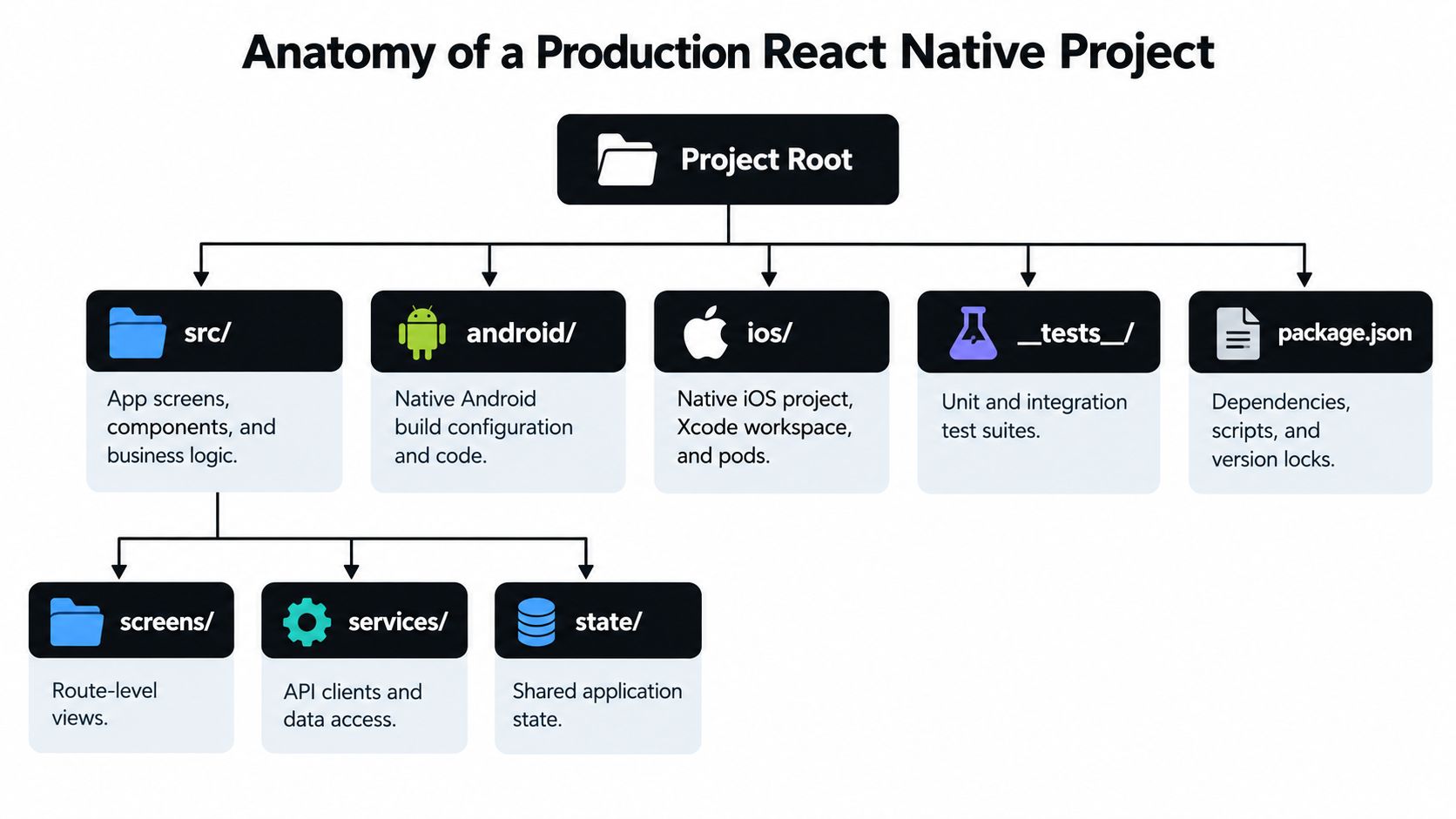
A task-management app might use a tree like this:
src/app/for routes and navigationsrc/screens/for route-level views such as task lists and task detailssrc/components/for shared elements such as buttons and form fieldssrc/features/tasks/for task-specific behaviorsrc/services/for API clients and data accesssrc/state/for shared application statesrc/hooks/for reusable React hooksassets/for images, icons, and fonts__tests__/for unit and integration testsandroid/andios/for native project files, when the app keeps them in the repository
The tree is a map, not a rulebook. The useful test is whether a developer can find the task creation flow, identify how it reaches the API, and tell which parts are shared across platforms.
Know what is handwritten and what is generated
In Expo projects, declare native configuration in app.json, app.config.js, or app.config.ts. Config plugins can apply changes to native files such as AndroidManifest.xml and Info.plist. Running npx expo prebuild regenerates the native android and ios directories from the app configuration, installed Expo version, autolinking, and prebuild template; npx expo prebuild --clean is used when a clean regeneration is needed. See Expo's guide to customizing app configuration.
Don't make manual edits to generated native directories your only record of a configuration change. Put repeatable changes in config plugins or local modules, then review the generated diff. Otherwise, a clean prebuild or another developer's machine may produce a different result. This distinction also makes code review easier: the team can discuss its configuration source separately from generated output.
Native Boundaries and Architecture Decisions
A shared JavaScript screen is a good fit for interface behavior and product logic that works the same way on both platforms. A feature starts to cross the native boundary when it needs platform APIs, particular permission flows, background execution, or behavior that differs by operating system. Deep links are a useful example: the user-facing destination may be shared, but the platform configuration and the way a link enters the app still need explicit review.
Start with the simplest implementation that meets the requirement. Use JavaScript when React Native APIs and a supported package cover the behavior. In an Expo project, consider an Expo module when you need custom native functionality implemented in Swift or Kotlin. A native component is appropriate when the interface itself depends on a platform view or behavior that a regular React component can't provide cleanly. C++ integrations can use Turbo Native Modules where they fit the requirement.
If the feature needs custom native code, define the contract before writing the platform implementations. React Native's Turbo Native Modules guide describes a module as a TypeScript or Flow specification, generated Codegen interfaces, and the native implementation. Configure Codegen through codegenConfig in package.json; specification filenames follow the Native prefix convention, for example NativeLocalStorage.ts. Implement and review the Kotlin or Java side and the Objective-C++ or Swift side against that contract.
That structure makes parameter and return types visible, rather than leaving the JavaScript and native sides to rely on an informal runtime agreement. It also gives reviewers separate places to inspect the public API, generated glue, and platform implementation. For a broader view of how those pieces fit together, see mobile app architecture.
Practical rule: In an inherited repository, review native dependencies before upgrading the framework. Confirm who maintains each dependency, what platform code it includes, and whether the project's architecture supports it.
React Native 0.78 introduced React 19 and changes to Codegen and native integration. The legacy architecture was frozen from June 2025 onward, and official guidance describes interop paths while recommending alternatives or migration to Turbo Native Modules and Fabric Native Components. A migration-minded overview of React Native 0.78 is useful context when you encounter older modules. Don't assume that an app must be rewritten; first classify dependencies and identify which native boundaries need a supported path.
Here's a video walkthrough of the native integration topic:
Licensing Rules That Govern Reuse
A repository can be technically useful and still come with terms that don't fit your product. Read the root LICENSE, then check package licenses and the rights attached to fonts, icons, illustrations, and sample images. Code and visual assets can have different owners and different reuse terms.
| License type | Commercial use | Main obligations | Typical fit |
|---|---|---|---|
| MIT and similar permissive licenses | Usually permitted | Preserve required copyright and license notices | Reusable components and examples |
| Apache 2.0 | Permitted | Preserve notices and comply with its terms, including its patent grant provisions | Libraries where explicit patent terms matter |
| GPL-family copyleft licenses | Depends on the exact license and use | Derivative works can be required to use the same terms | Projects that can meet the license's sharing obligations |
| Commercial or proprietary templates | Determined by the contract | Terms may restrict redistribution, resale, or reuse outside a defined product | Paid starter kits with explicit usage rights |
Apply the check to the whole project
Don't stop at packages listed directly in package.json. Review the dependency tree, because a transitive package can introduce obligations too. Verify that a template's terms cover the use you intend, and don't assume AI-generated or copied code has no applicable terms. Check the generator or source material's conditions.
Suppose a developer copies a GPL-licensed component into a closed-source app. The team should pause before release, identify the exact license and how the component is used, then ask counsel whether the app's distribution creates obligations. Possible responses include replacing the component with code under compatible terms, obtaining a separate license from the rights holder, or changing the product's distribution approach if appropriate. Removing the component's attribution alone doesn't resolve the issue.
If notices must ship with the app, treat that as an implementation task. Add the required notices to an About or Licenses screen, or include them in another location that meets the applicable terms. This is a practical orientation, not legal advice. Ask counsel to review anything material to your product's distribution or business model.
Choosing Between Repos, Templates, and Generated Code
Choosing a starting point is a trade-off between speed, control, and the amount of work your team must own. A repository may demonstrate a complete flow but include assumptions you don't want. A scaffold can be clean and current, but leaves product decisions to you. Generated code can give a team a quick working interface, but it still needs engineering review.
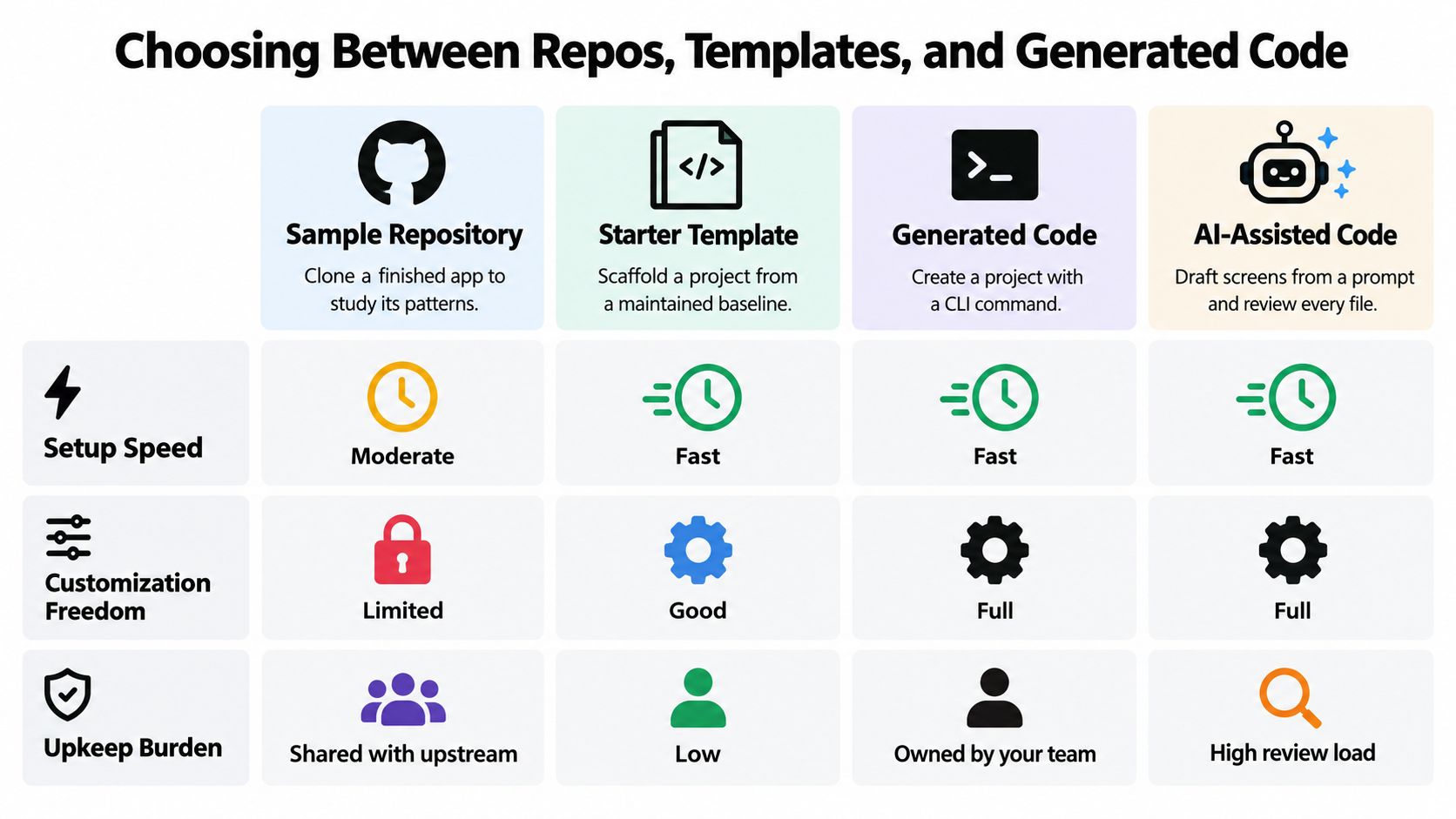
| Route | Time to first screen | Ownership and provenance | Native support | Best fit |
|---|---|---|---|---|
| Clone an open-source sample | Depends on setup and the sample's condition | Trace the license, upstream source, and copied changes | Limited to what the sample and its dependencies provide | Studying an existing pattern |
| Buy or download a starter kit | Often quick to install | Check the seller's terms and support expectations | Depends on the kit and its native dependencies | Starting from a maintained baseline |
| Scaffold with Expo CLI | Fast to create a project | The team owns its changes and configuration | Expo capabilities and supported native customization | Teams that want a clean starting repository |
| Generate screens with an AI builder | Fast for a visual first pass | Review generated files and record what was accepted | Native work may still be needed for specialized behavior | Validating flows before committing to detailed implementation |
A prompt or sketch can communicate a product idea faster than a blank screen, but code generation doesn't decide your dependency policy, test strategy, or native architecture for you. For a startup validating an onboarding flow, it can be reasonable to generate the screens, then move the exported project into the team's repository and inspect the routing, components, and package choices before adding production services.
RapidNative is an AI-native collaborative mobile app builder that turns prompts, sketches, images, product requirement documents, or whiteboards into React Native apps using Expo and NativeWind. It previews projects live through a link or QR code, supports real-time co-creation, and lets teams export modular code to their own repository; the trade-off is that exported code still needs tests, dependency decisions, and native implementation when requirements exceed what the generated project supports.
Choose the route that matches your validation stage and your ownership needs. If you're studying an API, start with its documentation example. If you want a clean baseline, scaffold one. If you use a template or generated project, treat it as the beginning of your repository review, not as a finished product.
Cleaning Exported Code Before It Ships
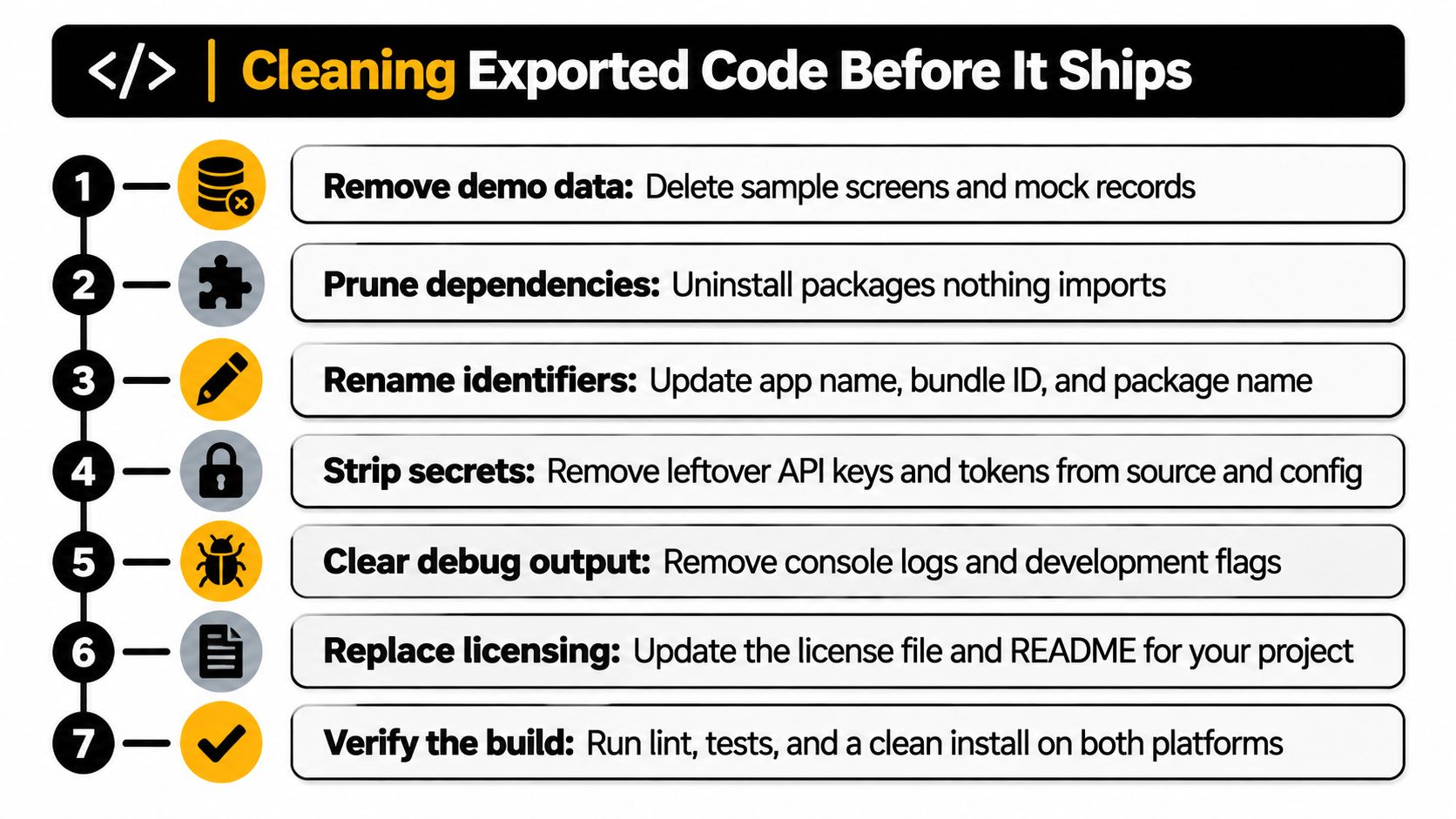
Once code is in your repository, clean it in an order that reduces confusion before adding features. Start by removing sample screens, placeholder copy, mock records, and duplicate components. Then uninstall packages the code doesn't import. A tidy interface can still hide demo endpoints or unused dependencies that complicate upgrades.
Make the repository reflect your product
Rename the app, bundle identifiers, package name, and visible metadata. Move environment-specific API configuration out of source files, and remove leftover keys or tokens rather than assuming they're harmless because the app is a prototype. Keep secrets out of logs and client bundles; credentials that must remain confidential belong in an appropriate server-side system.
Commit a lockfile and pin critical versions so developers and CI install a consistent dependency tree. Run type checks and linting, then document ownership boundaries: which components are shared, which feature owns a flow, and which native changes are generated. That context helps the next engineer change a screen without accidentally breaking a platform-specific capability.
Before running prebuild: Confirm that native configuration truly changed, then review the generated diff before committing it. Don't regenerate directories just to make an unexplained build error disappear.
For Expo projects, preserve the configuration source rather than relying on edits made only inside generated native folders. If a clean regeneration is needed, use the prebuild workflow described earlier and make sure the resulting diff matches the intended change.
If you're using RapidNative, export the project into your own Git repository, install its dependencies, and run the app before inviting engineers to extend it. Then apply the same cleanup process you'd use for an inherited project. The handoff from prototype to production is less risky when the team has recorded what is generated, what it owns, and what still needs implementation.
Finish with a first verified build: run the app locally in Expo, then use EAS Build to check that the project builds outside the original development environment. The aim is not to declare the app production-ready; it's to prove that the repository can be installed, understood, and built by the team that now owns it.
Security and Testing Checks for Reused Code
Security belongs in source-code review because a polished interface can conceal unsafe storage, hard-coded credentials, excessive logging, or authorization that exists only in navigation logic. Review what the app stores and sends, then verify that the server enforces who can access each resource. Hiding an admin screen from a regular user doesn't stop that user from calling an API directly.
OWASP's Mobile Application Security Verification Standard groups mobile controls around secure storage, cryptography, authentication and authorization, network communication, platform interaction, code security, resilience, and privacy. Use those categories to structure an open-book review: give testers access to architecture notes, source code, project documentation, authenticated endpoints, and accounts for the roles they need to test.
Apple's App Review Guidelines require clear disclosure of data collection and its uses. Apps that collect user or usage data need consent, including when the data is considered anonymous at collection or shortly afterward, and users need an accessible way to withdraw consent. For an analytics-enabled MVP, expose the consent choice, record it, keep optional tracking from initializing before consent, and provide a settings control for withdrawal. Don't make paid functionality conditional on agreeing to optional data collection.
A small device matrix catches platform gaps
Android's core app-quality guidance recommends testing representative device configurations, Android versions, and screen resolutions for the intended audience. A small team can start with a compact Android phone, a large modern phone, the oldest Android version it supports, and the latest Android version.
On each relevant configuration, test navigation, forms, keyboard behavior, permissions, offline states, and screen rotation where the product uses it. Record failures alongside the affected flow, then connect them to product outcomes: if users don't complete onboarding, check validation, loading, navigation, and error handling before adding unrelated features. That makes test results useful to the product team as well as the engineers fixing the code.
Quick Reference and Your Next Step with RapidNative
Use this as a lookup when you inherit or export a project:
- Where can I find useful sample code? Use the repository categories above, and inspect versions, tests, activity, and licenses before adopting a pattern.
- How do I read the project tree? Start at the root, then trace a screen through its feature logic, services, state, tests, and any native configuration it relies on.
- When do I need native code? Start with shared JavaScript; cross into an Expo module or native component when platform APIs or platform-specific behavior demand it.
- What license should I check? Read the root license, package terms, and asset rights. Ask counsel about obligations that could affect distribution.
- Which starting route fits? Use a sample to study patterns, a scaffold for a clean baseline, or generated code to explore a product flow. Keep ownership and review requirements in view.
- What should I clean before shipping? Remove demo content and unused dependencies, rename identifiers, secure configuration, lock versions, document boundaries, and verify the build.
- Which checks should run before release? Review security and consent, test the supported platform matrix, and connect failures to the user journey.
For one concrete first session, create a free RapidNative project from a prompt, sketch, or PRD, preview it on a phone using its QR code, and export the code to a Git repository. Then run the cleanup checklist before another engineer extends it. Your goal can be specific: review one screen, document its component boundary, and achieve a successful local run. The exported repository gives your team a codebase to keep and inspect, rather than making validation depend on staying inside the builder.
Start with a prompt, sketch, or product brief in RapidNative, preview the React Native flow on a phone, and export the code to your own repository. Use the cleanup checklist to establish ownership before your team builds on it.
Ready to build your app?
Turn your idea into a production-ready React Native app in minutes.
Free tools to get you started
Free AI PRD Generator
Generate a professional product requirements document in seconds. Describe your product idea and get a complete, structured PRD instantly.
Try it freeFree AI App Name Generator
Generate unique, brandable app name ideas with AI. Get creative name suggestions with taglines, brand colors, and monogram previews.
Try it freeFree AI App Icon Generator
Generate beautiful, professional app icons with AI. Describe your app and get multiple icon variations in different styles, ready for App Store and Google Play.
Try it freeFrequently asked questions
What is RapidNative?
RapidNative is an AI-powered mobile app builder. Describe the app you want in plain English and RapidNative generates real, production-ready React Native screens you can preview, edit, and publish to the App Store or Google Play.
Can I export the code?
Yes. RapidNative generates clean React Native and Expo code that you can export at any time. No lock-in, no proprietary format. Hand it to your developers or keep building inside RapidNative.
Is RapidNative free to use?
Yes. You can build apps on the free plan with no credit card required. Paid plans unlock unlimited AI generations, code export, and direct publishing to the App Store and Google Play.
Do I need to know how to code?
No. Most users build apps by describing what they want in plain English. Developers can drop into the code whenever they want more control, but coding is optional.
How long does it take to build an app?
Most users have a working first screen in under a minute. A full MVP usually takes a few hours instead of the weeks or months traditional development requires.