What Is Technical Debt? a Guide for Mobile Product Teams
What is technical debt? Learn the principal and interest model, the main types in mobile apps, and how to measure and prioritize it.
By Sanket Sahu
25th Oct 2026
Last updated: 25th Oct 2026

Technical debt is the future cost created when a team chooses a faster but weaker implementation today, and that cost is paid back later as extra effort. You've probably felt it already. A small change to your app should take an afternoon, but it takes a week because nobody wants to touch the checkout screen, the login flow breaks when anything near it changes, and your best engineer avoids two files without saying a word.
That slowdown isn't a motivation problem. It's the bill arriving for earlier shortcuts, some of which were sensible at the time. The useful question isn't how to avoid every shortcut. It's which shortcuts you've recorded, who owns them, and which ones are now blocking change.
What Technical Debt Means for Product Teams
Your login screen ships on time because an engineer hardcodes the API endpoints directly into the screen instead of putting them in one shared configuration file. It works. Then staging changes, and login breaks. A tester finds it, an engineer patches one place, and it breaks somewhere else next release.
That's what is technical debt in practice. The team borrowed speed to hit a launch date. The loan amount was the shortcut, and the repayments arrive as slower releases, repeated fixes, and extra testing.

Where the Term Came From
Ward Cunningham introduced the metaphor in 1992, comparing imperfect first-time code to borrowing money because the team later pays interest through debugging, maintenance, refactoring, and slower features, as explained in ISACA's account of Cunningham's original metaphor. His original meaning was narrower. As a team learns more about a problem, code written earlier no longer matches that better understanding, and closing that gap is the repayment.
Teams now use the term more widely. It covers architecture, design, tests, documentation, dependencies, and requirements, not just messy code.
Debt isn't the same as bad code. A recorded shortcut that buys real learning and gets repaid on schedule can be a rational loan.
A Three-Part Test for Any Shortcut
Ask three questions before you ship a shortcut:
- Is it known? Someone has written it down, not just mentioned it in standup.
- Will it be touched again? Code you'll never revisit costs less to leave alone.
- Who will repay it? A named owner and a trigger beat a vague intention.
If you can't answer those, you don't have a loan. You have a surprise waiting for a later release.
How Principal and Interest Make Debt Expensive
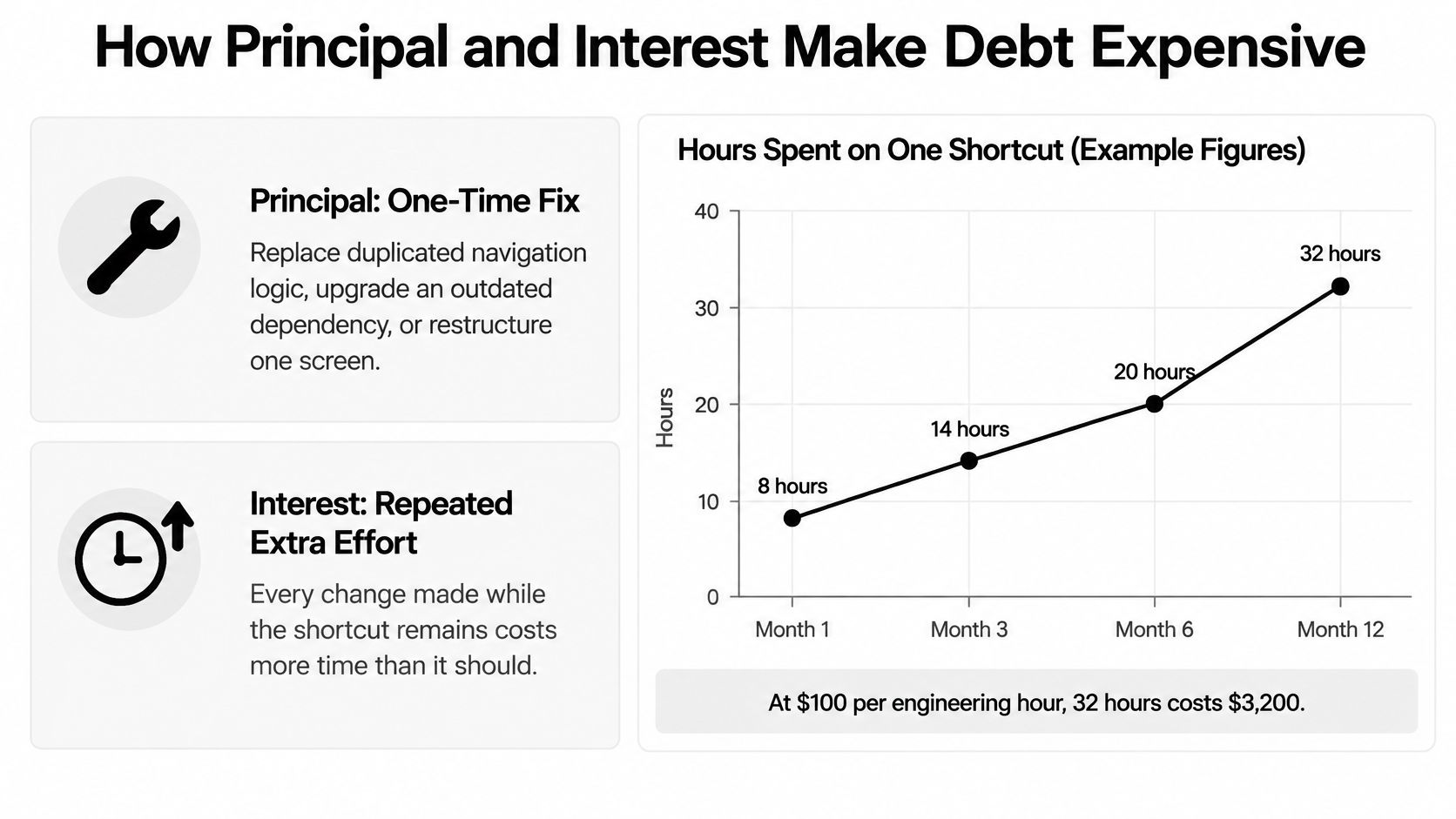
Every debt item has two prices, and teams confuse them constantly. Principal is the one-time effort to fix the shortcut properly. Interest is the extra effort you pay, release after release, while you leave it in place.
Principal might mean replacing duplicated navigation logic, upgrading an outdated dependency, or restructuring a screen that can't support a new feature. Interest looks different. It's the workaround repeated in every release, the extra regression checks before submission, or a small color change edited in four separate files.
Putting a Number on Principal
You don't need a finance degree to estimate this. A measurement model in software engineering research calculates principal from the number of debt items, the hours to fix each one, and labor cost, so ten issues at six hours each and $100 per hour equal an estimated $6,000 principal, as described in the principal calculation model using items, hours, and labor cost.
Principal cost at a $100 hourly rate
| Scenario | Debt items | Hours per fix | Estimated principal |
|---|---|---|---|
| One shortcut in a settings screen | 1 | 6 | $600 |
| Ten items across checkout and onboarding | 10 | 6 | $6,000 |
Read the table as a scaling argument. One shortcut looks trivial. Ten shortcuts, each cheap on its own, become a week of engineering time before you count any interest at all.
Why Interest Is the Dangerous Part
Principal is a snapshot. You can estimate it today and it stays roughly stable. Interest doesn't sit still, because every future change to that code pays a little more than it should.
That's why a shortcut in code you touch weekly can cost more than a large cleanup in code nobody opens. The fix is smaller, but the payments never stop.
Decision rule: Take the shortcut only when the learning, launch date, or revenue it buys is worth more than the principal plus the interest you'll pay until repayment.
Write that comparison down before you ship, even in two sentences. If nobody can state what the shortcut bought, it probably didn't buy enough.
Types of Technical Debt in Mobile Apps
A mobile app can carry several kinds of debt at once. A copied style may slow screen changes, while an unclear offline requirement can force a feature to be rebuilt. Use the categories below as a practical map: each points to a different kind of repayment work. Some shortcuts are reasonable product decisions under uncertainty, provided the team records them, assigns an owner, and knows how to repay them. Debt that stays hidden can block change without warning.
Debt types with mobile examples
| Debt type | Mobile example | Usual trigger | Where the cost shows up |
|---|---|---|---|
| Code debt | Screen styling copied across twelve screens | Deadline pressure | Every change to the shared style |
| Design or architecture debt | Navigation bypasses the shared stack, so deep links break | Skipping an abstraction for speed | Routing and new flows |
| Test debt | New payment state shipped with no automated test | Shipping before coverage exists | Regression cycles and manual QA |
| Defect debt | Known Android crash logged and deferred | Full triage backlog | Crash rate and store reviews |
| Requirements debt | Offline checkout behavior never specified | Unvalidated product assumption | Rework once scope is clarified |
| Documentation debt | Native module added with no notes on why | Handoff without a written decision | Slower onboarding of new engineers |
| Dependency debt | Outdated Expo SDK left several major versions behind | Skipped upgrades | Failed builds and delayed store submissions |
A study of 181 Java and Python open-source practitioners examined code, defect, design, documentation, and test debt. Its findings concern open-source software generally, not mobile apps specifically. The study reports how practitioners address these categories; it does not establish how common each type is in mobile teams. The practitioner study covering five debt categories
Two Rows Worth a Closer Look
Architecture debt can spread like a workaround copied from one room to the rest of a house. If navigation bypasses the shared stack, each new flow may depend on the detour. Replacing it later can mean changing screens that already work. Reviewing mobile app architecture decisions that prevent structural shortcuts can help teams identify where a quick choice may constrain later changes.
Test debt creates a different burden: without an automated check for a payment state, someone must verify it manually. A study of 15 open-source projects examined production code and test code that did not evolve together. It estimated the maintenance costs associated with that debt, including costs around code and tests. Those findings come from general open-source projects, not specifically mobile apps, so they illustrate a possible maintenance burden rather than a mobile-specific estimate. The study of production and test code evolving unevenly
The category helps identify an owner. An architectural shortcut calls for an engineering decision about shared structure; missing tests usually call for the feature team to add and maintain checks. Record the choice, the reason it bought time, and who will revisit it. That makes a deliberate loan repayable instead of a hidden limit on future product changes.
Causes and Warning Signs of Growing Debt
Debt rarely comes from laziness. It comes from conditions that reward shipping now and punish nobody for the structure left behind.
The Causes That Repeat
- Deadline pressure: The launch date is fixed, so structure becomes the flexible part.
- Unsettled requirements: Engineers build against a guess, then the guess changes.
- Prototypes promoted without review: Exploratory code ends up as the production foundation with no one having reviewed it.
- AI output accepted because it compiles: Code passes basic checks but nobody verifies it fits the existing structure.
- Knowledge leaving: The engineer who understood a module departs, and the reasoning goes with them.
The AI point deserves care. Stack Overflow's 2025 Developer Survey covered more than 49,000 developers, and 66% named AI solutions that were almost right as a leading frustration, while 45% said debugging AI-generated code took longer than expected, according to coverage of the 2025 survey findings on almost-right AI code. Code that almost works is easy to accept and hard to maintain.
Prototype generators shorten the first version considerably. That speed only helps when someone reviews the output before other features depend on it, and when dependency versions stay current, which is why dependency management practices for mobile projects matter from the first export onward.
The Loop That Makes It Worse
A longitudinal study of 43 developers found they wasted approximately 23% of working hours because of technical debt, with additional testing as the dominant sink, as reported in the longitudinal study measuring time wasted on technical debt. The mechanism is plain. Weak structure forces developers to rebuild context, touch more code paths, and add compensating tests, so each change takes longer and fails more often.
Then the loop closes. Deadline pressure creates a shortcut, the shortcut adds maintenance, maintenance eats capacity, and lost capacity forces the next shortcut.
Five Warning Signs to Check in Sprint Review
- Slipping estimates: Tickets in the same modules keep overrunning.
- Avoided files: Engineers route around code they'd rather not open.
- Double fixes: The same bug gets fixed, then fixed again elsewhere.
- Skipped tests: One category of feature routinely ships untested.
- Slow first changes: New hires need weeks before they can safely edit anything.
How to Measure Technical Debt Without Guesswork
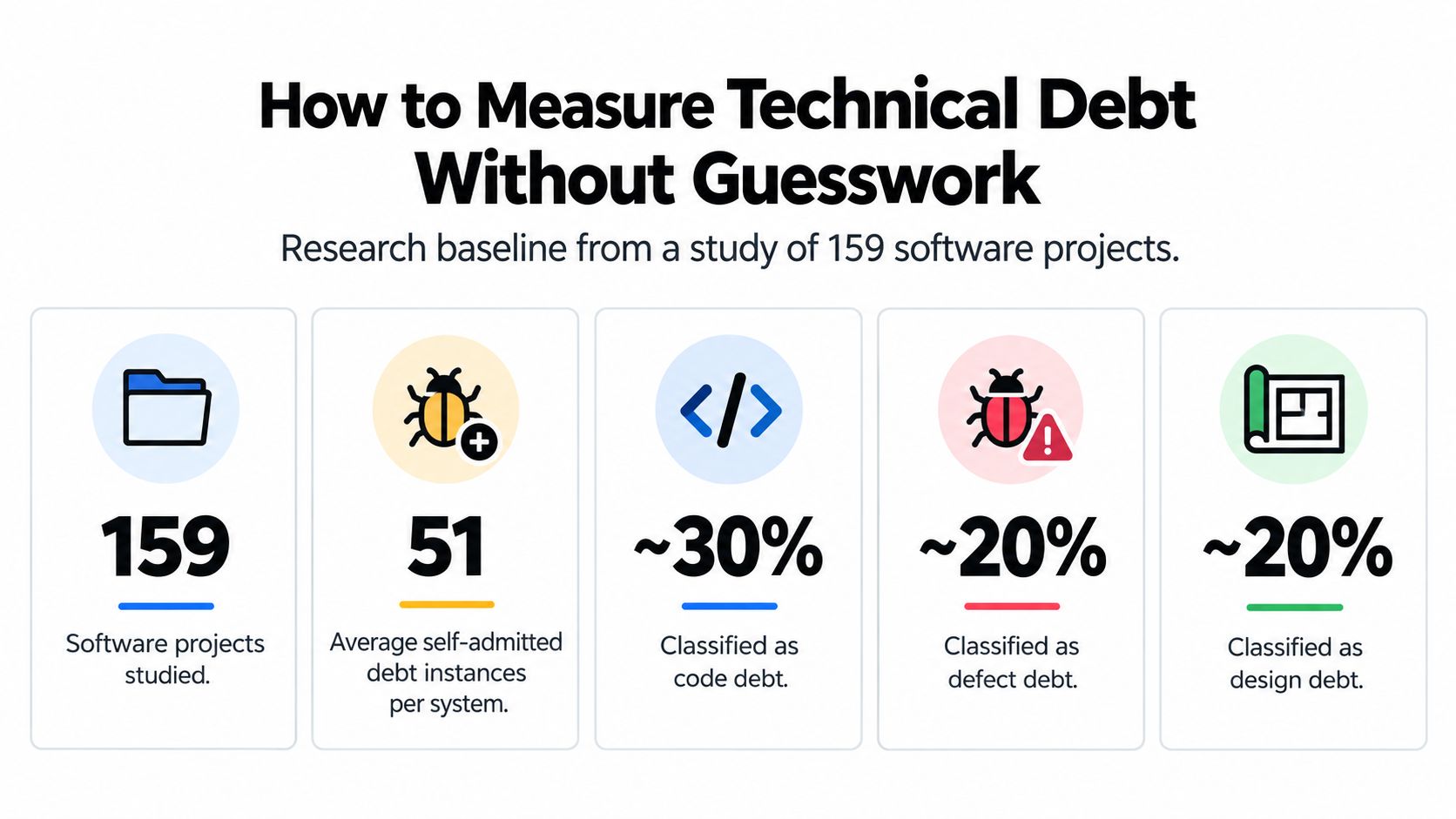
A team can't manage debt it can't see. Start by setting a baseline from your own repository and work records. The study of self-admitted technical debt across 159 software projects offers context for why teams record debt, but your own data should guide decisions about what to repay.
Begin with a simple inventory. Search code for TODO, FIXME, and HACK comments, then ask engineers to flag known shortcuts that lack a marker. For each item, record its location, the reason it was accepted, who owns it, and what would make repayment timely. A shortcut chosen to meet a launch date can be a sensible loan if the team can see it and has a way to pay it back. Unrecorded debt is harder to manage because nobody can tell whether it is safe to leave in place or secretly blocking change.
The infographic summarizes categories of debt discussed in the study. Use it as context, not as a target your codebase needs to match.
Seven Signals Worth Tracking
Technical debt signals and how to read them
| Signal | What it reveals | How to collect it | Reading guide |
|---|---|---|---|
| Remediation ratio | Cost to fix compared with cost to build | Fix hours divided by sprint hours for the module | Track the trend, not the absolute value |
| Self-admitted debt count | Shortcuts engineers already flagged | Search the codebase for TODO, FIXME and HACK | Rising count per module is a warning |
| Cycle time in debt-heavy modules | Slowdown in change | Compare planned and actual time per ticket, tagged by module | Compare against modules with no debt flags |
| Rework and workaround hours | Interest being paid now | Tag tickets that add workarounds or compensating tests | Hours per release should fall after repayment |
| Escaped defects and rollbacks | Quality risk reaching users | Count production bugs and rollbacks per module | A rising trend per release signals trouble |
| Change frequency | How often debt is touched | Count commits or pull requests per file per quarter | High churn raises the priority |
| Dependency age | Upgrade risk | Count major versions behind the current release | Two or more majors behind needs a plan |
Treat each signal as one clue, not a verdict. Remediation ratio estimates how much build time a fix would use. Rework hours show what the team already spends working around the problem. Change frequency helps estimate how often that cost may return. For a broader view of code quality measures for mobile codebases, use measures that fit the way your team builds and maintains its app.
No single metric gives a reliable debt score. Read the signals together and compare them across releases. A one-off spike may have a straightforward cause; a worsening pattern deserves investigation. Agree on a baseline, assign an owner to each recorded item, then review whether the measures change after repayment.
The short video below shows how these ideas can appear during a codebase review.
How to Prioritize Debt Against Feature Work
Start with the case that surprises people. A small fix in navigation code that changes every week can cost more over a year than a large cleanup in a settings screen nobody has opened in months. Size of the fix isn't the point. How often you pay interest is.
Two Established Measures
Postponing debt has a cost, and fixing it has a cost, so compare them the way you'd compare any feature against another. Research on technical debt measurement defines a debt ratio as remediation cost divided by development cost, while another approach estimates interest from the share of code expected to change in a year and the effort to repair it, as set out in the research defining debt ratio and interest estimation.
You don't need precise inputs to use this. You need honest estimates of three things: how often the code changes, how long repayment takes, and what breaks if you're wrong.
Repayment decision grid
| Change frequency | Remediation cost | Risk level | Recommended action |
|---|---|---|---|
| High | Low | Any | Fix in the next sprint |
| High | High | Low or moderate | Schedule a repayment item this quarter |
| High | High | High | Repay before the next release |
| Low | Low | Any | Fix when the file is next touched |
| Low | High | Low | Document it and accept it; revisit on a set trigger |
| Low | High | Moderate or high | Plan it on the roadmap; repay before the next release if it touches sign-in, checkout or offline paths |
Applying the Grid to a Mobile Roadmap
Postpone the analytics screen cleanup. It changes rarely, users barely see it, and the interest is close to zero. Schedule repayment in authentication, checkout, or navigation instead, because every sprint touches those paths and every sprint pays for their shortcuts.
For each item, record the affected components, change frequency, remediation hours, and release risk. Then review that list during roadmap planning, next to the features competing for the same engineers. That's what makes the trade-off defensible to a founder or a finance-minded stakeholder. Debt stops being an engineering complaint and becomes a priced option.
Debt in high-change paths accumulates interest faster. That's the whole prioritization rule in one sentence.
Finally, protect the plan with a capacity rule. Reserve a fixed share of each sprint for the top-ranked repayment items, and report repayment against that budget at each roadmap review. Without a protected share, repayment loses to feature pressure every single time, and the register becomes a list of good intentions.
Start a Debt Register This Week
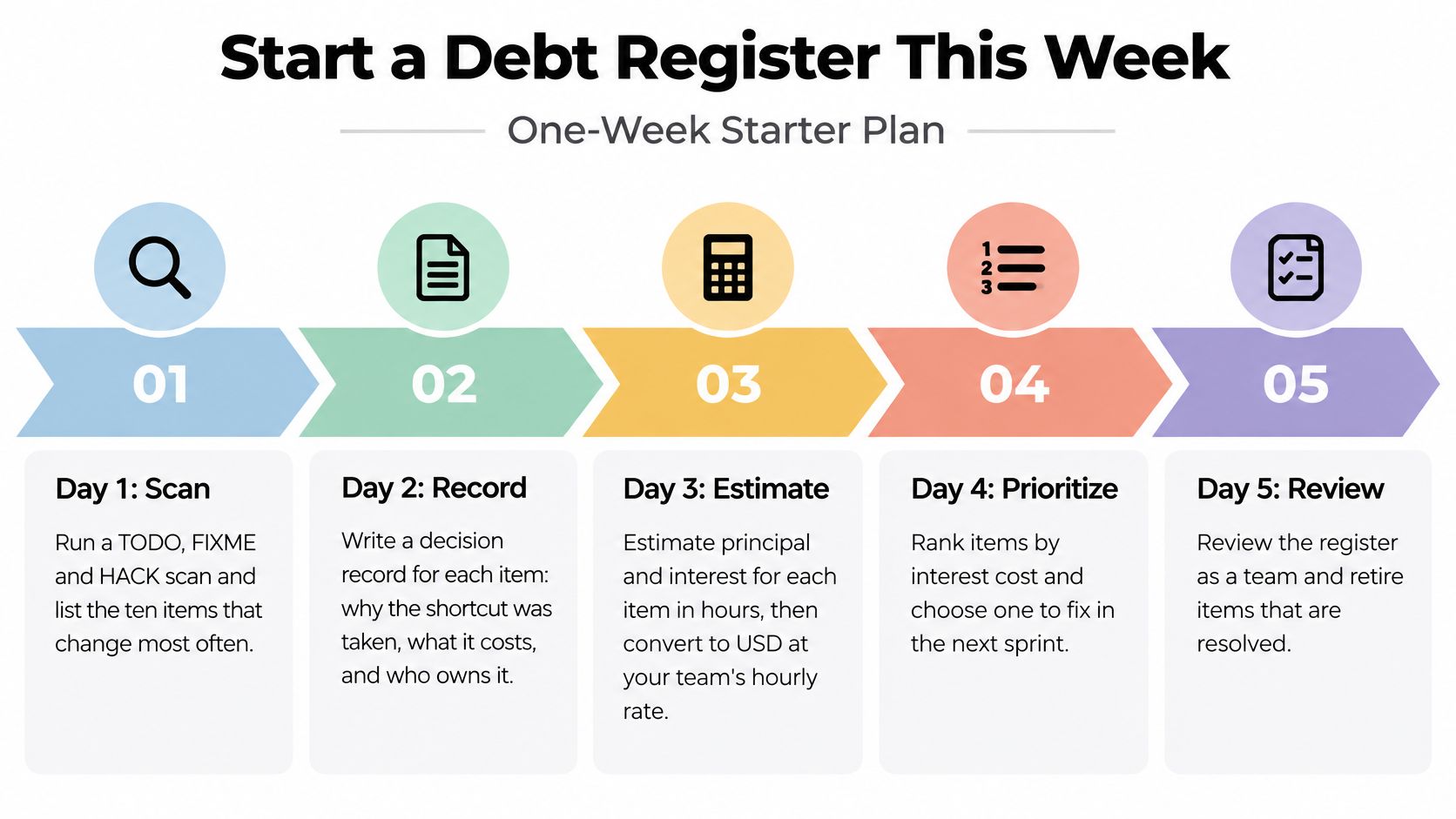
A shortcut that saves a release can be a sensible loan when the team records why it was taken, who owns repayment, and what will trigger it. An untracked shortcut is different: it can quietly block changes because nobody knows its cost or responsibility. You can start distinguishing the two with a shared list, rough estimates, and a regular review, all within a working week.
The infographic maps the five-day process. The six steps below fit into it: scan and document on day one, estimate and tag on day two, add guardrails on day three, review prototypes on day four, and choose a lifecycle metric on day five.
The Six Steps
- Scan for what engineers already flagged. Search the codebase for TODO, FIXME, and HACK comments. Start with ten items in files that change often. These are recorded shortcuts, so the team has a concrete starting point.
- Write a decision record for each item. Note why the shortcut was taken, what future work it creates, how its cost will show up, who owns repayment, and what event will trigger it. These fields turn an undocumented decision into something another engineer can understand and act on.
- Estimate remediation hours and tag the module. Rough estimates are enough to begin. A module tag lets the team compare the item with cycle time and defect data later.
- Add guardrails on critical paths. Set up linting and strict typing where they fit, and require automated tests for sign-in, checkout, and offline behavior. These checks help prevent new shortcuts from arriving faster than the team can repay existing ones.
- Review prototypes and generated screens before they become dependencies. Check component reuse, navigation boundaries, dependency versions, automated tests, accessibility behavior, and platform-specific code. A screen other features will rely on merits closer review than one built only for user testing.
- Track one lifecycle metric. Measure the time from first prototype to code that is owned, tested, documented, and changeable. Demo speed alone says little about the later work needed to maintain and extend that code.
Where Generated Code Fits in This
If you use a tool like RapidNative, exported React Native code lives in your own repository. Apply the same handoff review from step five that you would use for handwritten code. In the register, label exploratory prototypes separately from production code. That distinction helps prevent a screen made to test an idea from becoming the foundation for billing without anyone noticing.
A working demo and maintainable architecture are different things. Label the code's intended role, and the team can judge what review and ownership it needs.
Your First Action
Book 45 minutes this week with your lead engineer, product manager, and designer. Bring the scan results, fill in the register for the top ten items together, then select one high-frequency, low-cost item to repay in the next sprint. A completed repayment shows that the register records decisions the team will act on, not just concerns it will carry forward.
For mobile teams seeking prototype speed while keeping future work visible, RapidNative turns prompts, sketches, and PRDs into React Native code that can be exported to your repository and reviewed like other code. Generate screens, run the handoff checks before they become dependencies, and record any shortcuts while the list is still manageable.
Ready to build your app?
Turn your idea into a production-ready React Native app in minutes.
Free tools to get you started
Free AI PRD Generator
Generate a professional product requirements document in seconds. Describe your product idea and get a complete, structured PRD instantly.
Try it freeFree AI App Name Generator
Generate unique, brandable app name ideas with AI. Get creative name suggestions with taglines, brand colors, and monogram previews.
Try it freeFree AI App Icon Generator
Generate beautiful, professional app icons with AI. Describe your app and get multiple icon variations in different styles, ready for App Store and Google Play.
Try it freeFrequently asked questions
What is RapidNative?
RapidNative is an AI-powered mobile app builder. Describe the app you want in plain English and RapidNative generates real, production-ready React Native screens you can preview, edit, and publish to the App Store or Google Play.
Can I export the code?
Yes. RapidNative generates clean React Native and Expo code that you can export at any time. No lock-in, no proprietary format. Hand it to your developers or keep building inside RapidNative.
Is RapidNative free to use?
Yes. You can build apps on the free plan with no credit card required. Paid plans unlock unlimited AI generations, code export, and direct publishing to the App Store and Google Play.
Do I need to know how to code?
No. Most users build apps by describing what they want in plain English. Developers can drop into the code whenever they want more control, but coding is optional.
How long does it take to build an app?
Most users have a working first screen in under a minute. A full MVP usually takes a few hours instead of the weeks or months traditional development requires.