Creating a Product: Idea to Validated MVP Step by Step
Creating a product from idea to validated MVP: user research, RapidNative prototyping, testing gates, release checks and engineering handoff.
By Suraj Ahmed
24th Oct 2026
Last updated: 24th Oct 2026

A founder drops a link in the chat. The app looks finished. Onboarding, a home screen, settings, even a settings toggle nobody asked for. Someone asks when engineering can start. Creating a product at that moment usually means the team spent three weeks making screens nicer, not proving the problem is real. A polished prototype is a test artifact. It isn't demand, and it isn't a build order.
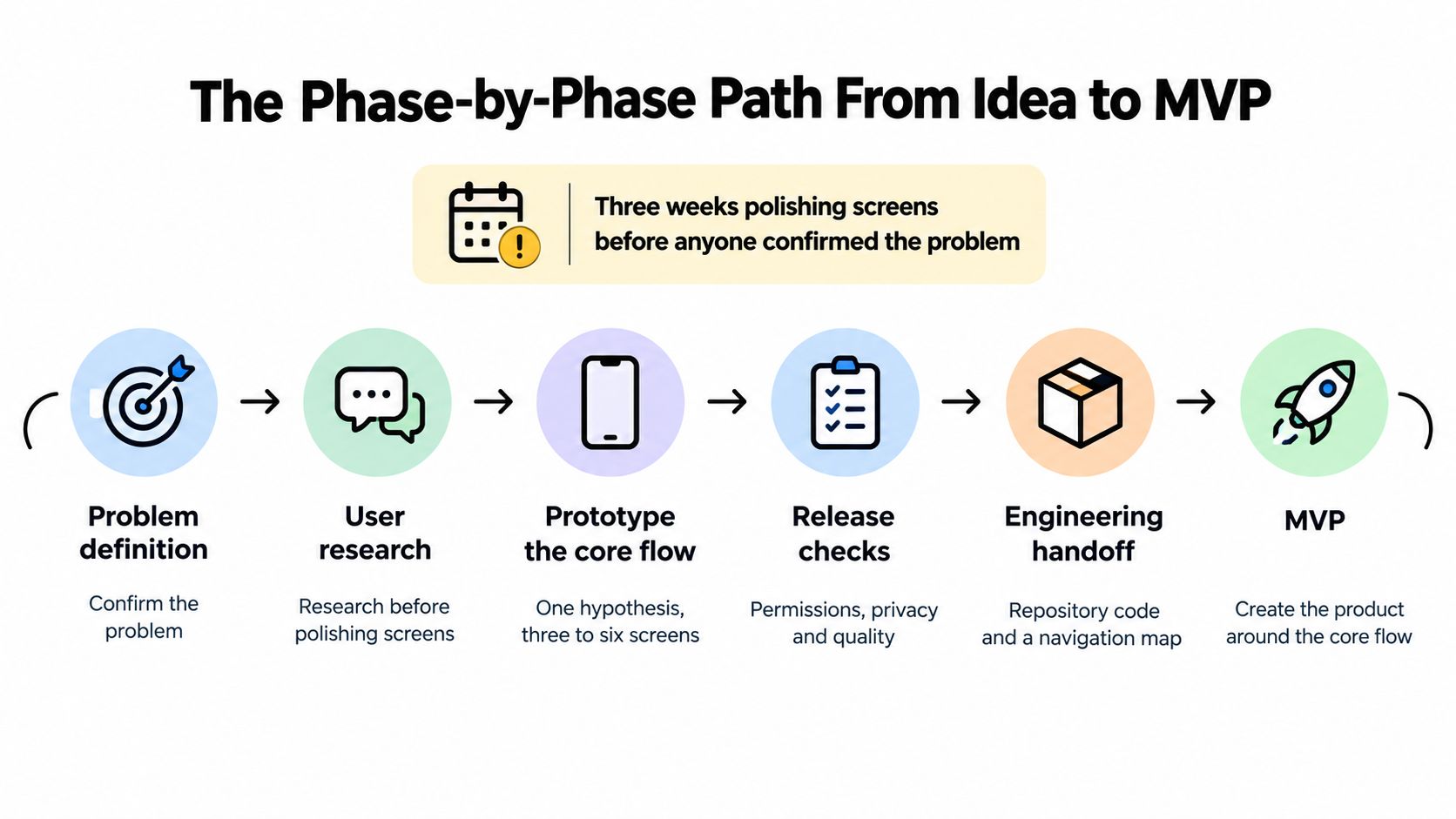
The Phase-by-Phase Path From Idea to MVP
A team can spend weeks refining screens while the problem remains unconfirmed. Each phase below answers a distinct question, produces evidence, and ends with a decision: proceed, revise, or stop. The phases can overlap, but the next investment should depend on what the current evidence supports.
| Phase | Question it answers | Output | Exit evidence |
|---|---|---|---|
| Problem definition | Who has this problem, and how often? | One-sentence problem statement and named target segment | Interviews confirm the problem in users' own words |
| User research | What do they do today, and where do they quit? | Interview notes and task map | The same pain point appears across interviews |
| Core-flow prototype | Does the main workflow make sense? | Clickable app for the core flow, shared by link | Target users can open and use the test-ready prototype on their phones |
| Testing | Can users finish the task without help? | Completion rate, time on task, critical errors | Unaided completion of 78% or higher on the core flow |
| Iteration | Which single change matters most? | Revised prototype and retest results | Retesting improves the target metric without adding errors |
| Handoff | Can engineering build from this without guessing? | Exported code, flow document, data and permission list | Engineering confirms the build plan and open questions |
Why the odds force a gate
Historical new-product research describes stage-gate work as roughly five execution stages separated by quality and investment decisions. That model does not require a five-phase product workflow. The six phases here make the work more operational: design, research, and engineering may overlap, while evidence still determines whether the team commits more time and budget. The research also reports that only about one in four projects fully succeeds, and about 33%–60% of launched products miss the economic return the team expected.
Map each phase to a decision
Use six phase gates, one for each row in the table. Problem definition produces problem evidence. User research tests target-user demand. The core-flow prototype checks whether the proposed workflow is testable, while Testing supplies the core-flow usability evidence. Iteration has no separate evidence gate: it acts on the test result, then returns the revised flow to testing. Handoff verifies technical feasibility and records evidence of willingness to adopt or pay before engineering receives the work.
For every gate, name an owner, an evidence threshold, the unresolved risk, and the next experiment. A polished prototype can create false confidence, stakeholder approval can displace observed user behavior, and features can pile up before the primary workflow shows value. Treat the prototype as a test artifact, not proof of demand.
Every phase ends with a gate, not a deadline.
Put the six phase gates and their evidence on one page before opening RapidNative.
Turning a Vague Idea Into One Testable Hypothesis
A meal-planning app for everyone gives a team too many problems to test at once. Families, athletes, and restaurant owners have different schedules, kitchens, and reasons to open an app. Start with rotating-shift workers. A defined audience makes recruitment and observation practical, and gives the team a basis for cutting screens that do not support its workflow.
Describe one person, the situation they face, how often it occurs, and the workaround they use now. Keep the bet to one line:
We believe [segment] in [situation] will [action] because [reason], and we will know when [metric] reaches [threshold].
A forecast is a hypothesis until users respond. Toyota set a monthly sales target of 5,000 units for the redesigned second-generation Prius in 2003. Global monthly sales topped 10,000, at least twice the target, according to Toyota's ten-year Prius note. Treat demand estimates the same way: as claims to test, not permission to build. Use this guide to validating a startup idea to shape the test before funding development.
Six steps for the shift-worker app
- Write the problem. Rotating-shift workers may spend a significant part of each week deciding what to cook and often default to takeout. Interviews should establish how much time this takes and what they do instead.
- Name who is out. Exclude families, athletes, and restaurant owners for this test. Keep the hypothesis focused on one segment.
- List assumptions. Workers will share a shift calendar, prefer a full week of meals to one dinner, and trust a generated plan. Each claim needs evidence.
- Rank assumptions by risk and cost of being wrong. Building around calendar sharing is costly if workers will not provide their schedules.
- Test the riskiest assumption first. Find out whether shift workers will share a schedule, even in rough form.
- Set one metric. For example, measure the share of recruited workers who accept a generated week-long plan. Set the threshold before testing.
A polished prototype is a test artifact, not proof of demand. Use the first version to check whether workers will share a schedule and accept a useful plan. Add optional calendar access only when evidence supports it. Leave family portions, macro targets, and restaurant mode out of this test; extra features can make a prototype look persuasive without resolving the main uncertainty.
Research Methods That Show What Users Actually Do
A freelance invoicing idea sounds obvious in a pitch. People say they want payment reminders. Sit with them and the story changes. They already chase late invoices by text. The job they can't finish is knowing who has paid, who promised Friday, and which thread is the source of truth. Reminders were the feature they named. Reconciliation was the work.
Recruit people who match the segment. Colleagues, friends, and the founding team will be polite and unrepresentative. A small team can run four methods in two weeks if each one asks about past behavior.
Start with problem interviews. Ask about the last time the problem happened, what they tried, and where they stopped. Don't ask whether they'd use your app. Then run a workaround audit. List the spreadsheets, texts, notes, and manual steps they already use. A screen or diary study over a few days shows the actual sequence, including the steps they forget in an interview. A concierge test delivers the value by hand before any app exists. For invoicing, that might be a human who replies each morning with who has paid. For the meal planner, it's a manual week of dinners emailed to shift workers.
What the notes have to show
Plan on five to eight participants in the segment, a script of past-behavior questions, and no pitching. If you need a wider scan of competitors and substitutes, fold it into app market research after the interviews, not instead of them.
Turn the notes into a task map with four columns. Trigger, what starts the job. Steps, what they do next. Workaround, the tool they already trust. Quit point, where they give up. Those notes are only useful as ground truth for AI training later if they describe what people did, not a feature list you prompted.
If the same pain shows up in most interviews, prototype. If it appears only when you suggest it, go back to discovery.
How to Prototype the Core Flow in RapidNative
The team has interviews pointing to one repeated job, but the first screen still leaves key choices unresolved. That is a reason to prototype the flow, not to fill the gap with features. For one hypothesis, keep the prototype to three to six screens. RapidNative can generate a starting point from an existing prompt, sketch, product requirements document, or whiteboard flow. Treat the result as a test artifact: generated screens can look complete while relying on plausible defaults no one has checked.
| Starting point | Best when | Check before testing |
|---|---|---|
| Prompt-to-app | A founder is testing a new idea quickly | Confirm the core flow matches the written hypothesis and no extra features were added by default |
| Image-to-app | A designer has sketches or screenshots of existing screens | Check labels, spacing, and missing states, including empty and error states |
| PRD-to-app | A PM has written requirements | Identify additions beyond the spec and contradictions between sections |
| Whiteboard-to-app | A team has mapped a flow in a workshop | Make sure decision points and branches have distinct screens and clear navigation |
Seven build steps
- Write the core flow in one sentence. For example: sign up, see a week of meals, and confirm they fit tonight's shift.
- Choose the input you already have. Use a prompt, sketch, short PRD, or workshop board. Avoid writing a longer spec just to make the work look complete.
- Generate a first version and inspect every screen. Compare each step with the hypothesis, not with the prototype's visual finish.
- Add or check missing states. Review empty, loading, error, and offline states. A happy path alone will not show where the flow breaks.
- Remove anything outside the core flow. Cut profile themes, social sharing, and features for other audiences.
- Open the prototype on a real phone using its link or QR code. A laptop preview cannot show how thumb reach and type size work on a handset.
- Co-edit with the team and label decisions. Record which choices the team made and which came from the generator.
Match fidelity to the test question. A usability test needs a clickable flow, not a polish pass. The short walkthrough below shows the generation and review process, from an initial input to a phone preview.
Plausible is not validated
A generator fills gaps with defaults that can look sensible without reflecting what users need. A polished screen may therefore create false confidence: it shows that a flow can be assembled, not that users want it or can complete it. The go/kill decision still depends on evidence from the people and task the hypothesis concerns.
Log each generated assumption about users, data, and logic. Mark it unverified, then identify how a test could check it. If a screen assumes what information a user has, what action they will choose, or how the system should respond, record that assumption before testing. Skipping the log creates validation debt, because the team may mistake its own design choices for confirmed requirements. Keep the prototype focused enough to test one hypothesis, and treat each phase as a gate: proceed only when evidence supports the next investment.
Testing, Measuring and Iterating the Prototype
A prototype can look finished and still fail at the point where users need to act. Set the test tasks and decision criteria before building, then use observed behavior to decide whether to proceed, revise, or stop. Prototype-testing guidance treats 78% or higher unaided task completion as a useful usability benchmark. Below that, examine and redesign the flow before spending time on visual polish. The same guide summarizes Nielsen's model as a directional rule: about five users can reveal roughly 85% of recurring usability problems. Treat that as a starting point, not a guarantee. A varied audience or a high-risk product may require more participants.
Test key tasks separately, including onboarding, permission handling, navigation, the primary value action, and error recovery. Track results by task so a strong performance in one part does not hide a failure in another.
| Metric | Benchmark | If it misses |
|---|---|---|
| Unaided task completion on the core flow | 78% or higher | Redesign the flow; restyling will not fix a broken path |
| Time on task | Compare against your own baseline across rounds | Cut or merge the step that adds the most time |
| Critical errors | Track by step and participant | Fix the step where errors cluster before adding anything new |
| Participants per round | About 5 for recurring problems | Add a round with more users if the segment is varied |
| Changes per retest | One high-impact change | Split the test so you can tell which change caused the result |
One change per round
Give each participant the same task and instructions. Then stay quiet. Record unaided completion, time on task, critical errors, and points of hesitation. If you explain a screen or guide someone through a step, mark the session as assisted rather than counting it as an unaided success.
For example, suppose a team is testing a shift-worker meal planner. In a hypothetical first round, five night-shift workers try to plan a week of dinners: two finish unaided, while three stall at a calendar-permission screen shown before any meal appears. The team moves the request until after the first plan is generated and gives a clear reason for asking. In an illustrative retest with five new shift workers, four complete the task unaided. These figures show how to reason through a test, not results from a reported study.
Change one high-impact source of friction per round, state the hypothesis behind the change, and retest with new users. Fast AI-assisted prototyping can make a weak flow look convincing; polish is a test artifact, not evidence of demand. Recruit people who match the target segment, score what they do rather than what they say they might do, and avoid changing several variables at once. If evidence remains weak after a focused iteration, stop or revisit the underlying hypothesis before handing the prototype to engineering.
Release Checks for Permissions, Privacy and Quality
Technical quality is a product requirement a founder can read, not a ticket engineering owns alone. Give every row an owner and a date before you call it an MVP.
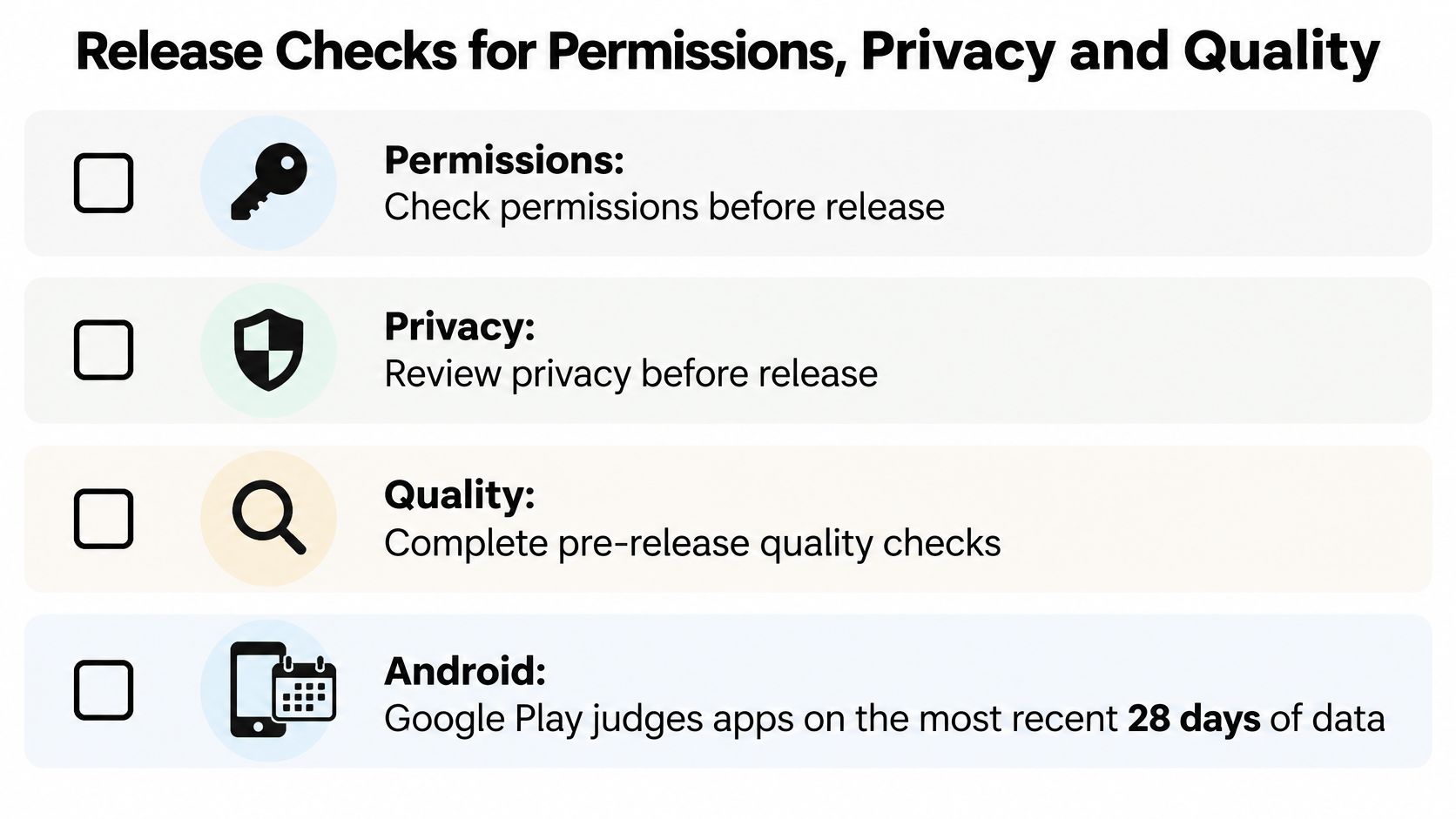
| Area | Requirement | Check before release |
|---|---|---|
| Quality (Android overall) | Crash rate below 1.09% and ANR rate below 0.47% over the last 28 days | Test on older phones your audience actually uses |
| Quality (per device model) | No device model above 8% for crashes or ANRs | Check each model your audience owns |
| Permissions (iOS) | Request data only when a feature needs it, with the reason stated first | Feature still works if the user declines |
| Privacy policy | Link in App Store Connect and inside the app | Policy covers collection, use and third-party sharing, including AI systems |
| Tracking (ATT) | Used only if personalized tracking is essential to the first use case | Otherwise left out of the MVP |
| Accessibility | Complicated layouts or navigation affected 46.4% of disabled respondents in a 2025 U.S. survey | Test dynamic text, captions, gesture alternatives, screen readers and orientation with disabled users |
| AI output | Generated assumptions kept separate from validated requirements | Exported code and dependencies reviewed, and a named person approves release |
What the thresholds are actually judging
Google Play's bad-behavior thresholds use the most recent 28 days. Overall user-perceived crashes at 1.09%, or ANRs at 0.47%, count as bad behavior. The per-phone-model line is 8% for both. Crossing them can hurt discoverability. A fitness app used on older Android phones can't be signed off on a developer's flagship alone.
On iOS, Apple's privacy guidance says to request only data a feature needs, and not before the person has shown interest. Location, contacts, camera, microphone, and health data are protected. Explain the reason before the system prompt, and keep a useful path if they decline. App Store review rules require a privacy-policy link in App Store Connect and inside the app, covering collection, use, and third-party sharing, including third-party AI, before explicit permission. App Tracking Transparency applies on iOS 14.5 and later if you track users or read the advertising identifier. If personalized ads aren't essential to first use, leave the prompt out of the MVP.
A 2025 U.S. survey of disabled respondents found complicated layouts or navigation affected 46.4% of them. Test dynamic text, captions, gesture alternatives, screen readers, and orientation with disabled users, not with a contrast checklist alone. Pair this table with an app QA checklist so each item has an owner and a date.
Hand Off to Engineering or Stop Before You Build
Handoff is a package, not a zip of screens. Engineering shouldn't have to guess which flow won the test.
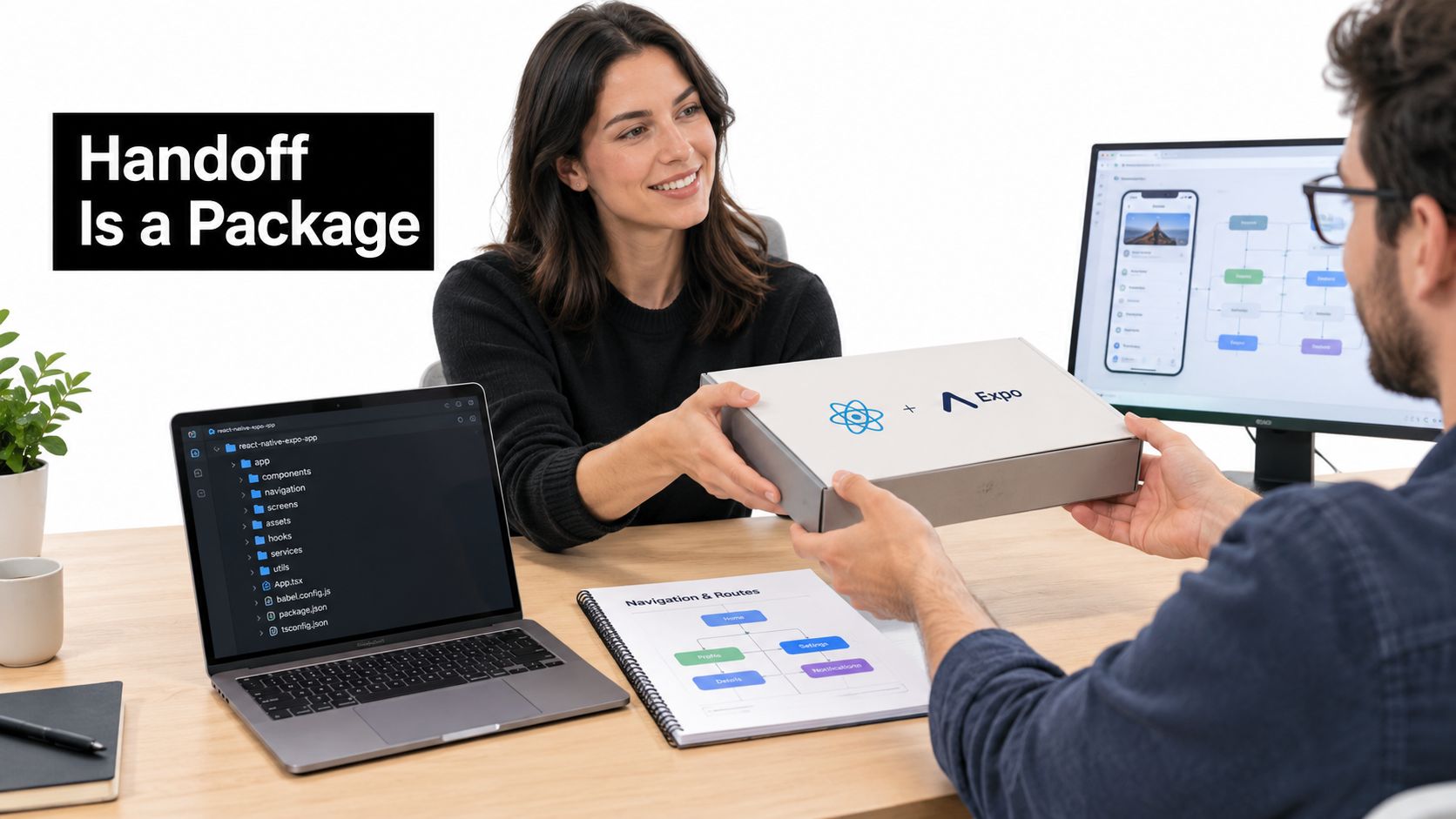
Put these in the package: exported React Native and Expo code in your repository; a navigation map of every screen and route; reusable components and their names; data and API needs per screen; acceptance criteria for each core flow, taken from the test results; the list of devices you tested; and open questions with owners. RapidNative exports clean, modular code without lock-in, so the team can review and extend it in their own repo.
Go only when every gate on the sheet has evidence and the core flow clears the unaided-completion bar. Otherwise iterate or stop.
Go when each gate has an owner, a threshold, and evidence, and the core flow cleared that bar with target users. Technical feasibility and a willingness to adopt or pay are included, not assumed because the UI looks done.
Iterate when one usability or quality metric misses and one specific change could fix it. Don't open a feature pile. Retest that change with new users.
Stop when several honest rounds still show no demand. Stopping is a valid outcome. It's cheaper than building the wrong product and calling the sunk time momentum.
This week, build one core flow, test it with five target users, record the gate results, and make the go, iterate, or stop call with the team in the room.
RapidNative turns a prompt, sketch, image, or PRD into a shareable React Native and Expo flow you can open on a phone and hand to engineering as real code. Use it to test one hypothesis before you fund a full build, with the gate sheet from this article as the filter. When the core flow is ready to try with target users, build it in RapidNative.
Ready to build your app?
Turn your idea into a production-ready React Native app in minutes.
Free tools to get you started
Free AI PRD Generator
Generate a professional product requirements document in seconds. Describe your product idea and get a complete, structured PRD instantly.
Try it freeFree AI App Name Generator
Generate unique, brandable app name ideas with AI. Get creative name suggestions with taglines, brand colors, and monogram previews.
Try it freeFree AI App Icon Generator
Generate beautiful, professional app icons with AI. Describe your app and get multiple icon variations in different styles, ready for App Store and Google Play.
Try it freeFrequently asked questions
What is RapidNative?
RapidNative is an AI-powered mobile app builder. Describe the app you want in plain English and RapidNative generates real, production-ready React Native screens you can preview, edit, and publish to the App Store or Google Play.
Can I export the code?
Yes. RapidNative generates clean React Native and Expo code that you can export at any time. No lock-in, no proprietary format. Hand it to your developers or keep building inside RapidNative.
Is RapidNative free to use?
Yes. You can build apps on the free plan with no credit card required. Paid plans unlock unlimited AI generations, code export, and direct publishing to the App Store and Google Play.
Do I need to know how to code?
No. Most users build apps by describing what they want in plain English. Developers can drop into the code whenever they want more control, but coding is optional.
How long does it take to build an app?
Most users have a working first screen in under a minute. A full MVP usually takes a few hours instead of the weeks or months traditional development requires.