How a No Code AI App Builder Can Get Your Mobile App to Market Faster
Discover how a no code AI app builder turns ideas into reality. This guide covers how they work, key features, and choosing the right platform for your project.
By Parth
10th Feb 2026
Last updated: 10th Feb 2026
So, you have a great idea for a mobile app. Now what? Traditionally, the next step involved a long, expensive journey of hiring developers, translating your vision into technical specs, and waiting weeks—or months—just to see a working prototype.
A no code AI app builder changes that equation entirely. It’s a new breed of tool designed for product teams that lets you create a real, functional mobile app simply by describing what you want. You can use plain English, upload a quick sketch, or even connect your Figma designs, and the AI generates the code for you.
This isn't about replacing developers. It's about empowering founders, product managers, and designers to build, test, and validate ideas at the speed of thought.
What Is a No-Code AI App Builder, Really?
Imagine sitting down with a senior mobile engineer. You explain your app concept, maybe sketch a user flow on a whiteboard, and they immediately start building a working version. That's the practical experience a no-code AI app builder provides. It acts as your on-demand engineering partner, turning ideas into a tangible product in minutes, not months.

Think of it as a specialized translator for your product team. You provide the vision in a format you already use—whether that's a simple text prompt ("Create a login screen with Google and Apple sign-in options") or a polished Figma design. The AI then translates that input into clean, production-ready code, like React Native, that runs on both iOS and Android devices.
This fundamentally changes the path from idea to launch. The old process was slow, sequential, and full of handoffs. The new way is direct and nearly instant, removing the technical barrier that so often stalls great ideas.
Bridging the Gap Between Idea and a Testable Product
This is a game-changer for non-technical founders, PMs, and designers. In the past, building even a simple prototype to test a feature was a significant investment of time and money, requiring total reliance on the engineering team. This created a bottleneck where just validating an idea was slow and costly.
A no-code AI app builder flattens that timeline.
It gives product teams the power to:
- Build without code: Go straight from a concept in a product spec to an interactive prototype without writing a single line of code.
- Validate ideas in hours: Test user flows and get real feedback on a working app in a single afternoon, not over several sprints.
- Align the entire team: Miscommunication between design, product, and engineering drops significantly when everyone can see, touch, and interact with a live version of the product from day one.
The real value of these tools is how they make app creation more accessible and collaborative. It’s not about avoiding code forever. It’s about giving product teams the ability to iterate on ideas at lightning speed, ensuring the final product is validated and polished before major engineering resources are committed.
A Practical Analogy for App Building
If traditional drag-and-drop builders are like using LEGOs—you can only build with the specific blocks they give you—then a no-code AI app builder is like having a 3D printer for your app. You just provide the blueprint (your idea), and the AI builds the exact components and screens you need, perfectly customized to your vision.
This approach offers far more flexibility than pre-made templates, ensuring the final product is a much closer match to your original idea. You can learn more about how to create an app without coding using these modern methods.
Ultimately, these platforms empower everyone on a product team to be a builder. They dramatically accelerate the early stages of creation, from brainstorming and prototyping to getting stakeholder buy-in with a functional demo they can actually use on their phones.
How AI Is Fixing the Problems of Old No-Code Tools
For years, product teams had two choices: code everything from scratch or use a traditional drag-and-drop no-code tool. Those early platforms made a big promise of speed, but teams often found themselves trading one problem for another. They were great for simple projects, but they hit a wall the moment you needed something custom.
Many teams who went all-in on traditional no-code eventually got stuck. The very tools that were supposed to give them freedom ended up trapping them.
The Frustrations of Traditional No-Code Platforms
The promise of early no-code was speed, but that speed often came with serious trade-offs. Most product teams eventually ran into one of these classic roadblocks that killed their momentum and budget.
- The 'Feature Ceiling': You can move fast… until you can’t. The moment your product needs a unique feature, a custom API integration, or a non-standard UI element, you slam into a hard ceiling. The platform's pre-made components simply can't do what you need, and innovation grinds to a halt.
- Vendor Lock-In: Your app isn't truly yours. It lives and dies inside a closed, proprietary system. You can’t export the code, host it yourself, or hand it off to your engineering team to extend. If the platform changes its pricing or shuts down, your product is at risk.
- The "Throwaway" Prototype: When a no-code project finally outgrows the platform, all that work often ends up in the trash. Engineers can't use the proprietary output, forcing them to rebuild the entire application from scratch. All that time and effort spent on the prototype? Wasted.
These issues made it clear that product teams needed a better way—something that combined the speed of visual building with the power and flexibility of real code. This is where the modern no code AI app builder comes in, and it’s built on a completely different philosophy.
The AI-Native "Code-First" Approach
Instead of hiding code behind a wall, AI-native builders generate clean, human-readable code that you own from day one. The AI acts as an expert co-pilot, not a black box. This small shift in philosophy completely changes the game for product teams.
The goal is no longer to avoid code, but to use AI to generate high-quality, production-ready code that accelerates the entire development lifecycle for everyone on the team—from the founder to the lead engineer.
This isn't just a niche trend; it's a massive shift in how software is being built. The global low-code/no-code market is projected to skyrocket, with some reports like the explosive growth of no-code platforms on Fortune Business Insights showing massive growth potential.
This AI-powered approach unlocks a powerful new workflow. A PM can paste in a user story, and an AI can generate the first set of screens. A designer can import a Figma file, and the AI translates it directly into an interactive prototype. But here’s the key: a developer can then take that generated code—written in a standard framework like React Native—and immediately start adding complex business logic. There's no vendor lock-in, no rebuilding from scratch, and no wasted effort. It creates a seamless path from a non-technical idea to a fully-engineered product.
Key Features Your Product Team Needs in an AI App Builder
While "AI-powered" sounds great in a sales pitch, it's the specific features that determine whether a tool will actually help your team ship faster. A modern no code AI app builder is more than a simple code generator. It's a collaborative platform designed to get you from a rough concept to a production-ready codebase without the usual friction.
Let's break down the core features that define these next-generation platforms and what they mean for your team's day-to-day workflow.
Multi-Modal Inputs: Build from What You Have
The best AI app builders meet your team where they are by accepting ideas in multiple formats. This flexibility is what allows them to integrate into your existing creative process without forcing everyone to adopt a new, rigid system.
You can typically start building with:
- Text Prompts: Simply describe a screen or feature in plain English. For example, "Create an onboarding screen with a logo, a title that says 'Welcome!', and a 'Get Started' button." The AI translates your words into a UI.
- Images or Sketches: Have a whiteboard drawing or a wireframe sketched on a notepad? Upload a photo. The AI uses computer vision to analyze your design and turn it into a functional layout.
- Design Files: Import your designs directly from tools like Figma. The platform intelligently converts your pixel-perfect designs into interactive app screens, preserving styles and components.
This multi-format approach means anyone on the team can contribute. A product manager can use a spec, a founder can use a sketch, and a designer can use a polished UI—all leading to the same result: a working app.
Live Previews and Real-Time Collaboration
Building an app is a team sport, and modern AI tools are built for that reality. Think of them as a Google Doc for app creation, where everyone can see the product come to life in real time. When a designer tweaks a component or a PM adjusts a text prompt, the rest of the team sees the changes instantly.
Even better, you can test your creation on a real device almost immediately. A quick QR code scan pushes a live, interactive preview straight to any iOS or Android phone. This allows you to get immediate feedback from stakeholders or run quick usability tests with users within minutes of making a change.
The ability to go from a text prompt to a testable app on a real phone in under a minute is a superpower for product teams. It closes the gap between imagination and reality, enabling rapid validation of user flows and UI concepts before committing engineering resources.
Production-Ready Code Export: Your Exit Strategy
This is the most critical feature. It's what truly separates modern AI builders from the walled gardens of traditional no-code. The end goal isn't to lock you into their platform; it's to give your development team a massive head start. At any point, you should be able to export the entire application as clean, human-readable code.
Top-tier platforms generate code in industry-standard frameworks like React Native. This means your engineering team gets a high-quality codebase they can immediately understand, build upon, and integrate into their existing CI/CD pipeline. Many of these builders are now leveraging Large Language Models to ensure the generated code is not just functional, but also well-structured and maintainable.
This "export-first" philosophy is a game-changer. It completely eliminates vendor lock-in and ensures your project is future-proof.
Here’s a summary of how these features support your team:
Essential Features of No Code AI App Builders
A breakdown of key capabilities and their direct impact on the product development lifecycle for founders, PMs, designers, and developers.
| Feature | What It Does | Why It Matters for Your Team |
|---|---|---|
| Multi-Modal Input | Accepts text prompts, images, sketches, and design files to generate app UIs. | Empowers everyone to build. Founders can use prompts, PMs can use docs, and designers can use Figma files, streamlining the idea-to-app process. |
| Real-Time Collaboration | Allows multiple team members to edit and view the app simultaneously, like in a Google Doc. | Reduces miscommunication. It aligns product, design, and engineering by providing a single source of truth that everyone can interact with live. |
| Instant Device Preview | Generates a shareable link or QR code to run a live, interactive version of the app on any phone. | Accelerates feedback cycles. You can test user flows and get stakeholder buy-in on real devices within minutes of making a change. |
| Clean Code Export | Generates and allows you to download the complete, production-quality source code (e.g., React Native). | Eliminates vendor lock-in. Your app is truly yours, ready for handoff to developers for advanced features and long-term maintenance. |
These features work together to create a faster, more collaborative, and far more flexible way to build mobile apps.
Real-World Use Cases for Your Product Team
Theory is great, but how does this actually work day-to-day? A no code AI app builder isn't just a futuristic concept; it's a practical tool that solves common bottlenecks for busy product teams. Whether it's a founder trying to get an idea off the ground or a designer testing a new user flow, these tools can have an immediate impact.
Let’s look at some real-world examples of how different members of a product team can use these tools to move faster.
For the Startup Founder: Validate an Idea Over a Weekend
You have a great app idea, but the old path meant raising capital, hiring a dev shop, and waiting months for a V1. With a no code AI app builder, that whole process can shrink to a single afternoon.
Here’s a practical workflow:
- Sketch to Prototype: Take a photo of your whiteboard drawing and upload it. The AI analyzes the layout and generates the corresponding screens and components.
- Refine with Prompts: Now, iterate using plain English. Type commands like, "Add a user profile icon to the top right of the home screen," or "Change the primary button color to #5A45FF," and watch it happen instantly.
- Share and Test: Within minutes, you have a clickable prototype. You can generate a shareable link to send to potential investors or a QR code for early users to test on their phones.
This allows you to validate your core assumptions and gauge market interest before writing a single check to a developer—a massive competitive advantage.
For the Product Manager: Secure Buy-In with a Live Demo
As a Product Manager, getting stakeholders to fully grasp a 20-page product requirements document (PRD) is a challenge. Static mockups often fail to capture the user experience, leading to confusion and endless revision cycles down the line.
A no code AI app builder changes that dynamic completely. Instead of just presenting your PRD, you can bring it to life.
By feeding key user stories from the PRD to the AI, a PM can generate a functional prototype that demonstrates core user journeys. This transforms a dry planning document into a live, interactive experience that stakeholders can actually use on their phones, making it far easier to get alignment and secure resources.
Suddenly, everyone from marketing to engineering is on the same page. The conversation shifts from "What did you mean by this?" to "This flow feels great, but what if we move this button here?" It helps you get to the important feedback faster.
For the Designer: Test User Flows in Minutes, Not Days
Designers spend hours crafting pixel-perfect mockups in tools like Figma. But a beautiful static design can only tell you so much. You never really know if a user flow is intuitive until someone interacts with it on their phone.
This is where a no code AI app builder becomes an essential part of the modern design toolkit.
- Figma to Live App Instantly: A designer can import their Figma file, and the AI converts the static screens into a fully interactive mobile app, automatically wiring up navigation and tappable elements.
- Run Realistic User Tests: Forget clunky prototyping tools. The designer can send a simple link to testers and get high-quality feedback on the actual user experience on a real device, not just a simulation.
- Iterate on the Fly: When feedback comes in, the designer can make quick changes directly in the AI builder or update the Figma file and re-import. This creates a tight feedback loop, cutting iteration time from days to minutes.
This workflow bridges the gap between static design and real-world usability, allowing designers to validate their work faster and deliver a more polished, user-tested product to engineering.
How to Choose the Right No Code AI Tool for Your Team
The market for AI development tools is growing fast, and it can be hard to tell which platform is the right fit. This isn't just about picking the tool with the most features; it's a strategic decision that will impact your project's flexibility, scalability, and ultimately, who owns your work.
When evaluating a no code AI app builder, you need to look beyond the promise of speed and ask critical questions about the long-term health of your product. The no-code market is projected to hit $187 billion by 2030, so picking the right partner is more important than ever. You can explore detailed no-code market growth statistics to see the full picture.
You need a clear framework to cut through the marketing noise and focus on what truly matters for your team.
Walled Gardens vs. Open Platforms: The Critical Difference
The biggest distinction between no-code AI tools comes down to one question: Do you own the code? The answer splits the market into two categories, and your choice has massive implications for your project's future.
-
Walled Gardens (Traditional No-Code): These are closed, proprietary systems. You build your app inside their ecosystem, using their components, and it stays there. They are often easy to start with, but they come with a huge catch: you can't export clean, usable source code. The moment you outgrow the platform or need a custom feature it doesn't support, you're trapped. Your only choice is to start over and rebuild everything from scratch.
-
Open Platforms (AI-to-Code Builders): These tools operate on a different philosophy. They use AI as a co-pilot to generate high-quality, production-ready code in standard frameworks like React Native. The platform is a launchpad, not a cage. You can export the entire, human-readable codebase at any time, giving your engineering team a solid foundation to take over and build upon.
The core trade-off is between short-term convenience and long-term freedom. A walled garden might seem easier at first, but an open platform ensures your work is an asset you own and can scale indefinitely, preventing the costly "no-code rewrite" that plagues so many growing products.
Key Questions to Guide Your Decision
To make an informed choice, evaluate potential tools based on what actually matters for a real product team. Focus on these three critical areas.
-
Can I Export Production-Ready Code? This is the most important question. For any serious project, the answer must be yes. If a platform doesn't give you full ownership of your code, it's a non-starter for anything beyond a simple hobby project. Look for tools that are explicit about your ability to export the complete codebase without restrictions.
-
Is the Code Built on an Industry-Standard Framework? Just getting code isn't enough; the quality of the code matters. A tool that generates code in a popular, well-supported framework like React Native is far more valuable than one that outputs proprietary or obscure code. This ensures your developers can easily understand, maintain, and extend the app. Our guide on what software to build apps with explores why this is so critical.
-
Does It Support Real-Time Team Collaboration? Building an app is a collaborative process. The best tools are designed to be a central hub where founders, PMs, designers, and developers can work together. This eliminates endless email chains and ensures everyone is aligned around a single, interactive version of the product.
Choosing the right no code AI app builder is about finding a true partner for your product's entire lifecycle. By prioritizing code ownership, standard frameworks, and genuine team collaboration, you'll select a tool that helps you move faster today without creating technical debt for tomorrow.
Building Your First AI-Generated App: A 4-Step Guide
Let's move from theory to practice. You understand what a no-code AI app builder is and why it's a valuable tool for your team. Now it's time to actually build something. This simple, hands-on workflow will take you from a blank slate to a working app you can test on your phone.
The goal here isn't perfection on the first try. It’s about building momentum and proving that you can go from an idea to a testable prototype in a single session.
A Simple Four-Step Workflow
Getting your first app off the ground is much easier than you might think. This process is designed to remove the traditional barriers, so anyone on your team can contribute—no coding experience required.
-
Start with a Clear Input Begin with whatever you have. It could be a simple text prompt like, "Create a user login screen with a logo, email and password fields, and a sign-in button." It could be a photo of a whiteboard doodle from a brainstorming session or a polished design from Figma. The key is to give the AI a clear starting point.
-
Let the AI Generate the First Draft Once you provide your input, the AI gets to work. It will interpret your prompt, sketch, or design and generate the screens, components, and basic navigation in seconds. This gives you a tangible first version of your app to work with.
-
Collaborate and Refine in Real Time Now, invite your team. A product manager can jump in to tweak user flows by editing prompts, a designer can adjust the UI, and stakeholders can see the vision come to life. Everyone can work on the project simultaneously, making changes and seeing the results instantly.
-
Preview Instantly on a Real Device This is where the magic happens. Scan a QR code to push a live, interactive preview of the app directly to your phone. This makes user testing and getting stakeholder feedback incredibly simple. It closes the gap between building something on a screen and understanding how it actually feels to use. For a deeper look, our full guide on how to build a mobile app covers this process in more detail.
This decision tree can help you visualize the process of choosing the right tool. It boils the choice down to a few key questions about code ownership, development standards, and team collaboration.
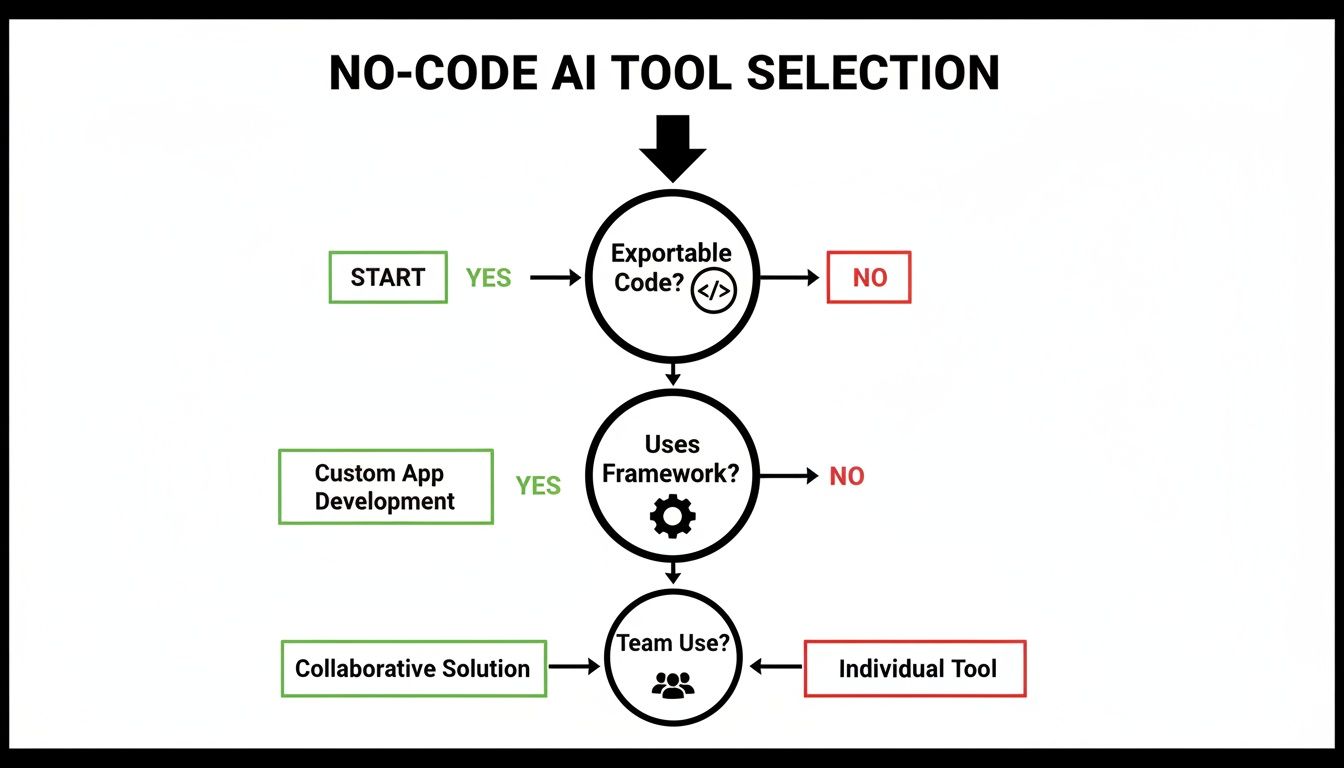
Ultimately, the best tools are the ones that give you an exit path. Having the ability to export clean code means your project can grow and evolve without being trapped on a single platform.
Your Questions About No-Code AI Builders, Answered
Adopting any new tool comes with questions. Product teams need to be confident they're choosing a platform that not only helps them start fast but can also support their product as it grows and scales.
Let's address the most common questions head-on.
Can I Build a Complex, Scalable App with This?
Yes, absolutely—the key is to understand the workflow. A modern no-code AI app builder excels at generating the front-end (the user interface) of your app at incredible speed.
For more complex back-end logic, custom databases, or proprietary APIs, the solution is simple: you connect the AI-generated front-end to your own custom back-end. This hybrid approach gives you the best of both worlds:
- Rapid UI Development: Build, test, and iterate on user-facing screens in minutes, not weeks.
- Total Back-End Control: Your engineering team retains full control over the core logic, data, and infrastructure of your application.
This means you can build a robust, scalable product without sacrificing power or flexibility.
What Happens If We Outgrow the Platform?
This is the most critical question, and it's where modern AI-native builders are completely different from older no-code tools. The best platforms are built with an "export-first" philosophy. You are never trapped.
At any point, you can export the entire, clean, human-readable codebase. Because the code is generated in a standard framework like React Native, there is zero vendor lock-in. Your project is a portable asset, ready to be moved into your team's development environment whenever you choose.
This freedom ensures that your initial work is never wasted and can evolve into a mature, enterprise-grade application.
Do I Need to Be a Developer to Use These Tools?
Not at all. These platforms are designed specifically for non-technical members of the product team—founders, product managers, and designers.
If you can describe your app in a sentence, sketch a wireframe on a napkin, or create a design in Figma, you have everything you need to build a working application. This shift truly democratizes app creation, empowering anyone with a great idea to build and test it themselves, without writing a single line of code.
Ready to turn your idea into a real app in minutes? RapidNative is a collaborative, AI-native builder that generates production-ready React Native code from your prompts, sketches, or designs. Experience the future of app development today.
Ready to build your app?
Turn your idea into a production-ready React Native app in minutes.
Free tools to get you started
Free AI PRD Generator
Generate a professional product requirements document in seconds. Describe your product idea and get a complete, structured PRD instantly.
Try it freeFree AI App Name Generator
Generate unique, brandable app name ideas with AI. Get creative name suggestions with taglines, brand colors, and monogram previews.
Try it freeFree AI App Icon Generator
Generate beautiful, professional app icons with AI. Describe your app and get multiple icon variations in different styles, ready for App Store and Google Play.
Try it freeFrequently asked questions
What is RapidNative?
RapidNative is an AI-powered mobile app builder. Describe the app you want in plain English and RapidNative generates real, production-ready React Native screens you can preview, edit, and publish to the App Store or Google Play.
Can I export the code?
Yes. RapidNative generates clean React Native and Expo code that you can export at any time. No lock-in, no proprietary format. Hand it to your developers or keep building inside RapidNative.
Is RapidNative free to use?
Yes. You can build apps on the free plan with no credit card required. Paid plans unlock unlimited AI generations, code export, and direct publishing to the App Store and Google Play.
Do I need to know how to code?
No. Most users build apps by describing what they want in plain English. Developers can drop into the code whenever they want more control, but coding is optional.
How long does it take to build an app?
Most users have a working first screen in under a minute. A full MVP usually takes a few hours instead of the weeks or months traditional development requires.