Choosing the Best Software to Build Apps
Discover the best software to build apps for your project. Our guide compares traditional code, no-code, and AI builders for founders, PMs, and developers.
By Rishav
31st Jan 2026
Last updated: 31st Jan 2026
Picking the right software to build apps isn’t about finding a single "best" tool. It's about matching the right approach to your team, your budget, and what you’re trying to build. Are you a founder trying to quickly test a new idea with a prototype, or are you an established product team building a high-performance app meant to scale for years? The answer dramatically changes your path.
Choosing Your App Development Path
The first real decision you'll make when building an app is how you're going to build it. The landscape has moved far beyond just hiring a team of engineers to code everything from scratch. Today, founders, product managers, and designers have to weigh the pros and cons of three very different ways of working.
This guide is designed to walk you through those choices, helping you land on a strategy that fits your immediate needs without boxing you in later. With the global mobile application market projected to hit USD 1,230.23 billion by 2035, the pressure is on to build faster and smarter. The right tool is your biggest advantage. You can explore the detailed market projections from Precedence Research here.
Understanding the Three Core Approaches
Each category of app-building software serves a different purpose. Picking the wrong one early on can lead to frustrating dead-ends, blown budgets, and a product that can't grow with your business.
- Traditional Code: This is the ground-up, hands-on-keyboard approach using languages like Swift for iOS or cross-platform frameworks like React Native. It gives you total control but is the slowest and most expensive path.
- No-Code Platforms: These are visual builders. Think drag-and-drop interfaces that let people without a technical background piece together functional apps. They're all about speed but come with major limitations.
- AI-Native Builders: This is the newer, hybrid model. These tools use AI to turn text prompts or design files into actual, production-ready code, aiming for the best of both worlds—the speed of no-code with the quality of traditional development.
Every product team is constantly trying to balance speed with quality. The software you choose sits right at the center of that trade-off, dictating how fast you can launch and how far you can scale.
To help you get your bearings, the table below offers a quick snapshot of these three paths. Each has its place, and figuring out which one aligns with your project is the first critical step. If you want to dig deeper, our complete overview of different types of app creation software is a great next read.
App Building Approaches at a Glance
This table breaks down the essentials of each category to help you quickly identify which path might be the best fit for your project.
| Approach | Ideal For | Key Benefit | Primary Limitation |
|---|---|---|---|
| Traditional Code | Complex, mission-critical systems and high-performance apps where customization is paramount. | Unrestricted control over features, performance, and security. | High cost, long development timelines, and requires specialized engineering talent. |
| No-Code/Low-Code | Non-technical founders validating an idea with a simple prototype or building a basic internal tool. | Extremely fast prototyping and low initial barrier to entry. | Platform lock-in, scalability ceilings, and limited customization options. |
| AI-Native Builder | Product teams (PMs, designers, founders) who need to build high-fidelity prototypes or MVPs with real code. | The speed of no-code with the quality and ownership of an exportable codebase. | Primarily focused on frontend UI/UX, requiring developers for backend integration. |
As you can see, the "right" choice isn't universal. A founder building a simple MVP to test an idea has very different needs than a large enterprise building its flagship banking app. Understanding where you fit is everything.
Comparing the Three Types of App Building Software
Picking the right software to build apps is really about understanding the trade-offs between speed, control, and what your app can become down the road. Let's cut through the marketing noise and get into what actually separates these different approaches, focusing on how they play out in the real world for product teams.
Each path you can take—traditional code, no-code, and the new AI-native route—comes with its own set of strengths and weaknesses that will directly shape your project's timeline, budget, and future potential.
Traditional Code: The Path of Total Control
When you need absolute control and customization, traditional coding is the way to go. This means writing code from the ground up, either with native languages like Swift for iOS and Kotlin for Android or using cross-platform frameworks like React Native to share a single codebase.
Real-world use case: Imagine building a high-frequency stock trading app. Every millisecond of performance counts, and security has to be ironclad. You need fine-grained control over network requests and custom UI animations that can't be done with a template. This is where you need to write your own code.
But that power doesn't come cheap. It demands a team of specialized, expensive engineers and a much longer development cycle. For a startup, choosing this path for an initial MVP could mean spending 6-9 months and over $100,000 just to get a first version in front of users. That kind of timeline can be a death sentence for an early-stage company that needs to learn and adapt quickly.
No-Code and Low-Code: The Path of Maximum Speed
Platforms like Bubble, Adalo, and Glide completely changed the game by making app creation possible without writing code. Their visual, drag-and-drop interfaces let non-technical founders and product managers piece together functional apps in days or weeks, not months.
Real-world use case: A founder has an idea for a local community event-finder app. Before spending thousands on developers, she uses Adalo to build a simple, clickable prototype in a weekend. She can show it to potential users, get immediate feedback on the concept, and prove there's demand—all without writing a single line of code.
The biggest catch with no-code is platform lock-in. The app you build belongs to the vendor's ecosystem. If you hit the limits of what it can do, face a sudden price hike, or the platform just disappears, you can't take your app with you. You're forced to start over from scratch.
This creates a hard ceiling on how much you can grow. While these tools are fantastic for getting started, they often can't handle custom features, complex business logic, or the performance needs of a scaling user base. For a much deeper dive on this, check out our guide on no-code vs. real code and what it means for your business in the long run.
AI-Native Builders: The Modern Hybrid Path
A new category of AI-native app builders has emerged to solve the age-old dilemma: do you choose the speed of no-code or the quality of real code? Tools like RapidNative use AI to turn text prompts, designs, or even product requirement documents directly into clean, human-readable code.
Instead of hiding the code behind a visual interface, an AI-native tool actually generates a real, production-ready codebase, typically in a popular framework like React Native. This means a non-technical person can quickly build a high-fidelity app, but the final product isn't a proprietary, locked-in asset. It’s a clean, exportable codebase that professional developers can pick up, extend, and scale without missing a beat.
Real-world use case:
- A product manager needs to prototype a new onboarding flow for their existing mobile app.
- Instead of making static mockups in Figma, they use an AI-native builder and a text prompt to generate a fully interactive prototype with real code in just a few hours.
- The engineering team doesn't get a design file they have to interpret; they get a functioning React Native branch. They can merge it, hook it up to APIs, and ship it—cutting the typical design-to-development handoff from weeks down to a couple of days.
This approach gives you the rapid iteration you get from no-code, but with the quality, ownership, and flexibility of traditional code. It's a powerful new workflow for any modern product team.
How to Compare App Builders on What Actually Matters
Choosing the right way to build an app goes way beyond a simple feature checklist. If you want to make a smart decision, you need to understand the real-world trade-offs that product teams grapple with every single day. Let's break down the different approaches across four critical areas that will directly shape your budget, timeline, and shot at long-term success.
These aren't just abstract ideas; they're the make-or-break factors that decide whether your app can grow from a quick MVP into a scalable, successful product.
This diagram gives a quick overview of each path before we dig into the specifics.
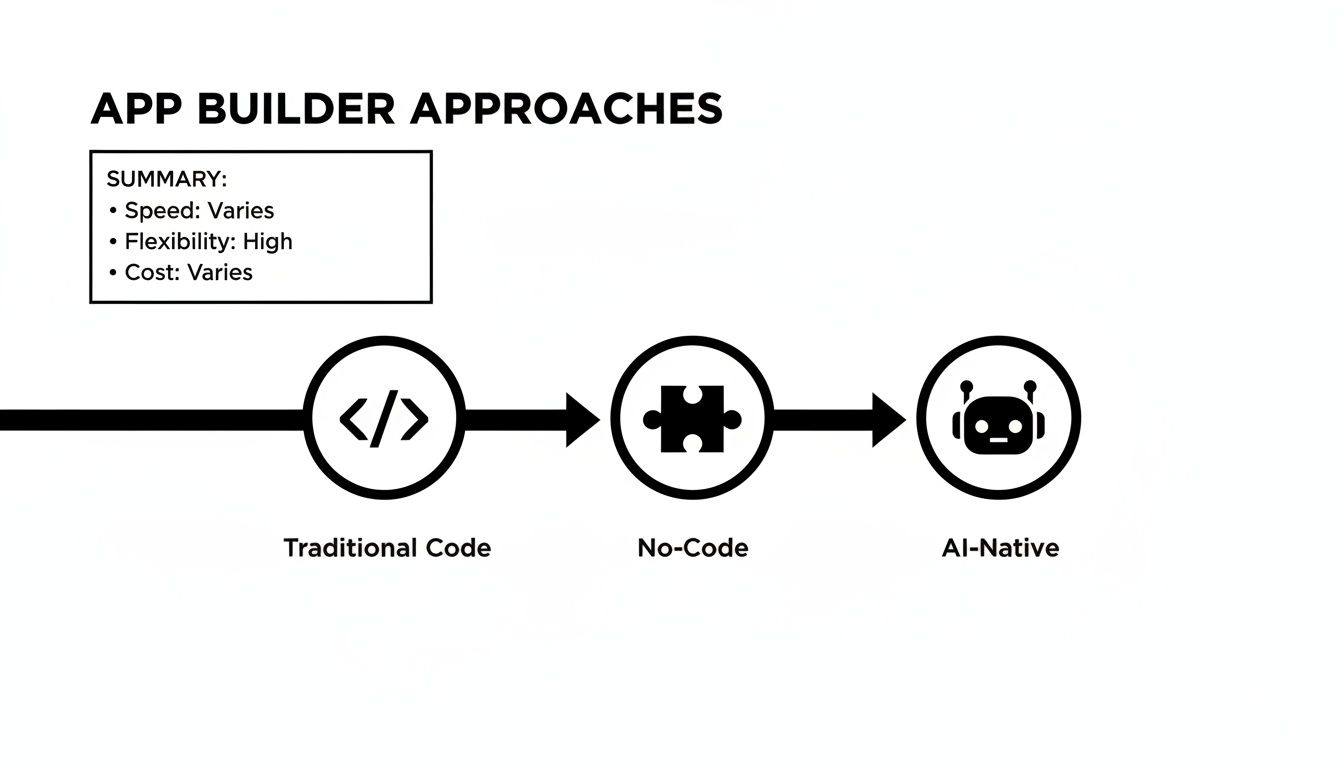
You can see the central idea of each approach right away: traditional code is all about control, no-code is built for speed, and AI-native tries to bridge the gap between them.
Speed vs. Long-Term Extensibility
The first big trade-off is often the most immediate: how fast can you get to market versus how easily can you adapt and grow later?
When it comes to pure speed, no-code platforms are the undisputed champions. A non-technical founder can use a tool like Bubble to get a functional prototype up and running in a few days. That same task would take months with traditional coding.
This initial velocity is a game-changer for validating an idea. You can put a real product in front of users, collect feedback, and iterate without a massive upfront investment. But that speed comes with a hidden cost: long-term flexibility.
So, what happens when your app starts to take off and you need a custom feature the no-code platform can’t handle? Or when your user base explodes and performance starts to drag? This is where extensibility becomes everything. Traditional code, though slow to start, offers infinite possibilities. An AI-native builder, on the other hand, gives you that no-code speed for the first build while generating a standard codebase any developer can extend later.
Code Ownership vs. Platform Lock-In
This might be the single most important factor for the long-term health of your business. When you build with a typical no-code platform, you're essentially building on rented land. Your application—its logic, design, and data—is completely tied to that vendor’s proprietary system. You don't actually own the code.
This creates a serious business risk. What if the platform hikes its prices, shuts down, or you simply outgrow what it can do? Your only option is to start over from scratch. You can't just pack up your application and move it somewhere else.
In stark contrast, both traditional code and AI-native builders give you full code ownership. The final product is a standard, portable codebase. With an AI-native tool, you can build visually, but at any moment, you can export clean React Native code to your own GitHub repository. This freedom completely eliminates platform lock-in and puts you in control of your product’s destiny.
Initial Build Cost vs. Total Cost of Ownership
Looking at cost means looking beyond the sticker price. The average price tag for a mobile app can run anywhere from USD 40,000 to USD 250,000, which makes a low-cost entry point incredibly tempting.
No-code platforms shine here, with low monthly subscriptions that look much better than the cost of hiring an engineering team. This makes them a fantastic choice for founders on a tight budget who are just testing an idea. However, the total cost of ownership (TCO) tells a very different story. Some studies even suggest that efficient cross-platform frameworks can cut development time by 40-50%, showing how important it is to find a cost-effective path that doesn’t compromise on quality.
The hidden costs of no-code pop up when it's time to scale or migrate. The expense of rebuilding an entire app from the ground up because you're trapped on a platform can be astronomical, easily wiping out any initial savings. Traditional code has a high initial cost but a more predictable TCO. AI-native builders aim for the sweet spot by lowering the initial build cost with AI-powered speed while keeping long-term migration costs at zero, thanks to that exportable code.
Product Team Collaboration
Finally, you have to think about how the software fits into your team's day-to-day workflow. How well does it support collaboration between founders, product managers, designers, and engineers?
- Traditional Code: This process is often rigid and sequential. Designers hand off static Figma mockups, PMs create detailed Jira tickets, and developers try to translate it all into code. This frequently leads to misunderstandings and frustrating rework cycles.
- No-Code Platforms: These tools are great for non-technical team members. A PM or designer can build and test ideas on their own. The problem is that the handoff to developers is a dead end—the work has to be completely rebuilt from scratch.
- AI-Native Builders: This approach creates a fluid, real-time collaboration space. A PM can use a prompt to generate a UI, a designer can jump in to refine it visually, and a developer can grab the production-ready code. It creates a shared workspace that closes the gap between design and engineering, cutting down on friction and speeding up the whole product cycle.
To help you weigh these factors, here's a matrix that summarizes the key differences.
App Software Decision Matrix
| Decision Criterion | Traditional Code | No-Code/Low-Code | AI-Native Builder (e.g., RapidNative) |
|---|---|---|---|
| Initial Speed | Slowest (months) | Fastest (days/weeks) | Very Fast (hours/days) |
| Extensibility | Unlimited | Highly Limited | Unlimited (via code export) |
| Code Ownership | Full Ownership | None (Platform Lock-in) | Full Ownership |
| Initial Cost | Very High | Very Low | Low |
| Total Cost of Ownership | Predictable (High Upfront) | High (Risk of Rebuild) | Low (No Rebuild Cost) |
| Best For Non-Techs | Poor | Excellent | Excellent |
| Developer Handoff | The entire process is developer-led | Non-existent; requires a full rebuild | Seamless (exports clean code) |
| Collaboration | Siloed, sequential workflow | Empowering for non-techs, but isolates developers | Collaborative, shared workspace for all roles |
Ultimately, the right tool depends entirely on where you are in your journey and where you plan to go. This matrix should give you a clearer picture of the strategic trade-offs involved with each path.
Which Software Is Best for Your Specific Scenario?

It’s one thing to understand the high-level differences between app-building tools, but it’s another to apply that knowledge to your actual project. The best software to build apps is the one that solves your immediate problem without creating bigger headaches down the road.
To make this crystal clear, let's walk through four common situations that product teams face every day. We’ll pinpoint the best type of tool for each and, more importantly, break down the logic behind the choice.
Scenario 1: The Non-Technical Founder Validating an Idea
You've got a fantastic app idea but no coding skills. Your only goal right now is to build a functional prototype as quickly and cheaply as possible. You need something to show potential investors and get in front of early users for feedback. Speed is everything, and your budget is paper-thin.
Recommended Tool: A no-code platform like Bubble or Adalo.
Why It Fits:
- Warp Speed: You can get a clickable, interactive prototype up and running in days, not months. This lets you test your core assumptions with real people almost immediately.
- Dirt-Cheap to Start: The monthly subscription for a no-code tool is a tiny fraction of what you'd pay a freelance developer or an agency.
- No Technical Hurdles: The visual, drag-and-drop interface is built from the ground up for people who don't code. You can build it all yourself.
The crucial thing to remember is what you're actually building: a disposable prototype. The goal isn't a scalable V1; it's to learn as much as you can, as fast as you can. For that job, no-code is perfect.
Scenario 2: The Product Team Prototyping a New Feature
Your team works at an established company and needs to build a new feature for your existing mobile app. The biggest pain point is the handoff between design and engineering. Static Figma mockups get lost in translation, and you waste weeks on rework. You need a high-fidelity, interactive prototype that developers can actually use.
Recommended Tool: An AI-native builder like RapidNative.
Why It Fits:
- Closes the Design-to-Dev Gap: AI-native tools convert designs or text prompts into real, production-grade code. This eliminates the guesswork between a static image and a functional component, slashing misinterpretations.
- Gives Developers a Head Start: The prototype isn't a dead end. It generates clean React Native code that your engineering team can copy and paste directly into their existing codebase, saving a ton of time.
- True Collaboration: PMs, designers, and developers can finally work in the same environment, iterating on a real, working prototype instead of a picture of one.
Scenario 3: The Digital Agency Building Client Apps
You run an agency that builds apps for all kinds of clients. Your business hinges on delivering top-notch products on tight timelines while managing client expectations. You need a workflow that speeds up development but doesn't lock your clients into a proprietary system they can't ever leave.
Recommended Tool: An AI-native builder.
Why It Fits:
- Deliver Projects Faster: You can use AI to knock out the frontend UI for a client's app in a fraction of the time it normally takes. This means you can handle more projects and impress clients with your speed.
- Clients Get Full Code Ownership: Unlike no-code, you can hand over the complete, exportable React Native codebase. This is a massive selling point, giving clients the freedom and security that comes with owning their technology.
- Focus on What Matters: By automating the tedious UI work, your developers can concentrate on complex backend integrations and custom business logic—the high-value work that truly sets your agency apart.
Scenario 4: The Enterprise Building a Mission-Critical System
You're at a large enterprise, maybe in finance or healthcare, and you're building a core system. This could be an internal tool or a customer-facing app with ironclad security, compliance, and performance needs. The app has to integrate with legacy systems and is expected to last for a decade or more.
Recommended Tool: Traditional code (either native or a proven cross-platform framework).
Why It Fits:
- Absolute Control and Security: When you're handling sensitive data and navigating complex regulations, you need total control over every line of code, from data encryption to network calls. Nothing but traditional code gives you that level of power.
- Peak Performance: For apps where every millisecond counts, you need the ability to optimize code at a low level. This is where custom coding shines.
- Built to Last: A bespoke application built with standard programming languages and frameworks is the most reliable and maintainable choice for a system that needs to be a long-term, dependable company asset.
How AI-Native Builders Are Redefining App Development
The classic app development dilemma has always been a painful one: build fast with a no-code tool and risk hitting a wall, or build “right” with traditional code and accept a long, expensive process. Teams were forced to compromise. But a new category of software to build apps is fundamentally changing the game.
These AI-native builders aren't just another layer on top of existing no-code platforms. Instead, they use artificial intelligence to generate high-quality, production-ready code directly from simple inputs like text prompts or design files. This approach forges a completely new workflow, combining the rapid iteration of visual builders with the power and ownership of a real codebase.
The impact is already clear. A staggering 63% of mobile app developers now incorporate AI features into their work, often to improve the user experience. AI-native builders just take this a step further by using AI to build the application itself, speeding up the entire product lifecycle from day one.
From Idea to Interactive UI Instantly
The real magic of AI-native builders is their ability to translate human ideas directly into functional user interfaces. Forget static mockups. We’re talking about creating interactive, coded components right from the start, dramatically shortening the path from concept to reality.
This new way of working is best seen through two powerful workflows:
- Prompt-to-UI: A product manager can describe a screen in plain English, like, "Create a user profile screen with a circular avatar, name, email, and a list of recent orders." The AI instantly generates the corresponding React Native code and renders a live, interactive preview.
- Image-to-App: A designer can upload a finished Figma design, and the AI will analyze the layout, components, and styling to generate an identical, fully coded version of the app.
This isn’t about making static pictures of an app. It’s about generating the actual building blocks of the app in real-time. This eliminates the huge amount of time normally wasted translating a design into code, which is often where misunderstandings and rework happen.
This immediate feedback loop lets teams see, test, and refine their ideas on a real device in minutes, not weeks. And even before the building starts, AI can help with foundational steps, like using an AI domain name generator to brainstorm the perfect app name.
Bridging the Gap Between Design and Development
One of the biggest sources of friction on product teams is the handoff between design and engineering. Designers craft pixel-perfect mockups, and developers have to painstakingly recreate them in code. AI-native builders act as a bridge, creating a shared workspace where both sides can finally collaborate effectively.
Think of it this way: the tool becomes the single source of truth. What the designer creates is exactly what the developer receives, because it’s already code. This approach solves a ton of common pain points and ensures design fidelity is perfectly maintained. You can learn more about how this transforms team dynamics by reading our guide on the benefits of an AI-native app builder.
Real Code Without the Lock-In
Here’s the most critical differentiator: the output from AI-native software is clean, exportable, production-grade code. Unlike traditional no-code platforms that trap your app in their proprietary ecosystem, tools like RapidNative generate standard React Native.
This means you truly get the best of both worlds:
- Initial Speed: Build and iterate on your app at an incredible velocity using simple text prompts or design uploads. No developer needed for the early stages.
- Long-Term Freedom: At any point, you can export the entire codebase to your own GitHub repository. This gives your engineering team a high-quality foundation to build upon, scale, and maintain indefinitely.
This workflow finally resolves the speed-versus-quality dilemma. Teams can move from idea to a fully interactive, developer-ready MVP in a fraction of the time, all without sacrificing the code ownership and extensibility required for long-term success.
Answering Your Key Questions About App Building Software
Choosing the right software to build apps can be a tough call. Even after comparing the options, some critical questions usually pop up. Let's tackle the most common ones that product teams and founders ask right before they commit to a development path.
Think of this as the final check-in to make sure you're moving forward with total confidence.
Can I Build a Truly Scalable App with No-Code or AI Tools?
This is the big one, and the answer isn't about the drag-and-drop interface. It’s all about what the tool actually produces.
Most traditional no-code platforms eventually hit a hard ceiling when it comes to scale. Your app is stuck on their proprietary infrastructure, which means you have almost no control over optimizing the code as your user base grows. If things start getting slow or you need a custom integration they don't offer, you're pretty much out of luck.
This is where AI-native builders like RapidNative completely change the game. Instead of trapping you, they generate standard, production-ready React Native code. You get the initial speed boost from AI, but then you can export that clean, human-readable code right into your own repository. Any React Native developer can pick it up, optimize it, and keep building. You get the best of both worlds: speed now, and true scalability later.
What Is Platform Lock-In and Why Should I Avoid It?
Platform lock-in is a nightmare scenario where your app is completely dependent on a single vendor's ecosystem. With most no-code tools, the app you build can only live and breathe on their platform. You don't own the tech; you're just renting it.
This introduces a huge risk to your business. What happens if the vendor jacks up their prices, shuts down, or you simply outgrow their feature set? You can't just pack up your app and move. Your only option is to start over and rebuild everything from scratch.
Avoiding platform lock-in is really about protecting your company’s future. The only surefire way to do that is to use tools that give you standard, exportable code. That way, the app you build becomes a tangible asset you actually own.
How Do AI App Builders Handle Complex Backend Logic and APIs?
AI app builders are absolute pros at accelerating frontend development—the user interface (UI) and user experience (UX) that people actually see and touch. They excel at turning a text prompt, a napkin sketch, or a design file into functional, clean screens and components.
When it comes to the backend, the workflow is built for a clean handoff to developers. A tool like RapidNative spits out well-structured React Native code that your team can easily hook up to any custom backend, database, or third-party API. The AI does the grunt work of building the UI, freeing up your expensive engineering talent to focus on the heavy lifting—the business logic, data architecture, and integrations that make your app truly powerful.
It's a smart division of labor. Let the AI handle what it's best at (UI generation), and let developers handle what they're best at (complex systems architecture).
As a Non-Technical Founder What Is My Safest Option?
What's "safe" really depends on your goals. Are you just testing an idea, or are you trying to build the foundation of a real business?
Let’s break down two common scenarios for founders:
- Goal: Pure Idea Validation. If you just need a quick, clickable prototype to show a few potential customers and see if your idea has legs, a classic no-code tool is a fantastic, low-risk choice. The prototype is disposable—its only job is to help you learn.
- Goal: Build a Scalable MVP. If you're building a minimum viable product that you hope will grow into a sustainable business, an AI-native builder is a much safer bet for the long haul.
The AI-native path lets you move fast without code, but the output is an actual asset: a high-quality codebase. This makes hiring your first engineers a breeze. Instead of showing them a locked-in prototype they have to throw away, you're handing them a solid foundation they can start building on from day one.
Ready to bridge the gap between your idea and a production-ready app? RapidNative lets you turn prompts, designs, and documents into high-quality, exportable React Native code in minutes. Stop rebuilding and start collaborating. Try RapidNative for free and experience the future of app development.
Ready to build your app?
Turn your idea into a production-ready React Native app in minutes.
Free tools to get you started
Free AI PRD Generator
Generate a professional product requirements document in seconds. Describe your product idea and get a complete, structured PRD instantly.
Try it freeFree AI App Name Generator
Generate unique, brandable app name ideas with AI. Get creative name suggestions with taglines, brand colors, and monogram previews.
Try it freeFree AI App Icon Generator
Generate beautiful, professional app icons with AI. Describe your app and get multiple icon variations in different styles, ready for App Store and Google Play.
Try it freeFrequently asked questions
What is RapidNative?
RapidNative is an AI-powered mobile app builder. Describe the app you want in plain English and RapidNative generates real, production-ready React Native screens you can preview, edit, and publish to the App Store or Google Play.
Can I export the code?
Yes. RapidNative generates clean React Native and Expo code that you can export at any time. No lock-in, no proprietary format. Hand it to your developers or keep building inside RapidNative.
Is RapidNative free to use?
Yes. You can build apps on the free plan with no credit card required. Paid plans unlock unlimited AI generations, code export, and direct publishing to the App Store and Google Play.
Do I need to know how to code?
No. Most users build apps by describing what they want in plain English. Developers can drop into the code whenever they want more control, but coding is optional.
How long does it take to build an app?
Most users have a working first screen in under a minute. A full MVP usually takes a few hours instead of the weeks or months traditional development requires.