Rapid App Prototyping: A Practical Workflow for Mobile Teams
Learn a practical rapid app prototyping workflow for mobile teams. Turn prompts, sketches, or PRDs into testable React Native prototypes fast.
By Riya
22nd Oct 2026
Last updated: 22nd Oct 2026
You've spent weeks getting a mobile prototype ready. The screens look consistent, the demo follows a convincing script, and everyone agrees it's ready for feedback. Then a prospective user opens it on their phone, taps the wrong tab, and asks what they're supposed to do next.
For a founder validating a mobile product, that's the expensive moment to discover you've answered the wrong question. Rapid app prototyping works when you shorten the entire learning loop, not just the time it takes to generate screens. Define the uncertainty, build enough to investigate it, observe real behavior, and decide what deserves engineering investment.
Why Rapid Prototyping Matters for Mobile Teams
Consider a hypothetical appointment-booking app. You've refined provider cards, adjusted colors, and prepared a smooth walkthrough. But during testing, parents can't tell whether they should choose a clinician, a location, or an appointment time first.
The visual work isn't necessarily bad. It's premature. You've invested in presentation before checking whether the information order matches the user's decision process.
Rapid prototyping is a risk-control method, not a faster way to produce a presentation. Its value comes from discovering misunderstandings while you can still change the experience without rebuilding production services.
Move discovery ahead of implementation
A widely cited IBM Systems Sciences Institute analysis found that correcting an error during implementation costs approximately six times more than during design, while correcting it during maintenance can cost up to 100 times more, as summarized in Lyssna's prototype-testing guide. Treat these historical comparisons as an economic rationale for early validation, not a forecast of your app's exact savings.
For the booking example, changing the order of provider selection and time selection is relatively straightforward in a prototype. After implementation, the same change might require different API responses, revised availability logic, updated analytics, and regression testing.
The practical distinction is between learning about an assumption and building dependencies around it.
Practical rule: Prototype the assumption that would force the largest rethink if it proved wrong.
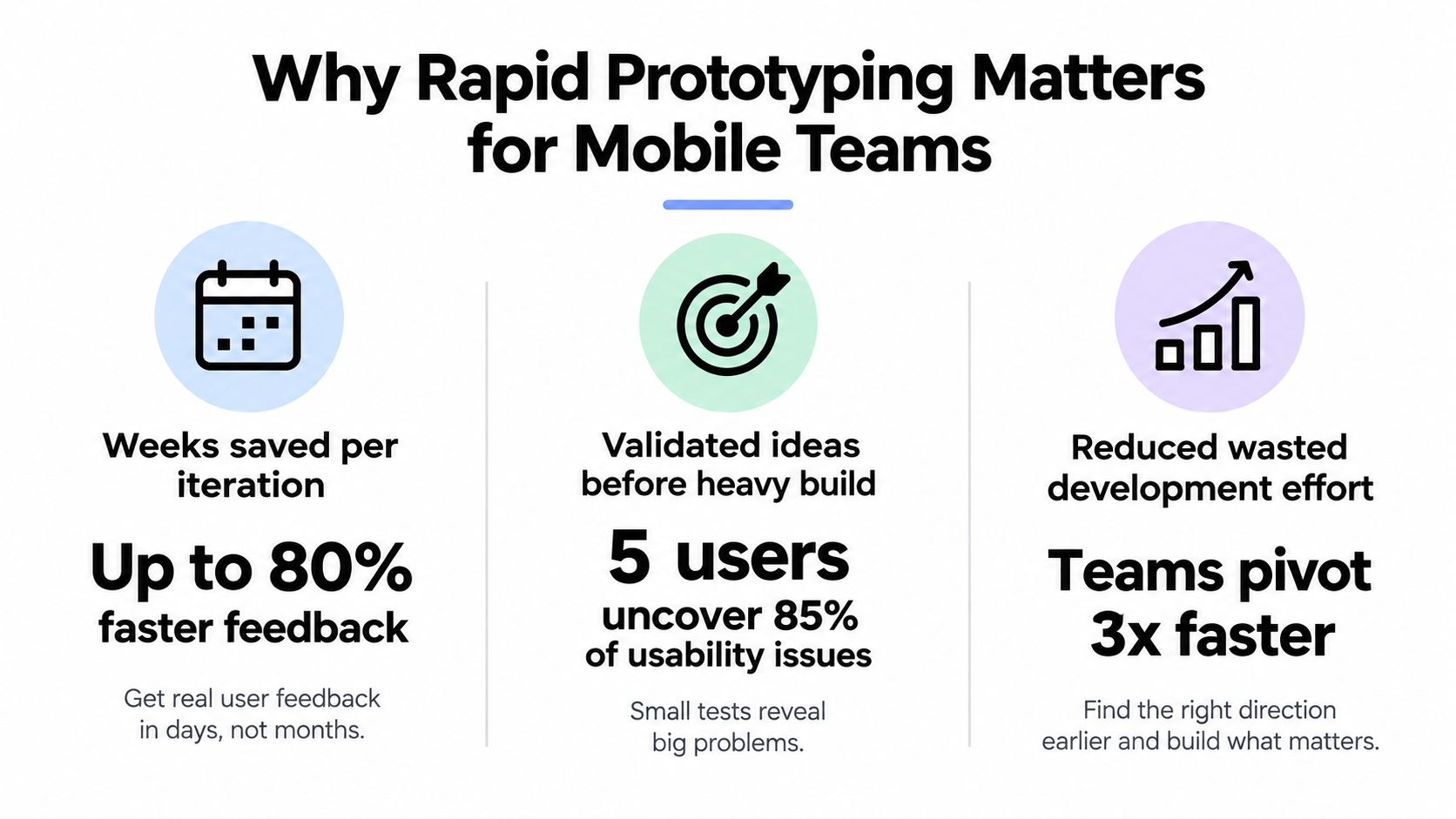
The feedback-and-iteration cycle is the useful principle behind this visual. Treat numerical performance claims in the graphic as illustrative, not as benchmarks for your project.
Compete on usefulness before polish
The App Store launched with 552 applications in 2008 and had more than 2 million apps and 170 billion cumulative downloads by 2018, according to this history of mobile-app development. That expansion provides context for why a functioning interface alone isn't a convincing product proposition.
As a founder, you need to understand why someone would use your app, whether they can complete its core action, and what would make them abandon it. A prototype gives you something concrete to investigate before committing to a complete product.
That doesn't mean every experiment should look unfinished. Use realistic content where comprehension depends on it, and working interactions where behavior matters. Leave decorative refinement until you know which experience you're refining.
Define One Audience and One Success Criterion
Start with a sentence that identifies who is trying to accomplish what, under which conditions. For the appointment app, choose first-time parents booking pediatric appointments, not an undifferentiated mix of parents, clinicians, receptionists, and clinic administrators.
Those groups have different responsibilities and expectations. Combining their feedback would make it difficult to tell whether a problem belongs to the interface or to your audience definition.
Nielsen Norman Group's guidance on usability-test participants recommends approximately five users from the same target group for a qualitative diagnostic round. Recruit around the actual behavior you're investigating, not whoever is available.
Write a decision-ready validation goal
A useful working statement would be:
First-time parents can create an account, find an appropriate pediatric provider, and complete a booking without moderator assistance.
Then choose a primary measure: unassisted completion of the booking journey. Define completion precisely, such as reaching a confirmation that correctly identifies the provider, appointment, and location.
You might set an 80% unassisted-completion target, with no critical navigation errors, as an internal advancement gate, following the example protocol in this guide to validating clickable prototypes. The same guide summarizes the commonly cited finding that five users can reveal approximately 85% of usability problems, but neither figure should be treated as universal proof.
Decide what counts as assistance before sessions begin. Explaining an unfamiliar label or pointing toward the next button means the user didn't complete that step independently. Otherwise, it's easy to coach someone through a broken flow and record a success.
Label the question before choosing fidelity
Use a clear purpose for each iteration:
- Desirability: Does the proposed booking experience address a problem parents care enough to solve?
- Usability: Can parents complete the journey without explanation?
- Feasibility: Can your intended implementation support the required behavior?
- Communication: Do collaborators understand the proposed experience and its boundaries?
Choosing fidelity around purpose is consistent with the methodology discussed in Cambridge research on successful prototyping. Don't ask a visual walkthrough to establish technical feasibility, or a technical proof of concept to establish demand.
Finally, write the decision in advance: kill, revise, or advance. If parents understand the flow but don't see a reason to switch from calling their clinic, another round of button styling won't resolve the underlying question.
Choose the Right Input for Your Starting Point
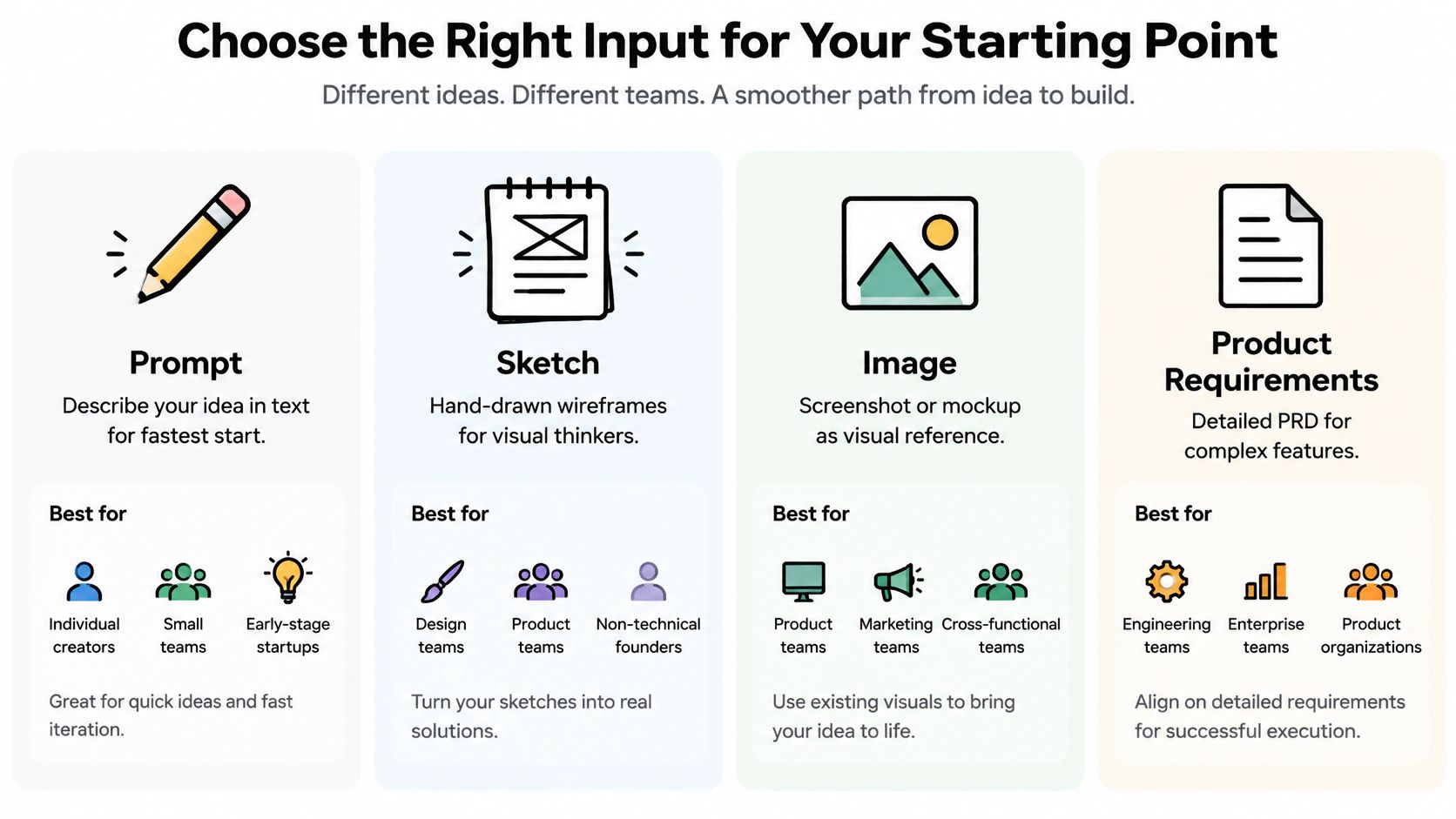
Your starting material should reflect what you already know. Don't write a detailed requirements document just to explore a rough concept, and don't discard a useful sketch because a tool opens with an empty prompt box.
For a founder validating the booking experience, the input is a way to communicate constraints. It isn't evidence that those constraints are correct.
Match the asset to the uncertainty
| Input | Useful starting situation | What to prepare | Main trade-off |
|---|---|---|---|
| Prompt | You know the user's job but haven't settled the interface | Audience, task, expected outcome, exclusions | Unspecified behavior remains open to interpretation |
| Sketch | You have a layout or information-order hypothesis | Legible labels, screen boundaries, navigation arrows | A sketch rarely explains all interaction states |
| Image | You already have a mockup or visual reference | Context explaining what to preserve and change | Appearance doesn't specify behavior |
| Product requirements document | You've documented business rules and acceptance conditions | A tightly scoped journey and explicit constraints | Broad requirements can encourage unnecessary coverage |
These inputs serve different purposes, as the comparison illustrates.
A practical prompt for the appointment app would describe parents finding pediatric care, selecting an available appointment, and reviewing the booking before confirmation. It should also explicitly exclude unrelated features such as clinician scheduling tools or clinic administration.
With a sketch, add annotations explaining what happens after a tap. An arrow toward a confirmation screen doesn't explain what should happen when the selected appointment becomes unavailable.
Combine inputs without creating competing instructions
Use text to specify behavior and a sketch or image to clarify layout. If the assets disagree, state which takes precedence. For example, preserve the sketch's information order but replace its bottom navigation with the journey described in the prompt.
A PRD can improve requirements coverage, but coverage isn't validation. Extract the requirements needed for the current question rather than generating every feature in the document.
Before generation, map the journey's entry point, decisions, and exit conditions. These user-flow diagram examples offer useful patterns for making those transitions explicit.
Keep the input package readable enough that you can inspect it yourself. If you can't clearly describe how a parent moves from finding care to confirming an appointment, generating additional screens won't fix the ambiguity.
Turn Your Assets into a Live React Native Prototype
Build a walking skeleton: a narrow, connected version of the core journey with enough behavior to test it. For the booking app, that means account entry, provider discovery, appointment selection, review, and confirmation, not a complete clinic platform.
Keep the workspace focused on the experience someone will test.
Generate connected behavior rather than isolated screens
In a React Native workflow using Expo and NativeWind, ask for screens, routing, reusable components, and explicit state changes. React Native provides the application structure, Expo supports running the prototype, and NativeWind handles styling in this stack.
Separate provider cards, appointment choices, and form fields into reusable components. More importantly, preserve the user's selections across navigation. Returning from the review screen shouldn't silently erase the chosen appointment.
Include the states that could change the user's understanding:
- Empty results: Explain what happened and offer a useful next action.
- Invalid input: Identify the field and describe how to correct it.
- Loading: Make it clear that the app is processing the request.
- Unavailable appointment: Preserve context and help the parent choose again.
- Failed connection: Distinguish an unsuccessful request from a confirmed booking.
Use synthetic provider and patient information. If the backend doesn't exist, simulate responses deliberately and record which behaviors are mocked. Don't connect sensitive information merely to make a demo feel convincing.
The walkthrough below provides a visual reference for moving from generation to an interactive app.
Check the phone experience before sharing
Open the prototype through the available preview link or QR-code workflow and complete the journey on a physical device. Check whether the keyboard covers the primary action, content collides with safe areas, or back navigation leaves the app in an unexpected state.
Don't assume an interaction behaves identically across iOS and Android. Inspect the platform behavior relevant to your intended audience, including scrolling, selection controls, and dismissal gestures.
A narrowly scoped generated app can become testable in minutes, but that's a starting condition, not a deadline you should force every prototype to meet. Stop adding screens when you can investigate the validation question. Continue fixing behavior when a prototype defect would make the session misleading.
Test with Five Users and Iterate Fast
Recruit participants who match your defined parent audience, then give each person the same realistic booking task. Ask them to arrange suitable care, not to follow instructions that name the buttons you want them to press.
Watch before explaining. If someone hesitates, ask what they're considering rather than telling them where to go.
Capture observations you can act on
Use a simple session record rather than relying on memory:
| Observation | What to record |
|---|---|
| Completion | Whether the booking was completed independently |
| Time on task | The same start and finish points for each session |
| Errors | The action, screen, and consequence |
| Abandonment | Where the participant stopped and why |
| Recovery | Whether they understood and resolved a failure |
| Objections | Concerns about suitability, trust, or usefulness |
Record whether a failure came from the product concept, the interface, or unfinished prototype behavior. Those categories lead to different fixes.
The working cycle is straightforward.
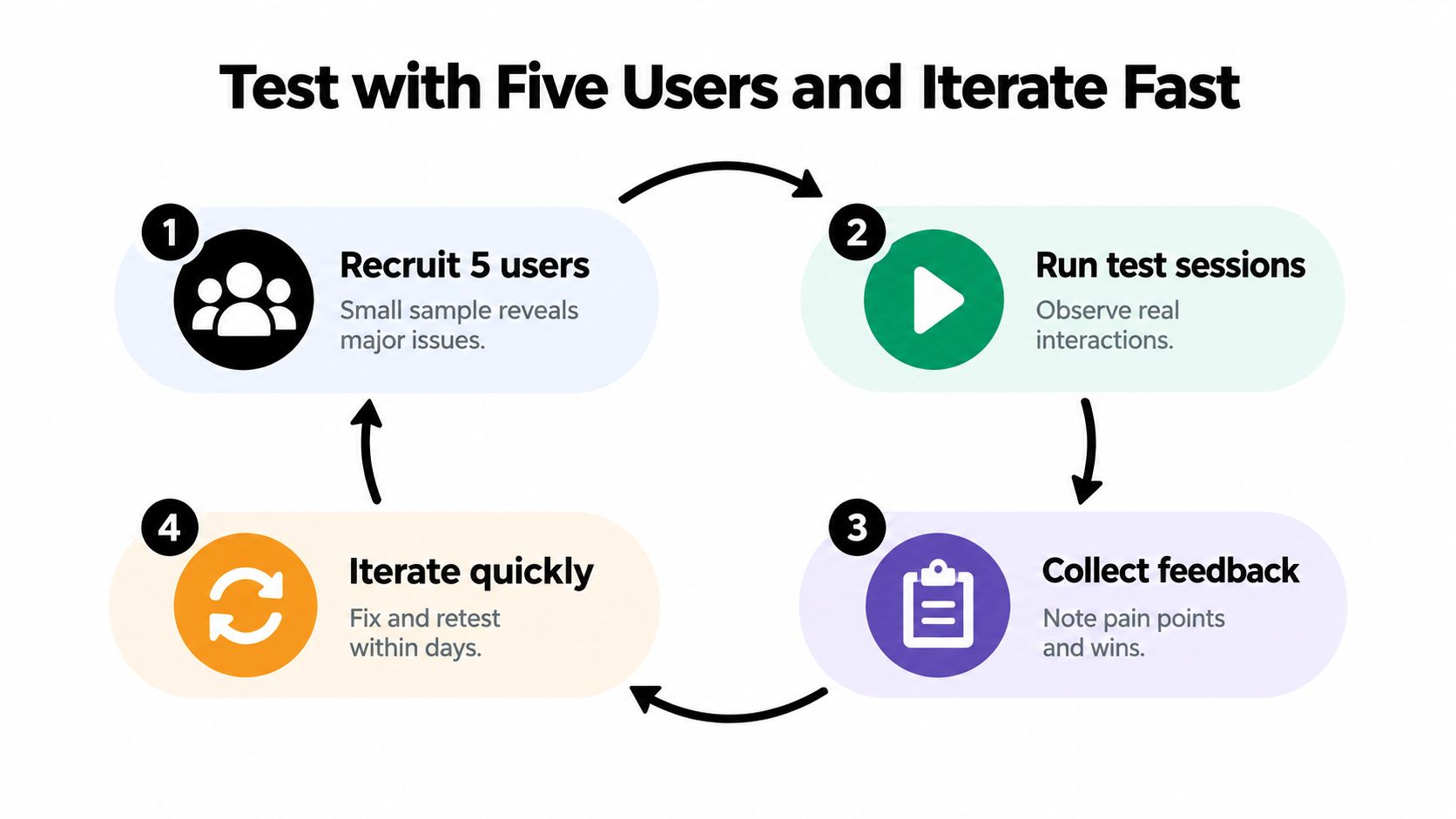
Prioritize the issue that prevents the core task or creates a harmful misunderstanding. If parents think they've booked when they've only selected a time, fix that before adjusting provider-card spacing.
Then recruit a fresh small sample. Returning participants may remember how to overcome the previous version's confusing interaction.
Understand what a small sample can establish
Faulkner's peer-reviewed study found that five-user samples identified between 55% and 99% of usability problems, while every ten-user sample found at least 80%, as summarized in Netguru's usability-testing guide. Your initial sessions are a fast diagnostic, not statistical proof that the interface works for everyone.
A small test can justify fixing a visible problem. It can't justify claiming that the rest of the market won't encounter one.
Include accessibility and context in recruitment and task design rather than treating them as a final inspection. Where they belong to your parent audience, involve older caregivers, people with cognitive impairments, and people using assistive technology. Research into adaptive mobile accessibility for older adults reinforces the need to investigate personalization and accessibility barriers with users.
Test interrupted attention and low connectivity deliberately. Can someone resume booking after switching apps, understand a connection failure, and recover without starting over?
Choose the session format around the uncertainty using these user-experience testing methods. Keep preference feedback separate from evidence that someone could complete the task.
Hand Off to Engineering Without Losing Trust
Exportable code isn't automatically production-ready code. A convincing prototype may contain temporary state, permissive access rules, simulated confirmations, and dependencies nobody has evaluated.
In a 2025 survey of 307 developers using AI in their daily workflows, 42% said at least half their codebase was AI-generated, but only 67% reported reviewing AI-generated code before every deployment, according to SC Media's reporting on AI-generated code review. That gap is a reason to establish explicit approval gates, not an argument against generation.
Decide what survives the prototype
Ask engineering to classify the implementation as retain, refactor, or replace. Reusable presentation components may survive with changes. A booking confirmation based only on local state should be replaced with authoritative server behavior.
Review the areas where a visual demo provides little assurance:
- Navigation: Check route access, back-stack behavior, and restoration of state.
- Authentication and authorization: Verify identity handling and server-side permission enforcement.
- Storage: Inspect sensitive data, session handling, and cleanup.
- API calls: Check validation, failure handling, cancellation, and duplicate submissions.
- Dependencies: Review necessity, maintenance status, licenses, and security findings.
Before an MVP pilot, require tests for critical business rules, component states, API integration, and the end-to-end booking journey. Add dependency and secret scanning, inspect data flows through a threat-model review, and assign an engineer to resolve findings before release.
A useful prototype-to-production handoff includes the repository, setup instructions, mock-service inventory, known limitations, test evidence, and unresolved decisions. Don't hand over an archive and expect engineers to reconstruct the intent.
Keep approval boundaries explicit
Design approval, usability evidence, and engineering approval are separate decisions. For a structured way to capture visual feedback and approval boundaries, PinDrop's client design signoff use cases provide a useful reference. Record what was approved and which version it applies to.
Assign ownership for code review, unresolved defects, release readiness, and post-pilot fixes. The founder can own the product decision without pretending to provide security approval.
If you plan an App Store submission, the experience must also provide actual utility. Apple's App Review Guidelines require more than a repackaged website and allow rejection for inadequate utility or lasting value. A clickable concept can support internal learning without being a suitable store submission.
The controlled sequence is prototype, inspect, test, document, then ship. Exporting the code changes where the work happens, not whether that work is necessary.
Common Pitfalls and How to Avoid Them
The most expensive prototyping mistakes aren't always technical. They happen when founders interpret an artifact as evidence for a decision it wasn't designed to support.
Recognize the misleading signals
| Pitfall | Concrete warning sign | Corrective action |
|---|---|---|
| Polishing too broadly | The app has an attractive profile area, but parents still can't find care | Remove secondary work from the current iteration |
| Confusing a demo with validation | The presenter explains every transition | Have participants attempt the task independently |
| Ignoring recovery | Booking works only when every request succeeds | Make failure and resumption observable |
| Overclaiming from sessions | A small diagnostic becomes a market-wide conversion claim | Report observed behavior with its limitations |
| Skipping engineering review | A clean export is labeled ready to ship | Require an accountable reviewer and release criteria |
A further trap is treating every objection as a request for another feature. If parents question whether a provider is appropriate, adding filters may help, but the underlying issue could be missing information or unclear eligibility. Investigate the reason before expanding the interface.
Finish with a decision, not another screen
After each round, write what changed in your understanding. Separate demonstrated behavior from assumptions that remain untested, and identify what would make you stop pursuing the current approach.
Define, generate, test, fix, hand off is the operating checklist. The discipline is knowing when to change the concept, when to improve the interaction, and when to ask engineering for a deeper feasibility review.
Faster generation is useful only if you preserve that judgment. Otherwise, you can build a more convincing version of the wrong product before anyone notices.
RapidNative turns prompts, sketches, images, and PRDs into shareable React Native apps, with device previews and exportable code for engineering handoff. Visit it with a narrowly defined validation question, build the core journey, and put that experience in front of representative users before expanding your scope.
Ready to build your app?
Turn your idea into a production-ready React Native app in minutes.
Free tools to get you started
Free AI PRD Generator
Generate a professional product requirements document in seconds. Describe your product idea and get a complete, structured PRD instantly.
Try it freeFree AI App Name Generator
Generate unique, brandable app name ideas with AI. Get creative name suggestions with taglines, brand colors, and monogram previews.
Try it freeFree AI App Icon Generator
Generate beautiful, professional app icons with AI. Describe your app and get multiple icon variations in different styles, ready for App Store and Google Play.
Try it freeFrequently asked questions
What is RapidNative?
RapidNative is an AI-powered mobile app builder. Describe the app you want in plain English and RapidNative generates real, production-ready React Native screens you can preview, edit, and publish to the App Store or Google Play.
Can I export the code?
Yes. RapidNative generates clean React Native and Expo code that you can export at any time. No lock-in, no proprietary format. Hand it to your developers or keep building inside RapidNative.
Is RapidNative free to use?
Yes. You can build apps on the free plan with no credit card required. Paid plans unlock unlimited AI generations, code export, and direct publishing to the App Store and Google Play.
Do I need to know how to code?
No. Most users build apps by describing what they want in plain English. Developers can drop into the code whenever they want more control, but coding is optional.
How long does it take to build an app?
Most users have a working first screen in under a minute. A full MVP usually takes a few hours instead of the weeks or months traditional development requires.