How a React Native App Builder Changes the Game for Product Teams
Discover how a react native app builder can speed up mobile development with practical tips for founders, PMs, and developers.
By Sanket Sahu
24th Dec 2025
Last updated: 24th Dec 2025
Building a mobile app often feels like you're stuck between a rock and a hard place. On one side, you have the frustrating limitations of no-code platforms. On the other, there's the slow, expensive grind of custom coding. A React Native app builder carves out a powerful middle ground, blending the speed of visual tools with the flexibility of a real, exportable codebase. It's a game-changer for founders, PMs, and designers who need to move fast without compromising on quality.
Bridging The Gap Between No-Code And Custom Development
Launching a mobile product forces a tough choice. Do you go with a no-code tool for a quick launch, knowing you might hit a wall when you need a custom feature? Or do you sink a massive budget into a traditional development team and accept the long timelines that come with building from the ground up? This classic dilemma stalls innovation and makes it incredibly difficult to test ideas and get to market quickly.

This is precisely where a React Native app builder creates a new path forward. It’s a hybrid solution designed to give you the best of both worlds.
- For Founders and PMs: You can build and launch an MVP in a fraction of the time and budget, getting crucial user feedback much faster.
- For Designers: You can turn static mockups into interactive, high-fidelity prototypes that feel just like a real app, making usability testing far more effective.
- For Developers: It automates all the tedious setup and boilerplate UI code, freeing them to focus on complex business logic and unique, high-value features.
A Practical Analogy For App Building
Think of your options like building a house. No-code platforms are like a prefab home—fast to assemble, but good luck trying to customize it beyond the original floor plan. Traditional coding is like building with bricks and mortar from scratch; you get exactly what you want, but it’s incredibly slow and expensive.
A React Native app builder is like a high-end modular home. It uses professional-grade, pre-built components (the code) that you can assemble quickly. But you still have complete freedom to modify the layout, add extensions, and own the final structure.
This modular approach doesn't just speed up the initial build; it lays a rock-solid foundation for future growth. The magic comes from using React Native, a framework trusted by companies like Instagram and Shopify for its incredible efficiency. In fact, teams report that React Native helps them deliver an MVP 30–40% faster than fully native development.
That speed translates directly into cost savings. Sharing code across both iOS and Android can slash development overhead by a similar margin. If you're curious, you can explore more data on React Native's business impact and see exactly how those savings are calculated.
To put it all in perspective, here's a quick breakdown of how these approaches stack up for a product team.
Development Approaches At A Glance
| Approach | Development Speed | Flexibility & Customization | Initial Cost |
|---|---|---|---|
| No-Code Platforms | Fastest | Low (limited by platform features) | Lowest |
| React Native Builders | Fast | High (fully editable codebase) | Medium |
| Traditional Custom Code | Slowest | Highest (completely unlimited) | Highest |
Ultimately, a React Native app builder isn’t a shortcut that sacrifices quality. It’s an accelerator that hands you a real, scalable codebase, empowering your team to build, iterate, and own their product without compromise.
How Visual Clicks Become Real, Functional Code
It can feel a bit like magic when you drag a button onto a canvas in a React Native app builder and watch it instantly pop up on a device preview. But behind that simple action is a sophisticated process that translates your visual ideas into high-quality, developer-ready code. It's not a "black box"—think of it more like a smart interpreter that speaks both the language of design and the language of React Native.
Let’s pull back the curtain on this process by imagining we're building a simple login screen. You aren't starting from scratch. The builder gives you a library of pre-built, production-grade UI components.
Think of these components as digital LEGO bricks. Each one—a button, a text input, an icon—is a self-contained piece of React Native code, already designed to be reusable and easy to customize. When you drag a "Text Input" component onto your screen, you're essentially telling the builder to insert a specific chunk of code into that screen's file.
From Visual Editor To Code Structure
The real genius is in how the builder organizes those code chunks. It doesn't just toss them all into one messy file. Instead, it follows the same best practices that experienced developers use, creating a clean and logical structure that anyone on the team can understand.
Let's go back to our login screen example:
- Component Placement: You drag two text inputs (for email and password) and a button ("Log In") onto the canvas. Instantly, the builder generates the corresponding
<TextInput />and<Button />components in the code. - Styling Properties: You use a visual panel to change the button's color to blue and add a bit of padding. The builder translates these clicks into style properties, often using a framework like NativeWind for clean, utility-class-based styling. The code now includes something like
className="bg-blue-500 p-4". - Layout and Structure: You stack these elements vertically. Behind the scenes, the builder wraps them in a
<View>component—React Native's core building block for layouts—and automatically applies Flexbox properties to control alignment and spacing.
This process guarantees that the visual design is perfectly mirrored in a well-organized codebase. Instead of just seeing pixels, a developer looking at the code sees a clean hierarchy of components.
Connecting The Dots With Data and Actions
Of course, a screen is more than just static elements; it needs to be interactive. This is where concepts like data binding and event handling come in, and modern builders make them accessible to everyone, not just coders.
When you want the "Log In" button to actually do something, you're setting up an event handler. In the builder, you might visually link the button's "onPress" event to a predefined action, like "Navigate to Home Screen."
Behind the scenes, the builder generates the necessary code to handle that user interaction. It writes an
onPressfunction that calls the navigation logic, effectively wiring up your visual flow into functional code without you having to write a single line.
This visual-to-code translation is also essential for connecting your app to backend data. You can link a list component to an API endpoint, and the builder will generate the code to fetch data and display it. This allows product managers and founders to build functional prototypes that use real data, making feedback cycles much more meaningful. This process is a massive leap from static designs, and you can learn more about how tools bridge this gap by exploring guides on converting Figma designs to React Native code.
Ultimately, a React Native app builder acts as a powerful orchestrator. It takes simple, visual inputs and translates them into the structured, idiomatic code that forms the foundation of a professional mobile application. It makes app creation faster and more collaborative than ever before.
Putting App Builders To Work In The Real World
Theory is one thing, but seeing how a React Native app builder can genuinely accelerate a real project is where its value becomes clear. These tools do more than just help you build an app faster; they fundamentally reshape how teams design, test, and launch their mobile products. Let’s jump into three common scenarios where these builders give product teams a serious leg up.
At its core, a React Native app builder's strength is its speed. It lets you produce a functional, native application in a fraction of the usual time, which is why so many teams who need to move quickly without cutting corners are flocking to it. The underlying framework, React Native, has already cemented itself as a top choice for cross-platform development for this very reason.
Its popularity isn't just hype. The framework’s market share for new cross-platform apps climbed from 4.73% in 2022 to around 6.75% in 2024. This growth is backed by real business results, with React Native apps recently generating almost $287 million in net developer revenue. It's holding its own against the other big players in the space. You can explore more cross-platform development statistics to get the full market picture.
Use Case 1: Launching an MVP in Weeks, Not Months
If you're a startup founder, your biggest enemy is the clock. You have to prove your idea works before the money runs out. A traditional development cycle can easily eat up six months or more just to get a Minimum Viable Product (MVP) in front of your first users. That’s a huge, expensive risk when you’re still trying to figure out if people even want what you're building.
A React Native app builder completely changes this dynamic. Instead of writing every line of code from scratch, a founder or product manager can visually piece together the essential screens—user registration, onboarding, and the core features. By hooking this front end up to a simple backend (or even just mock data), you can launch a working MVP in just a few weeks.
Here's how that plays out: Imagine a small team creating a new fitness tracking app. Their main goal is to test a single hypothesis: will users consistently log their workouts if they can also see a social feed of their friends' activities?
- The Old Way: They'd spend months and tens of thousands of dollars building separate iOS and Android apps from the ground up, all based on an unproven assumption.
- The Builder Way: They use a React Native app builder to create the core user interface for both platforms at once. They launch in four weeks, start gathering invaluable feedback, and can now show investors a real, working product instead of just a slide deck.
Use Case 2: Creating Truly Interactive Prototypes
Designers have long been frustrated by the limitations of static mockups from tools like Figma or Sketch. Even clickable prototypes, while better, can’t capture the true feel of an app. They miss the fluid transitions, the native component behaviors, and the real-world responsiveness that define the user experience. This gap often leads to feedback cycles based on how an app looks, not how it feels.
This is where a React Native app builder is a game-changer for the design process. It empowers designers to build high-fidelity, fully interactive prototypes that are practically indistinguishable from the final product. These aren't just pictures of an app; for all intents and purposes, they are the app.
This shift makes user testing sessions infinitely more valuable. Testers can interact with native iOS date pickers, feel how the keyboard behaves on Android, and navigate complex user flows on their own devices. The feedback they give is grounded in a real, tangible experience.
Use Case 3: Revolutionizing the Developer Handoff
The moment a design gets handed over to a developer is a classic source of friction. Developers are given static files and are expected to translate everything—spacing, font styles, component states—into code. It's a slow, error-prone process that almost guarantees the final product will be slightly off from the original vision.
A React Native app builder all but eliminates this painful step. Instead of sending a PDF or a link to a design file, the team hands off a complete, working codebase.
- Clean, Exportable Code: The developer gets a well-structured React Native project right out of the box, complete with reusable components and consistent styling.
- Focus on What Matters: With all the standard UI work already done, engineers can focus their brainpower where it's needed most: on complex business logic, third-party API integrations, and fine-tuning performance.
This workflow doesn't just save time—it creates a much tighter collaboration loop. Designers and developers are operating from a single source of truth from day one, which leads to pixel-perfect implementation and a faster path from idea to launch.
Choosing The Right Development Path For Your Project
Picking your tech stack is one of those foundational decisions that echoes through the entire life of your project. It dictates your launch speed, your budget, and how easily you can scale down the road. Most product teams find themselves staring at three main paths: pure no-code platforms, old-school traditional development, and the compelling middle ground of a React Native app builder.
There’s no single "right" answer. The best fit depends entirely on your project's goals, the skills on your team, and how much you're willing to spend. This isn't just about choosing a tool for today; you're setting the stage for how you'll build, iterate, and maintain your app for years to come.
Comparing The Three Core Approaches
To make a smart call, let's get real about how each path stacks up on the things that actually matter: speed, cost, flexibility, and who ultimately owns the work.
-
No-Code Platforms: If speed is your only metric, no-code is king. Tools like Bubble or Adalo are fantastic for getting simple apps, internal tools, or marketing sites out the door fast. The catch? You're playing in their sandbox. You're limited by their features and forever locked into their ecosystem.
-
Traditional Custom Development: This is the "sky's the limit" option. Hiring developers to code from scratch gives you total control over every feature and pixel. It's the go-to for incredibly complex, mission-critical apps where performance is non-negotiable. But that power comes with a hefty price tag and a much, much longer timeline.
-
React Native App Builders: This approach cleverly blends the best of both worlds. You get the visual, drag-and-drop speed you’d expect from a no-code tool, but the output is a real, high-quality codebase. This means you can launch an MVP in record time, but you also own the code and can hand it off to developers for infinite customization later. It's the perfect strategy for startups and product teams needing to move fast without painting themselves into a corner.
This decision tree helps visualize where an app builder fits into your strategy, whether you're just validating an idea, building a high-fidelity prototype, or looking to give your engineers a massive head start.
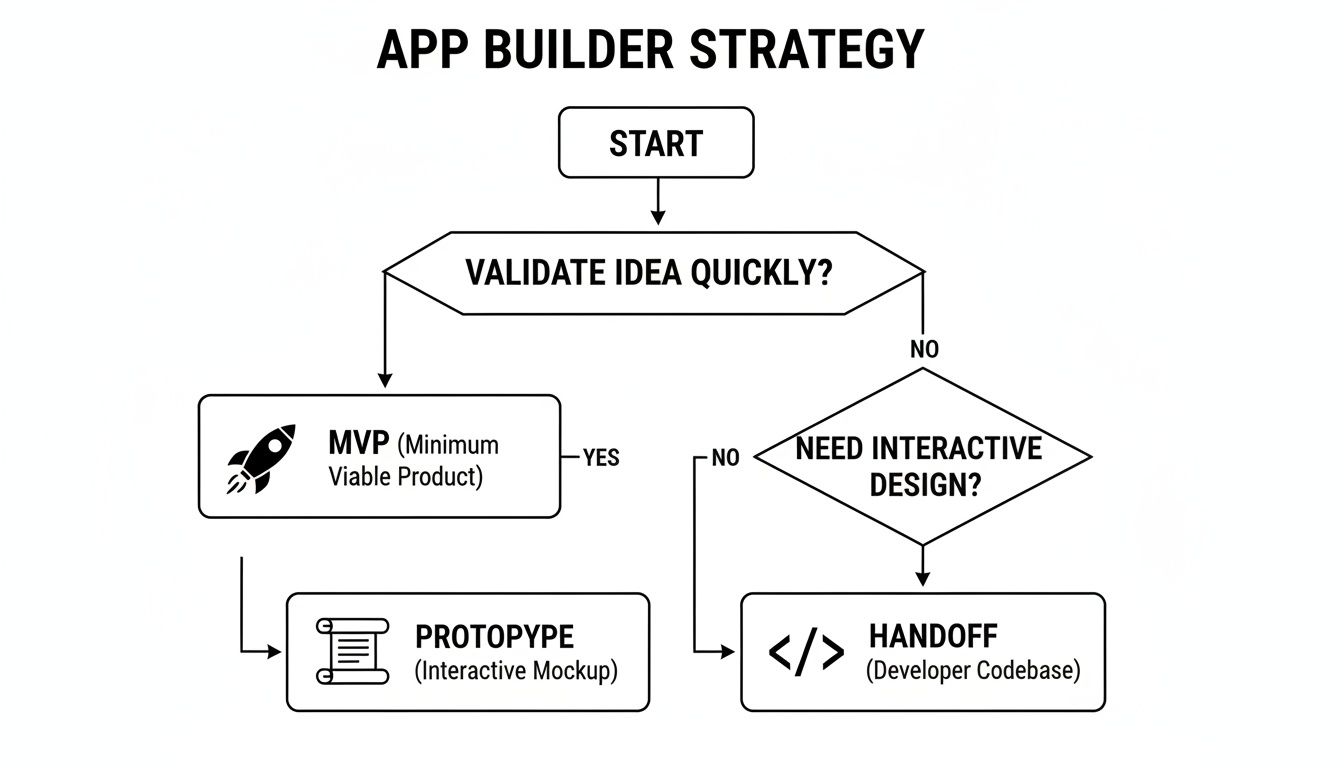
As you can see, a React Native app builder isn’t a one-trick pony. It adapts to where you are in the product lifecycle without forcing you to start over from scratch at each new stage.
A Detailed Look At Your Options
To really nail this decision, a side-by-side comparison makes the trade-offs crystal clear.
Comparing Your Development Options
The table below breaks down the key differences between no-code, React Native app builders, and traditional development, helping you weigh what's most important for your specific situation.
| Criteria | No-Code Platforms | React Native App Builders | Traditional Development |
|---|---|---|---|
| Speed to Market | Very Fast | Fast | Slow |
| Code Ownership | None | Full Ownership | Full Ownership |
| Customization | Low | High | Unlimited |
| Scalability | Platform-Dependent | High | Very High |
| Initial Cost | Low | Medium | High |
| Long-Term Cost | High (Subscriptions) | Low (Flexible) | Very High (Maintenance) |
The numbers don't lie. A React Native app builder carves out a strategic sweet spot, dodging the vendor lock-in of no-code and the staggering upfront investment of traditional development.
The crucial thing to understand is that you aren't trading power for speed. You're just automating the tedious, repetitive code that bogs developers down, freeing them up to focus on the unique features that make your app special. It’s a massive improvement over the all-or-nothing choices we used to face.
And as you look to the future, it's impossible to ignore the role of AI. To see how this is pushing the boundaries even further, check out our guide on how an AI app builder for React Native can take you from a simple prompt to a fully functional screen. In the end, choosing your path is about matching your resources to your ambition, and a modern app builder gives you a flexible, powerful way to get there.
Solving The Common Problems With App Builders
Let's be honest, not all app builders are created equal. It's smart to approach them with a healthy dose of skepticism. For years, the term "visual builder" came with some serious baggage—fears of being locked into a platform, getting stuck with messy code, and eventually hitting a hard ceiling on what you could actually build.
Frankly, those concerns were often valid. Early tools were all about speed, but that speed usually came at the cost of quality and control.

But a modern React Native app builder is a different beast altogether. It's engineered from the ground up to solve these exact problems. The philosophy is completely different: the visual editor isn't a walled garden; it's a powerful accelerator for producing real, professional-grade code.
The Myth Of Platform Lock-In
The biggest fear with any builder is losing your work. What happens if you outgrow the platform’s features? Or worse, what if the service just shuts down one day? With most traditional no-code tools, the answer is pretty grim: you start over from scratch. Your app, your intellectual property, is completely trapped.
This is why full, clean code export is a non-negotiable feature. A true React Native app builder lets you export the entire project—every component, screen, and style—into a standard, human-readable React Native codebase.
Once you export the code, it’s yours. Forever. You can run it, edit it, and deploy it completely independently of the builder. This single feature transforms the tool from a potential liability into a pure asset, guaranteeing you always own what you build.
This is the core difference between a temporary shortcut and a long-term strategic advantage. For a deeper look at this, check out our guide on the differences between no-code tools and real code generators.
From Messy Output To Maintainable Architecture
Another common complaint about older builders was the quality of the code they spat out. It was often a tangled mess of inline styles and poorly structured files that no developer would ever want to touch. This "throwaway code" was fine for a quick prototype but totally useless as a foundation for a real product.
Modern tools have cracked this problem by generating code that actually follows industry best practices. They produce a well-architected application that developers can easily understand, pick up, and extend.
This means you get:
- Modular Components: Reusable UI elements (like buttons and cards) are created automatically, keeping your app consistent and easy to update.
- Clean Styling: The builder uses established frameworks like NativeWind to keep styling separate from logic, making the app much easier to theme and maintain.
- Logical File Structure: Files and folders are organized just like an experienced engineering team would structure a project.
This focus on code quality is why the underlying technology is so important. React Native isn't just a trend; it's a dominant force in the professional development world. As of 2025, there were around 6,413 React Native job postings in the U.S. on LinkedIn alone, which shows you how strong and sustained employer demand is for these skills. You can find more insights into React Native's standing in the job market and its competition.
When a builder generates code in a framework with such a massive ecosystem, you’re not just getting a project file. You're getting a gateway to a huge community of talent and resources.
Ultimately, a top-tier React Native app builder isn't just a design tool. It’s a sophisticated code generator designed to give you a massive head start, delivering a clean, scalable, and fully ownable foundation for your mobile app.
Actionable Next Steps For Your Role
Alright, you understand the theory behind React Native app builders. But how does this actually change the way you work tomorrow? Let's break it down into a practical plan based on your role, whether you're leading the product vision, designing the user experience, or writing the code.
Think of it this way: everyone on the product team can get immediate value from these tools. It’s all about validating ideas faster, making prototypes feel real, and giving developers a massive head start.
For Founders and Product Managers
Your job is to find market fit and launch quickly without burning through your budget. A React Native app builder is a powerful strategic tool for doing just that.
Here’s a practical way to start:
- Need to test a core idea with real users, like, yesterday? Use a builder to spin up a functional MVP in weeks. Get a working app into people's hands so you can gather feedback on the actual experience, not just a design mockup.
- Working with a tight initial budget? Builders dramatically lower the upfront engineering cost, letting you prove your concept before you go all-in on hiring a full development team.
- Building something that needs to grow? Make sure the builder you choose offers a full, clean code export. This way, you’re creating a real asset that can be handed off to engineers, not hitting the dead-end wall of most no-code tools.
For Designers
You can finally close that frustrating gap between your static Figma files and a truly interactive product. By pulling a builder into your workflow, you can create prototypes that look and feel completely real, which leads to much better feedback.
Your next user testing session shouldn't be with a clickable PDF. It should be with a native app running on a real device. This is how you uncover genuine usability issues and validate a design's feel, not just its look.
Here’s a simple first step: take one key user flow from your latest design and rebuild it using a React Native app builder. Put that high-fidelity prototype in front of your stakeholders and a few users. The quality of feedback you get will be night and day, making it easy to show the value of working with real native components from the get-go.
For Developers
Let’s be honest, your time is better spent tackling complex logic, not writing boilerplate UI for the tenth time. A React Native app builder can automate the tedious parts of your job, freeing you up for more important challenges.
Instead of hand-coding yet another login screen or settings page, you can generate it in minutes.
Try this on your next feature: use a builder to scaffold the initial UI. Export the code and take a look at the clean, component-based structure. You'll quickly see how it lets you jump straight into the hard stuff—integrating APIs, managing state, and fine-tuning performance. It also gives the rest of the team a way to contribute while you focus on the core engineering.
Frequently Asked Questions
Whenever you’re exploring a new tool, a healthy dose of skepticism is a good thing. Questions are going to pop up. Since a React Native app builder sits at the crossroads of design, product, and engineering, different people on the team will naturally have different concerns. Let's tackle some of the most common ones we hear.
Getting these questions out on the table helps everyone understand what these tools can—and can't—do before you jump into a new way of working.
Can I Build A Truly Scalable App With A Builder?
Yes, but with one critical condition: you must choose a builder that exports clean, maintainable code. The real value of a good builder isn't just how fast it gets you started, but the quality of the foundation it lays down. A well-built tool will hand off a professional-grade React Native project that your developers can actually work with, extend, and scale.
Think of it this way: you get the first 80% of your UI and structure done in a tiny fraction of the usual time. Your engineers can then dive straight into the tricky remaining 20%—things like performance tuning, writing custom native modules, or implementing complex business logic—without getting bogged down in boilerplate code.
How Much Coding Do I Actually Need To Know?
To build out screens and style components visually, you need zero coding knowledge. This is a huge win for founders, PMs, and designers who want to build high-fidelity, functional prototypes without waiting on engineering resources. It’s a genuinely accessible way for non-technical team members to contribute directly to the product.
That said, a basic grasp of development concepts can help you push the tool further. Understanding how data is structured or how layouts work will let you create more sophisticated screens and interactions, helping bridge the gap between a great idea and a technically sound implementation.
What If The Builder Platform Disappears?
This is probably the single most important question you can ask. The answer is what separates a genuine development accelerator from a risky, walled-in platform. The fear of "what if they shut down?" is precisely why you should demand a full code export feature.
With the ability to export your entire codebase, the builder platform becomes a means to an end, not a lifelong dependency. Your app’s source code is your IP. A full export makes it yours forever, completely independent of the tool that helped create it. This is your guarantee against vendor lock-in; you always control your product's destiny.
This commitment to code ownership is what makes a professional React Native app builder a smart, strategic choice for any serious project.
Ready to see how fast you can turn your ideas into real, functional code? With RapidNative, you can generate production-ready React Native screens from simple text prompts, giving you a massive head start on your next mobile app. Start building for free.
Ready to build your app?
Turn your idea into a production-ready React Native app in minutes.
Free tools to get you started
Free AI PRD Generator
Generate a professional product requirements document in seconds. Describe your product idea and get a complete, structured PRD instantly.
Try it freeFree AI App Name Generator
Generate unique, brandable app name ideas with AI. Get creative name suggestions with taglines, brand colors, and monogram previews.
Try it freeFree AI App Icon Generator
Generate beautiful, professional app icons with AI. Describe your app and get multiple icon variations in different styles, ready for App Store and Google Play.
Try it freeFrequently asked questions
What is RapidNative?
RapidNative is an AI-powered mobile app builder. Describe the app you want in plain English and RapidNative generates real, production-ready React Native screens you can preview, edit, and publish to the App Store or Google Play.
Can I export the code?
Yes. RapidNative generates clean React Native and Expo code that you can export at any time. No lock-in, no proprietary format. Hand it to your developers or keep building inside RapidNative.
Is RapidNative free to use?
Yes. You can build apps on the free plan with no credit card required. Paid plans unlock unlimited AI generations, code export, and direct publishing to the App Store and Google Play.
Do I need to know how to code?
No. Most users build apps by describing what they want in plain English. Developers can drop into the code whenever they want more control, but coding is optional.
How long does it take to build an app?
Most users have a working first screen in under a minute. A full MVP usually takes a few hours instead of the weeks or months traditional development requires.