Building a Marketplace App: MVP Scope to Launch
Plan building a marketplace app step by step: MVP scope, payments, trust controls, liquidity metrics and a clean React Native handoff.
By Suraj Ahmed
27th Oct 2026
Last updated: 27th Oct 2026

You can have a polished app, a growing signup count, and still watch a buyer search their district and find nothing bookable. That's the marketplace cold start in practice: registrations look like progress, but a transaction only happens when suitable supply meets demand in the right category, place, and time window.
For founders and product teams building a marketplace app, the first hard decision isn't which framework to use. It's where to focus, what a successful transaction needs, and how to test that loop before spending on a full build. A prototype can expose broken assumptions; it can't prove real-world retention or operational readiness.
Scope Your MVP to One Market First
A v1 marketplace should cover one category, one city or region, and one transaction type. Everything else waits until a buyer can find suitable supply in that area and complete a transaction with a real seller. That's the scope test to run before debating feature requests.
Take a local tutoring marketplace. The first release needs subject and level fields, a booking request, in-app chat before booking, and a review after the first lesson. Recurring lesson packages, teacher analytics, and video classrooms can wait. They may become useful later, but they don't prove the core exchange works.
| Module | Include in v1 | Defer | Why |
|---|---|---|---|
| Listing creation | Title, photos, price, location, category fields | Bulk upload, spreadsheet import | Supply quality decides search quality |
| Search and filters | Category, location, price, two or three category filters | Saved searches, personalized ranking | Buyers must find supply in one step |
| Checkout and payment | One payment method, one fee model | Multi-currency, installments | Money flow is the riskiest part to rebuild |
| Messaging | In-app chat with an off-platform warning | Voice and video calls | Pre-booking questions drive conversion |
| Reviews | One rating and comment after completion | Reputation scores, badges | Only meaningful after completed transactions |
| Seller dashboard | Listing status, orders, payout balance | Analytics, promotions | Early sellers tolerate a simple view |
| Dispute and refund | Report, refund request, manual admin decision | Automated arbitration | Manual handling works at low volume |
| Admin moderation | Review queue, account suspension | Automated moderation models | Human decisions create the rules you later automate |
A focused launch also needs a market definition that's smaller and more useful than “online commerce.” Gross merchandise value (GMV) is the total value of goods or services sold through your platform before commissions, refunds, and operating costs. Track the GMV of the niche you serve, such as tutoring bookings in one city per month, rather than using total e-commerce sales as a proxy for your opportunity.
For context, global retail e-commerce sales reached about $6.01 trillion in 2024, and the cited market statistics put Amazon's 2024 marketplace GMV at nearly $800 billion. Those figures show the scale of online commerce, not the size of a local tutoring opportunity. A niche can be worth testing without competing for a meaningful share of global e-commerce. CompaniesHistory's e-commerce market statistics provide the wider context, while this overview of MVP development from Kushan Business Solutions can help teams think through what to validate before broadening scope. For a more grounded estimate, start with market research for app ideas and size the narrow market you can realistically serve.
Scope rule: If a feature doesn't help a buyer find supply, trust a seller, or complete the first transaction, put it in the deferred column.
Design Onboarding, Trust States and Core Screens
Buyers want to browse before committing; sellers need an account before they can publish. Let visitors browse as guests, then ask them to sign up when they contact a seller or publish a listing. Requiring an account before showing any inventory adds friction before the app has demonstrated value.
Six patterns cover most early flows. A role choice lets people select buyer, seller, or both. A gated publish keeps a rental listing in draft until an identity check passes. Category-specific forms ask a tutor for subject and level, but a car-rental host for mileage. An empty search state offers nearby-city results and a notify-me action. A request-to-book flow lets the seller accept or decline a high-value booking, while instant book confirms a standardized, low-risk item at payment.
Trust states need to show users what happened and what to do next. If a listing is pending verification, tell the seller what document to upload; if it's flagged, explain whether the seller can edit it or needs support. Verified, suspended, disputed, and resolved states also need clear messages and next actions. The marketplace trust-and-safety implementation guide recommends treating verification, reporting, disputes, and appeals as part of the transaction system, with decisions recorded for review.
Specify what's verified, when checks happen, what happens if they fail, and which transactions get extra review. For example, a peer-to-peer rental app might check identity before a first listing goes live and before a high-value booking. A local-services marketplace might verify a provider at first payout. For a related example of how clear prices help users assess trust, see Global Pet Sitter's guide to pricing transparency in pet sitting.
Model Your Data Before Choosing a Stack
Choose the marketplace's core entities and states before choosing a backend. If an order can be disputed, a seller can be suspended, or money can be held, those aren't merely screen variations. They're product states your data model and services need to represent.
Start with the relationships. A listing belongs to one seller, an order references one listing, and each order has one payment. A payment can have multiple ledger entries, because the amount captured isn't enough to show what's held, payable, refunded, or reserved. A conversation may connect a buyer and seller before an order exists, while a review belongs to a completed order.
Model order states from the start: requested, accepted, paid, in progress, delivered, completed, cancelled, and disputed. Keep payment accounting separate from the order record. If a buyer disputes a transaction, the system needs to know which balance changes and why, not just that the order's status changed.
| Entity | Key fields | Relationships |
|---|---|---|
| User | id, role flags, verification_status, created_at | Has many listings and orders |
| Listing | id, seller_id, category, price, location, status | Belongs to seller; has many orders |
| Order | id, buyer_id, listing_id, status, amount | Belongs to listing; has one payment |
| Payment | id, order_id, amount_captured, fee, status | Belongs to order; has many ledger entries |
| Ledger entry | id, payment_id, account, amount, held_until | Records held, payable, and reserve balances |
| Dispute | id, order_id, reason_code, state, resolution | Belongs to order |
| Conversation | id, listing_id, participant_ids, flagged | Links buyer and seller before an order exists |
| Review | id, order_id, rating, author_role | One per completed order |
A chargeback may first reduce a seller's payable balance; if that balance can't cover the loss, the platform can absorb the shortfall. A rolling reserve can hold back part of a seller's earnings for future refunds or disputes. If the reserve runs out, a seller's balance may go negative and recover through later sales. Those choices affect payout timing and seller terms, so reflect them in the schema rather than patching them in after launch. The marketplace payout accounting guide from Whop describes these liability patterns.
For the client app, React Native with Expo is a common choice when you need iOS and Android from one codebase. Choose a backend by answering three questions: do you need real-time chat, do payments need to split funds, and can your team own a custom API? Teams without backend engineers often benefit from managed services; a custom API makes sense when the team has a clear reason to own the services and the capacity to operate them.
Keep the schema in the prototype as mock data. If screens use the same entities and states the production app will need, engineers can replace the mock data layer without rebuilding the interaction model.
Design the Money Flow and Payout Rules
A seller who sees money in the app but can't withdraw it will ask why. The answer shouldn't be an improvised support reply. Define the money flow before building checkout or the seller balance screen.
The stages are authorization and capture, fee deduction, seller-platform split, tax handling, held balance, payout, and refund or dispute reversal. Consider a hypothetical $100 order with a 10% platform fee: the buyer pays $100, the platform keeps $10, and the seller's $90 stays in an order-specific held balance until the release event, such as confirmed delivery. After release, it moves into the seller's payable balance.
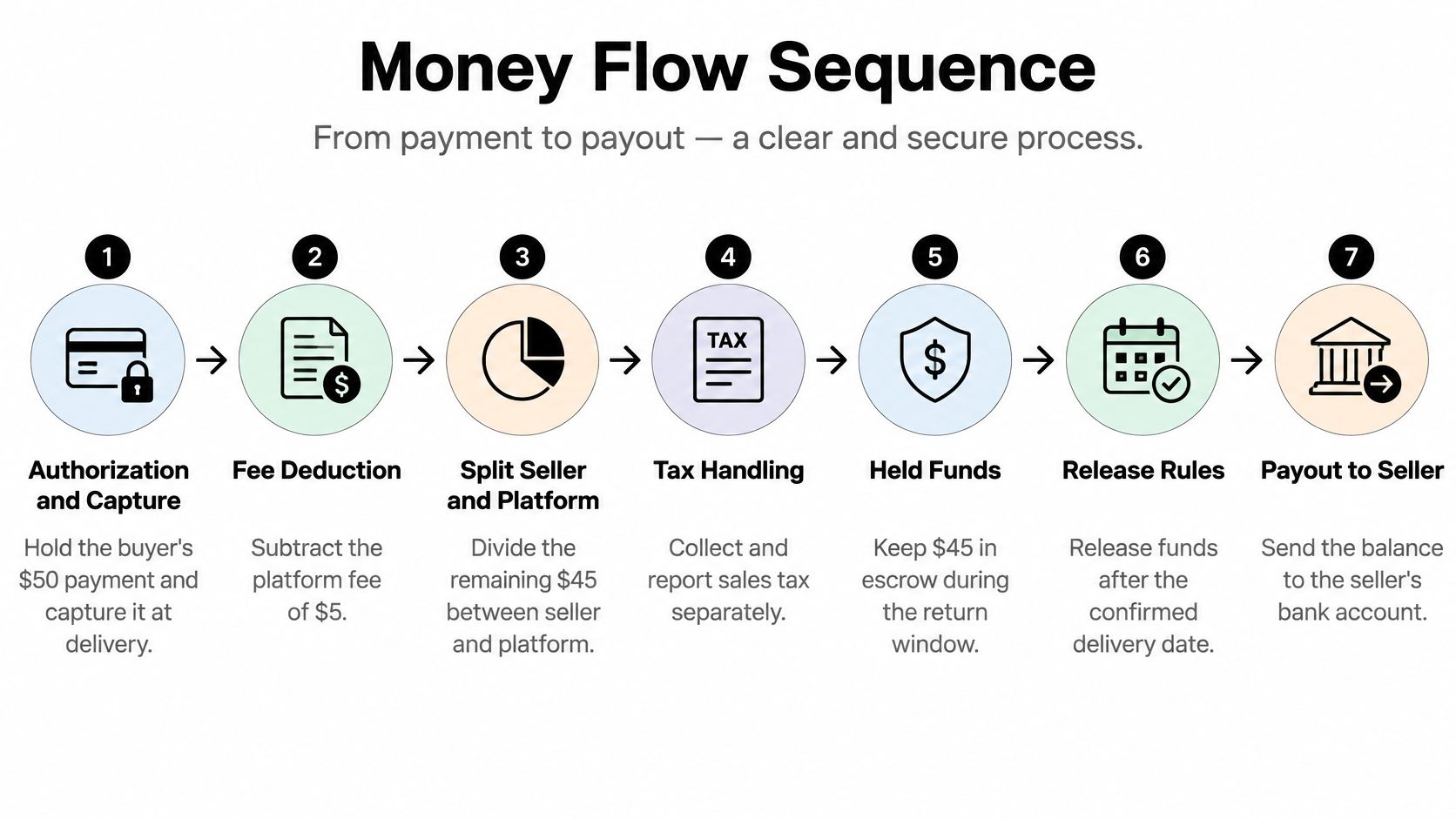
Money for an undelivered order shouldn't appear as withdrawable. Set the release event, define partial-refund behavior, decide who bears a dispute loss, and confirm whether your payment provider can reverse transfers. This marketplace payments overview from CS-Cart outlines why these rules belong in the product and payment design, not just the checkout UI.
Payout speed is a trade-off. Instant payouts can appeal to sellers, but they leave less money available if a buyer later disputes the transaction. A weekly schedule leaves more room to handle reversals. Whatever schedule you choose, keep held funds, payable funds, reserves, refunds, and disputed amounts distinct in the seller dashboard. Showing one undifferentiated balance creates confusion about what the seller can actually withdraw.
Payment terms also shape expectations in service marketplaces. For an example of how a service provider may communicate payment timing, Bornbir's guide to what doula contracts say about payment offers useful context. If you're evaluating the provider side of your integration, see an introduction to Stripe Connect. Decide the rules before building the dashboard, so its labels match how money really moves.
Measure Liquidity Before You Scale
A dashboard can show steady sign-ups while buyers in one district still can't find a bookable listing. That's because liquidity lives where transactions happen. Each category, location, time window, and provider group is a separate cell; a dead cell can hide behind healthy totals elsewhere.
| Metric | Formula | Example or reading |
|---|---|---|
| Fill rate | Completed transactions divided by valid requests | 72 completed of 100 valid requests = 72% |
| Median time to match | Middle value of request-to-accept times | Long values with idle providers suggest excess supply or weak matching |
| First-offer acceptance rate | Accepted first offers divided by first offers sent | Many declines point to pricing or relevance |
| Cancellation rate by side | Buyer and seller cancellations reported separately | Compare the two sides; they need different fixes |
| Provider utilization | Hours booked divided by hours online | Low values with fast matching suggest excess supply |
| 30-day reorder rate | Customers with a second order within 30 days divided by first-time customers | Track per category and area |
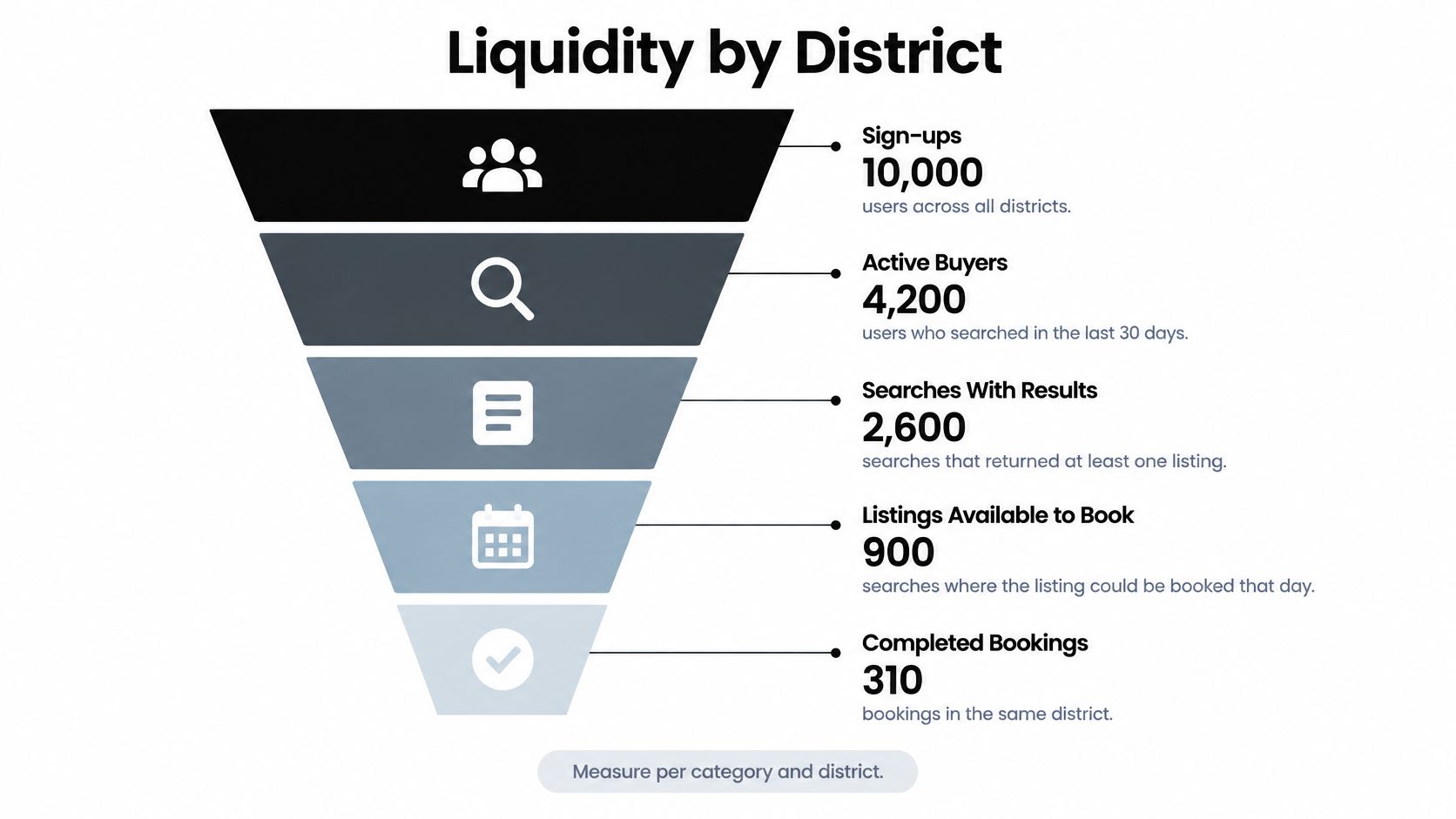
Use the signals together, not as isolated scores. Long matching times alongside idle providers suggest an oversupply or matching problem. Many declined first offers may point to price or relevance. If cancellations cluster on the buyer side, investigate the booking process; if they cluster among sellers, check availability, response expectations, or listing accuracy. Provider utilization is hours booked divided by hours online, so low utilization can indicate too much supply even when onboarding is working.
The marketplace liquidity guide from Apporio recommends measuring by location, time, category, and provider group, using measures such as fill rate, match time, cancellations, utilization, and reorder behavior. The core example is straightforward: 100 valid requests with 72 completed transactions gives a 72% fill rate.
A marketplace with fewer users and reliable matches can be healthier than one with more registrations and fragmented supply.
Launch with one category in one area, and report metrics per cell and per side of the transaction. Keep the wedge narrow for several weeks before expanding. If fill rate and reorder rate aren't holding steady, fix the matching, supply, or fulfillment problem first. New districts multiply the number of places a buyer can encounter an empty result; they don't solve the underlying issue.
Prototype the Core Flows in RapidNative
A marketplace prototype should test transaction logic, not just whether the screens look polished. The riskiest assumptions are whether buyers can find a suitable listing, understand the trust rules, and reach checkout, while sellers can publish and understand when they'll be paid.
Use this sequence:
- Write one prompt per role. Define the screens, key states, and transaction to test for a buyer and a seller. Include what happens when a search has no results or a listing is held.
- Start from the material you have. Add a sketch or PRD where available. RapidNative supports prompt-to-app, image-to-app, whiteboard-to-app, and PRD-to-app workflows.
- Seed different supply levels. Put a small number of listings in one area and a richer inventory in another. That makes it possible to test whether the sparse cell still supports a transaction.
- Share and observe. Send a preview link or QR code to people in your target group and watch them use it on their own phones. Don't lead them through the flow; note where they hesitate or get stuck.
- Keep the handoff clean. Use clear routing and reusable components, so exported code gives engineers a useful starting point rather than a screen-by-screen rebuild.

| Test | Setup in RapidNative | Pass signal |
|---|---|---|
| Two-role walkthrough | One prompt per role; share preview link | Testers finish signup and first action without help |
| Sparse-supply test | Three listings in one area, thirty in another | Testers still reach checkout in the sparse area |
| Trust gate test | Verification screen and held-listing state | Sellers can explain why a listing is held and what to do |
| Held-funds copy test | Checkout and seller payout screens with a held message | Buyers and sellers describe when the seller gets paid |
| Empty search test | Zero-result screen with a notify option | Testers choose an alternative instead of leaving |
A prototype can tell you whether the interaction is understandable. It can't tell you whether users will return after a week of real use, whether sellers will keep supply current, or whether payments and disputes work in production. Treat those as launch questions, not prototype claims. A practical way to improve the interface before committing engineering time is rapid app prototyping, with the tests centered on a specific transaction rather than a generic tour.
Retention needs its own measurement plan after launch. Adjust and AppLovin's 2025 benchmark for marketplace and classifieds apps reported approximately 24% Day-1, 14% Day-7, 11% Day-14, and 8% Day-30 retention in their mobile app trends report. Measure those windows separately for buyers and sellers, and track meaningful events such as listing, search, chat, purchase, cancellation, and repeat purchase. A prototype can help remove wrong assumptions, but it can't establish real retention.
Hand Off the Prototype and Decide Your Next Build
Engineers need more than a set of screens. They need a description of what each role can do, what changes after each action, and what the system should show when something fails. Freeze those decisions before treating exported code as a production app.
- Freeze the flows into a PRD. Record every state, including empty, loading, error, held, disputed, and suspended. Add the action a user can take from each state.
- Export the React Native code to your repository. Review navigation, reusable components, and the mock data layer with the team that will own the build.
- Replace mock data with real services. Start with authentication, listings, and the order state machine. Keep the production data model aligned with the user flows.
- Test payment paths in sandbox mode. Exercise held balances, refunds, and disputes before live money moves. Confirm that the displayed seller balance reflects what can be paid out.
- Prepare device builds and internal testing. Set up Expo builds and internal test tracks on TestFlight and Google Play. Store review timelines can vary, so don't treat submission as a guaranteed launch date.
- Wire analytics before the beta. Track signup, listing, search, checkout, and repeat purchase from the first real users. Separate buyer and seller behavior so one side's activity doesn't conceal the other's problem.
- Sign off on the handoff. Check that the PRD, data states, payment rules, and event names match the prototype and the implementation plan.
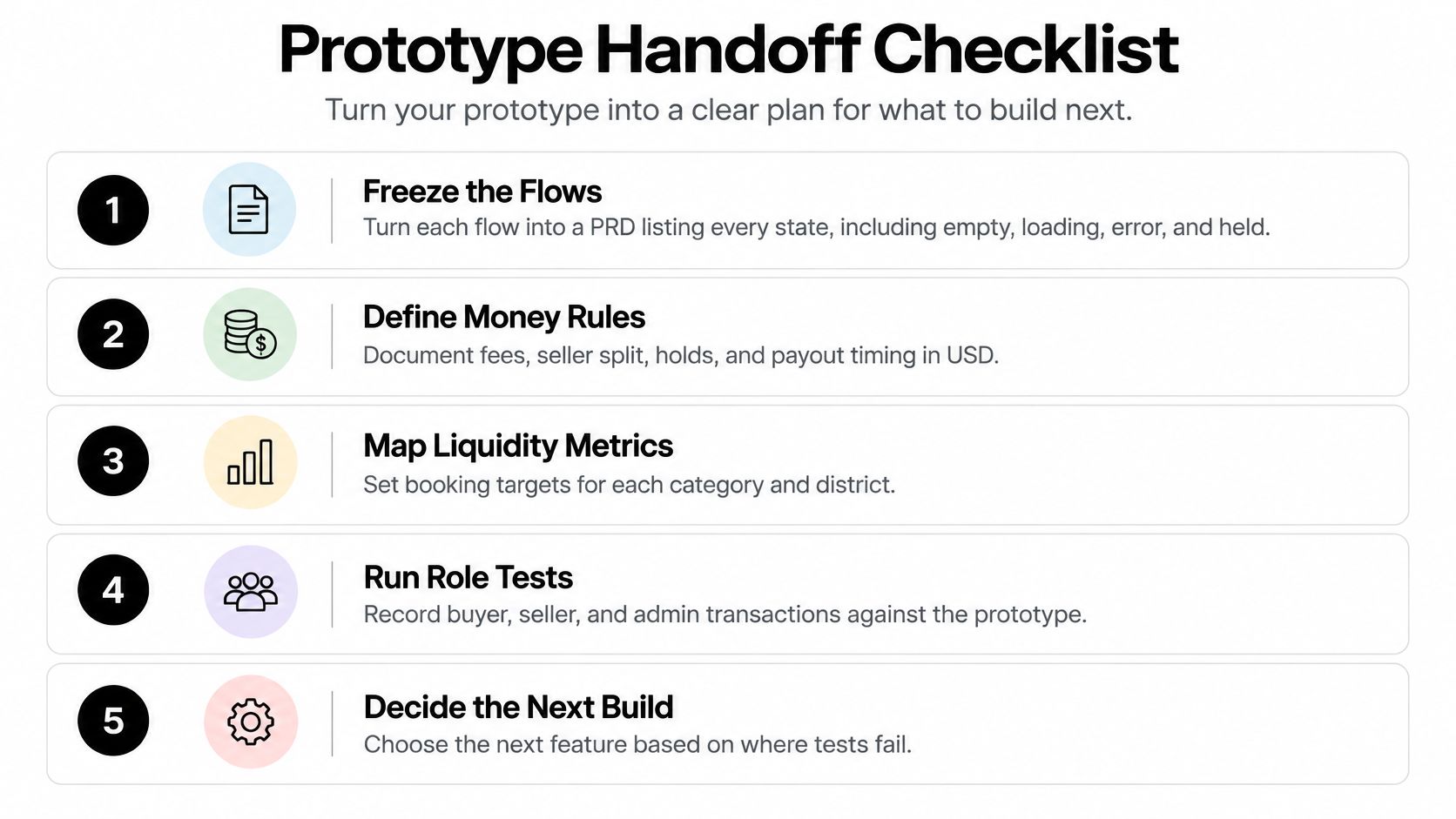
Exported code gives the engineering team a starting point, not production authorization, server-side fee logic, or completed compliance work. Those still require implementation and review. Make sure the team has assigned owners for payment behavior, trust decisions, and operational support before opening the app to customers.
For the next four weeks, run a closed beta in one category-area cell. Review fill rate and reorder rate there, alongside where buyers and sellers abandon the transaction. Expand only when that narrow market is producing reliable matches; if it isn't, build the fix for the bottleneck rather than adding another feature.
RapidNative turns prompts, sketches, images, or PRDs into shareable React Native prototypes, so your team can test marketplace flows before committing to a full build. Try your buyer and seller journeys with sparse supply, then visit RapidNative to create and share a prototype with your team.
Ready to build your app?
Turn your idea into a production-ready React Native app in minutes.
Free tools to get you started
Free AI PRD Generator
Generate a professional product requirements document in seconds. Describe your product idea and get a complete, structured PRD instantly.
Try it freeFree AI App Name Generator
Generate unique, brandable app name ideas with AI. Get creative name suggestions with taglines, brand colors, and monogram previews.
Try it freeFree AI App Icon Generator
Generate beautiful, professional app icons with AI. Describe your app and get multiple icon variations in different styles, ready for App Store and Google Play.
Try it freeFrequently asked questions
What is RapidNative?
RapidNative is an AI-powered mobile app builder. Describe the app you want in plain English and RapidNative generates real, production-ready React Native screens you can preview, edit, and publish to the App Store or Google Play.
Can I export the code?
Yes. RapidNative generates clean React Native and Expo code that you can export at any time. No lock-in, no proprietary format. Hand it to your developers or keep building inside RapidNative.
Is RapidNative free to use?
Yes. You can build apps on the free plan with no credit card required. Paid plans unlock unlimited AI generations, code export, and direct publishing to the App Store and Google Play.
Do I need to know how to code?
No. Most users build apps by describing what they want in plain English. Developers can drop into the code whenever they want more control, but coding is optional.
How long does it take to build an app?
Most users have a working first screen in under a minute. A full MVP usually takes a few hours instead of the weeks or months traditional development requires.