React Native
Weather App Fullstack
Template
A full-stack weather app with real-time conditions, hourly and 7-day forecasts, interactive radar maps, and severe weather alerts. Built on Expo and React Native with a Supabase backend powering user accounts, saved locations, and alert preferences.
 React Native
 TypeScript
Join thousands of developers building amazing apps
7-day money-back guarantee
Technically Optimized for Superior User Experience
Engineered for optimal performance and engagement. Our template's tech stack ensures speed, reliability, and seamless cross-platform functionality.
5
App Screens
2
Platforms
100%
TypeScript
Real-time Weather Display
Large temperature display with current conditions, high/low temperatures, and beautiful gradient backgrounds.
24-Hour Forecast
Detailed hourly forecast showing temperature, precipitation chance, and wind speed for the next 24 hours.
7-Day Weekly Outlook
Weekly forecast with visual temperature bars, daily summaries, and precipitation indicators.
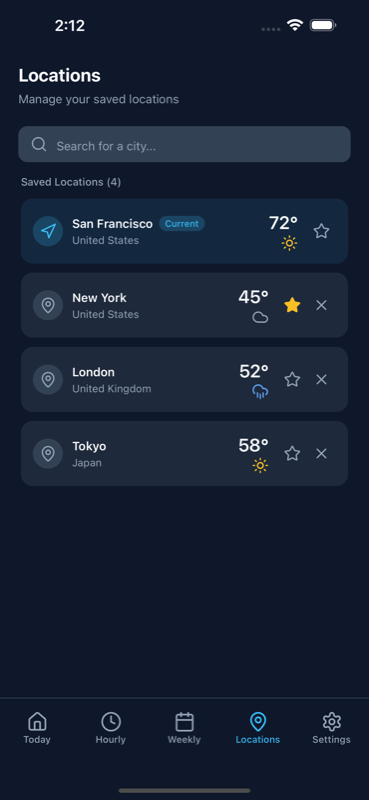
Multi-Location Support
Search and save multiple locations, mark favorites, and quickly switch between cities.
Light & Dark Mode
Automatic theme switching with a beautiful sky blue palette optimized for both light and dark modes.
Weather App Kit Preview
Experience the beautiful interface with stunning visuals, smooth animations, and intuitive navigation across all screens.
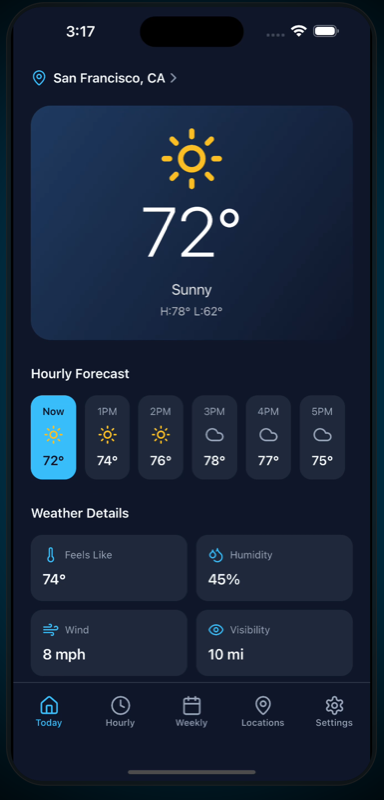
Today
Current weather with temperature, conditions, and hourly preview
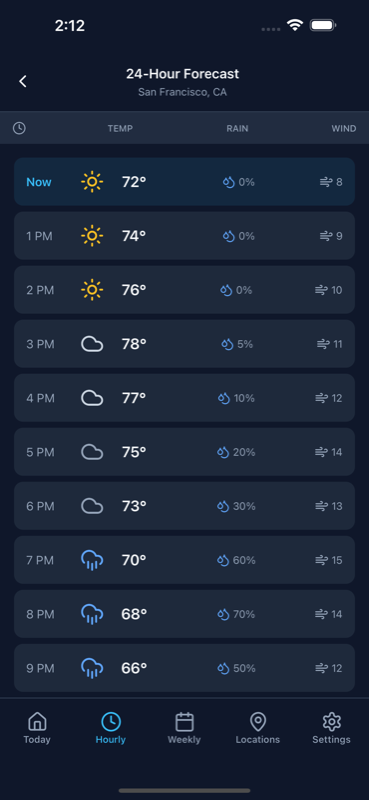
Hourly Forecast
24-hour detailed forecast with temperature and precipitation
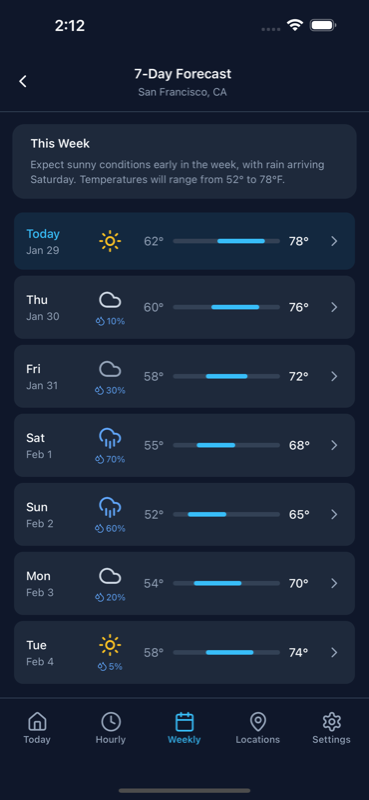
Weekly Forecast
7-day outlook with temperature bars and daily summaries
Locations
Search and manage multiple saved locations
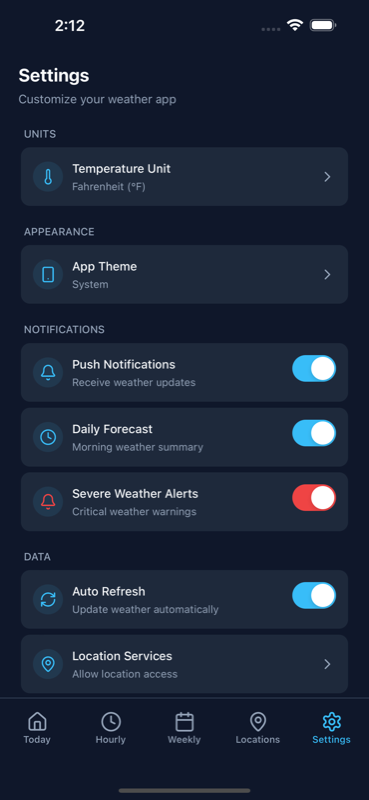
Settings
App settings and preferences
Get started in 4 simple steps
From download to deployment, we've streamlined every step to get your app live as quickly as possible.
Download the Template
Get instant access to the complete Weather App template with all screens, components, and configurations ready to go.
Customize Your Brand
Update the theme colors, add your logo, and customize the UI to match your brand identity using Tailwind CSS.
Connect Weather API
Integrate your preferred weather API (OpenWeatherMap, Weather API, etc.) to fetch real-time forecast data.
Deploy & Launch
Build for iOS and Android using Expo EAS, submit to app stores, and watch your beautiful weather app go live.
Launch Your Weather App 2x Faster
No need to code from scratch. Save 200+ development hours with this React Native UI template. With advanced features and creative tools, the Weather App UI Kit is the perfect choice to create engaging mobile app platforms for your community.
37.5 hours
UI Design & Prototyping
40.5 hours
Core Features Integration
22.5 hours
Navigation & Animations
16.5 hours
User Progress & Tracking
27.5 hours
Theming & Customization
15 hours
Accessibility Features
20.5 hours
Responsive Design Optimization
22.5 hours
Testing & Bug Fixing
Why Choose This Weather App Template?
Ship a polished weather app in days, not weeks. This React Native weather app template gives you 5 pre-built screens with gradient cards, hourly and weekly forecast layouts, multi-location search, and dark mode support. Built with Expo, NativeWind v4, and TypeScript — designed so you can connect your weather API of choice and publish to the App Store and Google Play with minimal effort.
Advanced Components
Access a library of pre-built weather components including forecast cards, temperature displays, and animated weather icons.
Seamlessly Responsive
Ensure your weather app looks stunning on any device with fully responsive components from mobile to tablet.
Customization & Theming
Tailor the sky blue palette to your brand with extensive theming options and light/dark mode support.
Effortless Copy-Paste
Streamline your workflow with easy copy-paste functionality. Quickly integrate components into your projects.
Inclusive Design
Ensure your weather app is accessible to all users with properly labeled components and screen reader support.
NativeWind + Tailwind
Leverage the power of Tailwind CSS through NativeWind for flexible and efficient styling in React Native.
Faster Development
Accelerate your workflow with pre-built screens, components, and navigation already configured and ready to use.
Cost Reduction
Save weeks of development time with this production-ready template without compromising quality.
Everything you need in a Weather App
A customizable React Native weather app template with built-in authentication and ready-to-use screens.
Real-time Weather Display
Large temperature display with current conditions, high/low temperatures, and beautiful gradient backgrounds.
24-Hour Forecast
Detailed hourly forecast showing temperature, precipitation chance, and wind speed for the next 24 hours.
7-Day Weekly Outlook
Weekly forecast with visual temperature bars, daily summaries, and precipitation indicators.
Multi-Location Support
Search and save multiple locations, mark favorites, and quickly switch between cities.
Light & Dark Mode
Automatic theme switching with a beautiful sky blue palette optimized for both light and dark modes.
Pull to Refresh
Update weather data with an intuitive pull-to-refresh gesture for the latest conditions.
Built with Modern Technologies
This template is designed to boost your productivity with cutting-edge tools. Built on React Native and Expo for cross-platform excellence.
Core Technologies
React Native

Expo
TypeScript
UI & Development Experience

NativeWind
Tailwind CSS for React Native
Responsive design
Dark mode support
Expo Router
File-based routing
Deep linking
Type-safe navigation
React Native Reanimated
Smooth animations
Gesture handling
Native performance
Loved by developers worldwide
See what developers are saying about this template. Join the community of builders creating amazing apps.
“Had a working MVP in front of beta users within a week. The entire backend was already wired up, so I just focused on customizing the UI and plugging in my API keys. Weeks of work, done.”

Sanket Sahu
Founder at GeekyAnts
“A client needed a proof-of-concept for an AI product by Friday. We grabbed the template Monday morning, swapped in their branding, and demoed a fully working app in 3 days. They signed the contract that week.”

Suraj Ahmed
Lead Developer at RapidNative
“We went from idea to App Store submission in under 3 weeks. The screens, navigation, and the backend were all there. We started onboarding users almost immediately. Saved us at least 2 months of design and engineering work.”

Damini Pandey
Lead Developer at FlyDash
Get the Weather App Template
Choose the license that fits your needs. All licenses include lifetime access and free updates.
FAQs about Weather App Template
Find answers to your key questions about this template. Our Quick Insights section covers features, pricing, and more, giving you the information you need at a glance.
What weather API does this template use?
+
The template comes with mock data that you can easily connect to any weather API like OpenWeatherMap, Weather API, or AccuWeather. We provide integration guides for popular APIs.
Does the app support location detection?
+
The template includes UI for location management. You can easily integrate Expo Location for automatic location detection and GPS-based weather.
Can I customize the color scheme?
+
Yes! The template uses NativeWind with Tailwind CSS. Simply update the theme configuration to change colors, and the entire app will reflect your brand.
Is the template production-ready?
+
Yes — the screens, navigation, and the built-in backend (database, auth, storage) are production-ready. You add a weather API of your choice and your app store credentials for publishing.
What platforms are supported?
+
Built with Expo and React Native, the app runs on iOS, Android, and can be exported for web. One codebase, multiple platforms.
How do I build a weather app with React Native?
+
The fastest approach is to start with a ready-made template. This React Native weather app template ships with 5 screens, forecast layouts, location management, and styling already done. Connect a weather API (OpenWeatherMap is the most popular), update branding, and submit to the App Store and Google Play.
Is this an Expo weather app template?
+
Yes. The template is built with Expo SDK 54 and works with Expo Go for development and EAS Build for production. Cross-platform on iOS, Android, and web.
Which weather API should I use with this template?
+
OpenWeatherMap is the most popular choice for indie developers — generous free tier and easy setup. WeatherAPI and Tomorrow.io are strong alternatives. The template is API-agnostic, so you can use any service that returns JSON forecast data.