App Development JavaScript: Build Better Apps
Master app development JavaScript for mobile. Compare React Native, PWAs, and Ionic, and learn how AI tools like RapidNative accelerate your workflow.
By Suraj Ahmed
27th Sep 2026
Last updated: 27th Sep 2026
Your team has a promising mobile idea, an AI-generated prototype, and a growing list of feature requests. The first screen looks convincing, but difficult questions are already appearing. Which JavaScript framework should carry the product? How will native APIs, offline behavior, accessibility, testing, and app-store releases work after the prototype becomes a real business?
That's the operational reality of app development with JavaScript in 2026. JavaScript can help a small team validate an idea quickly and share product logic across platforms, but speed at the beginning doesn't remove architectural decisions later. The teams that ship reliably treat the prototype as evidence, not as the finished foundation.
The Evolution of JavaScript in Mobile
A product team comparing Swift, Kotlin, Flutter, and React Native is rarely choosing only a programming language. It's choosing how much code to share, how closely the interface should follow each platform, and how much native expertise the team can maintain. JavaScript has earned a place in that conversation because it moved far beyond browser scripting.
Netscape and Sun announced JavaScript in 1995. Google's Gmail launch in 2004 helped popularize the Ajax pattern, where web applications behaved more like responsive software than collections of static pages. That experience influenced later JavaScript applications across browsers, hybrid containers, and mobile stacks. The language's long presence also created a broad talent pool and an ecosystem that spans interfaces, servers, testing, build tooling, and deployment. JetBrains' history of JavaScript places this evolution in the context of nearly three decades of development.
The important shift was from “put a web page inside a phone” to “share application logic while rendering an interface appropriate to the device.” React Native represents that change clearly. Its components are written in JavaScript, but they render through native platform views rather than relying on a browser DOM. That distinction gives teams a familiar development model without requiring the entire product to behave like a website.
A hypothetical retail team shows why this matters. The founders may use an AI tool to validate a catalog flow, a designer may refine the checkout experience, and engineers may later connect payments, push notifications, analytics, and offline order history. A shared JavaScript foundation can keep the domain logic aligned across iOS and Android, while native modules handle platform-specific behavior.
Practical rule: Choose JavaScript because it fits the product and team workflow, not because “write once, run anywhere” sounds effortless.
Cross-platform JavaScript development became a mainstream mobile workflow. One industry survey cited by JetBrains reports usage by around 97.5% of mobile developers for cross-platform app development. That figure describes survey adoption, not a guarantee that every JavaScript app will be simple to maintain. It does show why JavaScript remains closely associated with code sharing and why modern app-building teams continue to consider it for serious products.
Comparing the Major JavaScript Frameworks
The frameworks often grouped under JavaScript mobile development don't solve the same problem. React Native targets native-rendered interfaces. Ionic focuses on web technologies inside a native container. Progressive Web Apps stay in the browser. NativeScript takes a JavaScript or TypeScript approach to native platform APIs and views. The right choice depends on the user experience you need, not on the framework with the loudest community.
Choose the rendering model first
| Framework | Rendering Model | Best Use Case |
|---|---|---|
| React Native with Expo | JavaScript describes reusable components that render to native platform views | Consumer and business apps needing native-feeling iOS and Android experiences with shared code |
| Progressive Web Apps | HTML, CSS, and JavaScript rendered by the mobile browser | Services where install friction, store distribution, or deep device integration isn't central |
| Ionic with Capacitor | Web UI rendered in a WebView, with native APIs exposed through a runtime and plugins | Web-first teams extending an existing application to mobile and the app stores |
| NativeScript | JavaScript or TypeScript drives native platform APIs and UI components | Teams wanting JavaScript skills with direct native-oriented access and platform control |
React Native with Expo is usually the strongest default for a product team that wants a mobile-first experience and already understands React. Expo simplifies project setup, device testing, build workflows, and access to common native capabilities. The trade-off is that engineers still need to understand platform permissions, native modules, release configuration, and the points where iOS and Android diverge. React Native isn't a way to avoid mobile engineering.
PWAs are attractive when the product is primarily content, workflow, or account-based software. A browser delivery model can make updates straightforward and remove app-store installation from the initial journey. It becomes less suitable when users expect deep background behavior, dependable offline operation, device integrations, or the conventions of a fully installed app.
Ionic and Capacitor work well for organizations with a substantial web product and a mobile team that already thinks in HTML, CSS, and browser tooling. The WebView model accelerates reuse, but it can create a less native interaction model and introduce plugin dependencies. Test keyboard focus, scrolling, screen-reader announcements, and gestures on real devices rather than assuming a responsive web layout will translate cleanly.
NativeScript sits closer to native UI access while retaining JavaScript or TypeScript. That can suit a team with unusual platform requirements, though hiring, library selection, and long-term maintenance deserve careful review. The wider market context favors React Native, with one 2026 industry summary reporting about 35% of the cross-platform mobile framework market, about 12.6% of the top 500 U.S. apps, and adoption by more than 25,116 companies worldwide in 2025. These figures come from a React Native and Flutter market comparison, and they indicate ecosystem scale rather than automatic suitability.
For a deeper implementation-oriented comparison, review this guide to mobile app development with JavaScript. Then decide based on three questions: where should UI render, which device capabilities matter, and who will own upgrades after launch?
Performance and Architecture Trade-offs
JavaScript mobile performance isn't mainly a question of whether JavaScript is “fast enough.” It's a question of how often your app moves work between JavaScript and the native layer, how much it loads during startup, and whether the team profiles actual user journeys instead of optimizing assumptions.
React Native's earlier model relied on an asynchronous bridge for communication between JavaScript and native code. The New Architecture replaces that bridge with JavaScript Interface, or JSI, enabling synchronous access to the native layer and faster event handling. React Native's New Architecture documentation also describes changes to scheduling and native-module loading, including lazy loading by default.
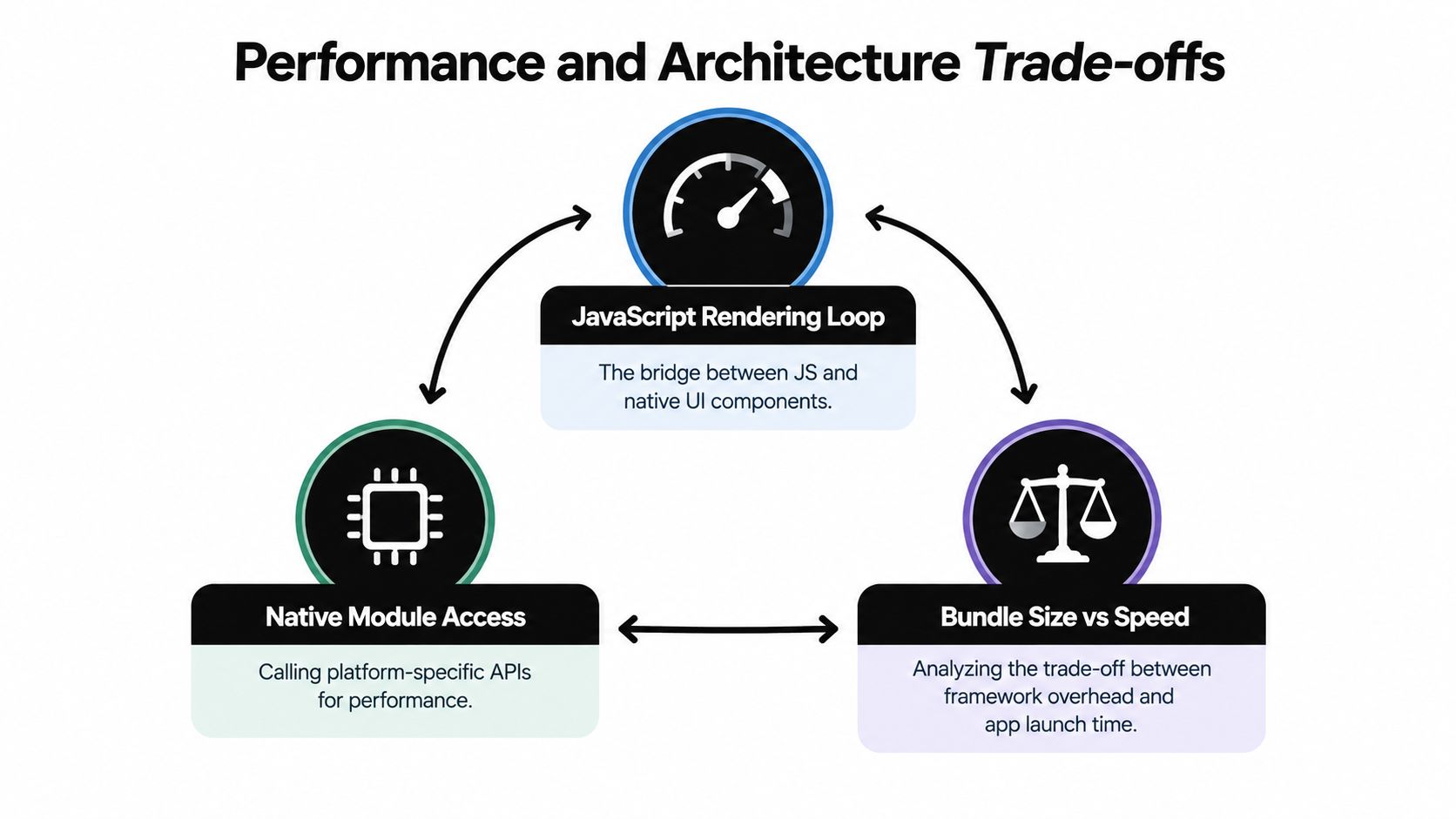
That architecture changes the bottlenecks, but it doesn't erase them. A product screen that repeatedly requests native sensor data, measures layout, or sends large serialized objects can still waste time. A screen that loads a heavy dependency tree before showing useful content can still feel slow. The practical response is to measure startup, interaction latency, memory use, list scrolling, and the behavior of low-end devices.
Tune the boundaries, not just the components
React Native doesn't render a browser DOM. JavaScript describes a component tree, and the application renders through native views and APIs. That means web-style advice about DOM batching only goes so far. Engineers should keep state updates focused, avoid unnecessary re-renders, virtualize long lists, defer nonessential modules, and keep native calls deliberate.
A messaging app, for example, shouldn't reprocess an entire conversation every time a typing indicator changes. A logistics app shouldn't load mapping, camera, barcode, and reporting modules before the first task screen appears. A finance app should avoid moving large datasets across the JavaScript and native boundary when a focused native operation or local query can do the work more efficiently.
Performance principle: Profile the journey users feel. A technically elegant component tree doesn't matter if launch, navigation, typing, or scrolling feels delayed.
The bundle also needs governance. Define which dependencies are essential, review native-module maintenance, and test upgrades in a release branch rather than treating package updates as harmless housekeeping. The React Native performance guidance is useful as a starting point, but your own traces should determine priorities.
The video below provides additional architectural context for teams evaluating the trade-offs.
A capable JavaScript stack can deliver responsive mobile experiences. It still needs the same discipline as native software: controlled dependencies, realistic device testing, clear ownership of native integrations, and performance budgets tied to user-critical flows.
Modern Workflows and AI-Native Prototyping
AI-assisted prototyping has changed the first week of app development. A founder can describe a booking flow, a PM can provide a product requirements document, and a designer can supply a sketch or screenshot. The team can see a working interface before it has committed to a full implementation.
That speed is valuable, but a generated prototype should answer product questions rather than conceal engineering ones. Can a user complete the main task? Is the navigation understandable? Which states are missing? What happens when the network disappears, a permission is denied, or an account has no data?
Use AI to reduce uncertainty
A disciplined workflow separates validation from production hardening:
-
Start with the core journey. Generate only the screens needed to test the main action, such as creating an appointment, scanning an item, or submitting a claim. Don't begin with settings, edge-case dashboards, and every possible account state.
-
Use realistic content. Placeholder text hides layout problems. Add long names, empty results, failed requests, loading states, validation errors, and permission prompts while the design is still easy to change.
-
Review the generated structure. Check navigation boundaries, component reuse, state ownership, TypeScript types, and the separation between visual data and business rules. A prototype that looks polished but duplicates every screen will create unnecessary work later.
-
Test with the people who will build and use it. A PM should be able to explain the user flow. A designer should verify hierarchy and interaction states. An engineer should identify unsupported native behavior before the prototype becomes a promise to stakeholders.
RapidNative is one option for this stage. It turns prompts, sketches, images, or PRDs into shareable React Native apps using React Native and Expo, with live previews and exportable code for a team's own repository. Its approach to code generation matters because an engineering team can inspect and continue the output instead of being forced to keep the product inside a proprietary runtime.
The handoff needs explicit acceptance criteria. Ask the generator or engineering team to preserve reusable components, define navigation clearly, identify mock services, and document assumptions. Then replace simulated data with real contracts, add error handling, and establish tests before calling the result production-ready.
Don't confuse speed with readiness
AI-generated code can accelerate interface exploration, but it won't decide whether an app needs background location, encrypted local storage, conflict resolution, or a native payment integration. Those decisions belong in the technical design. The strongest workflow lets AI shorten the path to a shared understanding, then lets engineers make the system reliable.
When JavaScript Is Not the Right Choice
JavaScript shouldn't be the default for every mobile product. Cross-platform development is increasingly treated as normal, yet recent framework commentary emphasizes stability, large-scale performance, and backward compatibility for products expected to live five to ten years. That long lifespan changes the decision. A fast prototype may become a platform that the team must upgrade, secure, test, and support for years. The framework trend discussion makes that longevity concern explicit.
Identify the expensive parts early
JavaScript becomes a weaker fit when the product's defining value depends on continuous, low-level device work. Examples include:
- Heavy on-device processing: A computer-vision workflow that analyzes camera frames continuously may need native or specialized platform code to control memory, threading, and hardware acceleration.
- Ultra-low-latency interaction: Musical instruments, advanced drawing tools, industrial controls, and some real-time collaborative interactions can expose the cost of cross-layer coordination.
- Complex offline synchronization: A field-service product that must reconcile edits across devices, support long offline periods, and preserve conflict history may need a carefully designed data layer that outweighs the convenience of shared UI code.
- Deep platform integration: Products built around HealthKit, ARKit, Bluetooth peripherals, background services, or unusual enterprise device policies may require native expertise from the beginning.
This doesn't mean React Native cannot call native code. It can. The question is whether the product team wants a JavaScript-led application with selected native modules, or a native-led application that shares only business logic. Kotlin Multiplatform, Swift, and Kotlin may be better fits when platform behavior is the product rather than an implementation detail.
Make the decision reversible where possible
A practical team maps risk before selecting a stack. Build a small technical spike for the hardest interaction, test it on representative devices, and verify offline recovery rather than benchmarking a simple static screen. Confirm who will maintain native modules and who will handle operating-system changes.
Architecture test: If the most important feature requires native code everywhere, don't choose a JavaScript-first stack just to preserve a single language.
For ordinary account, commerce, scheduling, content, and workflow apps, JavaScript can remain a sensible choice. For products with demanding latency, hardware, or durability requirements, native or a different cross-platform strategy may reduce long-term complexity even if the first release takes more engineering effort.
Navigating Mobile Accessibility Requirements
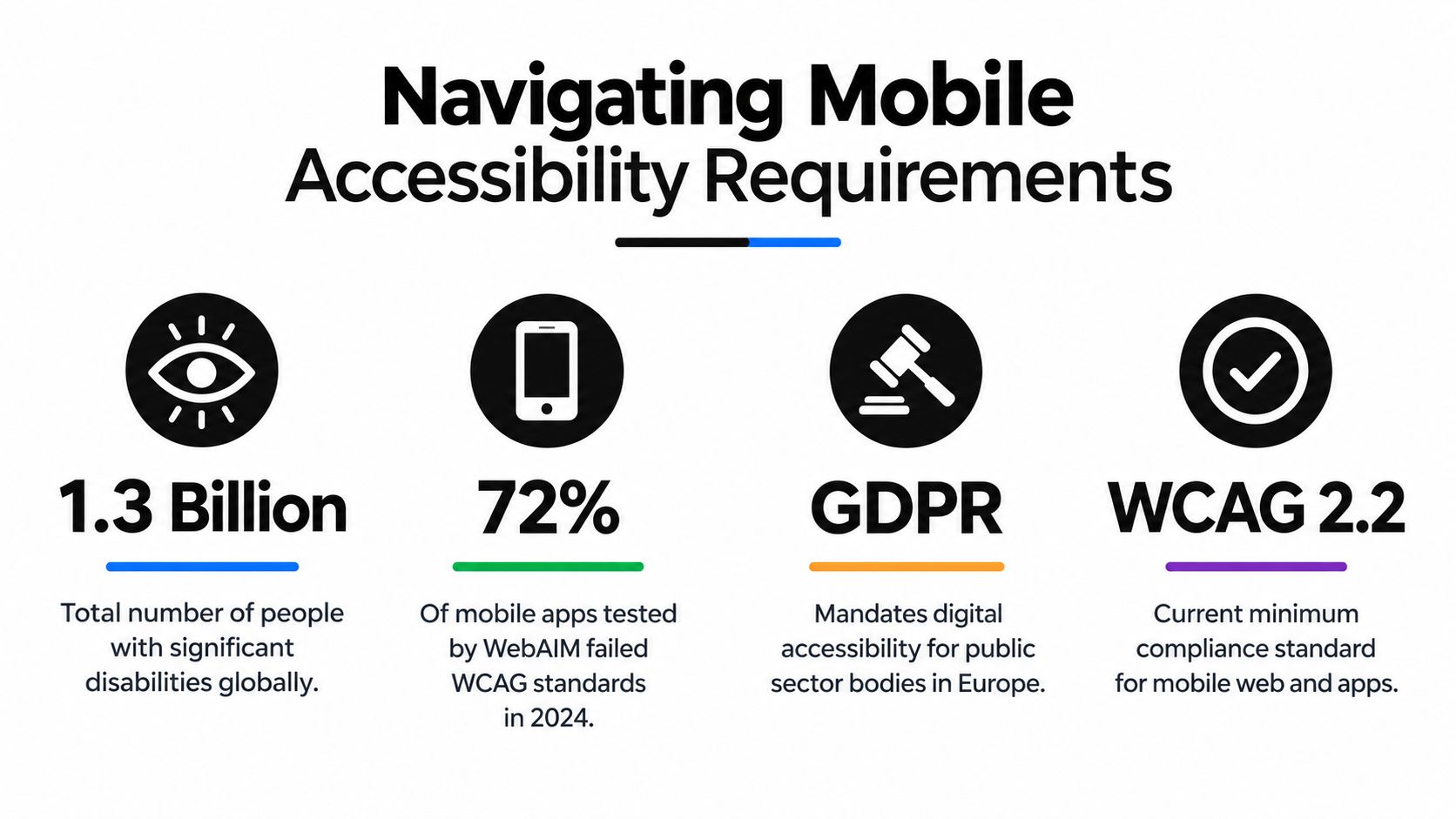
Accessibility belongs in the product definition, not at the end of QA. A mobile app can have attractive screens and still fail users who rely on screen readers, larger text, switch access, reduced motion, or clear focus order. JavaScript frameworks expose useful accessibility properties, but the team still has to assign names, roles, states, focus behavior, contrast, and touch targets deliberately.
The evidence is difficult to ignore. A major accessibility study found that 72% of mobile user journeys tested had accessibility barriers, while the average app score was “Fair.” Only 2 of 50 apps reached “Great” accessibility, according to the mobile accessibility study.
Build semantics into reusable components
A design system should make the accessible path the easy path. A shared button component can require an accessible label when its visible content isn't enough. A modal can manage focus and announce its purpose. A list item can expose its action without forcing a screen-reader user to guess what an unlabeled icon does.
Test the actual product states, not only isolated components:
- Navigation: Verify that screen readers encounter headings, controls, and actions in a logical order.
- Forms: Associate labels and error messages with their fields, and make validation failures discoverable without sight.
- Dynamic updates: Announce meaningful changes such as successful submission, new messages, or a failed network request.
- Touch and motion: Check target size, gesture alternatives, reduced-motion behavior, and orientation changes.
- Platform behavior: Test VoiceOver on iOS and TalkBack on Android, because equivalent code doesn't guarantee equivalent user experience.
Teams also need more than automated linting. Practitioner research involving mobile accessibility testing found that 88 participants, or 43.14%, used manual testing, while 46, or 22.55%, used automated testing, and 27, or 13.24%, used assistive technologies such as screen readers and switches. Those figures come from research on mobile app accessibility testing practices, and they point to a practical gap: teams often test manually but don't always test with the assistive technologies their users rely on.
Put accessibility checks into pull requests for component-level rules, then schedule device-based audits for complete journeys. Include people with relevant disabilities in usability testing where possible. Fixing semantics during component creation is much cheaper than retrofitting focus behavior across a finished product.
Building Your Mobile Development Roadmap
A reliable roadmap moves from uncertainty to evidence, then from evidence to controlled release. Don't spend the first engineering cycle polishing every screen. Prove the main journey, expose the difficult technical risks, and create a foundation the team can own.
-
Validate the journey: Use an AI-assisted prototype to test the core task with realistic states and feedback from target users.
-
Choose the stack: Select React Native with Expo, a PWA, Ionic, NativeScript, or native technologies based on rendering needs, device access, team skills, and maintenance risk.
-
Create the foundation: Establish navigation, environment configuration, error handling, analytics boundaries, a component system, and accessibility rules before feature volume grows.
-
Audit the hard paths: Profile startup, lists, memory, offline recovery, native-module calls, and the product's most important interactions on real devices.
-
Automate quality checks: Combine unit tests, integration tests, accessibility checks, device testing, and release validation. Keep manual assistive-technology testing in the plan.
-
Release in stages: Use internal builds and a focused beta to collect feedback, monitor failures, and verify support processes before expanding availability.
The best JavaScript mobile projects don't treat prototyping and engineering as competing phases. They use rapid tools to make product decisions visible, then apply architecture, testing, accessibility, and release discipline before users depend on the result.
RapidNative helps product teams turn prompts, sketches, images, or PRDs into shareable React Native and Expo prototypes that engineers can inspect and export into an existing workflow. Visit RapidNative to test a mobile concept quickly, align design and engineering around a working interface, and move from validated idea to maintainable app development.
Ready to build your app?
Turn your idea into a production-ready React Native app in minutes.
Free tools to get you started
Free AI PRD Generator
Generate a professional product requirements document in seconds. Describe your product idea and get a complete, structured PRD instantly.
Try it freeFree AI App Name Generator
Generate unique, brandable app name ideas with AI. Get creative name suggestions with taglines, brand colors, and monogram previews.
Try it freeFree AI App Icon Generator
Generate beautiful, professional app icons with AI. Describe your app and get multiple icon variations in different styles, ready for App Store and Google Play.
Try it freeFrequently asked questions
What is RapidNative?
RapidNative is an AI-powered mobile app builder. Describe the app you want in plain English and RapidNative generates real, production-ready React Native screens you can preview, edit, and publish to the App Store or Google Play.
Can I export the code?
Yes. RapidNative generates clean React Native and Expo code that you can export at any time. No lock-in, no proprietary format. Hand it to your developers or keep building inside RapidNative.
Is RapidNative free to use?
Yes. You can build apps on the free plan with no credit card required. Paid plans unlock unlimited AI generations, code export, and direct publishing to the App Store and Google Play.
Do I need to know how to code?
No. Most users build apps by describing what they want in plain English. Developers can drop into the code whenever they want more control, but coding is optional.
How long does it take to build an app?
Most users have a working first screen in under a minute. A full MVP usually takes a few hours instead of the weeks or months traditional development requires.