Benchmark Comparison for Mobile App Workflows
Master benchmark comparison for mobile app workflows. Evaluate performance, startup time, and developer velocity to choose the right tools
By Rishav
30th Sep 2026
Last updated: 30th Sep 2026
A product team can lose days arguing about whether to build natively, use React Native, or assemble an MVP in a visual builder. The founder wants a clickable concept quickly, the designer wants freedom to refine interactions, and the engineer wants an architecture that won't become a maintenance problem after launch. Everyone has a valid concern, but without shared evidence, the decision usually follows personal preference.
Benchmark comparison turns that debate into a repeatable product decision. Instead of asking which tool sounds most capable, the team tests the workflows against the work it needs to ship, then weighs performance, startup behavior, build size, developer velocity, handoff quality, and operational risk. The result isn't a universal winner. It's a clearer answer to a more useful question: which workflow fits this product, this team, and this stage of delivery?
The Role of Benchmark Comparison in Mobile Product Strategy
A founder, product manager, designer, and developer can look at the same mobile initiative and recommend four different paths. The founder sees time-to-market. The designer sees interaction quality. The developer sees maintainability and native escape hatches. The product manager sees a roadmap that keeps changing before the first release is validated.
Without a structured test, the team may choose a stack based on familiarity, a polished demo, or a single impressive benchmark score. That choice can work for the first screen and fail on navigation, data loading, animations, or engineering handoff. Rework then arrives after the team has already invested in components, design decisions, and release tooling.
From opinion to a repeatable management practice
Benchmark comparison has a longer history than mobile frameworks. Buyers of computing machinery and business analysts were already seeking standardized problems for fairer system comparisons in the 1960s. Auerbach Corporation's Standard EDP Reports, first developed in 1962, are an early documented example. By the mid-1960s, researchers were arguing that real workload completion time mattered more than raw specifications, while later efforts formalized benchmark libraries and competitive benchmarking. This history of benchmark comparison shows why the practice remains useful: it converts vague comparisons into repeatable tests tied to actual work.
For a mobile team, the workload might be a user signing up, browsing a list, opening a detail screen, editing a record, and returning to the home screen. Run that same journey through each candidate workflow. Record what the user experiences, how much engineering intervention is required, and how cleanly the resulting code enters the team's repository.
Practical rule: Benchmark the workflow, not just the framework. A fast runtime doesn't compensate for a slow feedback loop if the product is still changing every day.
The cost of skipping evaluation
A formal comparison also gives non-technical stakeholders a shared decision record. The team can state why it accepted a trade-off, which metric mattered most, and what condition would trigger a future migration. That prevents a prototype decision from becoming a permanent architecture without scrutiny.
Teams evaluating early-stage products can also use external context, such as browse startup benchmarks, to understand how other startup workflows are framed. The resource shouldn't replace product-specific testing, but it can help a founder identify which delivery assumptions deserve scrutiny.
For teams where launch timing is central, a practical discussion of mobile development time-to-market can add another useful lens. The important point is not to chase speed in isolation. Faster validation matters when it produces evidence that improves the next product decision.
Defining Objectives and Core Metrics for App Workflows
Before opening a profiler or writing a test script, agree on what success means. A founder may prioritize learning speed, while an engineer prioritizes predictable runtime behavior. A useful benchmark comparison makes those priorities explicit instead of averaging them into a score that nobody trusts.
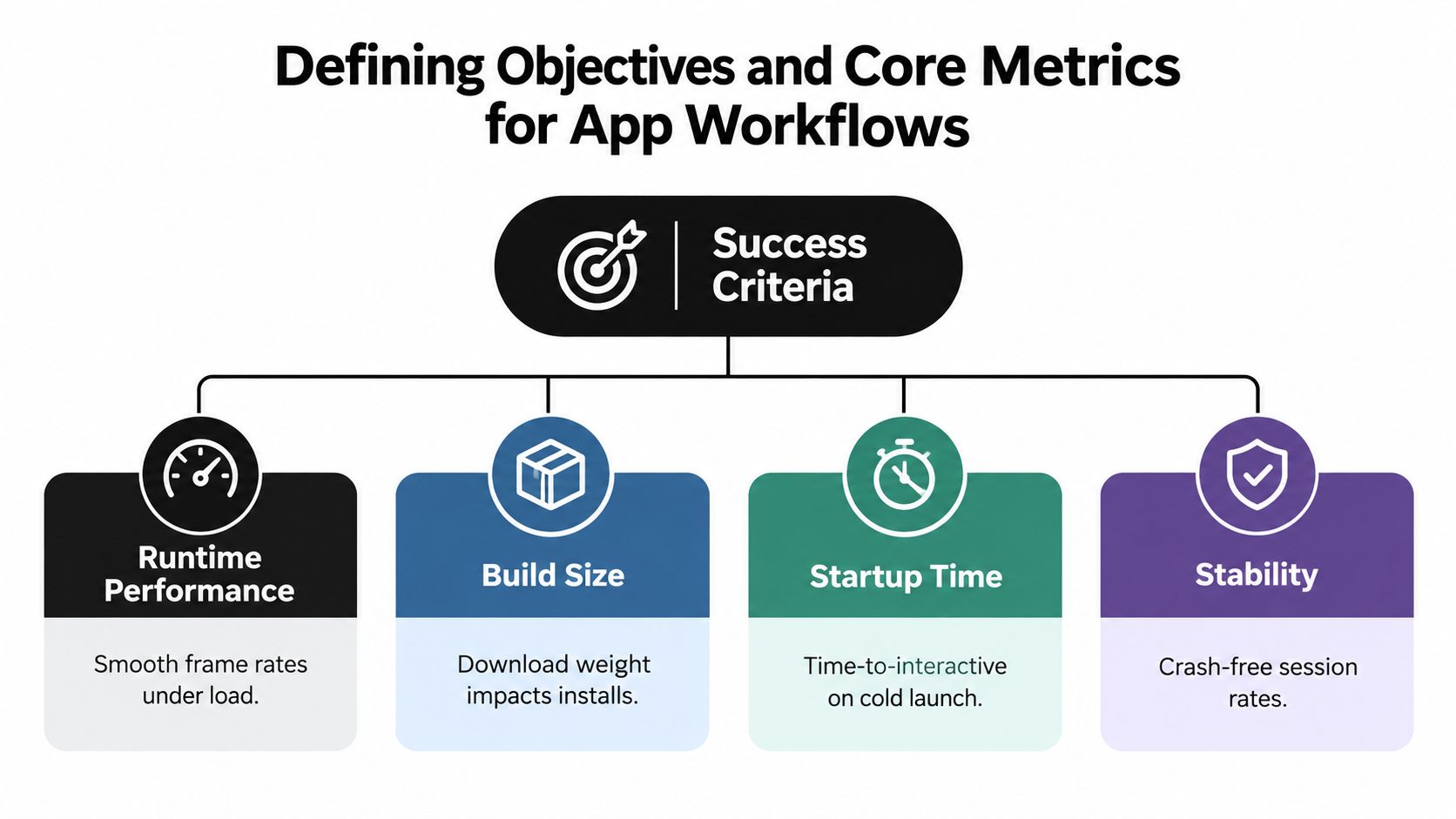
Four metric groups provide a practical starting point:
- Runtime performance measures whether interactions feel smooth under realistic work. On iOS and Android, a 60 Hz display gives React Native a 16.67 ms frame budget, and work that exceeds that budget raises the risk of visible jank. The React Native performance guidance also highlights list virtualization, image decoding, and JavaScript scheduling as important concerns, particularly on higher-refresh displays.
- Build size measures the download weight and installed footprint of the app. It affects how easily users install, update, and retain the product, especially when the first experience depends on a large asset bundle. Track the base application, images, fonts, and optional modules separately so the team knows what caused a change.
- Startup time measures how quickly a user reaches a usable screen after launch. Don't hide slow devices inside an average. Android's official guidance recommends tracking p95 and p99 startup latency, because those percentiles expose the slow experiences that averages can conceal, and says healthy p95 and p99 values should remain close to the median. Android's performance measurement guidance explains why this distribution matters.
- Developer velocity measures how quickly a team can turn an accepted product decision into a tested, reviewable change. Count the full path from requirement to working build, including design clarification, component reuse, debugging, review, and release preparation. Velocity is often the deciding operational metric for a startup or agency because a technically elegant workflow that stalls iteration can still miss the business objective.
Match metrics to people and decisions
Designers need evidence about scrolling, touch response, transitions, and visual stability. Founders need to know how quickly the team can validate a risky assumption. Product managers need comparable evidence across releases. Engineers need bundle composition, startup traces, memory behavior, and a clear path to isolate expensive work.
Don't give every metric equal weight by default. A content-heavy consumer app may place more emphasis on scrolling and image behavior. An internal operations tool may accept modest visual compromises if developers can change forms and workflows quickly. A regulated product may value reproducibility and audit trails more than a short-lived prototype advantage.
Use the mobile app performance framework as a practical reference when translating these concerns into test cases. Then write a one-page scorecard that names the primary decision, the metrics that support it, and the failure conditions that rule out a workflow.
Designing a Repeatable Test Methodology
A benchmark becomes useful when another person can run it and reach a comparable conclusion. A laptop demo with an undocumented network connection and manually entered data isn't a methodology. It tests the operator's circumstances as much as it tests the app.
Start with one representative user journey. Use seeded accounts, fixed content, the same images, and the same navigation sequence. Include the moments users care about, such as cold launch, authentication, list rendering, search, detail loading, editing, and returning to a previous screen.
Build the harness around controlled variables
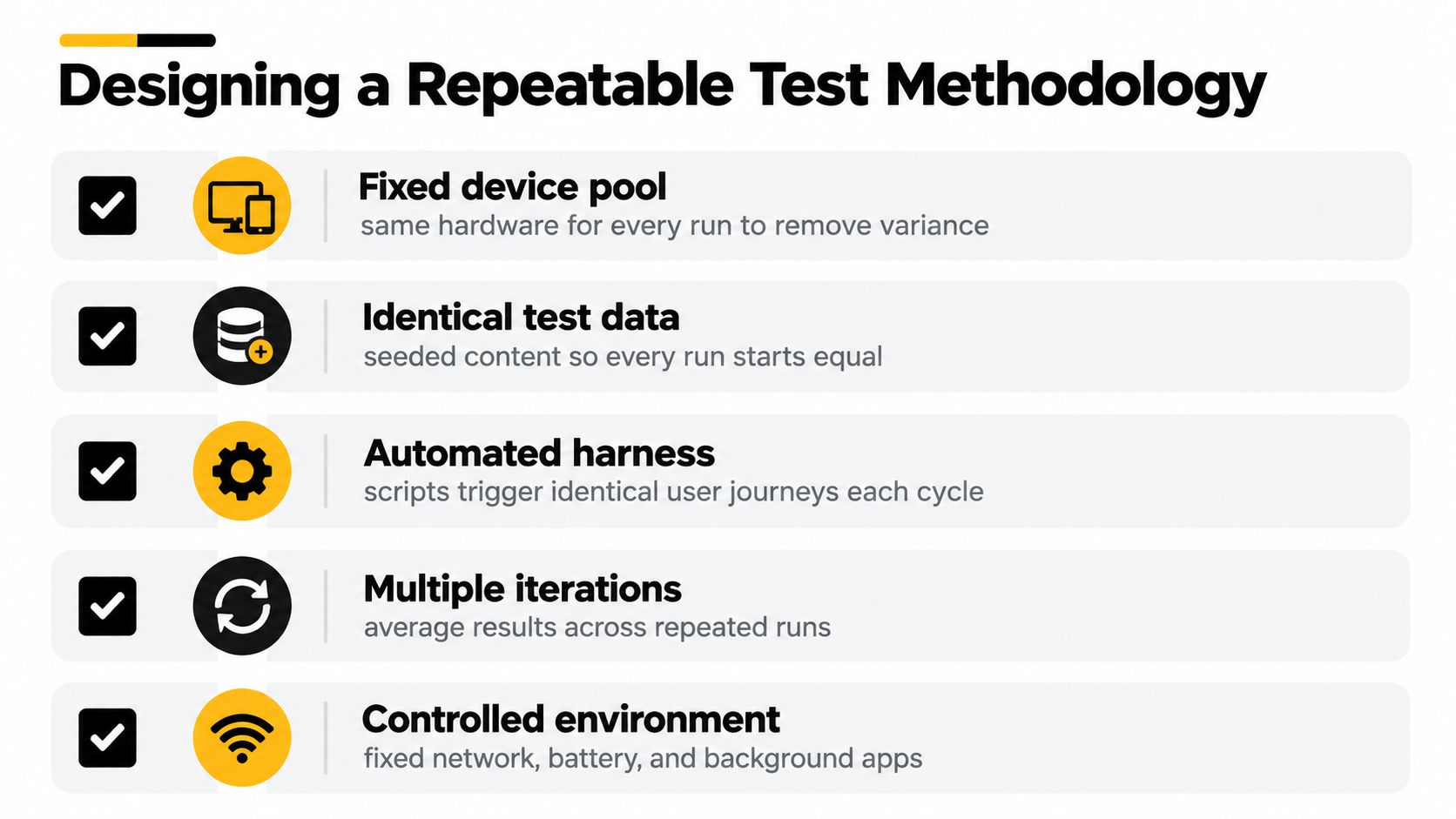
A reliable harness should define:
- The device pool. Segment results by low, mid, and high device classes. Don't allow a modern development phone to stand in for the full audience.
- The environment. Test defined network profiles, operating system versions, battery states, and background activity. A fast Wi-Fi run with no competing processes can make a fragile workflow look stable.
- The test data. Seed identical records and media. A short list and a large list exercise different rendering behavior, so both should be part of the chosen journey when they represent real usage.
- The cadence. Run the same automated journey at a documented point in each release cycle. Record the build, commit, device, OS, network condition, and test result.
- The repetitions. Repeat runs rather than trusting one timing. Preserve raw observations as well as summaries so an engineer can investigate an outlier.
This structure follows practical mobile testing guidance that calls for a fixed, reproducible harness, standard data, controlled conditions, a documented cadence, and segmentation by device class, network profile, and OS version. The mobile benchmarking methodology guide provides the underlying testing principles.
Translate timings into a product signal
Raw milliseconds can make a useful conversation difficult for a non-technical stakeholder. Apdex offers a common way to turn response timings into a 0-to-1 satisfaction score. It classifies a request as satisfied at or below a chosen threshold T, tolerating between T and 4T, and frustrated above 4T. The Apdex explanation for mobile performance describes the standard formula and its use in comparing experience across releases.
Choose the threshold from the interaction being tested, not from a convenient historical result. A launch, a search, and a background sync may need different expectations. Keep the raw percentiles beside the Apdex value, because a single score can hide whether frustration comes from a few severe outliers or broad, moderate slowness.
A trusted benchmark tells you what happened, under which conditions, and whether the result changes the product decision.
Detailed Comparison of Modern App Building Workflows
The practical choice usually sits among three workflows: AI-native code generation, conventional cross-platform development, and visual no-code construction. Each can produce a useful mobile experience. The differences appear in how the team handles changing requirements, reusable components, native behavior, testing, and the transition from prototype to owned code.
| Workflow Type | Developer Velocity | Code Export & Lock-in | Handoff to Engineering | Best Use Case |
|---|---|---|---|---|
| AI-native code generation | High during exploration and interface iteration, with engineering review still required | Real code can support export, but teams must inspect structure and dependencies | Strong when components, routing, and repository conventions remain understandable | Rapid validation, UI prototyping, and early MVP work |
| Traditional cross-platform development with React Native or Expo | Predictable for teams already comfortable with the stack, but dependent on engineering capacity | High control over source code and dependencies | Direct handoff within the same engineering environment | Products requiring sustained ownership and custom behavior |
| Visual no-code builder | Very fast for constrained CRUD flows and simple proofs of concept | Often dependent on the platform's runtime, data model, or export options | Can become difficult when engineers need custom modules or deeper control | Internal tools, simple workflows, and low-risk experiments |
What performance data actually tells you
React Native is competitive on startup and common UI paths in independent comparisons, but sustained animation and high-refresh scrolling can expose weaknesses. One study reported 85% to 95% performance parity with native for typical business logic, while another found React Native was the slowest across every benchmark it completed and lagged native in execution time and energy use in several tests. The comparative React Native study supports a more careful conclusion: test cold start and steady-state interaction costs, not only average interface speed.
AI-native code generation changes the velocity side of the matrix. A prompt, sketch, image, or product requirement can become a working interface quickly, but the generated result still needs review for accessibility, state management, error handling, testability, and platform-specific behavior. This is different from a visual builder that may conceal implementation details behind a hosted abstraction. The advantage is not that engineering disappears. It is that product and engineering can inspect and refine an actual codebase earlier.
Routing, reusable components, and export quality deserve dedicated tests. Ask whether a designer can change a screen without breaking navigation, whether an engineer can replace a data source without rewriting the UI, and whether the exported project matches the team's linting, CI, and dependency policies.
For founders deciding between web and native delivery, a web app guide for AI founders can help frame the platform decision before comparing implementation workflows. For teams considering an AI-native builder such as RapidNative, the relevant platform capabilities for building mobile apps should be tested against the same user journey as every alternative, not accepted from a feature list.
Real-World Use Cases and Situational Trade-Offs
A benchmark score has no meaning until it changes a decision. The right workflow for a founder validating a risky idea may be the wrong workflow for an enterprise team maintaining a complex internal system. Use the result to identify the next constraint, not to declare a permanent winner.

A founder testing a product hypothesis
A founder with a short validation window needs a credible path from an idea to something users can touch. The first benchmark should emphasize time from approved concept to usable flow, clarity of the resulting interface, and the effort required to change the flow after user feedback.
In this situation, accepting some runtime risk can be rational if the prototype is disposable and the team has a clear plan to profile the critical path before release. The mistake is treating a prototype benchmark as a production guarantee. Test the riskiest interaction early, especially if it involves camera input, large lists, maps, media processing, or complex offline behavior.
An agency delivering several MVPs
An agency needs more than fast screens. It needs a repeatable delivery system that different developers can understand and clients can review. Shared components, predictable export, environment separation, and a clean handoff matter because every project creates future support work.
An agency can benchmark one representative journey across client templates, then compare how much custom code each workflow requires. External workloads can also reveal hidden complexity. For example, a team building a marketplace interface may study a marketplace scraping benchmark as a reference for the kind of catalog, pagination, and data consistency challenges its product must represent. The benchmark isn't a substitute for the app's own tests, but it can expose assumptions about data volume and refresh behavior.
A visual builder may win the first demo and lose once the client requests custom authentication or a new data integration. A code-generating workflow may require more review up front but preserve a cleaner engineering path.
The team should review the benchmark results with the client before committing to an architecture. That conversation makes trade-offs visible while changes are still inexpensive.
An enterprise team scaling an internal tool
An enterprise product team usually needs auditability, predictable ownership, and integration with existing identity, observability, testing, and release systems. Developer velocity still matters, but it can't come at the cost of a codebase nobody can inspect or a benchmark nobody can reproduce.
Prioritize repository ownership, dependency transparency, accessibility checks, crash diagnostics, and the ability to replace generated components selectively. The best workflow may be hybrid: accelerate low-risk screens, then have engineers take direct ownership of security-sensitive flows and performance-critical interactions.
Actionable Recommendations for Product Teams
A one-time benchmark becomes stale when the product, devices, dependencies, and AI-assisted workflow change. The useful operating model is continuous recalibration. Run a small, stable suite on every meaningful release and revisit the suite when users, requirements, or platform conditions change.
Measure the work people actually do
Static system rankings are easy to publish and easy to misuse. A benchmark that measures isolated rendering speed may tell you little about how a designer and developer collaborate, how quickly a product manager can test a revised flow, or how much review generated code requires.
Recent AI benchmarking coverage makes this problem clear. Frontier models gained 30 percentage points in a single year on Humanity's Last Exam, a change that can shorten the useful life of a static test. The same AI benchmark analysis argues that many evaluations measure systems in isolation even though real deployments depend on human-AI collaboration.
Add workflow measures beside runtime measures:
- Prompt or requirement fidelity: Did the generated flow reflect the accepted product behavior?
- Iteration cost: How much effort did the team need to correct navigation, states, and edge cases?
- Review burden: Could an engineer understand and safely modify the output?
- Handoff continuity: Did the artifact move cleanly from design and product review into the repository?
- Operational traceability: Can the team identify which input, component, or dependency caused a regression?
Audit the benchmark itself
A benchmark can be technically precise and strategically wrong. Before trusting it, ask whether the tested journey represents real users, whether the environment resembles production, whether the scoring favors one workflow's strengths, and whether the result remains useful after the tools evolve.
Industry benchmarking coverage describes a shift from annual snapshots toward continuous recalibration and from comparison toward decision enablement. It also connects useful comparisons to operational drivers such as process design, automation, organizational structure, vendor choices, and integrated data from ERP, procurement, HRIS, ITSM, and cloud observability systems. The benchmarking services analysis supports a practical principle: record why a gap exists, not only how large it is.
Use AI-native builders where they reduce translation between product intent and working interface. Keep human review in the loop, preserve source ownership, and rerun the benchmark after the workflow becomes part of everyday delivery.
Implementing Your Chosen Workflow
Select one real feature, not a toy screen, for the first rollout. Create the project structure, agree on component naming, connect the export path to the team's repository, and add the benchmark journey to CI or a scheduled test job.
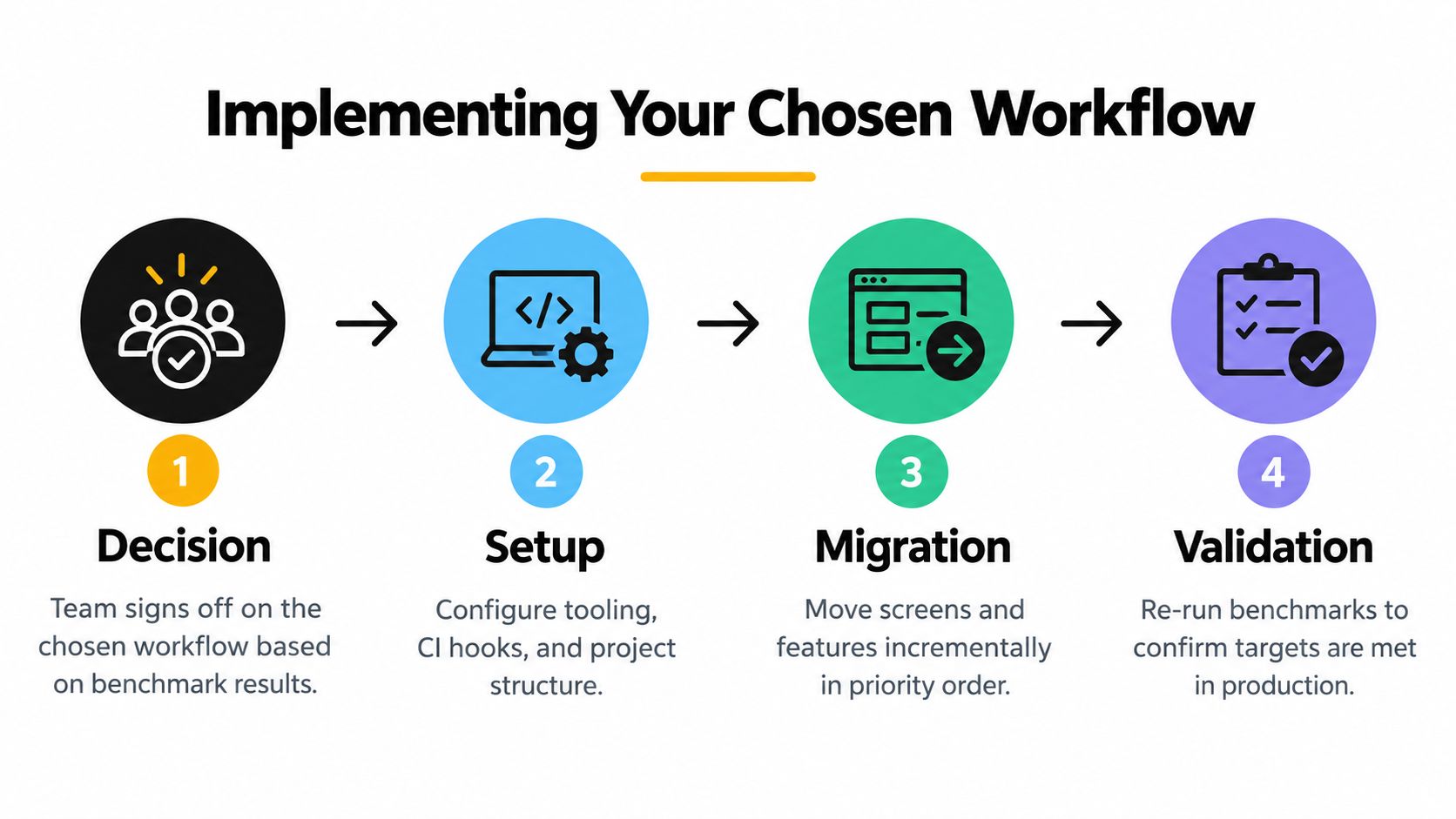
Use a short implementation sequence:
- Decision: Record the chosen workflow, the winning criteria, and the trade-offs the team accepted.
- Setup: Configure the design system, shared components, repository conventions, CI hooks, and test data.
- Migration: Move one feature at a time, starting with the flow that has the clearest user value and lowest integration risk.
- Validation: Rerun the original benchmark on representative devices and inspect both user-facing metrics and engineering effort.
Assign one owner for measurement and one owner for code quality. Product, design, and engineering should review the results together so the workflow becomes part of delivery practice rather than a tool experiment.
RapidNative turns prompts, sketches, images, and PRDs into shareable React Native apps with exportable code, live previews, routing, and reusable components. Use RapidNative to test an AI-assisted mobile workflow against your own benchmark journey, then decide with evidence whether it belongs in your product pipeline.
Ready to build your app?
Turn your idea into a production-ready React Native app in minutes.
Free tools to get you started
Free AI PRD Generator
Generate a professional product requirements document in seconds. Describe your product idea and get a complete, structured PRD instantly.
Try it freeFree AI App Name Generator
Generate unique, brandable app name ideas with AI. Get creative name suggestions with taglines, brand colors, and monogram previews.
Try it freeFree AI App Icon Generator
Generate beautiful, professional app icons with AI. Describe your app and get multiple icon variations in different styles, ready for App Store and Google Play.
Try it freeFrequently asked questions
What is RapidNative?
RapidNative is an AI-powered mobile app builder. Describe the app you want in plain English and RapidNative generates real, production-ready React Native screens you can preview, edit, and publish to the App Store or Google Play.
Can I export the code?
Yes. RapidNative generates clean React Native and Expo code that you can export at any time. No lock-in, no proprietary format. Hand it to your developers or keep building inside RapidNative.
Is RapidNative free to use?
Yes. You can build apps on the free plan with no credit card required. Paid plans unlock unlimited AI generations, code export, and direct publishing to the App Store and Google Play.
Do I need to know how to code?
No. Most users build apps by describing what they want in plain English. Developers can drop into the code whenever they want more control, but coding is optional.
How long does it take to build an app?
Most users have a working first screen in under a minute. A full MVP usually takes a few hours instead of the weeks or months traditional development requires.