How to Collaborate on Code: A Guide for Product Teams
Learn how to collaborate on code effectively. Our guide for product teams covers tools, workflows, and designer-developer handoff to ship mobile apps faster.
By Sanket Sahu
16th Sep 2026
Last updated: 16th Sep 2026

Your product team has a promising mobile feature, but everyone is working from a different version of it. The PM is describing one experience, the designer has another in the prototype, and two developers are modifying the same screens in ways that don't fit together. By the time the team compares the result, the app needs rework instead of a release.
This is a collaboration problem, not a Git problem. To collaborate on code effectively, founders, PMs, designers, and developers need shared tools, a visible workflow, a reliable handoff, and team habits that make questions and feedback safe. The right system helps the team move from an idea to a tested mobile experience without turning every mismatch into an emergency.
Why a Code Collaboration Strategy Matters
A mobile feature can pass individual reviews and still fail as a product. A button change may alter layout, navigation, analytics, accessibility, and another developer's work. Designers, PMs, and developers need a shared way to connect those decisions before inconsistencies become rework.
A clear collaboration strategy assigns each role a useful point of control. The PM defines the user problem and acceptance criteria. The designer explains the interaction and visual language. Developers choose how to implement, test, and maintain the experience. Founders can review a working mobile flow instead of guessing from tickets and screenshots. AI-assisted development can speed up implementation, but the team still needs human review of behavior, context, and product intent.
Improving team collaboration starts with visible decisions. A shared issue should state what the team is building, why it matters, what is out of scope, and how success will be checked. That record reduces repeated explanations and gives reviewers enough context to assess a change. It also gives AI tools clearer requirements when they generate, refactor, or test code.
Speed is not the same as rushing
Collaboration can feel expensive when two people review a change that one person could write alone. Pair programming shows the trade-off. A 1998 University of Utah study found that pairs used 15% more developer hours but produced code with 15% fewer bugs, as summarized by IBM's pair programming overview.
That finding does not make pairing appropriate for every task. Judge the extra effort against rework, defects, onboarding, and lost context. A short pairing session on risky navigation logic may prevent a longer debugging session. A designer checking a live screen before implementation may stop the team from building the wrong interaction.
Build one operating rhythm
Use a rhythm that keeps the whole product team involved:
- Before coding: agree on the user outcome, screen states, technical constraints, and acceptance criteria.
- During implementation: make small, reviewable changes with a clear owner, and document important prompts or AI-generated edits.
- Before merging: have the appropriate people inspect behavior, code, accessibility, and edge cases.
- After merging: test the target mobile flows and record decisions that future contributors need.
The strategy works when non-technical teammates can see progress without reading every file, while developers can trace implementation back to product intent. Shared visibility turns collaboration into a product quality practice, not merely a schedule of meetings.
Choosing Your Collaboration Tool Stack
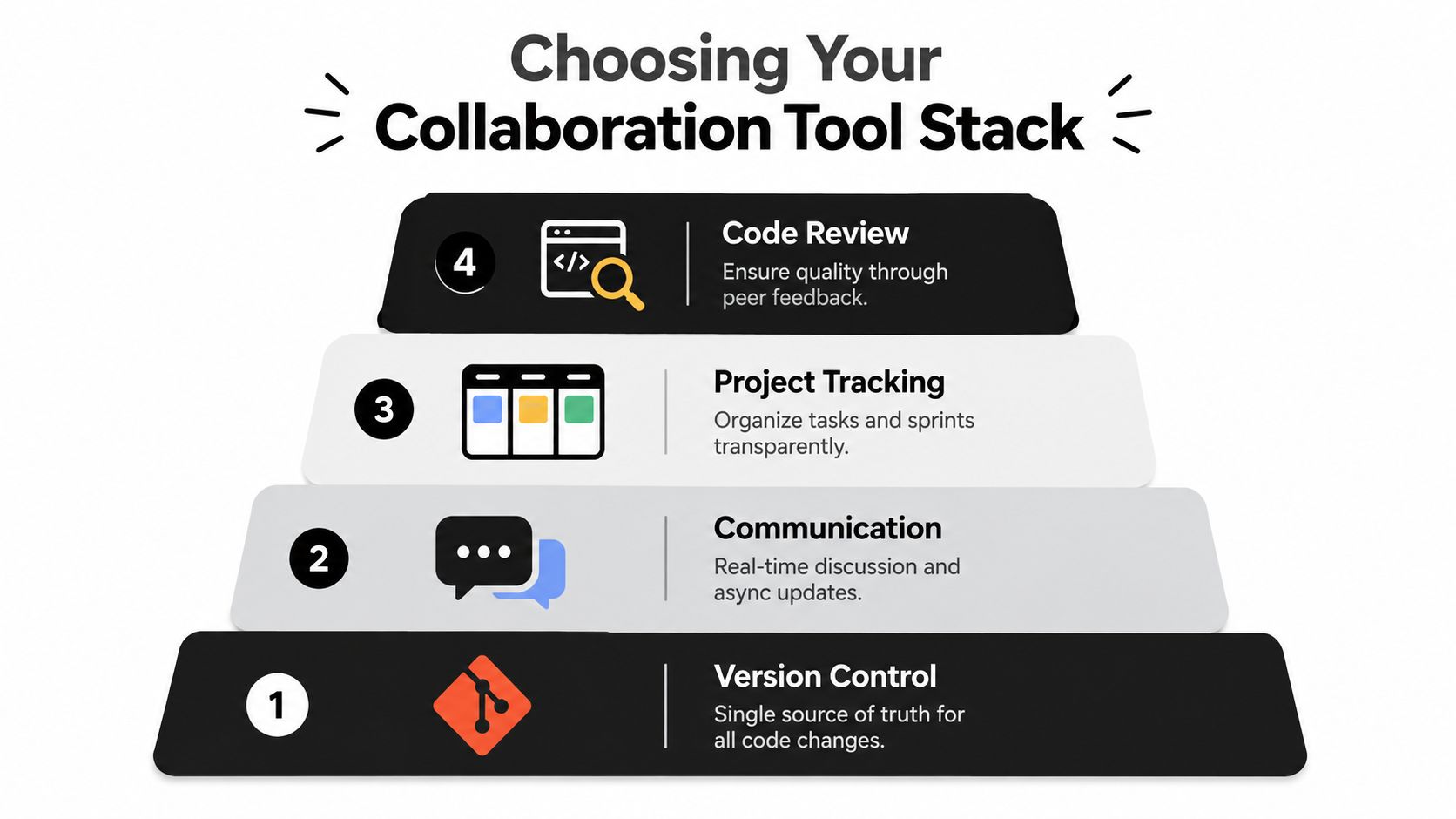
Your tool stack should answer four different questions. Where does the code live? How does the team communicate? Where do people co-create? How do changes get checked and shipped? Mixing those responsibilities creates confusion, while assigning each layer a clear role makes the workflow easier to explain.
Start with a source of truth
Use GitHub or GitLab as the authoritative home for the codebase. A repository records changes, branches, pull requests, and discussion in a way that a chat message can't. Slack can support fast questions and incident communication, but important decisions should be copied into the relevant issue, pull request, or product document.
Project tracking belongs beside the code workflow. A PM should be able to connect a feature request to its design, implementation branch, review, and release status. The board doesn't need to expose every technical detail. It does need to show whether work is being explored, built, reviewed, blocked, or shipped.
Add real-time co-creation carefully
Real-time collaborative programming lets multiple programmers view and edit shared source code simultaneously, with changes becoming visible to other collaborators immediately. Research describing this as concurrent shared editing connects the model directly to pair programming and team code review workflows, as outlined in this paper on real-time collaborative code environments.
VS Code Live Share can help developers inspect the same implementation while discussing a bug or unfamiliar module. A browser-based mobile workspace can also make a product review more concrete, especially when a PM or designer needs to react to a live screen rather than a static capture. For distributed teams, a comparison of tools for LATAM remote teams can help you evaluate communication and coordination options across time zones.
The tool should support the task, not replace the conversation. Before opening a shared session, define what the group is solving. Is the team reviewing a visual mismatch, pairing on a difficult state, or deciding between implementation options? A focused session creates progress. An always-open room often creates noise.
Automate the repeatable checks
CI/CD should run the checks people shouldn't have to remember manually. That can include linting, tests, type checks, build validation, and deployment to a review environment. Automation gives developers fast feedback and gives PMs a more reliable signal than “it works on my machine.”
Choose tools that preserve the same source of truth. A prototype may begin in a collaborative builder, but the team should know how its output enters the repository, who owns the next change, and which checks must pass before release. That connection is what turns a collection of tools into a collaboration system.
Defining Your Team's Code Workflow
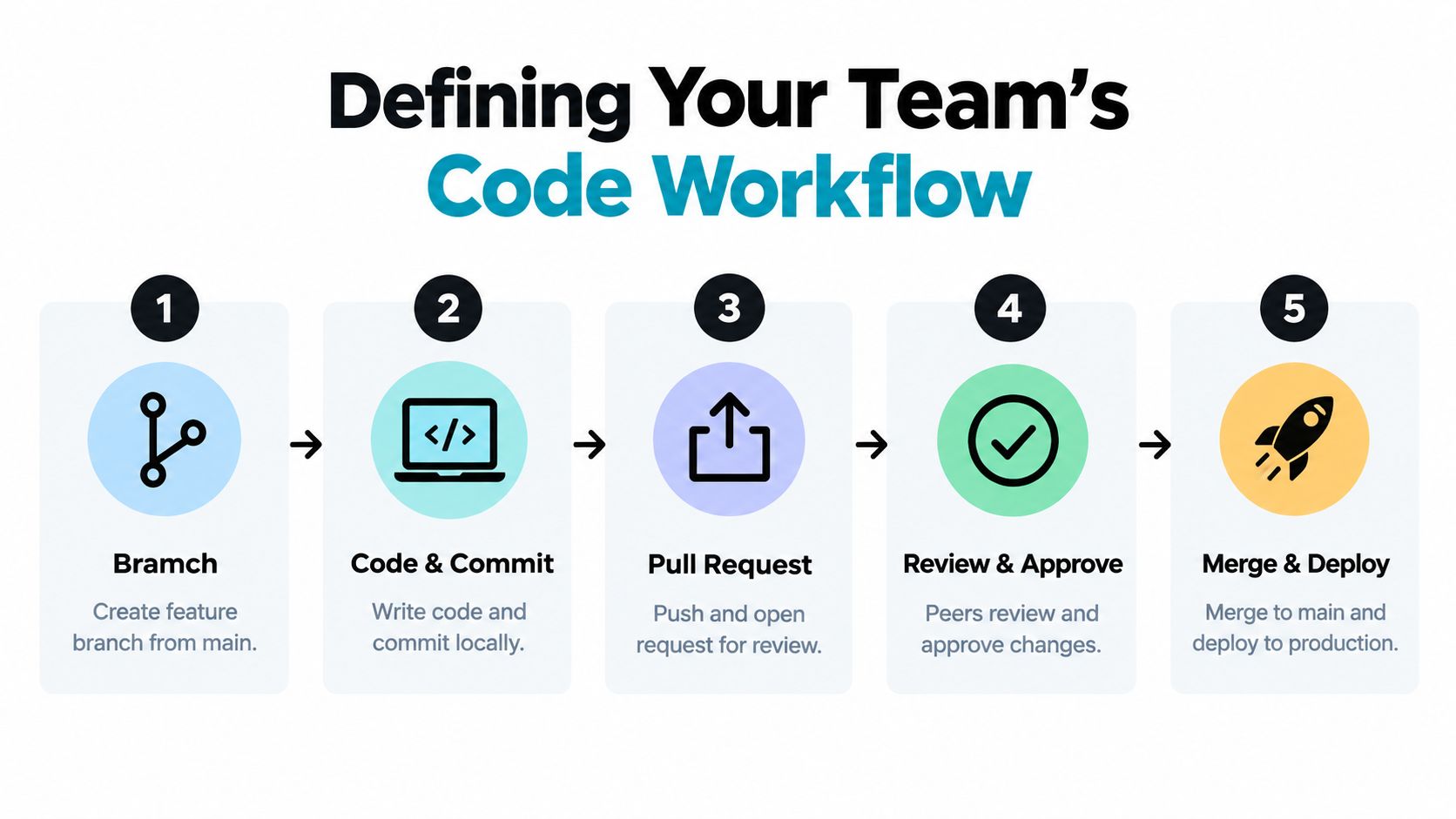
A code workflow is the route a change takes from an idea to a shipped feature. Explain it in product language: a branch is a safe workspace for one change, a commit is a saved checkpoint, and a pull request is a review room where the team decides whether that change is ready to join the product.
A small mobile team can use a simplified feature-branch workflow. The developer creates a branch from main, implements one focused feature, pushes it, and opens a pull request. Reviewers inspect the code and the running behavior, automated checks report problems, and the approved change is merged and deployed.
Pick a branching model the team can follow
Trunk-based development keeps branches short-lived and integrates changes into the main line frequently. It can reduce divergence, but it demands disciplined reviews, automated checks, and careful handling of unfinished features.
A simplified GitFlow-style model separates feature work from release preparation. That structure can help teams coordinating planned releases, but long-lived branches increase the chance that code and product assumptions drift apart. For an early mobile product, simplicity usually wins. Use the lightest model that protects the main branch and keeps work visible.
The version control best practices for product teams should be understandable to everyone who participates in delivery. A PM doesn't need to resolve merge conflicts, but should know why a feature is waiting for review and what evidence is needed to approve it.
Make pull requests useful
A pull request should answer four questions:
- What changed: Name the screen, behavior, or technical area.
- Why it changed: Link the user story, decision, or defect.
- How it was checked: Describe automated tests and manual mobile testing.
- What reviewers should focus on: Call out risks, open questions, and intentional trade-offs.
Keep the changeset narrow. An empirical study found that review effectiveness was inversely proportional to review size. Larger changed-line counts increased review duration and reduced the number of review messages, as reported in this study of code review effectiveness. A focused pull request lets a reviewer understand the decision instead of hunting through unrelated edits.
Feedback should describe the code or behavior, not the person. “This empty state doesn't explain what the user can do next” is actionable. “This screen is confusing” leaves the author guessing. Reviewers should separate required changes from preferences, and authors should ask for clarification rather than treating every comment as a personal judgment.
Use a short walkthrough when the change affects interaction. The following video can help teams discuss the mechanics of a pull request and review process:
Bridging the Designer-Developer Handoff Gap
A static design file can communicate appearance without fully communicating behavior. The developer still needs to infer loading states, validation errors, keyboard behavior, navigation transitions, content overflow, and what happens when a network request fails. Those assumptions create the gap that teams often call a handoff problem.
Consider a PM reviewing a new onboarding flow. In the old workflow, the PM might compare a Figma frame with a development build after implementation. By then, changing the layout may require code changes, new assets, and another review. The team has turned a question that could have been answered early into a late-stage correction.
Replace the handoff event with a feedback loop
A stronger approach uses component-driven development, interactive previews, and a shared workspace. Designers and PMs can review the actual states of a mobile interface while developers establish reusable components and connect the experience to the codebase.
A collaborative prototyping workflow can let stakeholders, product managers, and design teams work in the same workspace, inspect a live preview, and share a running link that reviewers can click immediately. That model supports founders who want to test an idea before committing to a full engineering handoff, as described in this collaborative app prototyping workflow.
A designer might build the first version of a profile screen, share the live preview, and ask the PM to check the content hierarchy. The developer can then identify whether the design needs a new component, a navigation decision, or a data contract. Everyone is looking at the same behavior before the work becomes expensive to change.
Make visual feedback precise
Screenshots still have a role. A tool such as ScreenSnap Pro screenshot tool can help reviewers mark a visual issue, capture a device state, and attach a clear reference to a ticket or pull request. The screenshot shouldn't replace the live preview. It should make a specific observation easier to communicate.
Ask reviewers to report the state and the expected result. “On the empty search screen, the action is below the visible area on a smaller device” gives the developer a reproducible issue. “The screen feels off” doesn't.
The developer's responsibility is not to reproduce a picture at any cost. It's to preserve the intended user experience within the app's technical constraints. The designer's responsibility is to explain the priority behind a visual decision. The PM's responsibility is to resolve trade-offs when fidelity, scope, and platform behavior compete.
This approach turns handoff into continuous collaboration. The design collaboration workflow becomes part of implementation rather than a ceremony that ends when a design file is marked complete.
Cultivating a Culture of Collaboration
Tools can't make people share uncertainty. A pull request can exist while reviewers avoid difficult feedback, junior developers stay silent, and designers hesitate to question an implementation. The team may appear organized while important information remains locked inside individual conversations.
Psychological safety means people can ask questions, admit uncertainty, and propose an alternative without expecting ridicule or punishment. It doesn't mean the team avoids standards or criticism. It means criticism focuses on improving the product and the code, not proving who is smartest in the room.
Make questions part of the work
Leaders set the tone through their responses. When a developer asks why a component uses a particular pattern, answer the question and record the decision if it will matter later. When a designer says they don't understand a technical constraint, explain the constraint without turning the discussion into a test.
A 2026 PLoS article argues that collaborative coding culture depends on explicit review practices and on normalizing questions and insecurities, rather than relying only on shared editors, as discussed in research on collaborative coding culture. That principle applies to product teams because every role encounters information gaps.
Useful habits include:
- Office hours: Set aside recurring time for anyone to bring a code, design, or product question.
- Pairing sessions: Invite a second person to work through a risky decision, even when they won't own the final implementation.
- Decision records: Capture the reason behind important choices, not just the chosen option.
- AI disclosure: Mark where an agent helped generate or modify code so reviewers can apply appropriate scrutiny.
- Review norms: Define response expectations, approval rules, and what requires a conversation instead of a comment thread.
Resolve disagreement without creating factions
Technical disagreement is normal. A team needs a method for handling it before every choice becomes a contest of confidence.
Start by stating the shared goal, such as reducing user confusion or keeping the codebase maintainable. List the constraints, compare the options against those constraints, and assign a decision owner when the group can't reach agreement. Once the owner decides, the rest of the team should support the decision and record the reasoning. That isn't agreement with every detail. It's a commitment to avoid reopening the same debate without new information.
AI-assisted development makes these norms more important. A coding agent can produce an apparently complete solution, but it can't replace the team's product context or accountability. Treat AI output as a contribution that requires a human owner, review, testing, and clear disclosure.
Your Starter Kit for Effective Code Collaboration
A new mobile product team can start with a small operating model. Agree on four connected practices:
- Shared tools: Keep source code in GitHub or GitLab, use Slack for active discussion, track work on a visible board, and connect changes to automated checks.
- A predictable workflow: Begin from a protected main branch, keep each branch focused, open a pull request, require review, and test the result before deployment.
- A living handoff: Let designers, PMs, and developers inspect interactive screens early. Record visual feedback with enough detail for another person to reproduce it.
- A generous culture: Welcome questions, document decisions, hold office hours, and disclose AI involvement in code changes.
A practical starting agreement can name GitHub for code, Slack for conversation, and RapidNative for collaborative mobile UI prototyping. Use a feature-branch workflow with one required reviewer for every pull request. Make a shared preview link the default for reviewing a new screen before engineering work is considered complete. This gives designers and PMs a concrete way to assess the experience, while developers receive feedback before implementation becomes expensive to change.
Schedule one weekly show-and-tell for the whole product team. A session might feature a working screen, a design decision, a technical discovery, or a problem that needs help. The purpose is shared context, not performance. Seeing the same work together helps product, design, and engineering catch misunderstandings earlier.
Apply pairing selectively for unfamiliar areas, high-risk changes, onboarding, and decisions where spreading knowledge matters more than minimizing effort on one task, as discussed earlier. Pairing is a tool for managing risk and sharing context, not a default requirement for every change.
AI-assisted development makes ownership especially important. A coding agent can produce an apparently complete solution, but it cannot replace product context or accountability. Treat AI output as a contribution that needs a human owner, review, testing, and clear disclosure.
A good starter kit creates a feedback loop: the PM explains the outcome, the designer demonstrates the experience, the developer implements a focused change, automation checks it, and teammates review the result. That loop lets the full product team collaborate on code without losing sight of users, positioning, or usability.
RapidNative lets product teams turn prompts, sketches, images, or PRDs into shareable React Native interfaces, collaborate on screens in real time, preview changes through links or QR codes, and export editable code to their repository. Visit RapidNative to build a mobile workflow around earlier feedback and a clearer designer, PM, and developer handoff.
Ready to build your app?
Turn your idea into a production-ready React Native app in minutes.
Free tools to get you started
Free AI PRD Generator
Generate a professional product requirements document in seconds. Describe your product idea and get a complete, structured PRD instantly.
Try it freeFree AI App Name Generator
Generate unique, brandable app name ideas with AI. Get creative name suggestions with taglines, brand colors, and monogram previews.
Try it freeFree AI App Icon Generator
Generate beautiful, professional app icons with AI. Describe your app and get multiple icon variations in different styles, ready for App Store and Google Play.
Try it freeFrequently asked questions
What is RapidNative?
RapidNative is an AI-powered mobile app builder. Describe the app you want in plain English and RapidNative generates real, production-ready React Native screens you can preview, edit, and publish to the App Store or Google Play.
Can I export the code?
Yes. RapidNative generates clean React Native and Expo code that you can export at any time. No lock-in, no proprietary format. Hand it to your developers or keep building inside RapidNative.
Is RapidNative free to use?
Yes. The free plan gives you 20 credits a month with no credit card required. Paid plans start at $20 a month and add more credits, code export, private projects and commercial rights to publish to the App Store and Google Play.
Do I need to know how to code?
No. Most users build apps by describing what they want in plain English. Developers can drop into the code whenever they want more control, but coding is optional.
How long does it take to build an app?
Most users have a working first screen in under a minute. A full MVP usually takes a few hours instead of the weeks or months traditional development requires.