Design System Implementation: A Step-by-Step Playbook
Design system implementation step by step: plan the team, build mobile tokens and components, gate quality, and measure adoption across React Native apps.
By Suraj Ahmed
28th Oct 2026
Last updated: 28th Oct 2026

More than 37% of organizations had no process to block inaccessible features from production, according to the 2025 State of Digital Quality in Accessibility report. That's a useful way to reframe design system implementation: a library isn't an operating system for product delivery until someone can enforce its rules.
For a team building a React Native mobile product, the hard part isn't drawing consistent buttons. It's deciding who owns those buttons, how engineers prove they work, and why a product team should adopt them instead of copying yesterday's screen. Treat the system as a product with customers, release criteria, and maintenance capacity, not as a design-file cleanup.
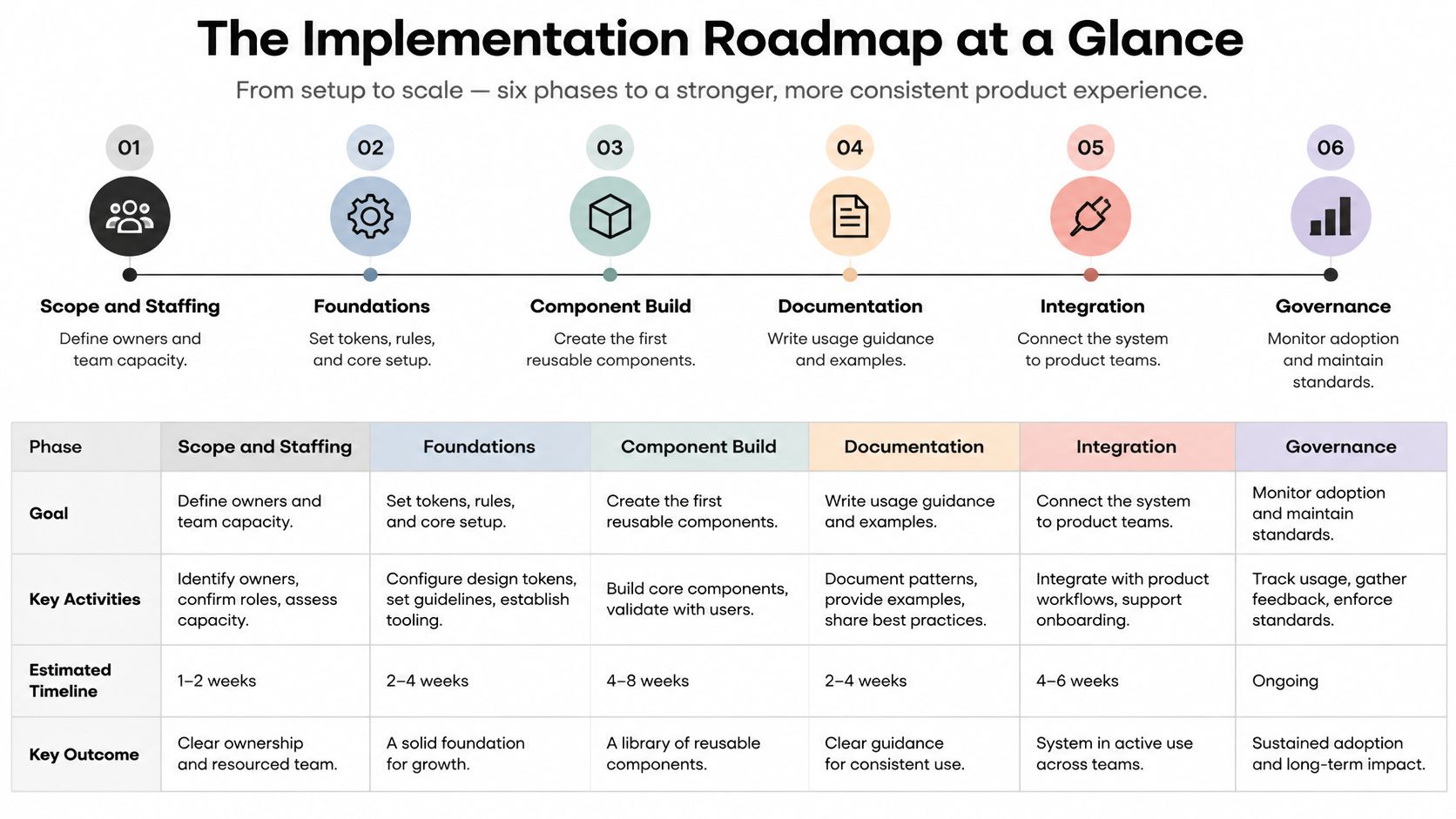
The Implementation Roadmap at a Glance
Start with a sequence the whole mobile product team can follow:
Scope and staffing → Foundations → Component build → Documentation → Integration → Governance and metrics
These phases overlap. Documentation starts while engineers build components, and governance decisions begin before integration. The sequence describes dependencies, not a waterfall schedule.
Design system implementation phases, owners and exit criteria
| Phase | Lead owner | Deliverable | Exit criterion |
|---|---|---|---|
| Scope and staffing | Product manager with engineering lead | Screen and component inventory, pilot surface, named owners | Owners named and pilot surface chosen |
| Foundations | Design lead | Color, type, spacing, radius and motion tokens in primitive and semantic layers | Tokens exported to code and used on one screen |
| Component build | React Native engineer | Button, IconButton, ListRow, Tab and TextField with labels and hit areas | Components pass automated and manual checks |
| Documentation | Designer with a technical writer | Usage rules, do and don't examples, accessibility notes, changelog | A new team member can use a component without asking |
| Integration | Engineering lead | Shared package wired into one high-traffic flow | Pilot flow ships on shared components |
| Governance and metrics | Product manager | Decision rights, contribution rules, adoption dashboard | Adoption and override rates reviewed every month |
Use this roadmap as a delivery checklist rather than a presentation asset.
Why the order matters
A phase without a named owner hasn't started, whatever the design files show. Without agreed scope, designers build speculative components. Without working foundations, engineers embed temporary values that become expensive to remove.
In Sparkbox's 2022 Design Systems Survey, 84% of subscriber respondents were required to use their organization's system, yet only 44% reported a governance model or shared product roadmap, 16% tracked metrics, and 30% provided support, training, and onboarding. Respondents describing their systems as successful reported that enablement 76% of the time.
The practical lesson is to fund the work around the library while building it. Give someone responsibility for answering integration questions, reviewing contributions, and explaining changes. For broader design-process reading alongside your implementation work, Wecomeet's the Wecomeet journal is a supplementary resource, not a substitute for your own component contracts.
Practical rule: A finished design file is evidence of design progress, not evidence of product adoption.
Small teams are especially tempted to skip governance and metrics because nothing breaks on launch day. They pay later through silent forks, unowned components, and a library nobody can change without a meeting.
How to Scope Your System and Staff It
Before anyone opens Figma or Xcode, make these scoping decisions:
- Inventory the product surfaces. List screens and count distinct buttons, cards, list rows, tabs, and form fields. Record duplicates by behavior, not just appearance.
- Choose a bounded pilot. Settings is often easier to isolate than onboarding, where authentication and conversion requirements can complicate changes. Use actual product traffic to confirm the pilot matters.
- Assign decision rights. Name a product owner who can prioritize requests and an engineering counterpart who can merge and release code.
- Reserve capacity. Put implementation and maintenance work into planning. An owner with no available time can't support adoption.
- Write a short charter. Define supported platforms, included patterns, exclusions, contribution rules, and who approves changes.
Staff for ownership, not a benchmark
The 2025 Design Systems Report recorded dedicated design-system functions rising from 72% in 2024 to 79% in 2025, and reported the following average team sizes by organization size.
Design-system team size by company size
| Company size | Average team size 2024 | Average team size 2025 |
|---|---|---|
| Fewer than 100 employees | 5 | 3 |
| 100 to 499 employees | 4 | 4 |
| 500 or more employees | 8 | 9 |
These are descriptive averages, not hiring targets. A startup doesn't need a department before it can standardize its mobile interface. It needs enough protected capacity to finish the pilot and support the people using it.
For example, a founder with a five-person product team could assign one designer and one React Native engineer part-time. That's a proposed staffing arrangement, not an industry benchmark. Keep their initial scope narrow enough that they can review every component change without blocking feature delivery.
Separate implementation help from authority
An external engineer can build components, write tests, or package tokens. They shouldn't become the only person who understands how to release the system.
If hiring is the constraint, LatHire's Hire Latin American Developers page is an option to evaluate alongside direct recruitment and existing contractors. Assess candidates on accessible React Native components, package maintenance, and migration work, not just screen-building speed.
Keep product decisions inside the team. Your charter should explicitly exclude business-specific workflows, such as subscription eligibility or payment authorization, even when shared components render those workflows. Otherwise, every product request becomes a library request.
How to Build Tokens and Components for Mobile
Build the layers before expanding the catalog:
- Define primitive tokens. Store raw colors, a spacing scale, typography values, radii, and motion values. Names such as
blue-600identify a value, not its purpose. - Map semantic tokens. Use names such as
color-action-primary,text-muted, andsurface-danger. Screens should express intent instead of selecting raw colors. - Introduce component tokens selectively. Add
button-heightortab-bar-paddingwhen the component needs an independent rule. Don't create a token for every style property. - Export a usable theme. Transform the token source into a theme file that your NativeWind configuration or Expo application styles can consume.
- Build the initial primitives. Start with Button, IconButton, ListRow, Tab, and TextField, then prove them inside the pilot.
A semantic layer makes theme changes manageable. If designers change the primary action color, engineers shouldn't need to search screen files for matching hex values. Blu Dragonfly LLC's guidance to document your brand's color usage can help clarify brand intent before you translate it into interaction and state tokens.
Make geometry a component contract
A visible icon and its activation area aren't the same thing. Set the usable area inside the shared component, then inspect its rendered bounds on a device.
Touch-target minimums by standard
| Standard | Minimum size | How to apply it |
|---|---|---|
| W3C mobile accessibility mapping | 9 mm by 9 mm, with extra inactive space near close targets | Group an icon and its label into one tappable target |
| Android accessibility guidance | 48 by 48 dp activation area | Set the hit area in the component; keep the icon visually smaller if needed |
| Apple Human Interface Guidelines | 44 by 44 pt | Use as the iOS baseline in component metadata |
| WCAG 2.2 Target Size (Minimum), Level AA | 24 by 24 CSS pixels, with exceptions and spacing alternatives | Web baseline for audits of shared tokens |
| WCAG 2.2 Target Size (Enhanced), Level AAA | 44 by 44 CSS pixels | Stricter target to consider for high-risk actions such as payments |
The WCAG sizes in the final rows use CSS pixels, not native platform units. Don't mechanically translate them into React Native dimensions or treat the stricter target as a payment-specific requirement.
Padding is usually easier to inspect than an invisible extension around a tiny control. Where you use hitSlop, verify that neighboring targets don't compete and that parent bounds don't undermine the intended area.
Own behavior as well as appearance
A task-list row with swipe-to-delete still needs an accessible alternative. W3C's mobile application guidance explains that multipoint or path-based gesture functionality must also work with a single pointer unless the gesture is essential. Give the row a menu or visible delete action, then define the resulting announcement and focus behavior.
Build other accessibility behavior into the primitives:
- Text scaling: Let labels grow and layouts reflow rather than clipping text to preserve a fixed height.
- Reduced motion: Read the system preference and replace nonessential movement with an appropriate static or simpler transition.
- Contrast: Validate supported foreground-and-background token pairs, including errors and selected states.
- Interaction states: Specify loading, disabled, pressed, selected, invalid, and focused behavior where applicable.
The trade-off is deliberate: a smaller public API gives screen authors fewer ways to create inconsistent behavior. Use component-based architecture to separate reusable interface responsibilities from product-specific data and actions. Don't turn a general ListRow into a container for every business rule in the app.
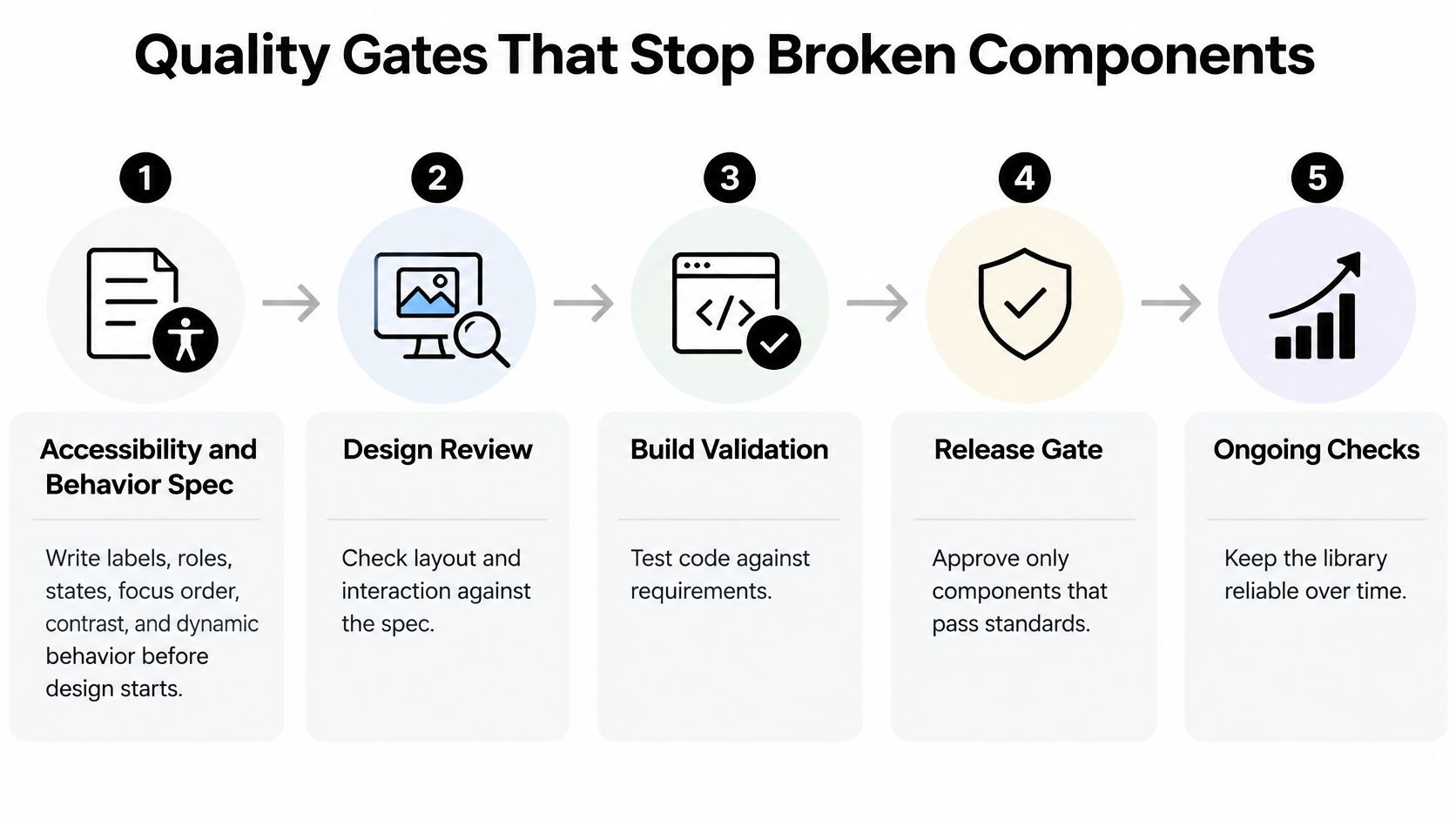
Quality Gates That Stop Broken Components
A component that matches the mockup isn't necessarily ready to ship. Visual review won't prove that a screen reader announces its purpose, that loading prevents duplicate actions, or that focus returns somewhere sensible after dismissal.
The U.S. Department of Veterans Affairs' component accessibility testing process moves from architecture specifications through design review, development testing, specialist auditing, and independent platform review, mapping checks to WCAG 2.2 criteria and Section 508 obligations. Adapt that delivery discipline to native mobile behavior rather than copying web semantics into React Native.
Use explicit checkpoints so reviewers know what evidence to request.
Require evidence at each gate
- Accessibility and behavior specification. Before visual design starts, define labels, roles, states, focus order, contrast, dynamic type, reduced motion, and touch-target behavior. The designer and engineer agree on what the component guarantees.
- Design and implementation review. Compare layout, interaction, and the proposed public API against that specification. Reject an API that requires consumers to reconstruct essential behavior.
- Development validation. Run automated assertions for labels, roles, states, callbacks, and relevant render output. Test transitions, not just the initial appearance.
- Specialist audit before staging. Exercise the component with VoiceOver on iOS and TalkBack on Android, including error paths and enlarged text.
- Independent platform review before release. Have someone other than the implementer verify the integrated behavior on supported platforms.
Consider a Button that looks correct but exposes no accessibility role. A screenshot review passes it. A development test that queries for the expected role fails at the third gate, before the component spreads through the product.
That failure is useful. A test that only checks whether the label exists would miss it, so acceptance criteria must identify what each assertion proves.
Make exceptions explicit
A release deadline can change scope. It shouldn't quietly change the definition of passing.
Put the release rule in the charter: a component enters the shared library only after automated checks, manual assistive-technology checks, and documented edge-case behavior pass. An unfinished component can remain experimental without becoming the default import.
Record failures with reproduction steps, device details, expected behavior, and an owner. Distinguish a library defect from a consumer obligation, such as a screen supplying a meaningful label to IconButton.
Use a broader mobile application testing approach for integrated flows. Component tests won't establish whether a checkout error is announced at the right moment or whether navigation leaves focus on the intended screen.
Tooling for Tokens, Tests and Docs
Choose tools that execute a check or remove repetitive work. Don't build a tooling platform before a product screen consumes the package.
Start with a small working loop
Keep token definitions in Figma variables, then export and transform them with Style Dictionary or a short script. Make generated files reproducible, and review their diffs rather than editing them manually.
Build the primitives in a shared TypeScript package. Use Storybook for React Native to expose states on a device, including long labels, validation errors, and loading behavior. Designers should be able to inspect those states without navigating through a full app.
For a small team, the first working loop can be token export, component stories, and manual assistive-technology testing. That's a starting sequence, not permission to release without the automated checks your acceptance criteria require.
| Job | Tool option | Evidence it should produce |
|---|---|---|
| Component assertions | Jest and React Native Testing Library | Passing label, role, state, and interaction checks |
| Flow validation | Maestro or Detox | Repeatable success and failure paths |
| Release records | Changesets | Version changes and readable changelog entries |
| Mechanical migration | jscodeshift | Reviewable transformations of supported code patterns |
| Adoption telemetry | Repository script | Counts with documented inclusion and exclusion rules |
Add automation where repetition hurts
Use snapshots as supporting evidence, not accessibility verdicts. An approved snapshot can preserve the wrong behavior just as easily as the right behavior.
Add Maestro or Detox once the pilot has a stable path worth protecting, such as saving settings or completing checkout. Keep VoiceOver and TalkBack checks in the release workflow because automated assertions don't establish the quality of spoken output.
For migration scripts, test fixture files before touching the application repository. A rename tool needs to recognize imports and syntax, not replace matching text indiscriminately.
Finally, make telemetry reproducible in CI or a scheduled repository job. Judge every addition by a concrete question: which gate or decision becomes more reliable because this tool exists? If nobody can answer, postpone the tool.
Documentation and Migration Without Breaking Screens
Documentation should help someone choose and use a component without opening its implementation. A prop table alone doesn't explain when a component is appropriate or which responsibilities remain with the screen.
Use a consistent page template:
- Purpose and anatomy: Explain the user task, visible parts, and boundaries.
- Props and defaults: Show supported values and why someone would choose them.
- States and behavior: Describe transitions, errors, loading, and unsupported combinations.
- Accessibility notes: Separate built-in guarantees from consumer-supplied labels and relationships.
- Do and don't examples: Contrast intended usage with a plausible mistake.
- Code sample and release history: Provide a minimal working example and clearly marked breaking changes.
For Tab, explain selected state, label behavior, and its relationship to navigation. Don't imply that a visual tab primitive automatically owns routing, deep links, and navigation state.
Migrate a flow, not a screenshot
Say a shopping app has three copied tab bars with different heights, each maintained in a different part of the application. Suppose product analytics identifies the cart as the most visited relevant surface. Start there, while keeping the example's traffic assumption separate from any general rule.
- Map legacy usage. List each tab-bar implementation, the screens importing it, and behavioral differences. Check badges, safe-area handling, analytics events, and navigation actions.
- Ship alongside the old implementation. Introduce the shared Tab component without removing existing exports. The application must remain buildable throughout the migration.
- Automate mechanical changes. A codemod can change a prop from
varianttokindwhere the mapping is unambiguous. Navigation behavior still needs review. - Deprecate with an owner and removal date. Announce the replacement, provide a migration recipe, and assign remaining consumers to teams.
- Move from pilot to adjacent flows. Validate the cart integration, then migrate the other tab bars while tracking remaining legacy references.
The difficult part isn't replacing markup. It's preserving behavior that accumulated around each copy. If one tab bar hides during keyboard entry and another doesn't, the team must decide whether that difference is intentional before standardizing it.
Stop copies from becoming new defaults
Migration safeguard: Keep compatibility temporary, but keep the migration path usable.
A compatibility wrapper can preserve an old API while routing rendering through the new component. Document its limits and don't let new screens adopt it.
Generated and hand-copied screens need the same review. Inspect imports, look for local recreations of shared primitives, and flag unexplained styling overrides before merging. A generated screen that resembles the system but embeds its own button implementation hasn't adopted the system.
Test documentation with a teammate who didn't build the component. Ask them to implement a realistic state, then turn their unanswered questions into improvements to the page rather than another private chat thread.
Metrics and Governance That Keep Adoption Growing
Trust doesn't guarantee use. A 2026 industry report summarized by DesignRush found that 91% of surveyed practitioners reported moderate or high trust, but only 38% said their systems were widely or fully adopted; among stalled systems, 55% attributed the problem to weak governance and 73% to the absence of a company mandate.
Make adoption review a working meeting with decisions, not a tour of a dashboard.

Measure behavior in the repository
Review these measures monthly with the system owner and an engineer:
- Approved primitive coverage: The percentage of in-scope screens using approved primitives. Define what qualifies so a token Button import doesn't make an otherwise custom screen count as adopted.
- Duplicate component count: Known local implementations that reproduce shared responsibilities. Exclude justified domain-specific compositions.
- Override rate: Shared component usages with local styling exceptions divided by inspected usages. Preserve the reasons behind those exceptions.
- Time to integrate: Elapsed time from a ready component request to a working product integration. Separate engineering effort from waiting for decisions.
- Deprecation completion: Migrated legacy usages compared with the inventory targeted for removal.
Repository telemetry is imperfect. Import counts can miss wrappers, and style scans can flag harmless layout values. Inspect samples before treating a change in the dashboard as a product outcome.
Use the following video as a discussion prompt, then record decisions against your own repository findings.
Give contributors a route to approval
Governance needs practical answers, not a committee diagram:
| Question | Practical answer |
|---|---|
| Who approves a new component? | The system owner prioritizes the need; design and engineering maintainers approve the contract and implementation |
| How are changes versioned and announced? | The maintainer classifies compatibility, publishes the release, and includes migration instructions |
| Who can override a token? | A named reviewer approves a scoped exception with a reason, owner, and review point |
Publish a request template that asks for the user problem, existing alternatives, affected screens, and proposed behavior. A designer requesting a new variant should know where to submit it and who will respond.
Connect these decisions to explicit code ownership, including review responsibility for token changes and shared package releases. Leadership's mandate should require approved primitives for in-scope work while preserving a documented exception path.
Without that authority, the dashboard can identify divergence, but the owner can't require anyone to resolve it.
Confirm the First Release Before You Scale
Publishing the package does not prove that the design system is ready to grow. Expand only after the pilot shows that a team can build, test, document, and maintain a real product flow with shared foundations rather than parallel patterns.
Run a go-or-no-go review, with evidence for each decision:
| Release check | Evidence for a yes |
|---|---|
| Owners are named | The charter identifies decision-makers and maintainers |
| Tokens work in production code | The pilot consumes exported theme values |
| Components pass every gate | Test results and manual review records are attached |
| Documentation supports independent use | An unfamiliar teammate completes an integration task |
| The pilot ships on shared components | Released code imports the package without unexplained copies |
| Governance is operational | Requests, exceptions, and metric reviews have assigned owners |
Mark each item yes or no and record the reason beside every no. An unresolved check means the pilot continues. Moving to another surface will not resolve unclear ownership or a release process nobody can follow.
Choose the next surface deliberately
Rank candidate surfaces by actual traffic and the number of legacy components they contain. Prioritize a surface where meaningful usage and repeated components make migration worthwhile, then weigh the release risk. The system is a product with a mandate: its owners should choose work that tests adoption, not just component coverage.
A high-traffic payment flow may be a worse next step than account settings if the payment work coincides with a provider migration. The product manager should make that trade-off explicit. Otherwise, the component team may inherit risk it cannot control.
Use a prototype to assess a candidate before committing engineering time. Start with shared tokens and primitives, then check whether the proposed screen can be composed through their supported APIs. For unusually complex interactions, compare that approach with a manually assembled Storybook-backed screen. The prototype helps expose fit; it does not replace checking the production integration path.
Require improving adoption before expansion
Use a conservative scaling rule: move to the next surface only when the override rate falls for two consecutive monthly reviews. This is an operating recommendation, not a survey benchmark.
Keep the measurement scope stable across those reviews. If the scope changes, adding simple screens can lower the apparent rate while leaving the original integration problems untouched.
A real decline should come from removing exceptions, improving component APIs, or correcting usage. Hiding overrides inside wrappers or relabeling every deviation as intentional only makes the metric less useful. The owner should review both the rate and the reasons behind it, then assign follow-up work.
The first release is ready to scale when another team can adopt it with less uncertainty, and maintainers can explain what happens when a shared component does not fit.
RapidNative turns prompts, sketches, images, or PRDs into React Native apps, with live previews and code export to your own repository. Visit RapidNative to prototype a pilot flow, then review the exported, clean, modular code in your repository before it enters the shared delivery pipeline.
Ready to build your app?
Turn your idea into a production-ready React Native app in minutes.
Free tools to get you started
Free AI PRD Generator
Generate a professional product requirements document in seconds. Describe your product idea and get a complete, structured PRD instantly.
Try it freeFree AI App Name Generator
Generate unique, brandable app name ideas with AI. Get creative name suggestions with taglines, brand colors, and monogram previews.
Try it freeFree AI App Icon Generator
Generate beautiful, professional app icons with AI. Describe your app and get multiple icon variations in different styles, ready for App Store and Google Play.
Try it freeFrequently asked questions
What is RapidNative?
RapidNative is an AI-powered mobile app builder. Describe the app you want in plain English and RapidNative generates real, production-ready React Native screens you can preview, edit, and publish to the App Store or Google Play.
Can I export the code?
Yes. RapidNative generates clean React Native and Expo code that you can export at any time. No lock-in, no proprietary format. Hand it to your developers or keep building inside RapidNative.
Is RapidNative free to use?
Yes. You can build apps on the free plan with no credit card required. Paid plans unlock unlimited AI generations, code export, and direct publishing to the App Store and Google Play.
Do I need to know how to code?
No. Most users build apps by describing what they want in plain English. Developers can drop into the code whenever they want more control, but coding is optional.
How long does it take to build an app?
Most users have a working first screen in under a minute. A full MVP usually takes a few hours instead of the weeks or months traditional development requires.