Real Time Collaboration App: How Teams Co-Create Faster
Discover how a real time collaboration app transforms mobile prototyping. Learn core features, benefits, trade-offs, and how RapidNative enables co-creation.
By Riya
20th Sep 2026
Last updated: 28th Oct 2026

A lot of mobile teams are still working like this: the designer finishes a screen late in the afternoon, sends a link, the engineer replies the next day, the founder adds feedback in a separate thread, and by then nobody is reacting to the same version anymore. The UI changed, the intent got fuzzy, and the handoff picked up friction that didn't need to exist.
That gap is expensive when you're validating a product. Not because every delay is dramatic, but because mobile product work depends on dozens of small decisions made while context is fresh. If people can't see changes together, they start guessing. Then they revise twice, explain three times, and still end up rebuilding the same screen during development.
Why Your Team Needs Real-Time Collaboration
The biggest waste in product work usually isn't bad effort. It's disconnected effort.
A founder asks for a sharper onboarding flow. A designer updates the first-run screens. A PM rewrites the copy in a doc. An engineer interprets all of that through screenshots and comments that arrived hours apart. Nobody is wrong, but the team still loses a day because the conversation happened in fragments.
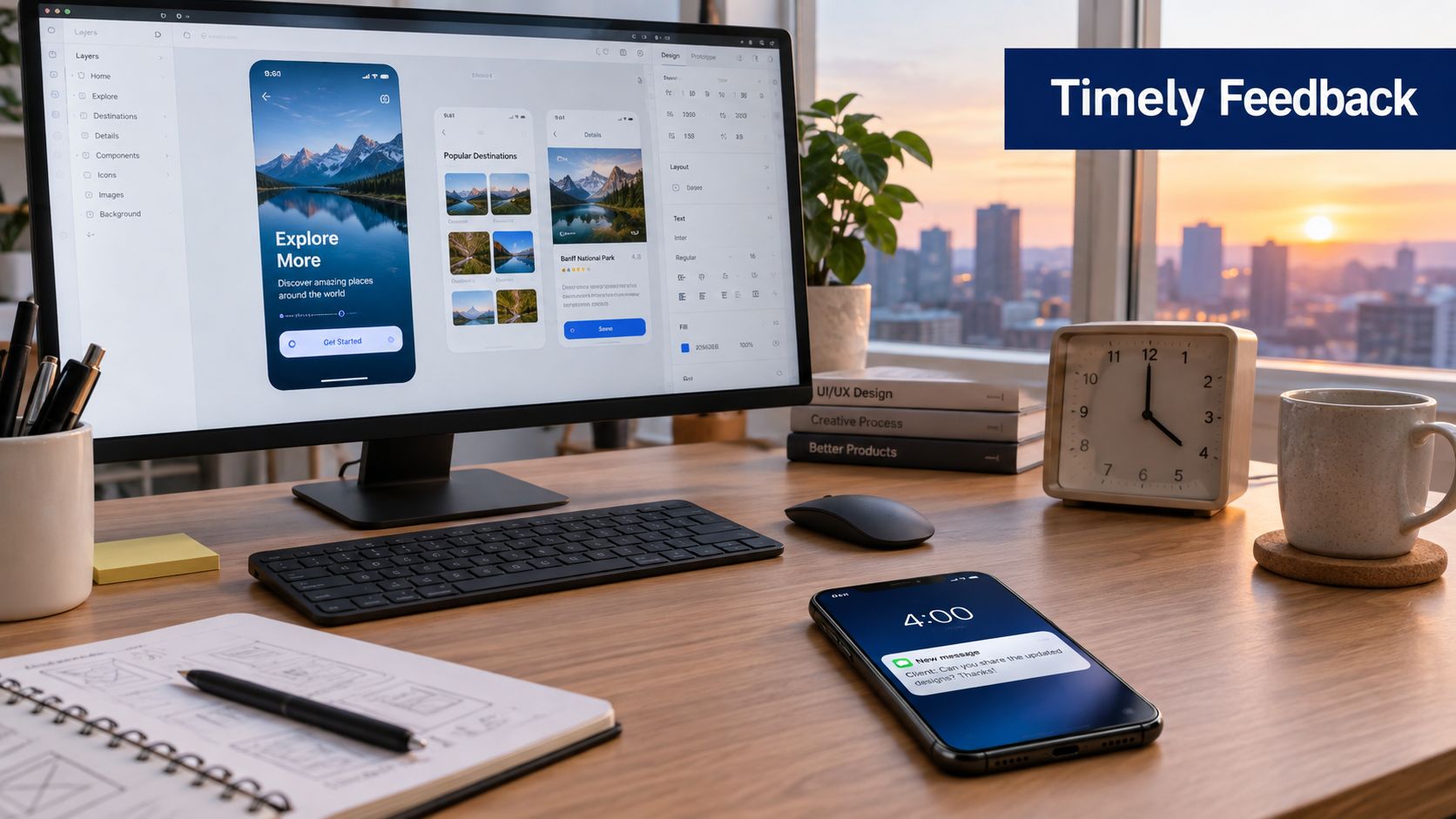
That's why a real time collaboration app matters for mobile teams. It closes the loop between idea, feedback, and execution while the work is still in motion. Instead of sending updates into separate tools, people react inside the same working surface.
The hidden cost of waiting
Asynchronous work still has a place. It's good for specs, recorded feedback, and decisions that need reflection. But mobile prototyping breaks down when everything is async.
A few common failure points show up fast:
- Version drift: one person comments on an older screen while someone else is already adjusting navigation.
- Context loss: by the next morning, the designer barely remembers why that interaction changed.
- Approval lag: founders and stakeholders delay feedback because opening multiple tools feels like work.
Practical rule: If a decision depends on seeing a screen, a transition, or a state change, don't leave it to screenshots and comment threads alone.
The broader market moved this way for a reason. One industry estimate valued the collaboration software market at USD 36.1 billion in 2024 and projected it to reach USD 57.4 billion by 2030, with a 7.4% compound annual growth rate from 2025 to 2030. That same framing centers demand around unified workspaces, real-time communication, document sharing, and integrated project tools for distributed teams (DataIntelo market estimate).
What changes when teams work live
The shift isn't abstract. Teams make faster product calls when everyone can see the same thing changing at the same time.
That matters even before you build. Founders raising capital often need to refine a prototype quickly based on investor conversations. A resource like the Gritt.io investor search tool is useful in that stage because it helps founders identify relevant investors while they tighten the product story those investors will see.
For teams trying to reduce handoff friction, this kind of workflow change is more useful than adding another meeting. The practical shift is simple: fewer static reviews, more shared creation. If you want a useful companion read on tightening collaboration habits, this guide on improving team collaboration is worth reviewing alongside your current process.
What Makes a Real Time Collaboration App Work
A real time collaboration app isn't just “software where multiple people can log in.” It works when people can see activity, trust the current state, and act without asking who changed what.
The easiest analogy is a shared whiteboard that keeps every stroke, shows who is drawing, and never forks into three conflicting copies. For mobile product teams, that means fewer status checks and more direct decisions.
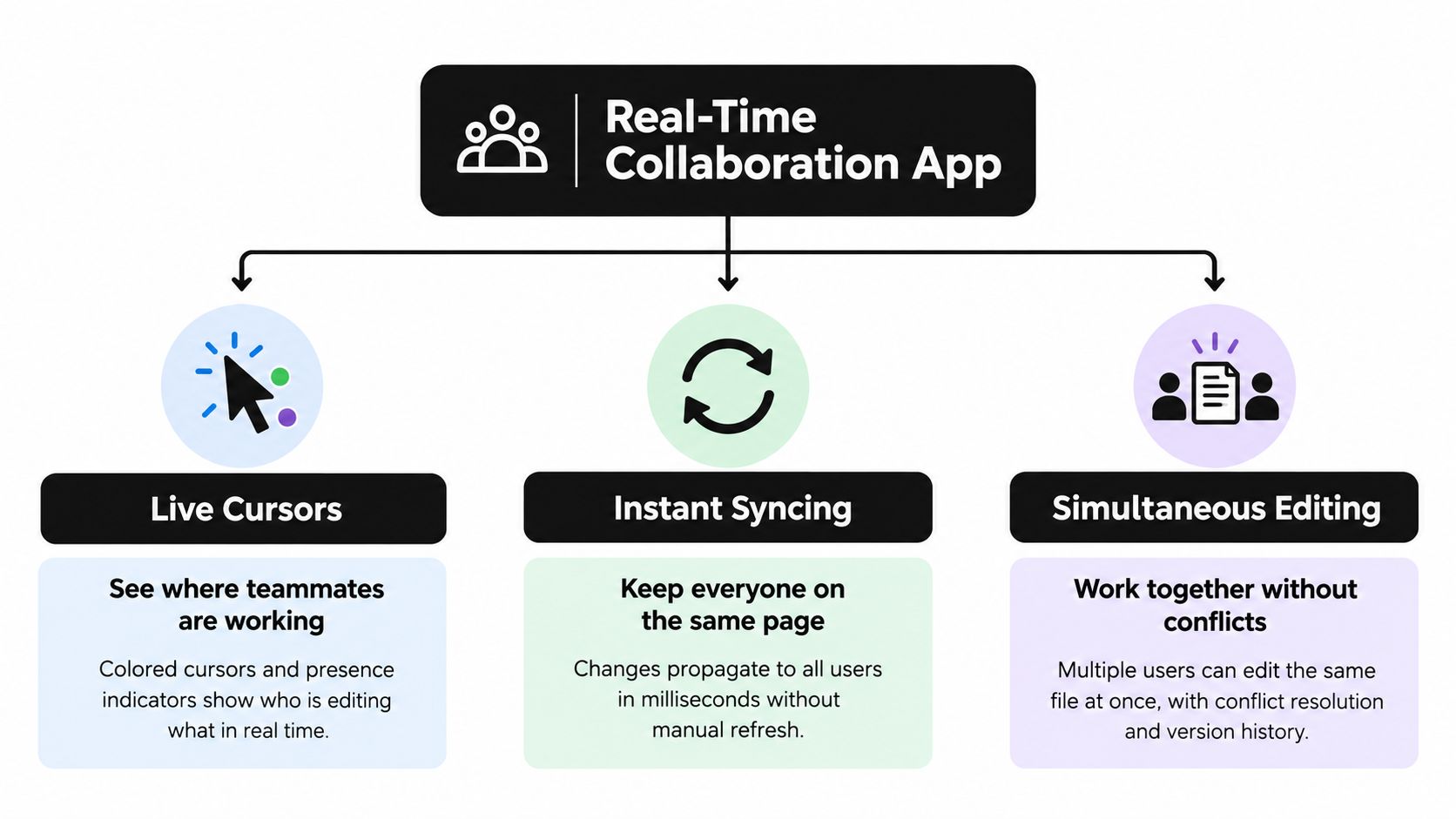
Three signals users need immediately
The strongest collaboration tools tend to get three things right.
-
Live cursors or visible activity
You need to know where teammates are working. If a designer is editing the settings screen and a PM is reviewing the paywall copy, visible activity prevents accidental overlap and reduces the need for “are you in this file?” messages.
-
Instant syncing
This is the trust layer. When one person changes a button label or updates a flow, everyone else should see the same state without refreshing, exporting, or reopening.
-
Presence indicators
Presence isn't cosmetic. It tells the team who's active, who's observing, and who might be heads-down. That changes how people ask for input and whether they interrupt at all.
One source of truth beats tool hopping
When those pieces work together, the app becomes the current truth of the product. Teams stop managing confusion through meetings and start resolving it in the work itself.
That's part of why adoption accelerated so sharply during the remote-work shift. Gartner-reported data showed enterprise collaboration tool use grew 44% since 2019, and by 2021 only one-third of enterprise meetings were still held in person, down from 63% in 2019. The same period also saw more use of messaging, storage, and sharing tools, which is a good signal that collaboration software became operating infrastructure rather than optional productivity software (enterprise collaboration usage figures).
The useful test isn't whether a tool offers comments. It's whether comments, edits, and decisions happen against the same live artifact.
For technical teams, the sync layer is where this either holds up or falls apart. If you want to understand that side better without getting buried in theory, this breakdown of a real-time sync layer for team app building is a practical reference.
The Latency Problem That Separates Good From Great
Some collaboration tools look real time in a demo but feel sluggish in actual use. That difference usually comes down to latency.
When people are co-creating a mobile prototype, they're not judging the architecture diagram. They're judging whether the tool keeps up with their attention. If a change lands late, even by a small amount, users start pausing, second-guessing, and talking over stale state.
Why speed changes the editing experience
One collaborative code-editor study noted that real-time collaboration systems typically target sub-100 ms synchronization because user perception degrades above that threshold. The same study reported observed synchronization delays of 70 to 90 ms and described WebSocket transport as lower-latency and more bandwidth-efficient than HTTP polling (collaborative editor latency study).
For non-technical readers, the practical takeaway is simple. Below that threshold, collaboration feels direct. Above it, the product starts to feel like a delayed shared document.
What teams should check before choosing a tool
Feature lists are easy to compare. Editing feel is harder, but it matters more.
Use these checks during evaluation:
- Watch for cursor lag: if another person's movement updates unevenly, the sync model may struggle under live use.
- Test simultaneous edits: have two people change the same screen or flow at once and see whether the app stays coherent.
- Check transport behavior: you don't need to inspect every system detail, but tools built for persistent live updates generally feel very different from tools faking real time with refresh-style behavior.
A practical consequence of many operational transformation systems is that a document usually relies on a centralized sequencing server. Clients send versioned edits, the server transforms incoming operations against concurrent ones, appends them to an operation log, and broadcasts the result. That setup helps preserve consistency while keeping collaborator-visible latency around the 100 ms class for a good editing feel (operational transformation architecture explanation).
Slow sync doesn't just annoy users. It changes behavior. People stop collaborating live and fall back to turn-taking.
On mobile products, network conditions also matter because teams often test from different devices and locations. That's why performance work isn't optional in collaboration-heavy tools. If you're evaluating the infrastructure side of app responsiveness, this guide to network optimization gives a useful lens.
How Product Teams Use Real-Time Collaboration Daily
The teams that get the most value from live collaboration don't use it for everything. They use it at the moments where shared context saves rework.
That usually starts early, before engineering calls anything final.
Early validation and rough product shaping
A founder and PM can sit in the same prototype and answer practical questions fast. Does onboarding ask for too much? Is the pricing screen too early? Does the tab structure make sense on mobile? Those aren't abstract strategy questions once the flow is visible and editable.
This stage works best when feedback is immediate but narrow. People react to one flow at a time instead of dropping broad opinions into a deck or long doc.
Screen-level feedback without leaving the work
Design tools are still useful here because they let non-technical teammates comment directly on the interface. In Figma, a reviewer can switch to the comment tool, click anywhere on the canvas, and leave feedback at that exact spot. That's helpful when a founder, designer, and developer need to discuss one button, one card, or one state without leaving the file (Figma inline commenting workflow).
For stakeholder reviews, version discipline matters just as much as comments. Figma also lets teams manually save and name versions, which is useful for marking milestones such as handoff points or review-ready checkpoints (Figma named version workflow).
A named checkpoint before a review saves arguments later. Everyone knows which version got approved.
Collaboration features by team role
| Team Role | Key Collaboration Need | Most Useful Feature |
|---|---|---|
| Founder | Validate whether the product story is clear | Live review of flows and comments tied to exact screens |
| Product manager | Keep decisions aligned across functions | Shared visibility into current version and discussion history |
| Designer | Refine UI details with fast feedback | Inline comments and simultaneous editing |
| Developer | Understand intended behavior before handoff | Real-time changes in navigation, states, and interaction logic |
| QA or tester | Verify flows without waiting for formal builds | Shareable previews and direct issue feedback in context |
Remote teams without constant calls
Daily collaboration doesn't mean a permanent video room. The best teams use live editing for moments that need shared attention, then switch back to async notes and documented decisions.
That balance matters because instant collaboration can easily become noise. Independent coverage points out that collaboration tools can create information fatigue when messages, file updates, and alerts arrive faster than users can process them, especially when teams use overlapping layers like chat, docs, project tools, and whiteboards (notification overload in real-time collaboration).
A practical mobile team rule is to separate actions into three buckets:
- Sync instantly: navigation changes, layout decisions, flow reviews
- Batch together: copy edits, backlog grooming, grouped UI polish
- Keep asynchronous: status updates, rationale notes, final decision logs
That mix keeps real-time collaboration useful instead of exhausting.
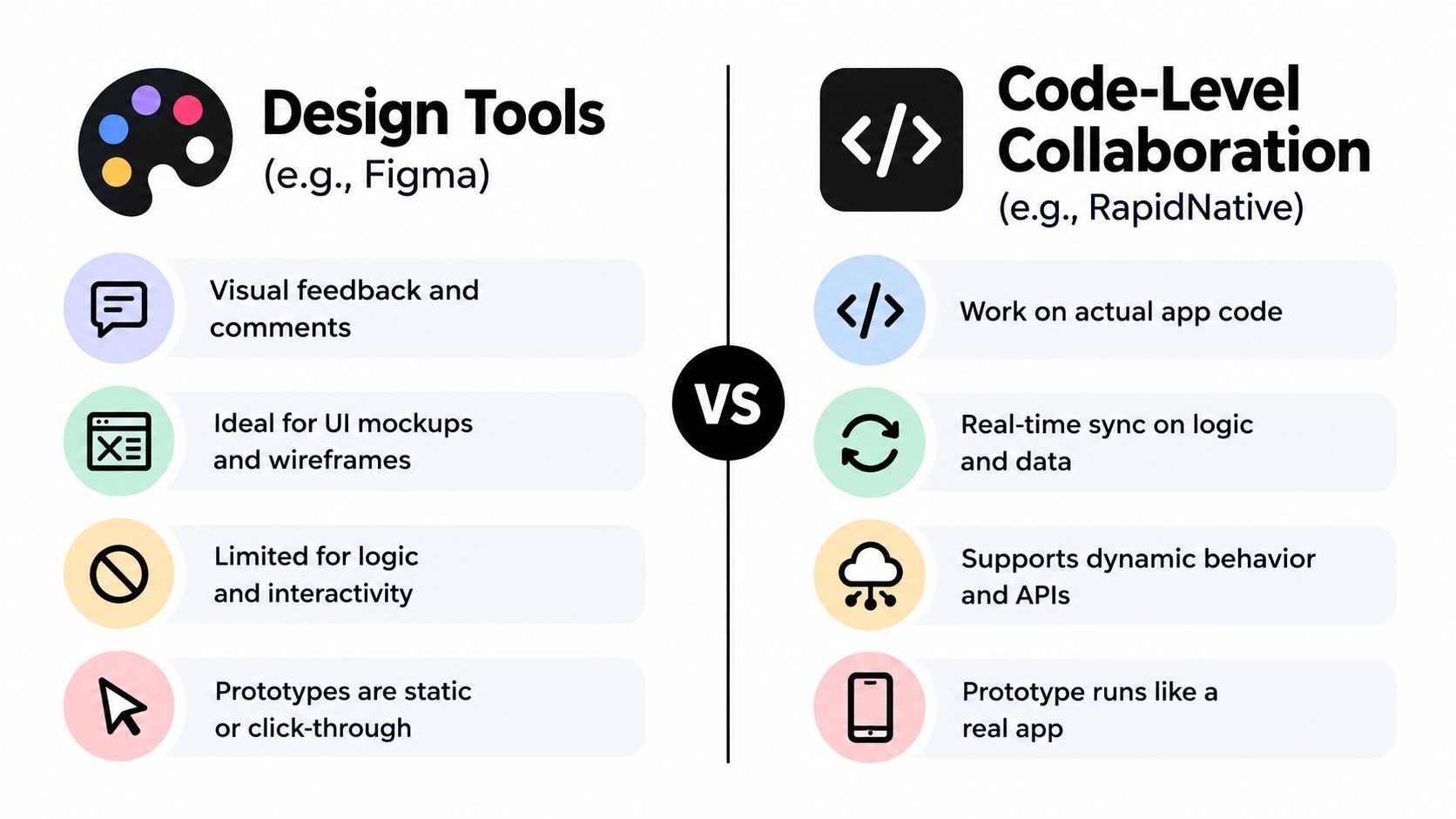
Design Tools vs Code-Level Collaboration
A common question comes up once teams get comfortable with shared design files. If Figma already supports comments and live editing, why add anything else?
Because visual collaboration and code-level collaboration solve different problems.
Where design tools are strong
Design tools are excellent when the work is still mostly visual. You're shaping layout, hierarchy, spacing, copy placement, and overall user flow.
They also help mixed teams collaborate because founders and PMs can review without touching code. Figma's version history creates a new checkpoint every 30 minutes and keeps the current version up to date with file changes, which gives teams a concrete recovery point during collaborative UI work (Figma version history behavior).
That's a strong fit for:
- Wireframes and mockups: quick comparison of alternate interface directions
- Stakeholder review: easy feedback from people who think visually
- Early UX iteration: fast discussion around one screen or one flow
Where design tools hit a ceiling
The limitation shows up when the team needs to test behavior, not just appearance.
A mobile app isn't only screens. It's routing, state changes, data loading, empty states, permissions, errors, transitions, and all the little conditions that turn a mockup into a product. Click-through prototypes can hint at this, but they don't fully answer whether the app behaves correctly.
That's where code-level collaboration starts to matter. Instead of discussing a representation of the app, the team works on something executable.
What code-level collaboration changes
Code-level collaboration is useful when the prototype is close to the product you intend to ship. The biggest gain isn't speed alone. It's the reduction of translation loss between design intent and engineering reality.
For mobile teams, that means:
- Less handoff ambiguity: the prototype already contains actual logic and structure
- Better functional testing: navigation and interaction can be reviewed as behavior
- Cleaner engineering transition: developers aren't reconstructing intent from separate artifacts
RapidNative fits this category because it lets teams co-create mobile prototypes in a shared environment that works directly with React Native code rather than stopping at static design output. That makes it a different kind of real time collaboration app from a standard design surface.
If your team is debating interaction logic, a polished mockup won't settle the question. Running software will.
The practical answer isn't “use code tools instead of design tools.” It's use each one for the stage where it's strongest.
Getting Started with RapidNative for Real-Time Co-Creation
For mobile teams, the interesting part of real-time collaboration isn't just shared editing. It's shared editing on something that can become a working app.
A practical workflow starts with whatever the team already has. That might be a prompt, a rough sketch, a product brief, or a few screenshots showing the intended direction. From there, the prototype becomes a shared working space instead of a static deliverable passed from one function to another.
What co-creation looks like in practice
One person adjusts screen structure while another refines copy and a third reviews flow logic. The useful part is that the team isn't collaborating around a future implementation. They're collaborating inside it.
That changes review behavior in a good way. Designers can react to spacing and hierarchy. PMs can check whether the flow matches the requirement. Developers can judge whether the behavior makes sense before a full build begins.
A lot of teams also need feedback from people who aren't inside the tool all day. Shareable previews matter here because stakeholders tend to respond faster when they can open a link or scan a QR code on a phone and react to the actual experience rather than a presentation.
Here's a quick product view of that model in action:
Where this fits in the build cycle
This approach works especially well in the awkward middle stage that slows many mobile teams down. The concept is clear enough to prototype seriously, but not settled enough to justify a full engineering cycle.
A real time collaboration app earns its place when it helps the team answer questions sooner:
- Can we validate the flow now instead of after handoff?
- Can stakeholders react to a runnable prototype instead of a slide?
- Can engineering start from structured output instead of interpretation?
That's why real-time co-creation is becoming a baseline expectation in mobile product work. Teams don't want another place to leave comments. They want a faster path from idea to something testable, shared, and ready for real implementation.
RapidNative gives product teams a way to turn prompts, sketches, images, or PRDs into shareable React Native apps while collaborating live in the same project. If your team is trying to shorten the gap between prototype review and working mobile software, visit RapidNative and see how its collaborative workflow fits your build process.
Ready to build your app?
Turn your idea into a production-ready React Native app in minutes.
Free tools to get you started
Free AI PRD Generator
Generate a professional product requirements document in seconds. Describe your product idea and get a complete, structured PRD instantly.
Try it freeFree AI App Name Generator
Generate unique, brandable app name ideas with AI. Get creative name suggestions with taglines, brand colors, and monogram previews.
Try it freeFree AI App Icon Generator
Generate beautiful, professional app icons with AI. Describe your app and get multiple icon variations in different styles, ready for App Store and Google Play.
Try it freeFrequently asked questions
What is RapidNative?
RapidNative is an AI-powered mobile app builder. Describe the app you want in plain English and RapidNative generates real, production-ready React Native screens you can preview, edit, and publish to the App Store or Google Play.
Can I export the code?
Yes. RapidNative generates clean React Native and Expo code that you can export at any time. No lock-in, no proprietary format. Hand it to your developers or keep building inside RapidNative.
Is RapidNative free to use?
Yes. The free plan gives you 20 credits a month with no credit card required. Paid plans start at $20 a month and add more credits, code export, private projects and commercial rights to publish to the App Store and Google Play.
Do I need to know how to code?
No. Most users build apps by describing what they want in plain English. Developers can drop into the code whenever they want more control, but coding is optional.
How long does it take to build an app?
Most users have a working first screen in under a minute. A full MVP usually takes a few hours instead of the weeks or months traditional development requires.