Agency App Development: Workflow, Pricing and Handoff
Agency app development explained: phases, timelines, pricing models, team roles, tech stacks and clean handoffs for MVPs that ship.
By Rishav
1st Nov 2026
Last updated: 1st Nov 2026
You've sent the same app idea to several agencies, and the proposals don't look like they describe the same product. One promises a fast launch, another includes a lengthy discovery phase, and neither clearly explains what happens if you need a different team after release.
For a founder without in-house mobile engineers, agency app development is a purchase of delivery capability, not just code. Compare what each team will validate, build and transfer to you. The price includes your ability to maintain the app, replace the agency and release an urgent fix without starting again.
What Agency App Development Means
An agency app development engagement is a contract with an outside team to design, build, test and release a mobile product. You supply the business priorities and make product decisions. The agency supplies specialist people, delivery processes and release expertise, with maintenance usually covered by a separate agreement.
Mobile delivery isn't interchangeable with general software development. In a 2015 survey of nearly 2,000 developers, Progress found that 57% were completely new to mobile development or had never built a mobile app, while 47% produced only one functional mobile app per year on average. That historical capability gap helps explain the role of specialist delivery teams, although it doesn't describe today's workforce.
The demand is substantial: an Appmakers USA statistics release puts combined Google Play and iOS downloads at roughly 142.9 billion in 2020. Downloads aren't agency revenue, but they show the scale of the distribution ecosystems your app must operate within.
Buying principle: Hire an agency to deliver an independently maintainable product, not merely to reach a store submission.
Say you're a founder with a fitness-tracking idea and a six-month launch window. Before discussing screens, establish who owns product decisions, backend operations, store accounts and post-launch support. Outsourcing engineering doesn't outsource your responsibility to decide what matters.
The Agency App Development Workflow, Phase by Phase
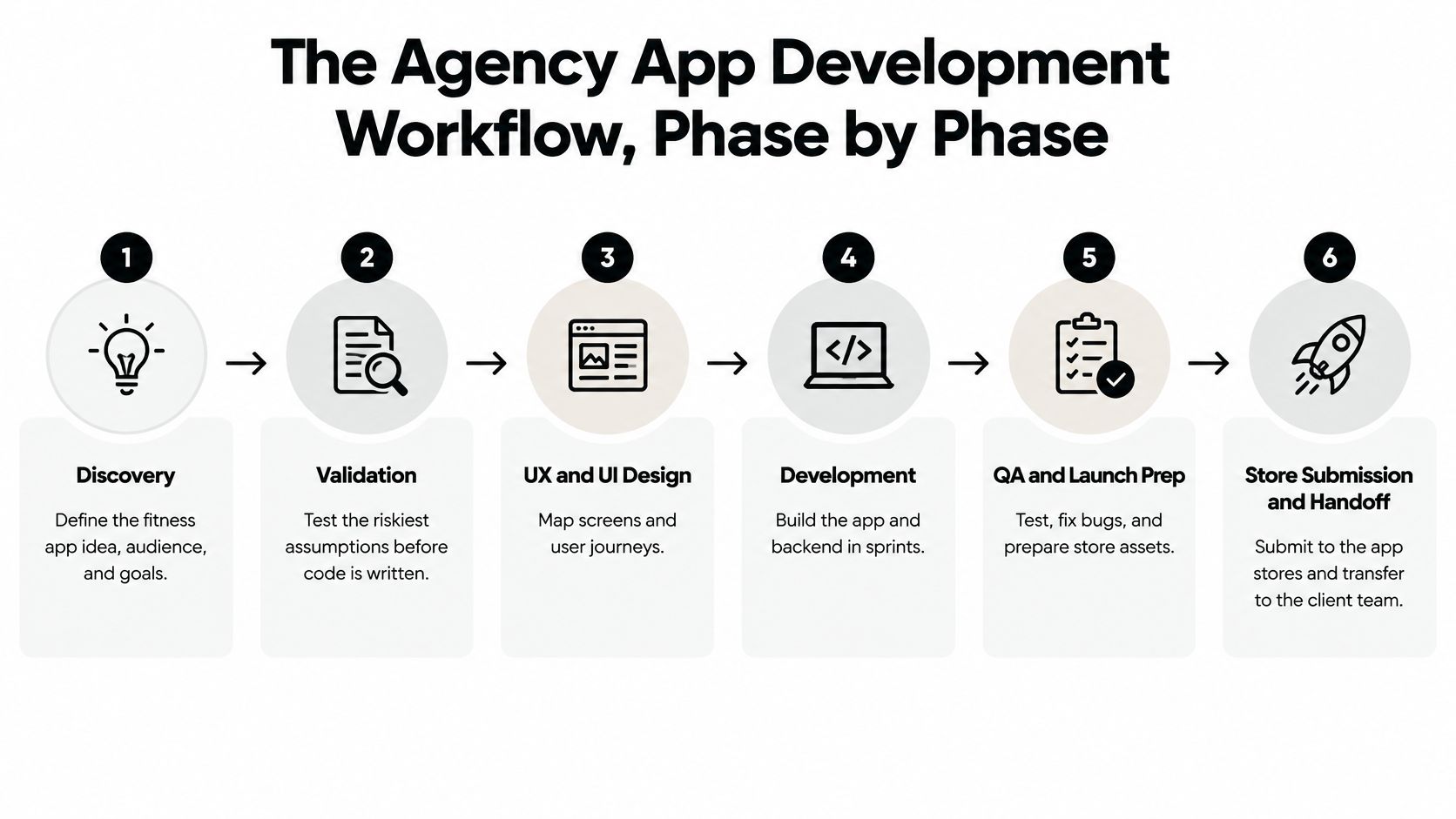
For that fitness app, the path from first call to store listing should be visible before kickoff. Ask the agency to connect each phase to an output, an accountable lead and a client approval, rather than presenting a launch date without dependencies.
The workflow below shows where validation and handoff belong within delivery.
Plan overlapping work, not isolated departments
Discovery defines the problem, audience, boundaries and technical risks. Your scope approval gives the designer a stable core journey to explore. Design turns that journey into a prototype and screen specifications, including loading, error and permission states.
Once you approve the core flows, development can begin while the designer finishes secondary screens. QA and testing should start in the first sprint, with acceptance checks attached to each feature. Waiting until coding ends makes foundational mistakes expensive to unwind.
Launch includes store assets, privacy disclosures, release configuration and submission. Client approval of the release candidate is a separate gate from store approval. Maintenance then addresses production defects, platform compatibility and agreed improvements.
Typical agency app project phases
These are illustrative planning allowances for a focused MVP, not surveyed industry averages or a delivery guarantee.
| Phase | Typical duration | Main output | Lead role |
|---|---|---|---|
| Discovery | 1-2 weeks | Problem brief, user flows, risk list | Product lead |
| Design | 2-4 weeks | Clickable prototype, design system, screen specs | UX/UI designer |
| Development | 6-10 weeks | Working app build, API integration, test builds | Mobile engineers |
| QA and testing | 2-3 weeks, overlapping development | Device test report, performance results | QA engineer |
| Launch | 1-2 weeks | Store listings, submitted builds, release notes | Release specialist |
| Maintenance | Ongoing from month two after release | Bug fixes, OS updates, feature releases | Support engineer |
Don't add the rows mechanically. Design and engineering overlap, QA runs alongside implementation, and launch preparation starts before the final build. In this planning scenario, reserve roughly three to six months from kickoff to store release, with immediate launch support bridging into ongoing maintenance.
Put approvals on the calendar
Late feedback can leave engineers waiting or force them to rebuild completed work. Name the founder who approves scope, the person who signs off the prototype and the person authorised to accept the release candidate. Give each decision a deadline.
Mid-build additions and store rejection also stretch the calendar, so distinguish engineering completion from public availability. Apply a simple proposal test: does every phase name an output, an owner and an approval gate?
Validating the Idea and Choosing Your First Move
Before buying production development, test the riskiest assumptions: who needs the app, what job they'll complete and whether they'll return or pay. Choose a test for each assumption instead of treating a polished prototype as proof of demand.
A useful workshop puts the user journey and unresolved questions in front of everyone.

Use interviews to understand motivation, a clickable prototype to observe task completion, and a landing page or waitlist to test whether people take a meaningful next step. For an initial qualitative test, I would recruit five to eight people from the same target segment, not mix unrelated audiences into a small sample.
Say you're testing meal planning for busy parents. If participants choose meals but abandon grocery-list creation, investigate that transition before adding recipes. Score the evidence against task success, retention intent, willingness to pay, technical feasibility and unresolved risk, with go/no-go criteria agreed before testing.
Validate data collection alongside the interface
Apple's App Review Guidelines require consent for collecting user or usage data, including data considered anonymous at collection, and privacy disclosures explaining collection, use and third-party sharing. Access to protected user data also needs clear purpose strings explaining why the app needs it.
Create a data inventory covering analytics and advertising SDKs, crash reporting, location, contacts and device identifiers. Link each entry to its feature, purpose string where applicable, consent experience, retention rule and deletion process. For a fitness app, request location when the user starts a location-dependent activity, not without context during onboarding.
Working previews help you test before committing to a full build. With RapidNative, we support live browser previews, PWAs and previews on your own phone through an Expo QR code served by ORCHD. Our free forever plan includes 20 AI credits per month and 5 screens per project, with no credit card required.
Use the walkthrough below as a prompt for deciding what your first test needs to demonstrate.
Make the first commitment small
- Write the brief. Name a primary user and the single job the app performs.
- Choose cheap tests. Match each risky assumption to observable behaviour.
- Test the core flow. Watch target users work without coaching.
- Score the evidence. Record failures and remaining uncertainty.
- Request comparable proposals. Send the brief to two or three agencies, asking for phases, named people, handoff requirements and exit terms.
A clickable prototype can demonstrate comprehension and navigation, not production reliability, payment settlement or background location behaviour. At the end of your proposed second week, make a single decision: fund the next implementation step or pause, based on observed task completion, credible demand signals and unresolved feasibility risks.
Pricing Models and What Drives the Cost
Why can agencies quote different prices for the same app description? They may be pricing different responsibilities. One includes account recovery, operational dashboards and release support; another assumes you'll provide them.
Scope is the first comparison, hourly rate the second. Review user flows and screens, integrations such as payments and sign-in, native features such as camera and biometrics, backend rules, platform coverage, and privacy or compliance work. The order of impact changes by product, but these categories expose omissions better than a single headline total.
Agency app pricing models compared
| Model | How it is billed | Best for | Main risk |
|---|---|---|---|
| Fixed price | Agreed total for a defined scope | Small, well-specified MVPs | Scope changes trigger disputes and change orders |
| Time and materials | Hourly or daily rate for actual effort | Discovery-heavy or evolving products | Total cost is harder to predict |
| Dedicated team | Monthly fee for a stable team | Products with long roadmaps | Needs an active client product owner |
| Post-launch retainer | Monthly fee for support and small changes | Apps in active use | Pays for capacity even in quiet months |
Compare a bounded release with an expanding product
Consider a hypothetical marketplace MVP with 12 screens, email sign-in and one payment provider. Compare it with a 30-screen version containing chat, maps and a custom admin panel. The latter requires more than extra interface work: chat introduces moderation and delivery states, maps introduce permissions and location behaviour, and administration introduces roles and audit requirements.
Even with the same team, those products shouldn't carry the same estimate. Screen count helps describe scope, but business rules and failure paths determine much of the engineering effort.
Use an app development cost calculator to organise assumptions, then ask the agency to price named deliverables by phase. Separate agency fees from hosting, transaction charges, third-party subscriptions and store-related expenses.
A fixed quote is only as useful as its exclusions, acceptance criteria and change-control terms.
Choose fixed price after discovery has made the MVP specific. Use time and materials when uncertainty remains, with spending limits and review checkpoints. A dedicated team needs your active prioritisation; a support retainer should begin after launch, with warranty fixes distinguished from paid changes.
Before signing, check termination notice, payment for unfinished work and transfer obligations. An inexpensive build isn't inexpensive if leaving requires rebuilding it.
Team Roles and Skillsets an App Project Needs
You don't necessarily need a large team. For planning, a focused MVP might use four to six people, with some responsibilities combined rather than every role staffed full-time. What matters is whether each decision and deliverable has an accountable owner.
Start with decision rights, then inspect technical coverage.
| Role | What the person owns | What to verify |
|---|---|---|
| Product lead or client product owner | Priorities, scope and acceptance | Authority to make trade-offs |
| UX/UI designer | Research, prototype and design system | Complete journeys, not just attractive screens |
| Mobile engineers | App behaviour and platform integration | Device debugging and production releases |
| Backend engineer | Data, authentication and APIs | Access control, migrations and recovery |
| QA engineer | Test strategy and device coverage | Repeatable checks of core and failure flows |
| Release specialist | Signing, store listings and submission | Experience diagnosing release blockers |
Check capabilities beyond job titles
A React Native engineer still needs native-platform knowledge. Permissions, push notifications, deep links and signing problems don't disappear because most application code is TypeScript. Ask who can diagnose a failure that occurs only in a store build.
QA should cover low-end Android hardware and older iOS versions within the agreed support policy. Test interruptions, denied permissions, slow networks and expired sessions. These conditions expose behaviour that a simulator demonstration can hide.
In a hypothetical five-person booking-app team, the agency could provide a delivery lead, a designer who also conducts UX research, a senior engineer covering mobile and backend, another mobile engineer and a QA engineer. A suitably experienced engineer could handle release work, while you act as the client product owner and approve each sprint.
That arrangement needs explicit capacity planning. If the senior engineer is simultaneously building authentication, reviewing code and fixing store submission problems, the project has a bottleneck regardless of the team size.
- Keep core capability assigned throughout. Product decisions, architecture, mobile implementation and testing need continuity.
- Buy specialist input at the right gate. Security review, accessibility assessment or a difficult native integration can be scoped as focused engagements.
- Confirm availability before kickoff. A proposal naming senior people is insufficient if they won't work on your project.
The hiring question isn't whether the agency has every specialist on payroll. It's which skills must be available from kickoff, and which can join for a defined sprint or review.
Choosing a Tech Stack and Tools for Speed and Control
Choose a stack a future engineering team can maintain, not only one the current agency can demonstrate quickly. React Native with Expo, Flutter, and native Swift and Kotlin all support serious products, but each changes the skills, implementation effort, and handoff your project will require.
App approaches and backends compared
| Option | Strength | Trade-off | Best fit |
|---|---|---|---|
| React Native with Expo | One TypeScript codebase for iOS and Android, with a large ecosystem | Performance-heavy features may need native modules | MVPs and content-driven apps |
| Flutter | One Dart codebase with consistent UI rendering | Smaller hiring pool to assess locally | Design-led apps with custom interfaces |
| Native Swift and Kotlin | Direct platform access and performance control | Separate codebases and platform-specific testing | Hardware-heavy apps or demanding platform requirements |
| Supabase | Postgres, authentication, and storage in one service | Vendor dependence to manage | Fast MVPs with relational data |
| Firebase | Integrated messaging and analytics capabilities | Proprietary database model | Apps needing integrated analytics and messaging |
Choose the app and backend together
The stack sets the hiring and support requirements after launch. React Native teams need TypeScript and native debugging skills. Flutter requires Dart expertise, while separate native apps need Swift and Kotlin capability. Check that both the agency and potential replacement teams can support the chosen approach in your hiring market.
Supabase or Firebase can reduce initial infrastructure work. A custom API may suit business rules, integration orchestration, or security boundaries that need a dedicated service layer. Whatever the choice, plan how authorisation and data recovery will work.
RapidNative-generated apps use a fullstack-supabase scaffold with React Native, Expo, Expo Router, TypeScript, NativeWind, Tailwind CSS, Postgres, Supabase-compatible APIs, and Lucide icons. Apps can be tested on iPhone and Android by scanning a QR code, without Xcode, Android Studio, or cables. That makes early flow checks easier, but does not replace release-build QA.
Use the mobile app tech stack chooser to compare requirements. Before making the stack contractual, confirm the code export path, dependency availability, and repository ownership. These terms affect whether another team can take over without rebuilding work or relying on the original agency. Compare each option against your hiring market and performance requirements, too.
Set a performance budget before implementation
For a hypothetical acceptance target, specify cold launch under 2 seconds on a named mid-range Android phone, tap feedback within 100 milliseconds, and a memory ceiling agreed during discovery. These are proposed project targets, not universal benchmarks. State the device and test conditions in the acceptance criteria so the agency and client assess the same behaviour.
Measure image-heavy screens, long lists, and offline synchronisation on physical devices. A controlled cross-platform framework study found workload-specific differences in completion time, CPU, and memory. Its results support measuring the actual app rather than assuming native parity.
The trade-offs depend on the workload. A University of Twente study found React Native had the highest overhead overall across its benchmark set, yet in five of ten CPU-intensive benchmarks, at least one framework implementation used less energy and finished faster than its native counterpart.
Profile first. Move proven bottlenecks to native modules rather than choosing a more complex architecture on speculation. A proposal's price is only part of the comparison: confirm what code and repository access transfer at handoff, and whether a replacement team can maintain the result.
Client Collaboration and a Handoff Engineers Can Use
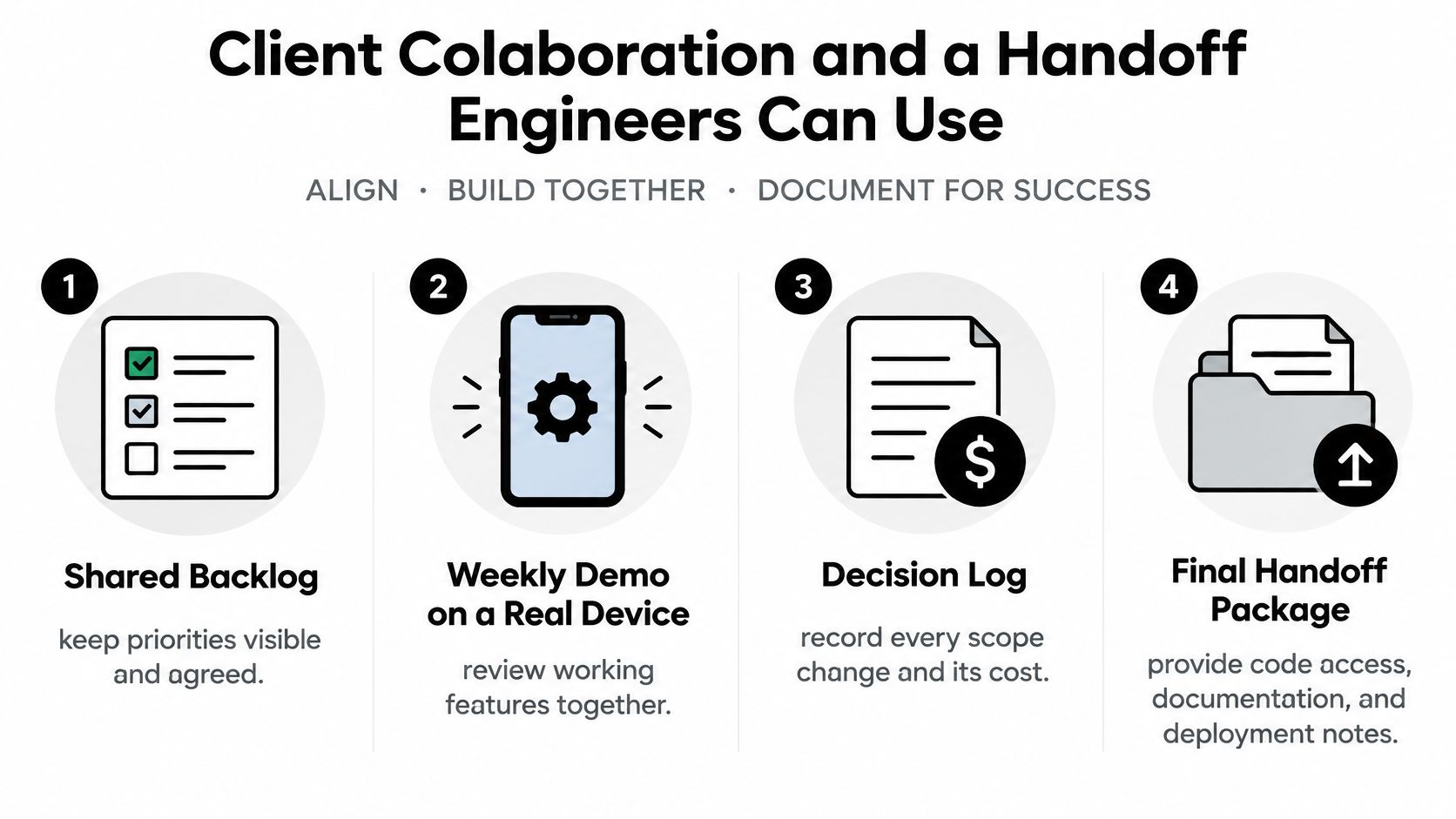
Keep delivery visible through a shared backlog, a weekly demo on a real device and a decision log. Each scope change should identify who approved it, its cost and its effect on the release. A progress percentage can't substitute for working software.
The collaboration rhythm should lead directly to a usable handoff package.
Define completion as transfer of control
Put the handoff checklist in the contract, not in a conversation during the final invoice.
- Client-controlled repository. Include full commit history and access to every required repository.
- Reproducible builds. Document commands and configuration so a clean machine can produce a build.
- Dependency inventory. Record versions, licences and any paid components.
- Automated tests. Cover core journeys, with instructions for running and interpreting them.
- Client-owned monitoring. Transfer crash reporting and analytics access.
- Release credentials. Keep store developer accounts and applicable signing credentials under client control.
- Operational documentation. Explain setup, environments, deployment, rollback and release steps.
- Data procedures. Document export, deletion and recovery operations.
- Incident-response SLA. State response times, escalation contacts, coverage hours and exclusions.
Define a response commitment separately from a resolution commitment. An acknowledgement doesn't mean a production fault has been repaired. Use code collaboration practices that preserve review history and decisions alongside implementation.
Price the operating product
The OST agency FAQ discusses post-launch support and maintenance, but a support promise alone isn't evidence that another engineer can take over. Request a handoff audit and a total-cost model separating routine maintenance, OS compatibility, third-party integration changes, security work and new features.
Acceptance test: A replacement engineer should be able to understand, build and operate the product without undocumented help.
Make that concrete with a proposed one-day patch exercise. Have an engineer who didn't build the app clone it onto a new laptop, follow the documentation, make a small fix and produce an installable patch build. Don't make public store approval part of that deadline.
If the exercise fails because credentials, instructions or dependencies are missing, handoff isn't complete. Our users can publish to the App Store and Google Play or export the code and ship it themselves. Exportable code should pass the same operational test as agency-written code.
Common Pitfalls and How to Avoid Them
Use these symptoms to diagnose weaknesses in a proposal before they become production problems. Each fix needs an earliest checkpoint and a person responsible for making it happen.
Common agency app pitfalls and fixes
| Symptom | Likely cause | Fix |
|---|---|---|
| Store rejection late in the project | Privacy and permission rules added after the build | Product lead maps data and permissions during discovery |
| Scope grows every sprint | No frozen MVP definition | Client product owner signs off scope before development and prices every change |
| App feels slow on mid-range Android | Testing only on simulators or flagship phones | QA engineer tests physical devices against the performance budget from the first working build |
| Controls are hard to tap | Touch targets set without a minimum size | Designer makes minimum touch target size a design acceptance criterion |
| Agency disappears after launch | Maintenance not priced or documented | Founder agrees exit criteria and a support SLA before signing |
| Build costs double after prototype approval | Prototype skipped error, empty and edge-case screens | Designer and technical lead review edge-case flows before development |
Check more than the happy path
Privacy review belongs in discovery, while scope control belongs with the person authorising expenditure. Device performance needs engineering evidence, not a promise to optimise later. Give the QA engineer permission to reject a build that misses its agreed budget.
For touch usability, a W3C mobile accessibility proposal specifies targets at least 9 mm high by 9 mm wide. It's a proposal rather than a universal legal requirement, but it provides a measurable design check. Test medication actions such as Taken, Snooze and Skip on an actual small-screen device.
Missing states are another expensive gap. Consider a hypothetical prototype approved without empty-state or error screens: engineers later identify twelve missing flows, and the schedule slips three weeks. The preventive action is a pre-development walkthrough led by the designer and technical lead, covering no results, failed payments, expired sessions and unavailable services.
Run a pre-kickoff risk review
Schedule a proposed 30-minute review with the agency before committing to the build. Ask which deliverable addresses each row, who owns it and what evidence you'll receive. If an answer is only verbal, add it to the statement of work.
Keep a weekly risk review during delivery, with a named owner and next action for every unresolved issue. Your aim isn't a risk-free project. It's to avoid discovering an unpriced responsibility when you're least able to change vendors.
RapidNative turns prompts, sketches and product requirements into shareable React Native apps, helping you test the core journey before commissioning a full agency build. Visit RapidNative to create a working prototype, gather feedback on your phone and bring clearer scope and exportable code into your agency discussions.
Ready to build your app?
Turn your idea into a production-ready React Native app in minutes.
Free tools to get you started
Free AI PRD Generator
Generate a professional product requirements document in seconds. Describe your product idea and get a complete, structured PRD instantly.
Try it freeFree AI App Name Generator
Generate unique, brandable app name ideas with AI. Get creative name suggestions with taglines, brand colors, and monogram previews.
Try it freeFree AI App Icon Generator
Generate beautiful, professional app icons with AI. Describe your app and get multiple icon variations in different styles, ready for App Store and Google Play.
Try it freeFrequently asked questions
What is RapidNative?
RapidNative is an AI-powered mobile app builder. Describe the app you want in plain English and RapidNative generates real, production-ready React Native screens you can preview, edit, and publish to the App Store or Google Play.
Can I export the code?
Yes. RapidNative generates clean React Native and Expo code that you can export at any time. No lock-in, no proprietary format. Hand it to your developers or keep building inside RapidNative.
Is RapidNative free to use?
Yes. The free plan gives you 20 credits a month with no credit card required. Paid plans start at $20 a month and add more credits, code export, private projects and commercial rights to publish to the App Store and Google Play.
Do I need to know how to code?
No. Most users build apps by describing what they want in plain English. Developers can drop into the code whenever they want more control, but coding is optional.
How long does it take to build an app?
Most users have a working first screen in under a minute. A full MVP usually takes a few hours instead of the weeks or months traditional development requires.