Free React Native App Templates That Already Work: Introducing RapidNative Templates
Four full-stack Expo apps, a ride-hailing app, an expense splitter, an AI calorie tracker and an AI companion, each with real screens, data and workflows. Copy one for free and change it with a prompt.
By Sanket Sahu
27th Oct 2026
Last updated: 27th Oct 2026
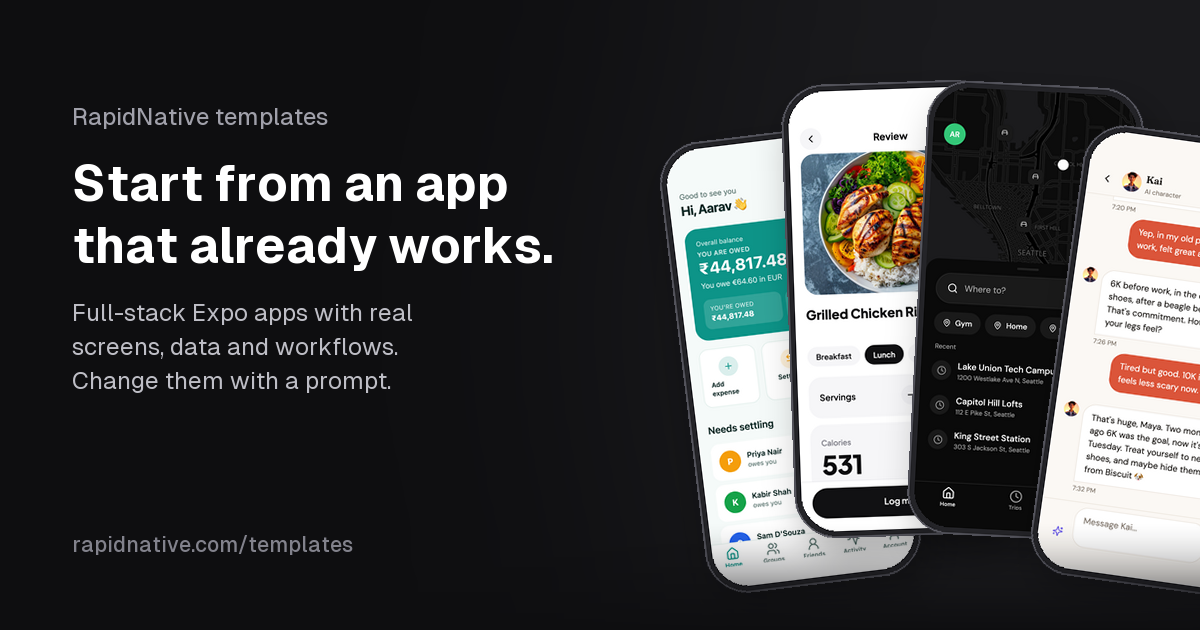
Most apps people build with RapidNative start the same way: a blank prompt box and a sentence like "an app like Splitwise for my flatmates." The AI builds the first screens, and then you spend the next hour adding the parts every app of that kind needs: sign-in, a database, sample data, the admin side, the edge cases.
Over the last two weeks we shipped a different starting point. RapidNative templates are free, full-stack React Native apps that already work. You pick one, say what you want to change, and your own copy opens in the editor with the AI already working on it. Four are live today, and you can browse them all at rapidnative.com/templates.
What a RapidNative template is (and isn't)
We have been fairly critical of templates on this blog. In The Template Tax we argued that most mobile boilerplate costs more than it saves: you buy a starter kit, spend days learning someone else's structure, and still build the hard parts yourself.
These templates are built the other way around. Each one is a complete app, built with RapidNative and checked by hand, and it is meant to be changed by the AI, not by you reading through a codebase. Every template comes with:
- Every screen built and filled with data. No empty lists, no "lorem ipsum." The ride-hailing app has a whole city of places, drivers and past trips.
- A real backend. Each app has its own Supabase database with designed tables, access rules on every table, and server code that deploys with the app.
- Workflows that run end to end. Not just screens that look right, but flows you can complete: book a ride, split a bill, log a meal, chat with a character.
- Several looks and app icons. Pick one before you start and your copy is made in it.
- Honest notes on what is simulated. Every template page says what is real, what is mocked, and where the real service plugs in.
Here are the four live today:
| Template | Works like | Screens | Workflows | Tables |
|---|---|---|---|---|
| Ride-hailing app | Uber | 33 | 9 | 12 |
| Expense splitting app | Splitwise | 17 | 9 | 8 |
| AI calorie tracker | Cal AI, MyFitnessPal and Lose It! | 17 | 9 | 6 |
| AI companion chat app | Character.ai, Replika and Talkie | 13 | 8 | 7 |
The four templates
Ride-hailing app like Uber
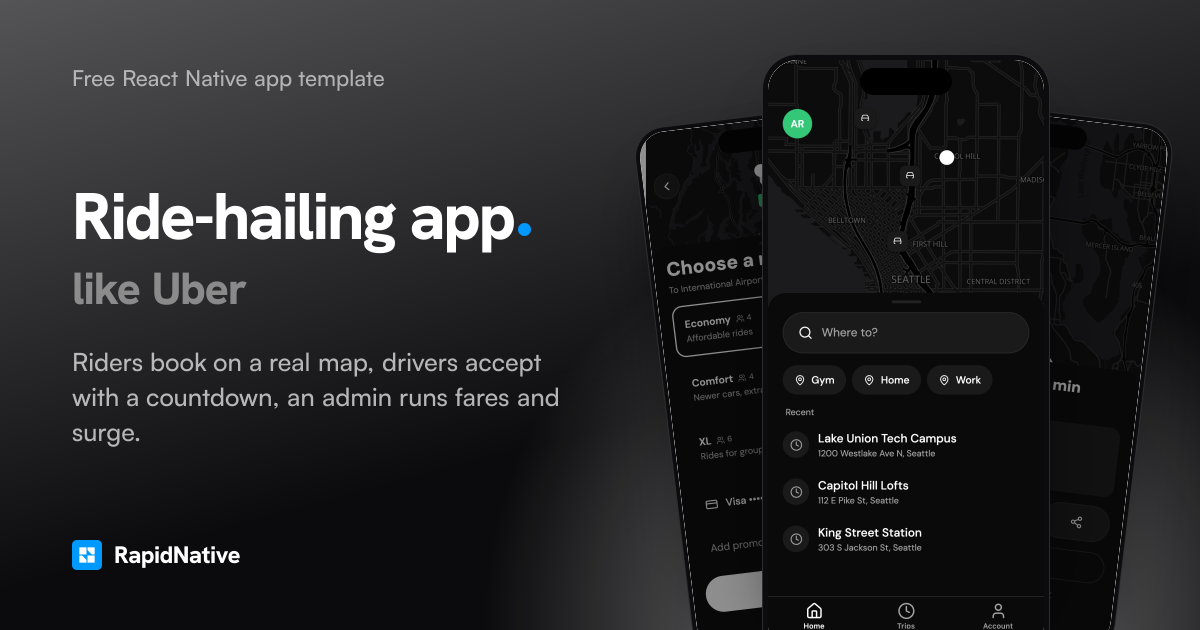
The biggest of the four, and the one that shows best how far a template goes. It is three apps in one:
- Riders search "Where to?" with saved and recent places, see Economy, Comfort and XL fares before booking, then follow the trip from "finding your ride" to "driver here" with the car moving along a real road route. At the end they rate the driver, add a tip and get a receipt with the full fare breakdown.
- Drivers go online, take incoming requests with a 15 second countdown, navigate to pickup, complete the trip and see their earnings for the day and the week after the service fee.
- An admin sees a live fleet map, approves new drivers after checking their documents, and sets fares per vehicle type and surge pricing for busy zones, which every new quote then uses.
It comes seeded with a city: 16 places on real coordinates, 10 drivers in every state (online, offline, pending, suspended) and dozens of past rides with fares, tips and ratings. If you have been reading our guide on how to build an app like Uber, this is that app, already built.
Expense splitting app like Splitwise
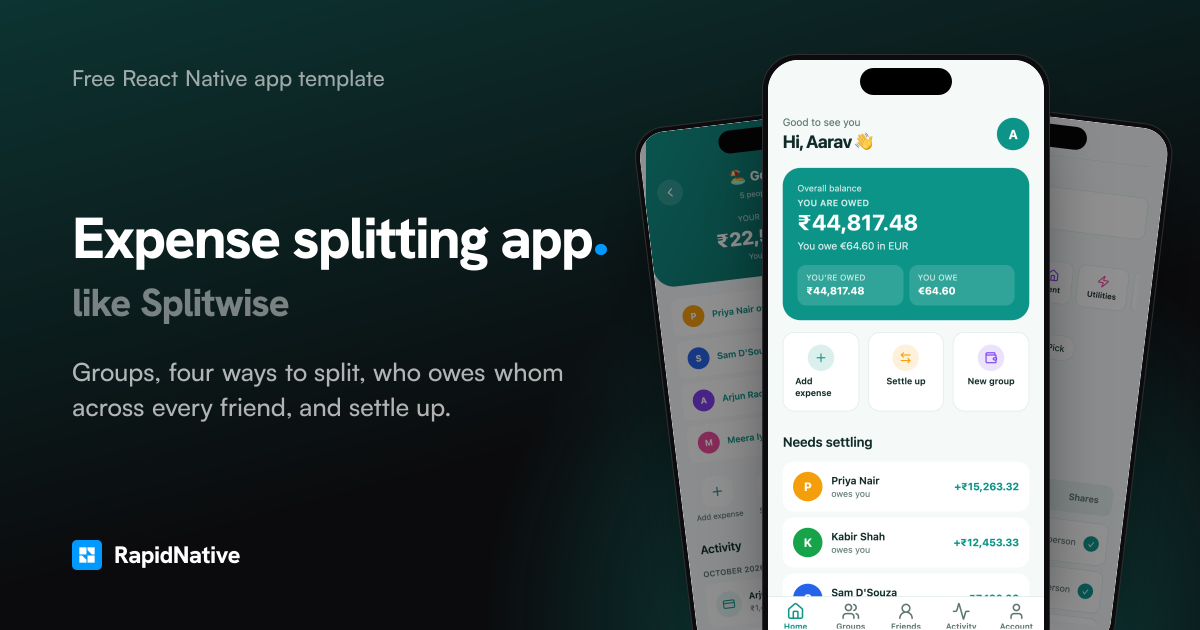
Groups for anything, four ways to split an expense, a running "who owes whom" across every friend, and settle up. Debts are simplified, so a group settles up in as few payments as possible. It is seeded with a Goa trip, a shared flat, Friday dinners and a weekend in Lisbon, so balances are already interesting the moment you open it.
AI calorie tracker like Cal AI, MyFitnessPal and Lose It!
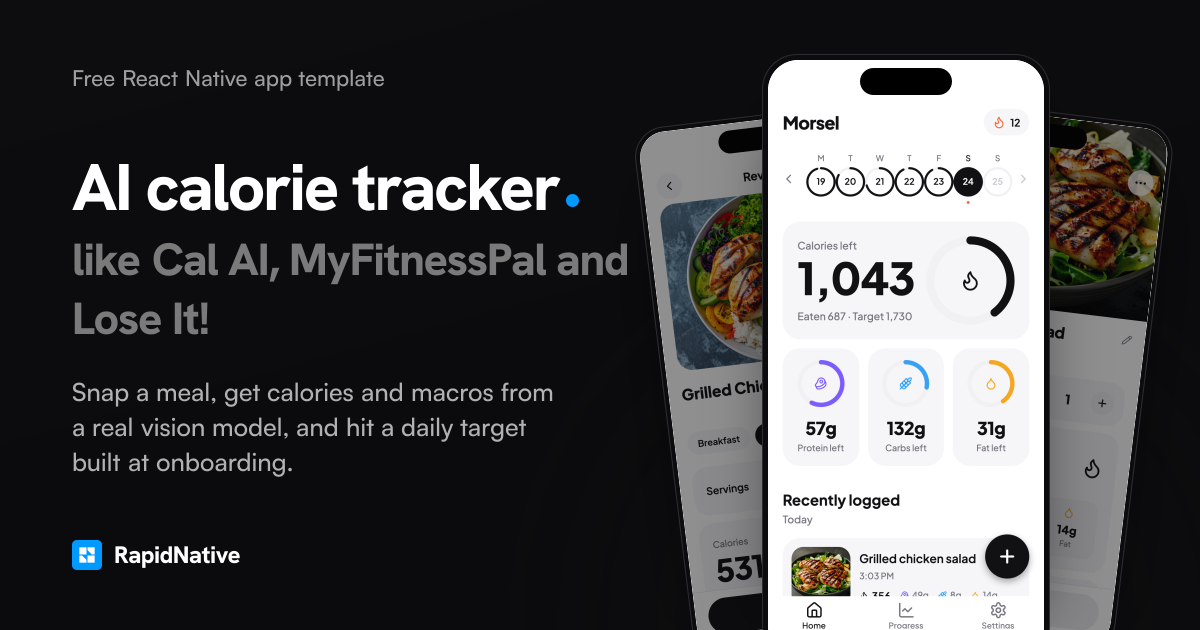
Take or pick a photo of a meal and get the dish, each item with its portion, calories, protein, carbs, fat and a health score. The photo analysis is real: it runs on a vision model through the platform's AI service, not a canned response. A short onboarding builds a daily calorie target, the home screen shows calorie and macro rings, and a progress screen charts weigh-ins. It comes with six weeks of meals and weigh-ins, and a food database for logging without a photo.
AI companion chat app like Character.ai, Replika and Talkie
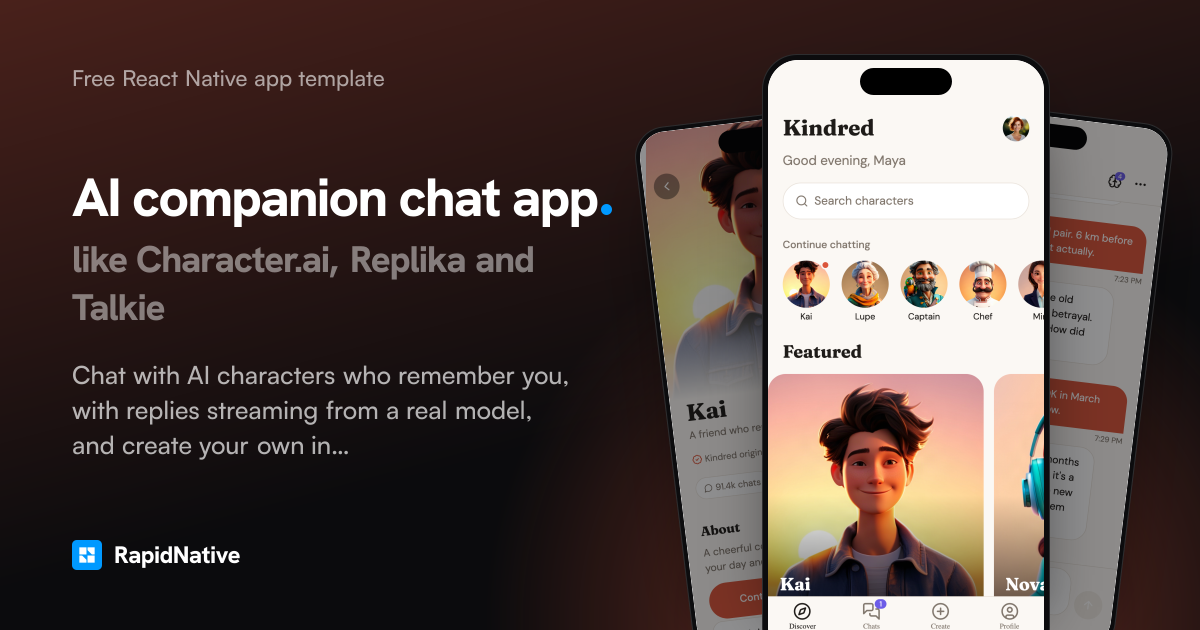
Chat with AI characters who remember you. Replies stream in from a real model, each character keeps memories you can see and edit, and you can create a new character from a single sentence, portrait included. It is seeded with 21 characters and real conversations, so the Discover screen and the chats inbox are full from the first launch.
How starting from a template works
The whole flow takes a minute or two.
- Open a template. Start at the templates page, the "Start from a working app" section on the homepage, or the template cards you see when you start a new project from the dashboard or the editor.
- Pick a look. Each template has four themes and a set of app icons. Your copy is made in the one you pick. This costs no prompt and no credits, and because the theme is a single file, every screen changes together.
- Describe your version. Type what you want to change first, or tap one of the suggestions on the page, like "Add Stripe payments for rides" or "Add water tracking." You can also skip this and just take a copy.
- Your copy opens in the editor. It is your own project in your account, with its own database and sample data. If you typed a change, the AI starts on it right away, editing this app in place rather than starting over.
What one prompt can do is the part we like showing most. Each template page has a "One prompt later" section with a real run on that template. On the ride-hailing app, the prompt was:
Call it Kerb, make the main buttons and brand colour coral, and add a note for the driver when booking a ride.
One turn renamed the app, recoloured every screen and added the new field to the database. On the expense splitter, "Call it Kitty, make the brand colour violet, and add an optional tip percentage to expenses" did the same. That is the real difference from a downloaded starter kit: the first hour of making it yours is a sentence, not a refactor.
Try a template on your phone before you copy it
Every template page has a QR code. Install Expo Go (free on the App Store and Google Play), scan the code with the Camera app on iPhone or from Expo Go on Android, and the template opens on your phone, running live, the same way your own copy will. Each one comes with demo accounts, so you can sign in and walk through every workflow on a real device before deciding.
On the ride-hailing app, the demo account is a rider, a driver and an admin at once, so every screen is one tap away. There are also separate rider, driver and admin accounts if you want to see a ride from both sides on two phones.
What's real and what's simulated
We would rather you know this before you start than find out after. Every template page has a "What is mocked?" answer, and it is specific. A few examples:
- Ride-hailing: the rider's location is simulated and the driver's car moves along the route by time, with "Simulated GPS" shown on every map. Card payments store only the brand and last four digits and charge nothing. The page names the exact files where device location, Stripe and a chat service plug in.
- Expense splitting: "Settle up" records a payment (cash, UPI, bank transfer) but moves no money. Reminders are saved, not sent.
- AI calorie tracker: photo analysis is real; barcode scanning uses a seeded catalogue of 50 foods until you connect a camera scanner and a nutrition database.
- AI companion: the chat, memories and character creation are real AI. There are no payments, push notifications or voice yet.
None of these are dead ends. They are usually the next thing you ask for: "Add Stripe payments for rides" is one of the suggested first prompts on the ride-hailing page for exactly this reason.
Under the hood
For the developers reading, every template page has an "Under the hood" section with the architecture, the data model, slices of the actual code and the full stack. The short version:
- Expo SDK 58 and React Native 0.88, running on iOS, Android and the web from one codebase
- Expo Router for file-based navigation
- TanStack Query for data fetching and caching
- NativeWind with one theme file
- Supabase (Postgres) with row-level security on every table, plus email and password sign-in and file storage
- API routes for server code, deployed with the app
- TypeScript in strict mode
It is the same full-stack setup RapidNative builds for any app, which we covered in Backend + Frontend in One Prompt. The access rules are written for the app's real roles: on the ride-hailing app, riders read and write only their own rides and cards, approved drivers see open requests and their own trips, admins see everything, and nobody can change their own role.
Templates on the free plan
Along with the templates, we changed how the free plan counts screens. Before, a project copied from a template counted every screen it came with toward the free plan's 5-screen limit. A 17-screen template left you with no room for a single new screen, so your first "add a profile page" was refused.
Now only the screens you add count. Start from any template, or remix any public project, and you can still add 5 new screens of your own. Every screen it came with stays fully editable.
Owning the code and shipping it
Your copy is a standard Expo and React Native project with its own Supabase migrations. Nothing ties it to the template after you copy it.
- Keep building in RapidNative, by prompt or by editing the code directly.
- Download the full source on the Starter plan and up, and keep going in your own editor. See pricing for the plans.
- Publish to the App Store and Google Play under your own name and developer account, from the editor yourself or through LetsDeployIt, our App Store and Google Play publishing service. Our guide on publishing a React Native app to the App Store walks through the steps.
One thing to do before you ship: rename the app and change its icon and colours. The templates work like well-known apps so you can start from a familiar shape, but they are not affiliated with those companies, and the stores reject apps that copy another brand. The first prompt is usually the right place for this, which is why "Rename the app and use my brand colour" is the first suggestion on every template.
What's next
Four templates is a start. We are building more, each to the same bar: every screen with data, workflows that run end to end, a real backend and a clear list of what is simulated.
If there is an app you want to start from, tell us which one. And if you want to try one now, pick a template, type what your version should do, and see how far one prompt gets you.
Ready to build your app?
Turn your idea into a production-ready React Native app in minutes.
Free tools to get you started
Free AI PRD Generator
Generate a professional product requirements document in seconds. Describe your product idea and get a complete, structured PRD instantly.
Try it freeFree AI App Name Generator
Generate unique, brandable app name ideas with AI. Get creative name suggestions with taglines, brand colors, and monogram previews.
Try it freeFree AI App Icon Generator
Generate beautiful, professional app icons with AI. Describe your app and get multiple icon variations in different styles, ready for App Store and Google Play.
Try it freeFrequently asked questions
Are RapidNative templates free?
Yes. Making your own copy of a template costs nothing on any plan, including the free plan. The changes you ask the AI for use credits from your plan, and the free plan includes credits to start.
What do I get when I use a template?
Your own copy of the whole app in your account: every screen, its Supabase database with tables, access rules and sample data, and its server code. It opens in the editor, and if you typed what you want to change, the AI starts on it right away.
Do I own the code?
Yes. Your copy is a standard Expo and React Native project with its own Supabase migrations. On the Starter plan and up you can download the full source and keep working in your own editor.
Can I publish a template-based app to the App Store and Google Play?
Yes, under your own name and developer account. Rename it and change the icon and colours first, because the stores reject apps that copy another brand. You can publish from the editor yourself, or let LetsDeployIt handle the submission.
Does a template use up my free plan's screen limit?
No. On the free plan, the screens a template comes with don't count. You can add 5 new screens of your own, and every screen it came with stays fully editable.
Are these templates affiliated with Uber, Splitwise or the other apps they resemble?
No. Each template is an original app that works like a well-known one, so you can start from a familiar shape. None is affiliated with or endorsed by those companies.