How to Build a SaaS App for Mobile-First Teams
Learn how to build a SaaS app with a practical roadmap for mobile-first teams. Covers MVP scoping, React Native stacks, AI prototyping, and launch checklists.
By Sanket Sahu
5th Oct 2026
Last updated: 5th Oct 2026
Most advice on how to build a SaaS app starts with the technology stack. That's backwards. A polished mobile interface, a carefully designed database, and an impressive AI feature won't rescue a product that solves a problem nobody urgently wants to pay to remove.
A mobile-first team can now move from a product requirement or rough sketch to a testable interface quickly, but speed only helps when it compresses learning rather than hiding weak assumptions. The practical path is to validate the commercial problem, scope one valuable workflow, prototype it with real users, and then build an architecture that can evolve without locking the team into a tool or cloud model.
Validating Product-Market Fit Before Writing Code
A feature list isn't evidence of demand. At most, it's a record of what the team believes users might want. The stronger question is whether your target customer already spends time, money, or political capital working around the problem.
Look for spreadsheets, shared inboxes, manual approvals, chat messages, exports, and homegrown scripts. A finance manager who maintains a spreadsheet to reconcile mobile field expenses is showing you a workflow. A support lead who copies information between a help desk and a CRM is showing you a workflow. A team that pays a contractor to perform repetitive cleanup is showing you both a workflow and a possible budget.
The evidence becomes stronger when the workaround creates recurring pain. Ask what happens when the process fails, who owns the consequence, how often the task occurs, and what the customer has already tried. Don't stop at “Would you use this?” People are often generous with hypothetical approval. Ask whether they would commit to a pilot, introduce you to the person who controls the budget, or replace the existing workaround with a paid version.
One analysis reports that about 92% of SaaS startups die within three years, and identifies lack of product-market fit as a factor in 34% of failures. The figures come from SaaS launch failure analysis, and the practical lesson is more important than the exact forecast: technical execution can't compensate for weak validation.
Test payment before testing scale
Willingness to pay doesn't require a finished app. You can test a narrowly described service, a clickable mobile prototype, a paid design-partner engagement, or a manual version of the intended workflow. The test should make the trade-off visible. If the customer won't exchange money, access to data, or time with their team for the proposed outcome, more features probably won't solve the problem.
Pricing also belongs in discovery. SaaS products increasingly combine subscriptions with usage or service-linked pricing, so ask whether customers value seats, completed jobs, processed records, automation volume, or a measurable business result. A per-seat plan may work for a collaborative workspace, while usage-based pricing may fit a mobile tool that processes inspections or generates reports.
Practical rule: Treat an existing workaround as your first competitor, not as evidence that the market is too small.
Write a one-sentence product boundary before opening a repository: “For [one audience], this app helps [specific job] by [specific outcome].” Then list everything the first release will not do. A focused validate product market fit guide can help teams turn interviews and experiments into a clearer demand signal. For mobile-specific discovery, compare that work with a practical app market research process.
Scoping Your MVP and Choosing a Modern Tech Stack
Once a customer has demonstrated a real problem, choose the smallest product that can deliver the promised outcome. An MVP isn't a cheap, broken version of the full vision. It's a deliberately narrow product that completes one useful job well enough for a real person to adopt it.
A traditional web-first stack can be a sensible choice when the product depends on dense tables, complex administration, or desktop-only workflows. It often gives developers mature browser tooling and straightforward access to existing web infrastructure. The cost appears when the validation audience expects a phone experience, push notifications, camera input, offline tolerance, or app-store distribution. Building the web version first can create a second interface model and delay the feedback that matters.
A mobile-first approach using React Native, Expo, and NativeWind lets a team share a substantial interface foundation across iOS, Android, and web. React Native provides the application layer, Expo reduces friction around device builds and previews, and NativeWind brings a utility-first styling workflow to the interface. That combination is useful when the same workflow must be tested on a phone and in a browser without maintaining unrelated codebases.
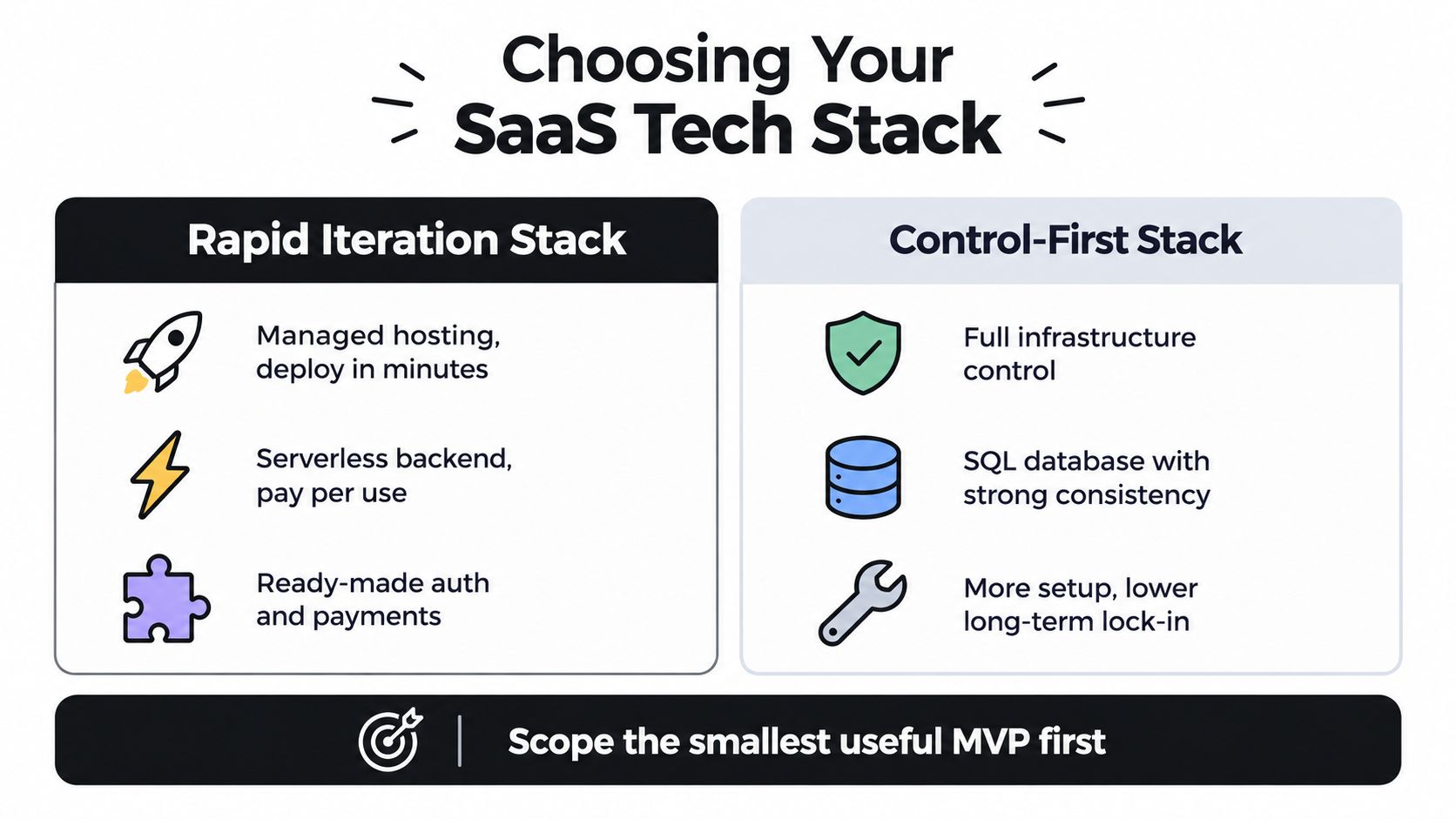
Choose for reversibility
Managed services can help a small team ship authentication, storage, payments, and deployment without building every operational layer. A control-first stack may be better when regulatory requirements, unusual infrastructure needs, or strict data residency constraints dominate the decision. Neither option is automatically more professional. The right choice depends on what the product must prove first.
The priority is clean ownership of the code and data model. Keep business rules in understandable modules, isolate provider-specific adapters, and make it possible to replace a managed service without rewriting the product's core workflow. Exportable code matters because a prototype can become a long-lived product, and the team shouldn't have to negotiate its future with a visual editor.
Model tenancy from the beginning, even if the first release has only one customer. A request should resolve an authenticated user, their organization or tenant, and the records that tenant can access. Put tenant identifiers into relevant tables, enforce authorization in the backend rather than trusting the client, and define roles around actual actions such as viewing, editing, approving, and administering.
Track product behavior from the first usable build. A practical methodology is to ship the smallest useful MVP around one core workflow and measure activation, usage, conversion, churn, and MRR, not just signups, as outlined in this SaaS MVP development guidance. For a plain-language explanation of how to keep that first release focused, use this minimum viable product guide.
A useful scope test is simple:
- Core action: Can one target user complete the job without a spreadsheet or external workaround?
- Proof event: Can the product record the moment the user receives value?
- Recovery path: Can the user correct an error without contacting the team?
- Expansion boundary: Can later features attach to the same workflow without changing its foundation?
If the answer to the first two questions is no, redesign the workflow before adding collaboration, advanced reporting, or AI automation.
Prototyping Workflows and Building Core Architecture
The fastest way to waste an AI-assisted build is to ask it for the entire product before deciding what the product must prove. Start with a small, explicit slice of the workflow, then use AI to produce an interface that people can react to.
A productive workflow looks like this:
- Write the job in user language. Describe the user, trigger, steps, decision points, and successful outcome. “A technician opens an assigned inspection, captures photos, marks failed items, and submits a report” is more useful than “Build an inspection platform.”
- Create a short PRD. Include screen states, empty states, validation rules, permissions, and the data each screen needs. State what happens when the device is offline or the user abandons the flow.
- Generate the first interface. Prompt-to-app tools can turn the PRD into screens, navigation, forms, lists, and reusable components. Ask for realistic sample data and explicit loading, error, and success states.
- Use images or sketches as constraints. Image-to-app and whiteboard-to-app workflows are useful when the team already has a visual direction. The generated result should be treated as a starting implementation, not as a substitute for interaction design.
- Preview on actual devices. Share a link or QR code with a designer, PM, developer, and a few target users. A phone reveals thumb reach, keyboard behavior, permissions, and scroll problems that a desktop preview hides.
- Export and refactor. Keep the generated React Native code, but review navigation, component boundaries, accessibility labels, state handling, and data access before adding production complexity.
The important shift is that AI handles repetitive scaffolding while the product team stays responsible for decisions. A generated screen can look complete while missing a destructive-action confirmation, an authorization boundary, or a useful empty state. Developers should inspect every generated dependency and keep the application structure understandable to someone who didn't write the prompt.

Build around observed interactions
Don't build the backend around assumptions that the prototype hasn't tested. First observe whether users understand the entry point, complete the primary action, recover from mistakes, and interpret the result correctly. If people consistently skip a proposed field, change the interaction. If they ask for information before starting, move that information earlier.
A prototype can use local fixtures or a thin mock API, but it should preserve the actual sequence of actions. For example, a mobile scheduling app can simulate available appointments while still testing date selection, confirmation, cancellation, and notification expectations. The team learns more from that realistic loop than from a collection of isolated screens.
Once the interaction survives testing, establish a small architecture:
- Presentation layer: Screens, navigation, form states, and device-specific behavior.
- Domain layer: Rules such as who can approve, cancel, assign, or edit.
- Data layer: API clients, caching, persistence, and typed models.
- Integration layer: Authentication, billing, notifications, analytics, and external services.
This separation keeps an AI-generated interface from becoming the permanent location of business logic. It also makes it easier for engineers to replace a mock service with a real one. A practical prototype to production workflow is useful when the team needs to preserve that handoff instead of throwing away the prototype.
Use version control from the first generated commit. Name prompts and decisions in commit messages, review changes like normal code, and ask the AI to explain a proposed refactor before accepting it. Prompt-to-app compresses implementation time, but it doesn't remove the need for testing, code review, or a clear owner for architectural decisions.
Integrating Authentication, Billing, and Essential APIs
Authentication is part of the first-run experience, not an isolated security task. A user who has to complete a long form before seeing the product is being asked to trust an unknown service before receiving any value. Collect only what the workflow needs, defer optional profile fields, and let the user understand what happens after sign-in.
Use an established identity provider or a managed authentication service unless identity itself is your product. Support the sign-in methods your audience already expects, protect session tokens, and make account recovery a deliberate flow. On mobile, test interrupted authentication, deep links back into the app, expired sessions, and switching between devices.
Billing needs the same discipline. Keep subscription state on the server, process provider webhooks idempotently, and distinguish between an active subscription, a trial, a failed payment, a cancellation request, and an expired entitlement. The client can display billing status, but it shouldn't decide whether a user is allowed to access paid functionality.
Connect conversion to implementation
An onboarding flow should lead to a meaningful first action, not merely a completed account. For a field reporting app, that might be submitting a first report. For a team inbox, it might be assigning and resolving a real item. Define the event precisely, record when it occurs, and make the path to it visible in analytics.
A benchmark across 220 product-led growth companies found that replacing form-based onboarding with conversational AI onboarding produced a 41% lift in activation rate and a 27% increase in trial-to-paid conversion, according to this AI onboarding benchmark. That doesn't mean every product should add a chatbot. It means teams should test whether guided questions, sensible defaults, and contextual help remove friction from the first valuable action.
Design APIs as products inside the product. Use stable resource names, predictable error responses, pagination, and clear permission checks. Webhooks should tolerate retries. Long-running AI tasks should expose progress or a recoverable status rather than leaving the user staring at a spinner.
For enterprise use, integration often determines adoption. SaaS environments already contain many tools, so provide practical connection points such as webhooks, import and export paths, calendar connections, or a documented API. An integration that saves a customer from copying data between systems can be more valuable than another dashboard.
A subscription screen should explain the value of the next action, not force the user to decode your billing model.
Deploying Securely and Setting Up Observability
A production SaaS app needs more than a successful build. It needs a repeatable path from commit to release, separate environments, controlled secrets, tenant-aware authorization, and enough telemetry to explain a failure without guessing.
Start with a CI/CD pipeline that runs formatting, type checks, unit tests, integration tests, and dependency checks before deployment. Keep development, staging, and production credentials separate. Store secrets in a managed secret system, never in the mobile bundle or repository, and make release permissions narrower than development permissions.
Multi-tenancy deserves an explicit threat model. Every backend request should derive tenant context from a verified identity and check that context before reading or mutating data. Don't accept a tenant ID from an untrusted screen and treat it as authorization. Test attempts to access another tenant's records, files, exports, notifications, and cached responses.
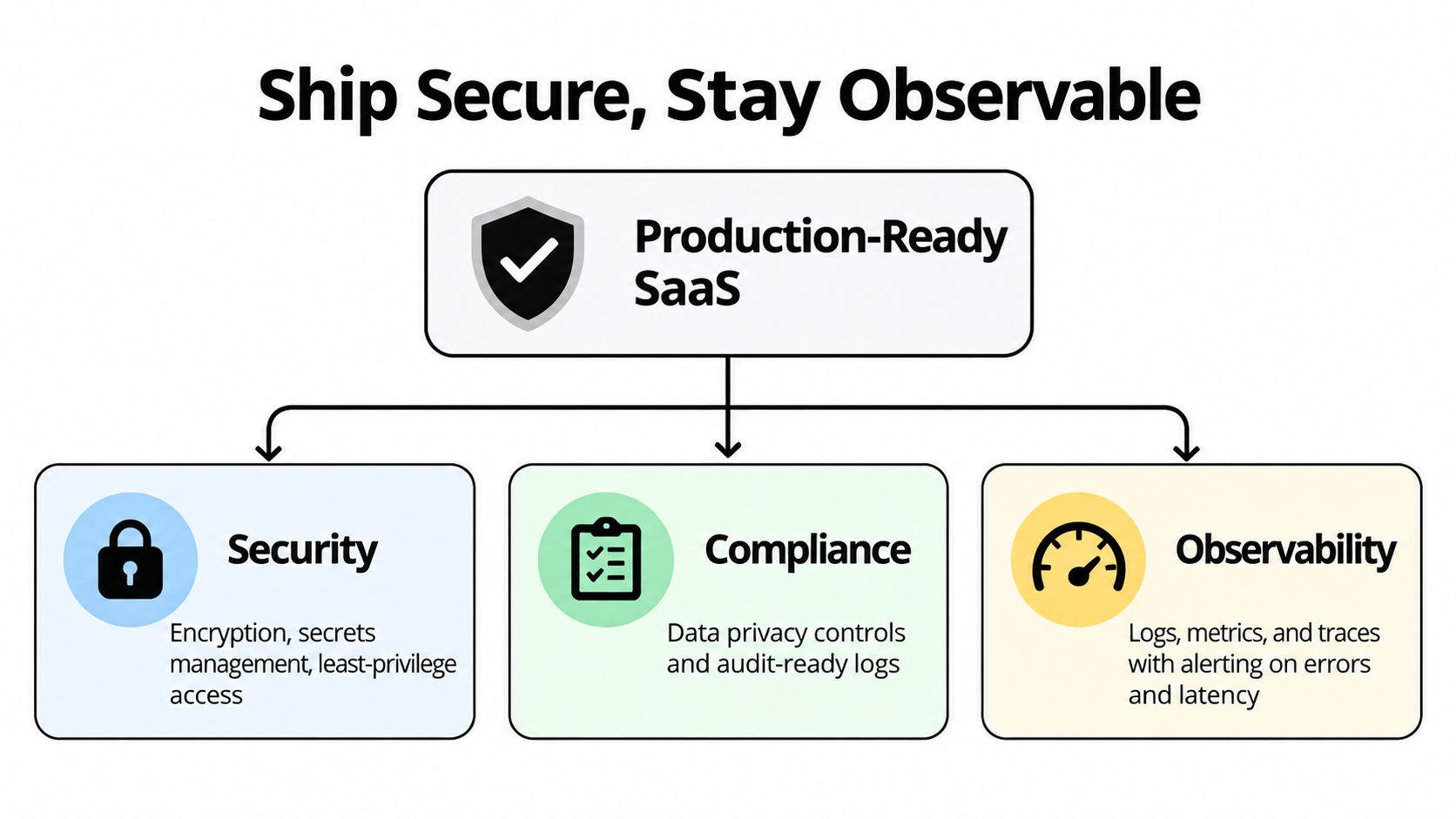
Make failures diagnosable
Observability should connect a user action to its backend consequences. Capture structured logs, request identifiers, tenant context where appropriate, error events, latency, queue status, and billing webhook outcomes. Avoid logging passwords, access tokens, private customer content, or model prompts that contain sensitive information.
Set alerts for conditions that need human action, such as elevated error rates, failed deployments, delayed background jobs, payment webhook failures, and unusual latency. A dashboard that nobody checks isn't observability. Pair each alert with an owner, a runbook, and a rollback decision.
Compliance work becomes easier when privacy controls exist in the product design. Define retention rules, document where customer data flows, restrict internal access, and provide audit records for administrative actions. Security reviews should cover third-party SDKs, file uploads, push notifications, analytics, and AI providers, not just the primary API.
AI features add another boundary. Send only the minimum data needed for inference, separate customer content by tenant, record which model or prompt version produced an output, and provide a way to correct or reject automated results. Put timeouts and fallbacks around model calls so an unavailable AI provider doesn't take down the core workflow.
Enterprise SaaS environments are already crowded. One industry report says the average company manages 305 SaaS applications, renewals represent 87% of software spend, and spending on AI-native SaaS applications increased 108% year over year, as reported in these SaaS application and AI spending statistics. The architectural implication is practical: buyers need secure interoperability and clear productivity gains, not another isolated tool with an opaque data path.
Executing the Launch Checklist and Iterating Post-Launch
Launch day should answer a small set of behavioral questions. It shouldn't be a celebration of raw registrations. Before inviting users, complete the primary workflow yourself on a clean device, with a new account, a failed network request, an expired session, and a payment interruption.
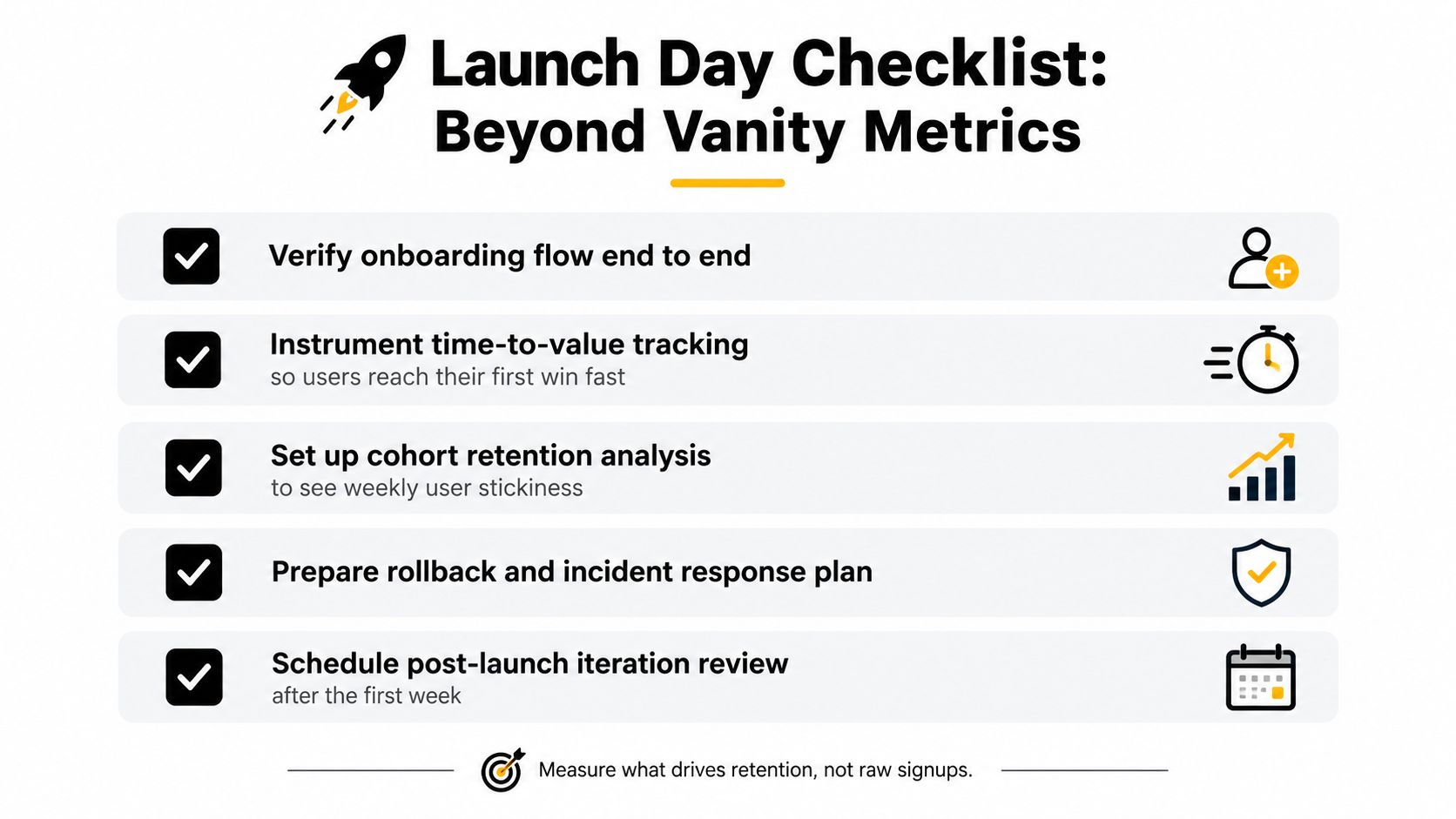
Use this launch checklist:
- Verify onboarding end to end: Confirm that a new user can sign up, understand the first action, complete it, and return to the result.
- Define the first win: Name the event that proves value, such as submitting a report, resolving a task, or inviting the required collaborator.
- Instrument the path: Record screen entry, validation errors, abandonment, successful completion, and the time between account creation and the first win.
- Prepare recovery: Test rollback, feature flags, data backups, support escalation, and incident communication before a customer encounters a serious failure.
- Schedule the review: Bring product, design, engineering, and customer-facing teams together after the first week of real usage to choose the next experiment.
A benchmark analyzing 547 SaaS companies found a median time to value of 1 day, 12 hours, and 23 minutes. The same time-to-value benchmark recommends splitting users who complete a candidate event within 48 hours from those who don't, then comparing their retention. This gives a mobile team a concrete test: identify the first meaningful event, create the cohort, and investigate what blocks the slower group.
Read cohorts instead of averages
Track activation within seven days, median time to activation, activation-to-retention correlation, conversion, churn, and recurring revenue. Compare users who retained and converted with users who churned during the same window. Look for behavioral differences, not demographic stories that the data can't support.
If users open the app but don't complete the first task, inspect the workflow. If they complete it but don't return, question whether the result is recurring or whether the product solves a one-time problem. If they return but don't pay, revisit packaging, limits, and the relationship between the paid capability and the value they already experienced.
The early period also needs financial discipline. One analysis identifies a high-risk “valley of death” between 18 and 24 months after launch, alongside the previously cited failure factors. A focused SaaS survival guide from IndieTool can complement the product metrics with practical launch and operating considerations.
Avoid changing several major variables at once. Test one onboarding prompt, one activation path, one pricing boundary, or one retention intervention. Keep a decision log that records the hypothesis, cohort, observed behavior, and next action. That habit prevents the roadmap from becoming a pile of requests from the loudest user.
A mobile-first SaaS product earns the right to expand when users repeatedly complete its central job and understand why they should return. Build the next feature only when it strengthens that loop, removes a proven bottleneck, or opens a clearly validated customer segment.
RapidNative turns prompts, sketches, images, and PRDs into shareable React Native apps with live screens, navigation, and reusable components, so your team can test a mobile SaaS workflow before committing to a large implementation. Explore RapidNative to prototype across iOS, Android, and web, preview with teammates, and export clean code for continued development in your own repository.
Ready to build your app?
Turn your idea into a production-ready React Native app in minutes.
Free tools to get you started
Free AI PRD Generator
Generate a professional product requirements document in seconds. Describe your product idea and get a complete, structured PRD instantly.
Try it freeFree AI App Name Generator
Generate unique, brandable app name ideas with AI. Get creative name suggestions with taglines, brand colors, and monogram previews.
Try it freeFree AI App Icon Generator
Generate beautiful, professional app icons with AI. Describe your app and get multiple icon variations in different styles, ready for App Store and Google Play.
Try it freeFrequently asked questions
What is RapidNative?
RapidNative is an AI-powered mobile app builder. Describe the app you want in plain English and RapidNative generates real, production-ready React Native screens you can preview, edit, and publish to the App Store or Google Play.
Can I export the code?
Yes. RapidNative generates clean React Native and Expo code that you can export at any time. No lock-in, no proprietary format. Hand it to your developers or keep building inside RapidNative.
Is RapidNative free to use?
Yes. You can build apps on the free plan with no credit card required. Paid plans unlock unlimited AI generations, code export, and direct publishing to the App Store and Google Play.
Do I need to know how to code?
No. Most users build apps by describing what they want in plain English. Developers can drop into the code whenever they want more control, but coding is optional.
How long does it take to build an app?
Most users have a working first screen in under a minute. A full MVP usually takes a few hours instead of the weeks or months traditional development requires.