React Native vs Native Development: A Founder’s Guide
Compare React Native vs native development for your next app. See real performance data, cost savings, and clear recommendations for founders and PMs.
By Suraj Ahmed
4th Oct 2026
Last updated: 4th Oct 2026
React Native can save roughly 30% to 45% of build costs versus developing two separate native apps, while native still wins for performance-critical, hardware-heavy, or heavily platform-integrated products. The practical choice is to use React Native for standard product flows and reserve native development for interactions where users can see or feel the difference.
Three weeks into planning, you've probably got a product brief, early screens, and two engineers arguing about the stack. One says React Native will get iOS and Android moving from one codebase. The other says native is the only responsible choice if the app needs to feel polished.
Both are partly right. The mistake is treating this as a permanent technology referendum. You're deciding how your product will spend its limited budget, how quickly you'll learn from users, and whether your most important interaction will feel effortless or merely acceptable.
The useful question in React Native vs native development isn't “Which technology is better?” It's “Which workloads create a hard requirement for native, and which ones are better served by shared code?” That distinction matters more than framework loyalty, especially when your first release needs to validate demand before you invest in every edge case.
Choosing Your Mobile Development Path
A founder building a marketplace usually has a very different problem from a founder building a camera-based fitness product. The marketplace needs authentication, search, product lists, payments, messaging, and account management. The fitness product may need continuous sensor input, real-time video analysis, and responsive motion feedback.
The first product can often use React Native without compromising its core experience. The second should assume that at least its most demanding features will need native implementation.
Native development means building separately for each operating system, typically with Swift for iOS and Kotlin for Android. You get direct access to platform APIs, device hardware, and operating-system conventions. React Native lets a team share application logic and interface code across platforms, then reach native capabilities where required.
That shared foundation has a meaningful business effect. A 2026 pricing guide estimates that cross-platform builds such as React Native can save about 30% to 45% compared with two separate native apps (2026 mobile app cost analysis). The saving isn't free. You accept framework constraints, platform-specific debugging, and the possibility that a small part of the product will eventually need native code.
The decision in one view
| Product situation | Recommended path | Why |
|---|---|---|
| Standard forms, feeds, search, commerce, and account flows | React Native | Shared code speeds delivery without putting the main experience under unusual strain |
| MVP with uncertain demand | React Native | You can test the product before funding two complete platform implementations |
| AR, advanced camera processing, complex 3D, or demanding sensor work | Native, or a hybrid architecture | Direct hardware and graphics access reduce performance risk |
| Product built around platform-exclusive features | Native | The team can adopt platform APIs without waiting for framework support |
| Internal tool with modest visual complexity | React Native | Cross-platform reach and maintenance efficiency usually matter more than maximum rendering control |
| Game or interaction where frame consistency is the product | Native or a dedicated engine | Small delays and dropped frames are visible to users |
The wrong choice creates two kinds of waste. A team can spend months tuning native implementations for a product whose users only need reliable forms and fast navigation. Or it can launch a visually demanding experience on React Native, then rebuild the core interaction after poor responsiveness damages first impressions.
Practical rule: Choose React Native for the product surface that helps you learn. Choose native for the interaction that defines whether users stay.
You don't need to settle every future architecture question on day one. You do need to identify the features that would make users judge the product as slow, imprecise, or disconnected from their device. Those features should drive the decision.
How React Native and Native Architecture Actually Work
Native apps compile platform-specific code against the operating system's own SDKs. An iOS team can work directly with Swift, UIKit, SwiftUI, Core ML, ARKit, camera APIs, and other Apple frameworks. An Android team can use Kotlin and Android's SDKs, with direct control over device services and rendering behavior.
React Native adds a shared JavaScript or TypeScript layer above native components. The team defines screens, state, navigation, and business logic in a common project. React Native then coordinates with the underlying iOS and Android implementations so that the same product logic can produce platform-specific application behavior.
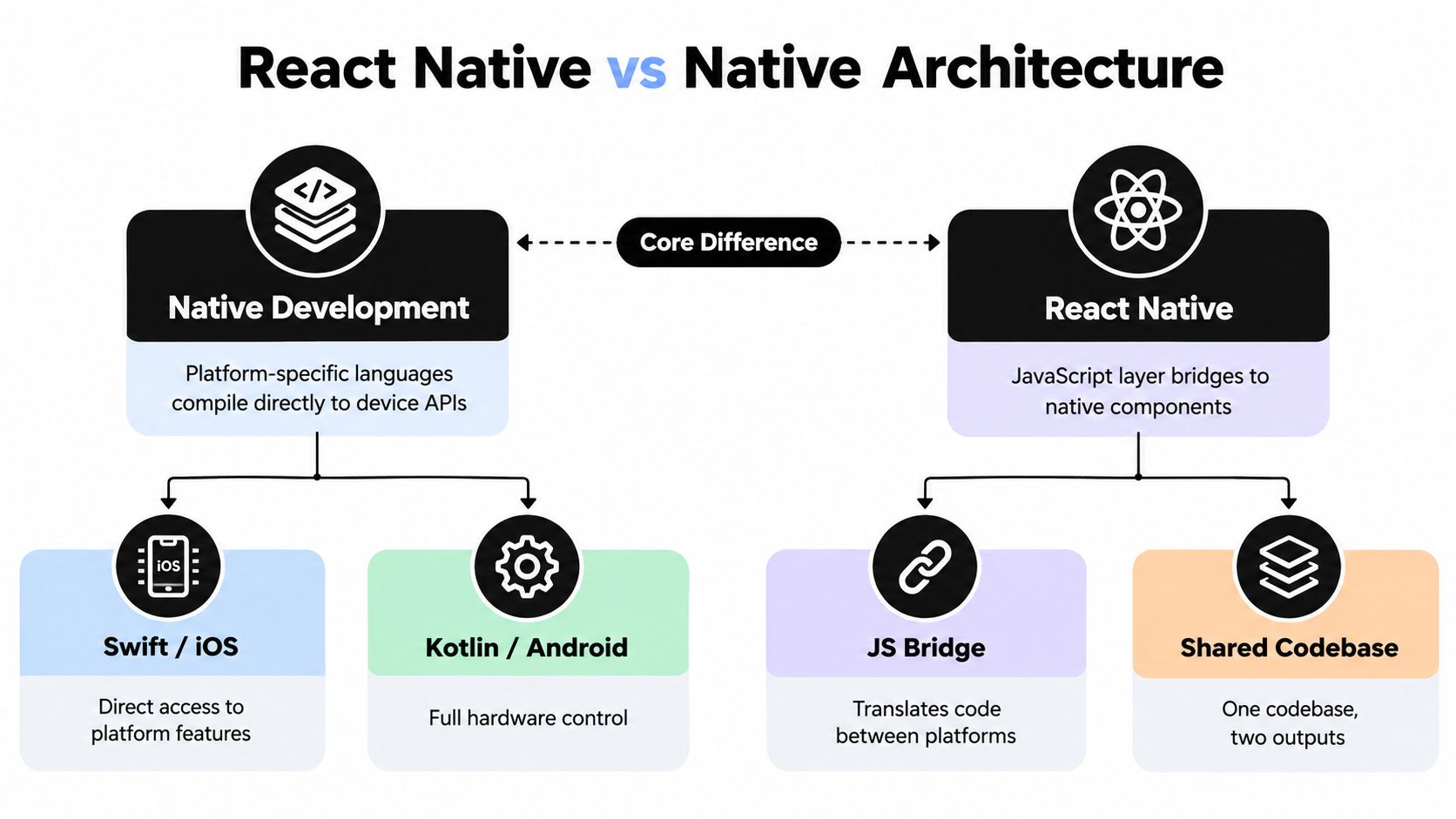
The architectural difference affects three decisions founders often underestimate:
- Code ownership: Native requires separate implementations for platform-specific surfaces. React Native allows teams to reuse much of the product logic and interface layer.
- Rendering control: Native gives engineers direct access to each platform's rendering tools. React Native provides a productive abstraction, but unusual visual behavior can require native components or custom modules.
- Hardware access: Native code reaches device APIs directly. React Native can access many of them through modules, but teams may need to maintain or adopt a bridge when the feature sits outside the framework's comfortable path.
What the abstraction buys you
A shared codebase reduces duplicated work. A product manager can request a change to an account flow and often see that logic move across both platforms without coordinating two independent feature implementations. A JavaScript-heavy team can also reuse familiar patterns from web development, especially when it already works with React and TypeScript.
The tradeoff appears at the edges. If the app needs an unusual camera pipeline, a custom Bluetooth protocol, or platform-specific background behavior, the shared layer may stop being the fastest route. The team then writes native modules, handles two platform toolchains, and tests the interaction across multiple runtime boundaries.
The React Native architecture overview is useful for explaining this distinction to a mixed product team. The important point isn't that React Native removes native development. It makes native development selective, so engineers can spend platform-specific effort where the product needs it.
For a founder, architecture is therefore a resource allocation decision. React Native concentrates effort in shared product behavior. Native concentrates effort in platform control. Neither approach eliminates complexity, but each puts complexity in a different place.
Performance Realities and What They Mean for Your App
Performance matters when it changes what the user sees or feels. A half-second delay before a business form appears may be tolerable in one context. A delayed camera preview, uneven animation, or lagging gesture can make an entire product feel broken.
Comparative research consistently gives native an advantage in startup efficiency and resource consumption. One analysis found faster load times in native apps, along with higher CPU and memory usage in React Native, particularly during demanding work such as image processing and real-time synchronization. It also found native apps more battery-efficient during extended use, which points to measurable overhead from the JavaScript bridge in performance-sensitive scenarios (comparative mobile performance study).
The gap isn't uniform across every screen. In a controlled rendering evaluation, React Native recorded an average rendering time of 4.94 milliseconds, compared with 3.3 milliseconds for native in one test (controlled React Native and native evaluation). The same body of research reports that React Native can be 1 to 3 times slower for pure computational tasks, while optimized business interfaces can approach near-native responsiveness.
Performance Comparison by Workload
| Workload Type | Native Advantage | React Native Viability |
|---|---|---|
| Forms, settings, account screens | Direct control, but usually unnecessary | Strong choice when components and state are well optimized |
| Lists, feeds, search, and commerce | Lower overhead at scale | Strong choice for most ordinary product flows |
| Image processing and real-time synchronization | Lower CPU and memory pressure | Viable for moderate workloads, risky when processing is continuous |
| Camera-heavy interactions | Direct access to capture and processing pipelines | Use selectively, often with native modules |
| Complex 3D and augmented reality | Maximum graphics and platform control | Poor fit for the core rendering loop |
| Pure computation and on-device processing | Faster execution | Benchmark the exact workload before committing |
| Standard animations and transitions | Fine-grained tuning | Usually viable when the animation isn't unusually demanding |
A performance comparison of React Native and native Android also found React Native slower while reporting that the difference didn't damage overall user experience in the tested product, and that React Native had a shorter development cycle (React Native and native Android comparison). That result is more useful than a blanket claim that one approach is always fast. Users judge the complete flow, not an isolated benchmark.
Translate the benchmark into product risk
Use React Native confidently for onboarding, browsing, checkout, messaging, dashboards, and content consumption. Measure carefully when your value proposition depends on a live camera feed, continuous sensor input, intensive image manipulation, high-refresh motion, or real-time synchronization.
The React Native performance optimization playbook can help a team approach optimization systematically. But optimization won't change the underlying classification of a workload. If the product's defining moment depends on direct hardware timing, start with a native implementation or a hybrid boundary rather than hoping generic tuning will erase the risk.
Development Cost and Timeline Trade-offs
Budget pressure usually makes the first decision for an early-stage team. Building two native applications means funding two platform implementations, two sets of platform-specific testing, and more coordination around shared product behavior. React Native compresses much of that work into one codebase.
A separate 2026 cost guide estimates cross-platform development at roughly 70% to 75% of the time required for native development (mobile app development time and cost guide). Combined with the estimated 30% to 45% cost saving for cross-platform builds, that creates a clear advantage when the team's immediate goal is market validation rather than maximum platform-specific polish.
The financial model is straightforward:
- List the features required to test the business hypothesis.
- Separate standard product flows from hardware-heavy or performance-sensitive interactions.
- Estimate shared implementation effort for the first group.
- Add native engineering for the small set of features that justify it.
- Reserve capacity for platform testing, release work, and maintenance.
Spend on evidence, not duplicated code
Suppose your first release needs account creation, a feed, payments, notifications, and a basic profile. Those features generally benefit from consistent business logic and rapid iteration. React Native is a sensible default because the team can put more of its initial budget into customer discovery, product refinement, and operational readiness.
Now change the brief. The first release's primary feature is real-time camera analysis, and users will abandon the product if the preview stutters or drains the battery. The cost of native development becomes insurance against a failed core experience. Saving on implementation doesn't help if the team has to rewrite the product after launch.
A shorter development cycle also has strategic value. It lets founders test pricing, retention, and product positioning sooner. The earlier study discussed above found that slower React Native performance didn't hurt overall user experience in its evaluation, while its shorter development cycle supported a practical cross-platform tradeoff.
The React Native app development cost guide is relevant when you need to turn this reasoning into a feature-level estimate. Don't compare framework prices in isolation. Compare the cost of reaching a useful learning milestone, then account for the native work required by the features that make your product distinct.
Tooling, Ecosystem, and Developer Experience
The daily development environment affects delivery as much as the framework's theoretical capabilities. Native teams work inside platform-specific ecosystems, with tools designed around each operating system. Xcode and Apple's SDKs give iOS engineers direct control over Apple features. Android Studio and Android's toolchain provide the equivalent depth for Android.
That specialization is valuable when the product depends on new platform capabilities, detailed profiling, or unusual device behavior. Engineers can inspect the system using tools built for that platform rather than explaining the behavior through an abstraction layer.
React Native trades some of that depth for a unified workflow. Teams can use JavaScript or TypeScript, share components, and keep more product behavior in one repository. Developers with React experience often transition more easily, particularly when the team already uses Expo and web-based tooling.

Where each workflow earns its place
Native development is strongest when:
- Platform depth matters: Engineers can adopt operating-system features as soon as the platform exposes them.
- Profiling must be precise: Teams can inspect CPU, memory, battery, rendering, and device behavior through platform-specific tools.
- The team owns specialized modules: Custom camera, graphics, Bluetooth, or machine-learning code can live close to the APIs it uses.
React Native is strongest when:
- The team already knows React: Shared conventions reduce handoffs between web and mobile work.
- The product changes frequently: Shared components make repeated interface updates easier to coordinate.
- The team needs early previews: A working cross-platform interface can support product discussions before every backend and native detail is complete.
The new React Native architecture has reduced overhead for common interfaces, and recent State of React Native coverage reports about 80% adoption in the 2025 results (State of React Native coverage). That doesn't make every native feature straightforward. It does mean founders shouldn't evaluate React Native using assumptions based only on its earliest architecture.
Third-party modules can still become a liability. A package that works well today may lag behind a platform release, require native fixes, or behave differently on iOS and Android. Treat critical dependencies as part of the product risk register, not as invisible implementation details.
When to Choose Native and When React Native Makes Sense
A social product with profiles, a feed, reactions, search, and direct messages doesn't need native rendering for every screen. React Native can give that team a common foundation while engineers focus on user research, moderation, notifications, and reliable release operations.
A warehouse app that scans codes, connects to Bluetooth equipment, and processes images continuously faces a different constraint. If a missed scan or delayed device response affects the operator's work, native access may be more valuable than shared interface code.
The boundary becomes clearer when you classify the interaction rather than the industry.
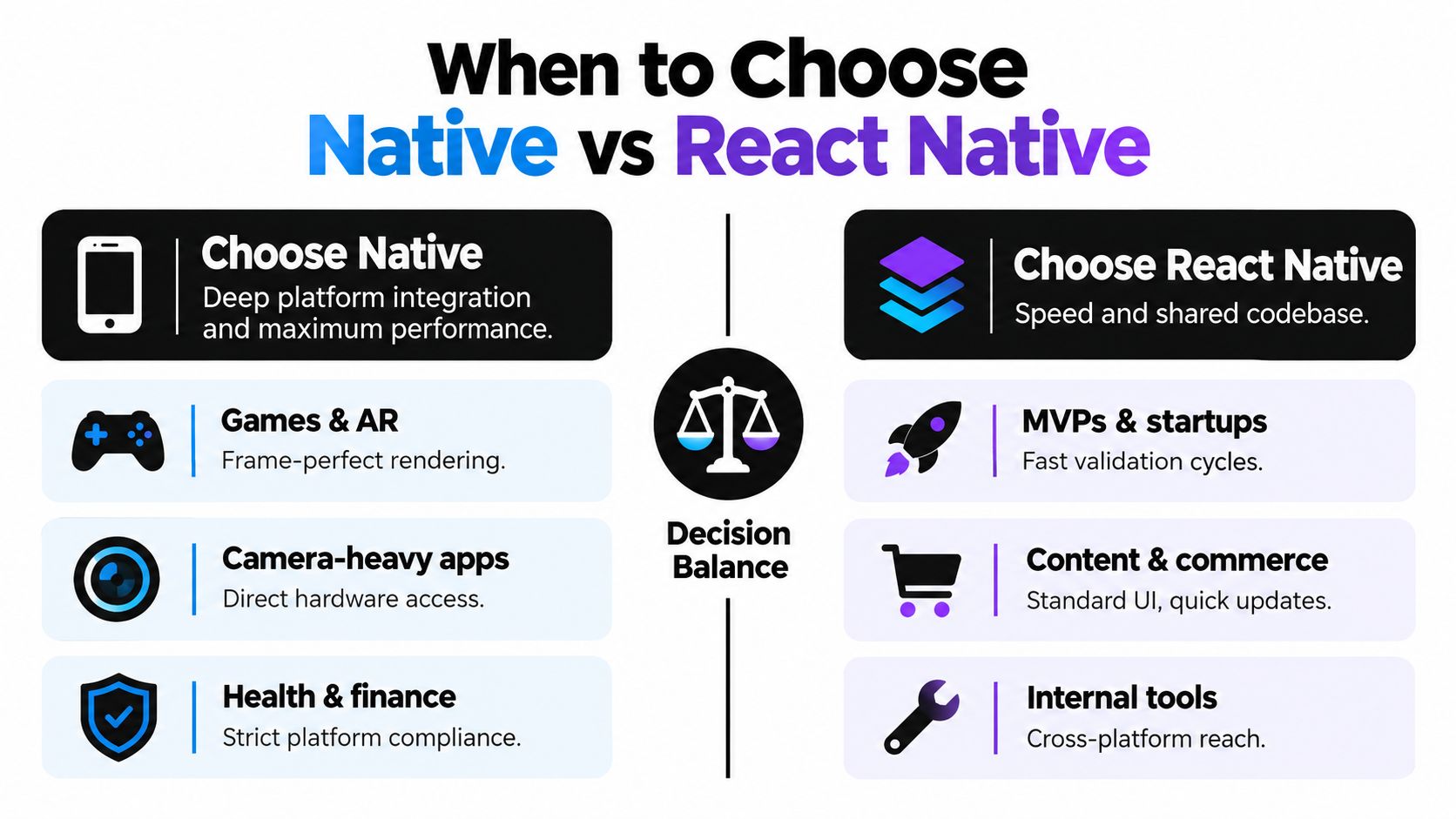
Use native for the defining interaction
Choose native when one or more of these conditions describe the product's central promise:
- AR and complex 3D: The experience depends on stable spatial tracking, intensive rendering, or precise frame behavior.
- Continuous camera processing: The app must capture, transform, and respond to live visual input with minimal delay.
- Bluetooth-heavy IoT: The product depends on device discovery, persistent connections, low-level protocols, or reliable background behavior.
- High-refresh animation: The interface itself is judged by motion quality, gesture precision, and consistent responsiveness.
- Deep platform integration: Widgets, extensions, wearables, or operating-system-specific services are central rather than optional.
Use React Native for products whose main work happens through ordinary interface patterns:
- Marketplaces: Browse, filter, save, purchase, and manage an account.
- Content platforms: Scroll through content, search, share, comment, and receive notifications.
- Internal business tools: Complete forms, inspect records, update workflows, and work across both mobile platforms.
- Early-stage products: Test the problem, positioning, and retention before investing in two full platform implementations.
Health and finance need closer scrutiny. A standard account and dashboard experience can fit React Native, but features involving strict platform compliance, protected data, secure hardware, or specialized device APIs may justify native modules or a native foundation.
The decision isn't binary. A React Native product can keep its navigation, forms, and business logic shared while a native team owns the camera, Bluetooth, or graphics boundary. That approach gives the founder a faster path through ordinary work without pretending that every workload behaves the same way.
How RapidNative Accelerates React Native Workflows
React Native can be the right architecture and still be slow to validate. Teams often lose time before engineering begins, translating product requirements into screen inventories, rebuilding mockups, and debating flows that could have been tested in an interactive prototype.
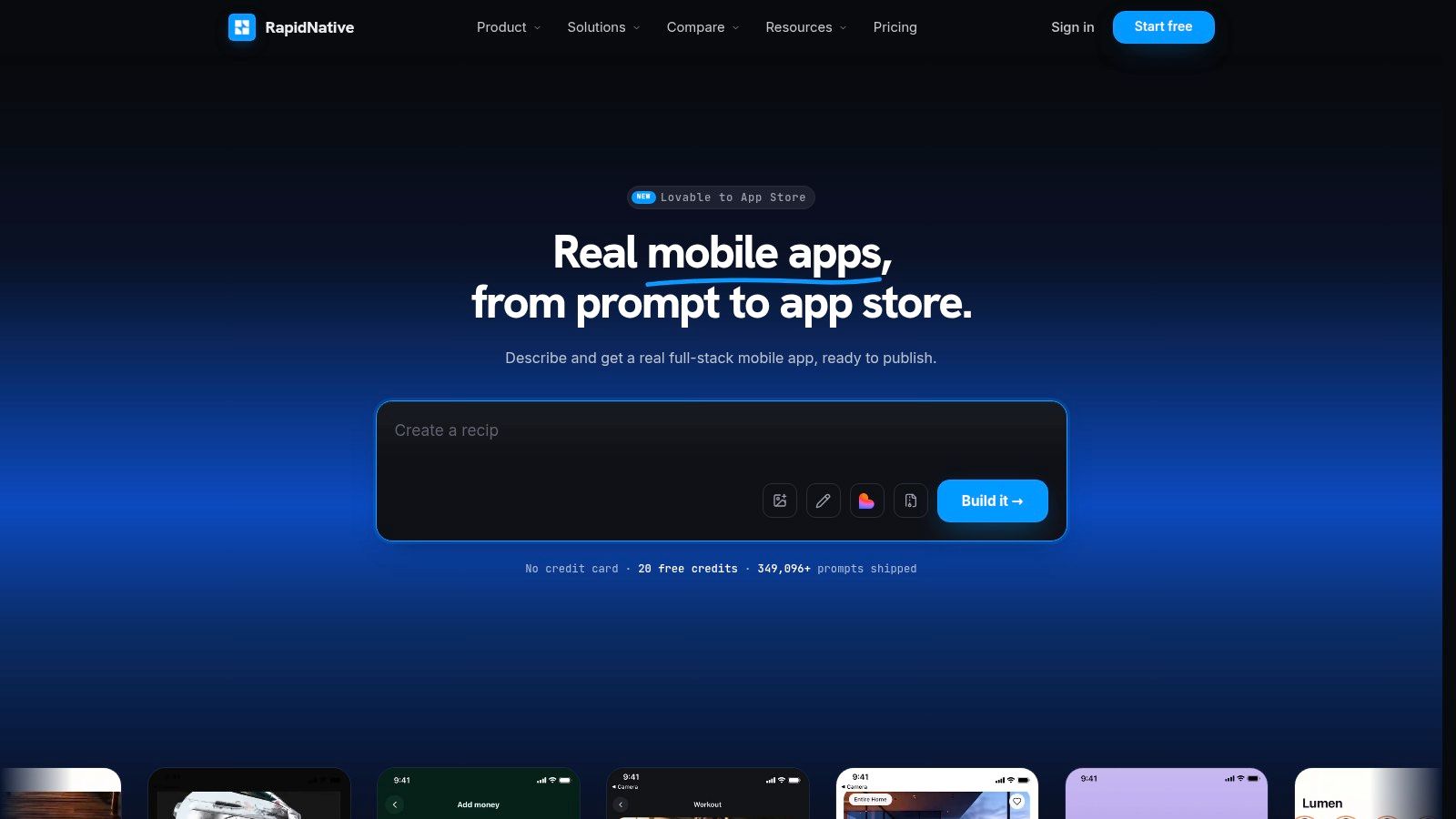
RapidNative addresses that early workflow by turning prompts, sketches, images, or product requirement documents into shareable React Native applications. It uses React Native, Expo, and NativeWind, renders screens and navigation flows live, and lets teams export the resulting code into their own repository rather than keeping the work inside a proprietary runtime.
A practical workflow for early validation
Start with the product requirement, not the final component library. Describe the user, the job they need to complete, the screens involved, and the decisions the prototype should help you make. If the team already has a whiteboard, sketch, or reference image, use that as the starting material instead.
Then review the generated flow as a product team:
- Check the journey: Confirm that onboarding, navigation, empty states, and error paths reflect the actual hypothesis.
- Test the interface: Ask whether a user can complete the important action without explanation.
- Preview across contexts: Share the app through a link or QR code so designers, founders, and engineers can react to the same artifact.
- Export when the decisions stabilize: Move the clean, modular Expo or React Native code into the engineering workflow and replace prototype behavior with production services.
This process doesn't remove the need for native engineering. It helps the team discover which screens are ordinary React Native work and which interaction deserves a native spike. That separation is valuable because it prevents the team from spending native effort on flows that customers may never use.
Founders can use prompt-to-app or PRD-to-app for concept validation. Designers can use image-to-app to test layout and interaction ideas. Engineers can use the resulting screens to clarify routing, component boundaries, and the parts of the product that need platform-specific implementation.
Making Your Decision with a Practical Framework
Make the decision feature by feature, then choose the architecture that handles the most important features with the least avoidable risk. Don't select native because it sounds premium, and don't select React Native because a shared codebase sounds efficient. Tie the choice to the user action that must work exceptionally well.
| Product characteristic | Favor React Native | Favor native |
|---|---|---|
| Core interface | Forms, feeds, search, dashboards, and standard navigation | Custom rendering is the main product experience |
| Hardware dependency | Occasional camera, location, notifications, or media access | Continuous camera, sensor, Bluetooth, or device processing |
| Performance profile | Network-bound business flows and ordinary interaction | Compute-heavy, graphics-heavy, or timing-sensitive workloads |
| Team profile | Strong React, JavaScript, or TypeScript experience | Deep Swift, Kotlin, graphics, or platform SDK expertise |
| Business stage | MVP, uncertain demand, rapid experimentation | Established product with a proven high-value interaction |
| Platform strategy | Similar experience required across iOS and Android | Platform-specific capabilities are a competitive advantage |
| Delivery constraint | Need a shared implementation and quick iteration | Need maximum control over a small number of critical flows |
A founder's decision sequence
First, write down the smallest release that can prove or disprove the business idea. Mark every feature that involves intensive graphics, continuous sensor data, real-time media, device communication, or deep operating-system integration.
Next, separate must feel perfect from must exist. A profile screen must exist. A camera preview may need to feel perfect. That distinction tells you where to allocate native expertise.
Finally, run a technical spike on the riskiest interaction before committing the whole product. If the spike demonstrates acceptable behavior in React Native, keep the shared architecture. If it exposes unacceptable latency, memory pressure, battery use, or platform limitations, isolate that feature in native code or move the product foundation to native.
The best architecture is the one that protects your most valuable user action without slowing every less demanding screen.
Your choice also isn't irreversible. Teams can validate a concept with a shared React Native foundation and later replace a critical module when real usage proves that the interaction deserves deeper optimization. Conversely, a native product can introduce shared tooling or cross-platform modules for ordinary surfaces as the team grows.
Choose React Native when speed, shared logic, and broad product iteration are the current constraints. Choose native when device behavior, graphics, or platform integration is the value proposition. If you want to test the React Native path before committing engineering capacity, build the first interactive flow with RapidNative, review it with your team, and use the result to identify which parts should remain shared and which deserve native implementation.
Ready to build your app?
Turn your idea into a production-ready React Native app in minutes.
Free tools to get you started
Free AI PRD Generator
Generate a professional product requirements document in seconds. Describe your product idea and get a complete, structured PRD instantly.
Try it freeFree AI App Name Generator
Generate unique, brandable app name ideas with AI. Get creative name suggestions with taglines, brand colors, and monogram previews.
Try it freeFree AI App Icon Generator
Generate beautiful, professional app icons with AI. Describe your app and get multiple icon variations in different styles, ready for App Store and Google Play.
Try it freeFrequently asked questions
What is RapidNative?
RapidNative is an AI-powered mobile app builder. Describe the app you want in plain English and RapidNative generates real, production-ready React Native screens you can preview, edit, and publish to the App Store or Google Play.
Can I export the code?
Yes. RapidNative generates clean React Native and Expo code that you can export at any time. No lock-in, no proprietary format. Hand it to your developers or keep building inside RapidNative.
Is RapidNative free to use?
Yes. You can build apps on the free plan with no credit card required. Paid plans unlock unlimited AI generations, code export, and direct publishing to the App Store and Google Play.
Do I need to know how to code?
No. Most users build apps by describing what they want in plain English. Developers can drop into the code whenever they want more control, but coding is optional.
How long does it take to build an app?
Most users have a working first screen in under a minute. A full MVP usually takes a few hours instead of the weeks or months traditional development requires.