Introducing Appshots: AI App Store Screenshots From Your Raw Screens
Upload the screens you already have. Appshots writes the headlines, picks the layouts, builds themes from your brand colors and exports every size the App Store and Google Play ask for.
By Sanket Sahu
28th Oct 2026
Last updated: 28th Oct 2026
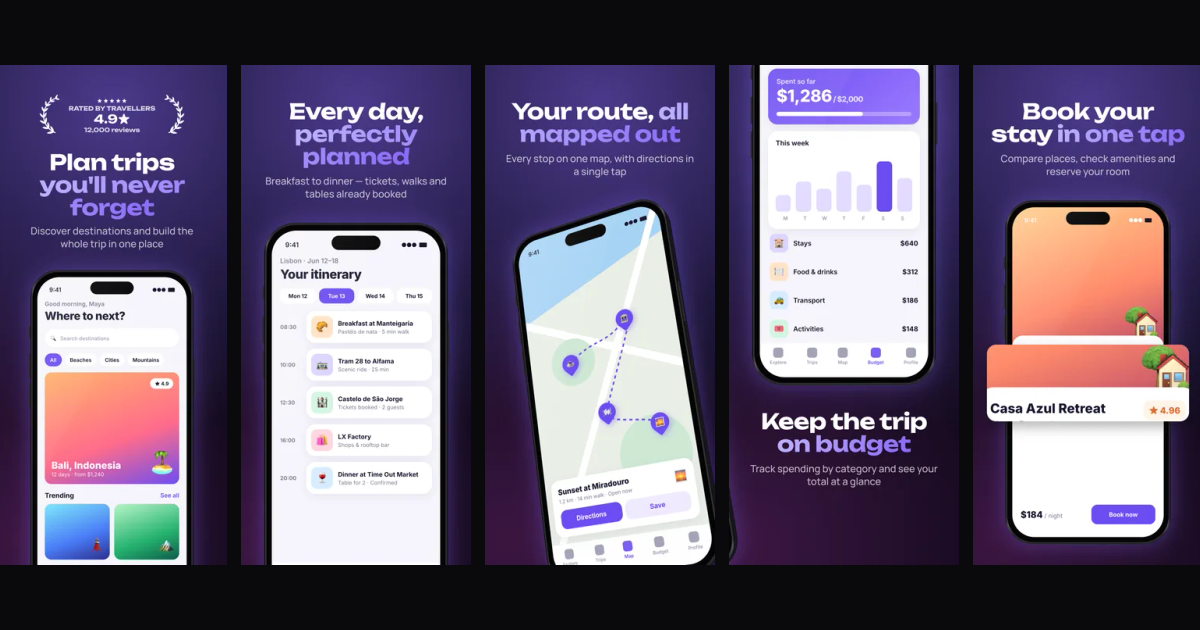
Your app works. The build is signed, the listing is half filled in, and then App Store Connect asks for screenshots. Not the raw captures sitting in your Downloads folder, but designed images with headlines, device frames and a consistent look, at 1320x2868 for the 6.9-inch iPhone, plus whatever Google Play needs. For a lot of builders this is the last chore between a finished app and a live one, and it is surprisingly easy to lose a weekend to it.
Today we're launching Appshots, an AI App Store screenshot generator built into RapidNative. You upload the screens you already have, tell it a line about your app, and it designs a full App Store and Google Play set in about a minute. Every headline, layout, color and device stays editable, and the export covers every size both stores ask for.
What Appshots does
Appshots turns raw app screenshots into designed store screenshots. It reads what each screen shows, writes benefit-first headlines from it, decides the order of the story, picks a layout for each screen and builds color themes from your brand. You get an editable canvas, not a flat image, and you export PNG or JPEG files sized for the App Store and Google Play in one ZIP.
It is not a template library you fill in by hand, and it is not an image model that hallucinates a fake UI. Your real screens stay at the center of every image. The AI does the parts that usually take the longest: copy, composition and color.
How it works
1. Add your screenshots
Drop in raw screens straight from the simulator, the emulator or your phone. Then fill in a few short fields:
- App name and platforms (iOS, Android or both)
- What does it do? One or two sentences in plain words
- Optional: a tagline, a design direction ("playful and bold" or "premium and minimal"), and facts for badges
That last field matters. Badges and laurels are built only from facts you type in, like a real rating or an award. Appshots never invents them, because misleading claims are one of the fastest ways to get a listing rejected.
You can also pick how many screens you want (up to 10) and switch on AI 3D decorations, which adds up to two generated objects that match your palette.
2. The AI designs the set
Press Create screenshots and a first layout lands on the canvas right away, so you are never staring at an empty screen. Then the design fills in as the model works: first a short summary of your app, then the themes, then each screen as soon as it is ready. Screens that are still drafts stay blurred until their final version arrives.
If you don't like where a run is going, stop it. What has already landed stays, and one undo takes you back to the design you had before the run.
3. Edit and export
Everything the AI made is a layer you can change. When it looks right, open the export dialog, tick the sizes you need and download a ZIP. Appshots checks the sizes and screenshot counts against each store's rules before you download, and exports images without transparency, which both stores require.
What the AI gets right for you
Headlines from your actual screens. The copy is written from what your screenshots show, not generic filler like "The best app for you". If a line isn't quite right, rewrite it in one click, or type your own.
A story, not a pile of screens. Store screenshots work best when the first two or three sell the main benefit. Appshots orders the set so the strongest screen leads.
Themes from your brand. Colors are pulled from your screenshots and turned into several candidate themes. Switching themes restyles every screen at once, and you can fine-tune fonts, backgrounds and accent styles (color, marker, underline, squiggle, pill, gradient or outline) yourself.
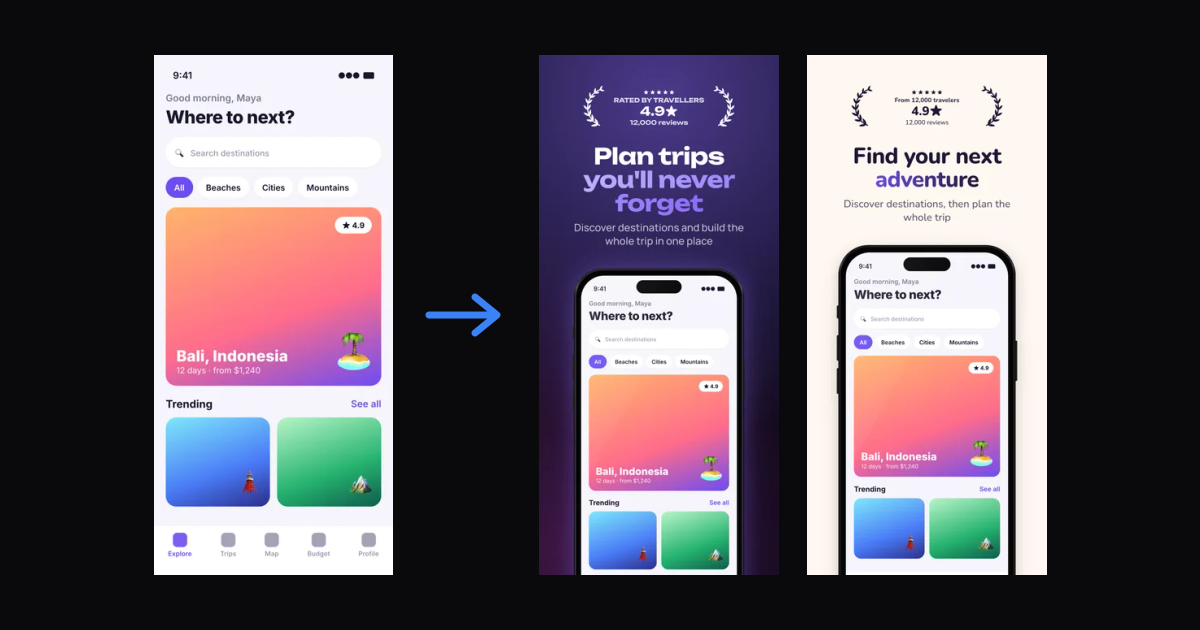
Every layer stays editable
Appshots gives you a real editor, not a one-shot result. You can move, resize and rotate text, devices and shapes, and swap the layout of any screen. The layouts include:
| Layout | What it looks like |
|---|---|
| Headline + device | Headline on top, device rising from the bottom edge |
| Device + caption | Device drops in from the top, caption underneath |
| Award hero | Laurel badge, headline and device; a strong first screen |
| Tilted device | A perspective-tilted device for energy and depth |
| Editorial | Huge left-aligned type with tilted devices above |
| Two devices | Two overlapping devices showing two screens |
| Pop-out card | A piece of the UI enlarged and floating over the device |
| Frameless | The screenshot as a rounded card, no device frame |
| 3D device | A real 3D phone shell at an angle |
| Statement | A big claim with a rating or social proof, no screenshot |
| Panorama pair | One device spanning this screen and the next |
Device frames cover modern iPhones, Pixel and other Android phones, iPad and Android tablets, in a range of frame colors. If you want something extra, generate a 3D mascot, sticker or background that matches your palette, with the background removed for you.
Every size both stores ask for
One project holds every format, so you design once and export for both stores.
| Store | Format | Sizes |
|---|---|---|
| App Store | iPhone 6.9" (required) | 1320x2868, plus 6.7" 1290x2796, 6.5" 1284x2778, 6.3" 1206x2622, 6.1" 1179x2556 |
| App Store | iPhone 5.5" | 1242x2208 |
| App Store | iPad 13" (required for iPad apps) | 2064x2752, plus 12.9" 2048x2732 |
| Google Play | Android phone | 1080x1920, 1440x2560, 1080x2160 |
| Google Play | Android tablet | 10" 1600x2560, 7" 1200x1920 |
| Google Play | Feature graphic | 1024x500 |
You can export in two ways. HQ export renders on our servers in a headless browser, pixel-exact, including 3D devices and perspective. In-browser export renders on your own device for free; 3D and tilt effects may flatten slightly. For a deeper look at the sizes and what to capture, read our guide on making App Store screenshots for a React Native or Expo app.
Pricing
There is no separate subscription. Appshots uses the same credits as the rest of RapidNative.
| Action | Credits |
|---|---|
| Generate a full screenshot set | 2.5 |
| Generate AI themes | 0.5 |
| Rewrite a headline | 0.5 |
| Generate an AI sticker or background | 1 |
| HQ export (server render, every size) | 1 |
| Export in your browser | Free |
A full set costs 2.5 credits, and you can restyle and re-export as often as you like. Plans and top-ups are on the pricing page.
Who it's for
Anyone shipping a mobile app. You don't need to have built your app with RapidNative. Appshots works with screenshots from any app, whether it was made with React Native, Expo, Flutter, Swift or Kotlin.
RapidNative builders. If you did build with us, Appshots lives in the same team workspace as your apps, under the Screenshots tab of your dashboard, with the same credits and the same team access. Anyone on your team can open, edit and export a design. Once your app is ready, our guide to publishing a React Native app to the App Store covers the build and submission side.
Teams without a designer. Store screenshots are a design job that often lands on a developer or founder. Appshots gives you a strong first draft and a real editor to finish it.
What it doesn't do yet
We'd rather you know up front:
- No built-in translation. If you need localized screenshots for many languages, you'll duplicate and edit the copy yourself for now.
- No direct upload to the stores. Appshots gives you a ZIP. You upload it in App Store Connect and the Google Play Console, or with a tool like fastlane.
If either of those is a deal-breaker, our roundup of the best App Store screenshot generators compares tools that do them today.
Try it
The fastest way to see what Appshots does is to open it and choose Use a sample app. It loads a set of example screens so you can watch a full design come together before you use your own. When you're ready, drop in your screenshots and press Create.
Ready to build your app?
Turn your idea into a production-ready React Native app in minutes.
Free tools to get you started
Free AI PRD Generator
Generate a professional product requirements document in seconds. Describe your product idea and get a complete, structured PRD instantly.
Try it freeFree AI App Name Generator
Generate unique, brandable app name ideas with AI. Get creative name suggestions with taglines, brand colors, and monogram previews.
Try it freeFree AI App Icon Generator
Generate beautiful, professional app icons with AI. Describe your app and get multiple icon variations in different styles, ready for App Store and Google Play.
Try it freeFrequently asked questions
What is Appshots?
Appshots is RapidNative's AI App Store screenshot generator. You upload raw screenshots of your app, and it writes headlines, picks layouts, builds color themes and exports store-ready PNG or JPEG sets for the App Store and Google Play. Everything it makes stays editable.
Do I need to build my app with RapidNative to use Appshots?
No. Appshots works with screenshots from any app, whether it was built with React Native, Expo, Flutter, Swift, Kotlin or anything else.
How much does Appshots cost?
It uses your RapidNative credits. Generating a full set costs 2.5 credits, AI themes and headline rewrites 0.5 each, an AI sticker or background 1, and an HQ export 1. Exporting in your browser is free.
Which sizes does Appshots export?
iPhone 6.9-inch (1320x2868) plus 6.7, 6.5, 6.3, 6.1 and 5.5-inch, iPad 13 and 12.9-inch, Android phone (1080x1920, 1440x2560 and 1080x2160), Android 7 and 10-inch tablets, and the 1024x500 Google Play feature graphic.
Will the AI invent ratings or awards for my badges?
No. Badges and laurels are built only from facts you type in, like a real rating or an award you won. If you leave that field empty, no claims are made.
Can Appshots translate my screenshots or upload them to the stores?
Not today. Appshots exports a ZIP of images that you upload in App Store Connect and the Google Play Console, or with a tool like fastlane. There is no built-in translation yet.