9 Best App Store Screenshot Generators in 2026, Compared
AI generators, template editors, free Figma files and a command-line tool. What each App Store screenshot generator does well, what it costs, and which one fits how you work.
By Sanket Sahu
28th Oct 2026
Last updated: 28th Oct 2026
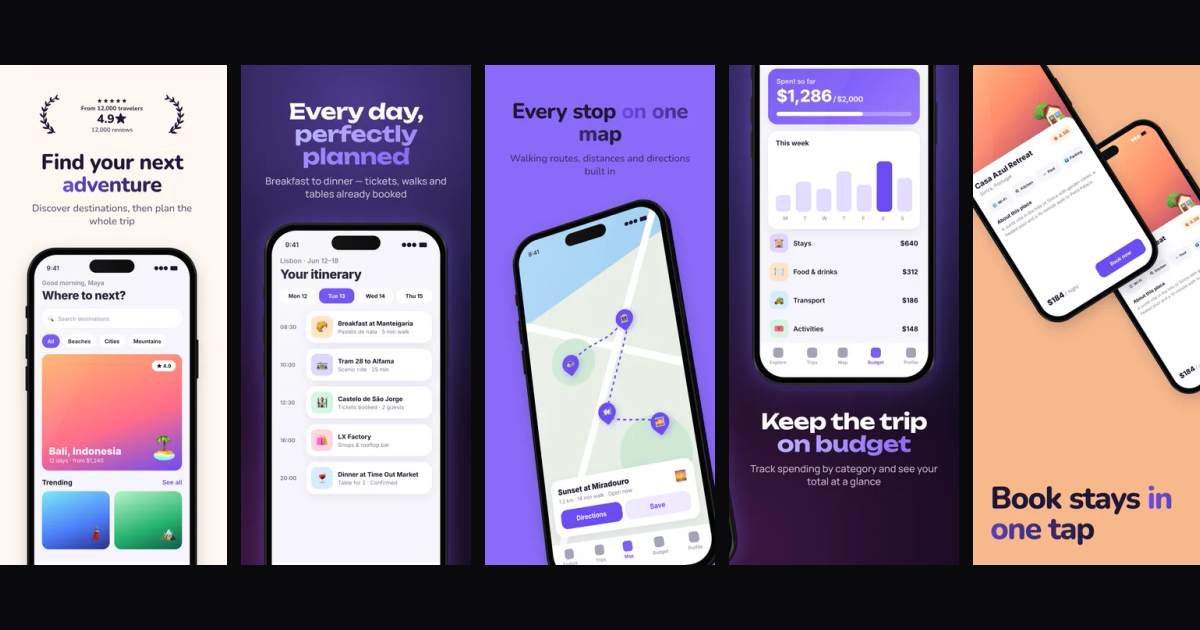
An App Store screenshot generator turns raw captures of your app into the designed images that sell it on its store page: a headline, a device frame, a background, sized exactly to what Apple and Google accept. The first two or three screenshots show up right in search results, so they do a lot of the work of getting someone to tap Get.
There are more tools for this than you'd expect, and they work in very different ways. Some generate the whole set with AI. Some give you templates to fill in. Some are free Figma files, and one is a command-line tool that runs in your build pipeline. This guide compares nine of them, with what each does well, what it costs, and who it fits.
How we compared them
We looked at each tool's own site and pricing page in October 2026 and compared them on the things that decide most choices:
- How the design gets made: AI-generated, template-based, or fully manual
- Store coverage: iPhone, iPad, Android phone and tablet, and the Play feature graphic
- Localization: whether it can translate captions into other languages
- Getting files to the stores: a ZIP you upload yourself, or a direct upload
- Price: free tier, and what paid plans cost
We didn't run invented benchmark scores. Prices change often, so check each vendor's pricing page before you buy. One disclosure up front: Appshots is our product. We've tried to describe it, and everyone else, the same way.
Quick comparison
| Tool | Approach | Free option | Paid pricing (Oct 2026) | Best for |
|---|---|---|---|---|
| Appshots | AI designs the set from your screens | Browser export free; AI uses credits | 2.5 credits per generated set | An AI-designed first draft you can edit |
| AppScreens | Template editor with AI captions | Free plan (5 screens, 1 project) | Pro $99/yr, Scale $180/yr | Many languages and direct store upload |
| Screenshot Whale | Templates plus AI art and translation | Free plan (3 AI generations/mo) | From $9.99/mo; $14.90 one-time pack | ASO-minded solo developers |
| Previewed | Mockups, 3D and video | Lite plan (720p 2D exports) | Plus $9.99 one-time, Pro $19/mo yearly | 3D mockups and app promo videos |
| AppLaunchpad | Template editor | Free plan | Paid plan; check current price | Quick template-based sets |
| Hotpot.ai | Free templates in a web editor | Free templates | Not listed for templates | Free iPad and iPhone templates |
| Figma templates | Community files you edit by hand | Free | Figma plan optional | Full design control |
| Canva | General design tool | Free plan | Canva Pro | Teams already using Canva |
| fastlane frameit | Open-source CLI | Free | None | Automating screenshots in CI |
1. Appshots (by RapidNative)
Best for: an AI-designed set from the raw screens you already have.
Appshots starts from your real screenshots rather than a template. You upload raw screens, add your app name and a line about what it does, and the AI writes benefit-first headlines from what the screens show, orders them into a story, picks a layout per screen and builds several color themes from your brand. The design streams onto the canvas as it is made, and everything stays editable afterwards.
What stands out:
- Headlines written from your screens, with one-click rewrites
- Themes from your brand colors; switching themes restyles every screen at once
- Layouts beyond "headline + phone": tilted devices, two devices, pop-out cards, frameless, real 3D phones, statement screens and panoramas that span two screenshots
- Badges built only from facts you provide, so it never invents ratings or awards
- Every size in one project: iPhone 6.9" (1320x2868) and smaller iPhones, iPad 13", Android phones and tablets, and the 1024x500 Play feature graphic
Pricing: uses RapidNative credits, with no separate subscription. Generating a full set costs 2.5 credits, AI themes and headline rewrites 0.5, AI stickers and HQ server exports 1. Exporting in your browser is free.
Limitations: no built-in translation and no direct upload to App Store Connect or Google Play today; you download a ZIP and upload it yourself.
Read more in the Appshots launch post.
2. AppScreens
Best for: apps that ship in many languages and want one-click store upload.
AppScreens is one of the longest-running tools in this space and ranks near the top for screenshot searches. It is a template-based editor with AI help on captions and restyling. Its strongest features are on the paid plans: 80+ locales including right-to-left languages, 150+ templates and 500+ layouts, 3D frames, custom sizes for other stores (Amazon, Huawei, Mac App Store), and one-click upload to App Store Connect and Google Play, including custom product pages and product page optimization tests.
Pricing: a free plan with up to 5 screens per project and one project, with watermarks on Pro previews. Pro is $99 a year (shown as $8.25/month billed annually), and Scale is $180 a year with an extended license for client work.
Limitations: the free plan is narrow, and localization and store upload are paid features. The design work is still yours; AI assists the copy rather than designing the set.
3. Screenshot Whale
Best for: solo developers who care about ASO and a few extra languages.
Screenshot Whale pairs templates with AI art generation and AI translation, plus an ASO editor with competitor analysis. Its plans are priced around how many AI art generations you need and how many apps you manage.
Pricing: a free plan with core templates, the base language only and 3 AI art generations a month. Solo is $9.99/month with a 7-day trial (30 AI generations, AI translation into 10 languages, all device types, commercial license). Studio is $19.99 and Agency $29.99 for more generations and app workspaces. There is also a $14.90 one-time Launch Pack for 30 days of full access, and single templates from $4.99.
Limitations: translation is capped at 10 languages on Solo, and the export sizes aren't spelled out on the pricing page, so check your required sizes before you pay.
4. Previewed
Best for: 3D mockups and app promo videos alongside your screenshots.
Previewed is broader than a screenshot generator. It makes App Store and Google Play mockups, 3D device animations and promo videos, which is useful if you also need an App Store preview video or marketing visuals for a launch.
Pricing: the Lite plan is free forever with unlimited 2D exports at 720p under a Creative Commons attribution license. Plus is a $9.99 one-time fee for commercial use, 10 higher-resolution exports, 3D and video exports. Pro is $19/month billed yearly ($228) for unlimited exports and 60fps video.
Limitations: the free plan's 720p exports and attribution license aren't meant for a commercial store listing, so most apps will need Plus or Pro. No AI design of the set itself.
5. AppLaunchpad
Best for: a fast, template-based set without learning a design tool.
AppLaunchpad is a browser-based screenshot builder with customizable templates for the App Store and Google Play. You pick a template, drop in your screens, edit the text and export. It is straightforward and has been around for years.
Pricing: a free plan to try it, and a paid plan for full access. Published figures for the paid plan vary between sources, so check AppLaunchpad's own pricing page for the current price.
Limitations: the look depends on the template you pick, and the copy is yours to write.
6. Hotpot.ai
Best for: free screenshot templates, especially for iPad.
Hotpot offers free App Store screenshot templates in a drag-and-drop web editor. Its iPad Pro generator, for example, has 24 editable templates at 2048x2732, works for 12.9 and 13-inch iPad slots in App Store Connect, and includes one-click resizing for Google Play. It also offers free custom templates on request.
Pricing: the templates are free to edit and download. Hotpot doesn't list a price for them.
Limitations: the template editor needs a computer, and each template is a fixed design you adapt rather than a set designed around your app.
7. Figma community templates
Best for: full design control, for free.
The top result for "app store screenshot generator" is a Figma community template, and there are hundreds more, from single-set files to packs of 500+ layouts for Android and iOS. You duplicate the file, paste your screens into the frames and edit everything by hand.
Pricing: most community templates are free, and Figma's free plan is enough to edit and export them.
Limitations: it is all manual. You write the copy, keep the frames at the right sizes, and export each size yourself. Great if you have a designer or enjoy design; slow if you don't.
8. Canva
Best for: teams that already design everything in Canva.
Canva isn't a dedicated screenshot generator, but it supports custom dimensions and has device mockups and plenty of templates. If your marketing team already lives in Canva, keeping screenshots there avoids another tool.
Pricing: a free plan, with Canva Pro for premium templates and assets.
Limitations: you'll set up each store size yourself, and there are no store-specific checks for counts or sizes. Check asset licenses for anything from the premium library.
9. fastlane frameit
Best for: developers who want screenshots generated in their build pipeline.
fastlane is the open-source toolkit many iOS and Android teams use to automate releases. Its frameit action puts screenshots into device frames and can add a colored background and a title above or below the frame. Paired with snapshot, which captures screenshots automatically through UI tests, you can regenerate your whole set on every release, in every language your app supports.
Pricing: free and open source.
Limitations: setup takes real developer time. Titles need a background image, framing is slow (the --resume flag helps), and the look is basic compared with designed sets. For React Native and Expo apps, you'll also need UI tests that can drive your screens.
How to choose
- You have raw screens and no designer: start with an AI generator like Appshots, then edit what it makes.
- You ship in many languages: AppScreens or Screenshot Whale, since both translate captions; fastlane if you want it automated.
- You need a promo video too: Previewed.
- You want it free and don't mind manual work: a Figma community template or Hotpot.
- You already release with fastlane: add frameit and snapshot to the pipeline.
Whichever you choose, check three things before you commit: the exact sizes it exports (iPhone 6.9" at 1320x2868 is the one App Store Connect asks for first), whether the free plan's license allows commercial use, and how much of the copy you'll still write yourself.
Tips for better screenshots with any tool
- Lead with the benefit. The first two or three screenshots show in search results. Put your strongest screen first and say what it does for the user, not what the feature is called.
- Use clean captures. Set the status bar to a tidy time and full battery, remove debug overlays, and use realistic sample data. Our guide to making App Store screenshots for a React Native or Expo app shows how.
- Keep text short. A headline people can read in a second beats a paragraph.
- Only claim what's true. Ratings, awards and download counts must be real.
- Mockups aren't screenshots. For pitch decks and landing pages, a mobile app display mockup may be what you want instead.
If you're still building the app itself, RapidNative turns a prompt into a working React Native app, and our guide to publishing a React Native app to the App Store covers the steps after that.
Ready to build your app?
Turn your idea into a production-ready React Native app in minutes.
Free tools to get you started
Free AI PRD Generator
Generate a professional product requirements document in seconds. Describe your product idea and get a complete, structured PRD instantly.
Try it freeFree AI App Name Generator
Generate unique, brandable app name ideas with AI. Get creative name suggestions with taglines, brand colors, and monogram previews.
Try it freeFree AI App Icon Generator
Generate beautiful, professional app icons with AI. Describe your app and get multiple icon variations in different styles, ready for App Store and Google Play.
Try it freeFrequently asked questions
What is the best App Store screenshot generator?
It depends on the job. For an AI-designed set from your raw screens, try Appshots. For many languages and direct upload to the stores, AppScreens. For 3D mockups and promo video, Previewed. For a free, fully manual route, a Figma community template. For automation in a build pipeline, fastlane frameit.
Is there a free App Store screenshot generator?
Yes. Figma community templates and Hotpot's screenshot templates are free to use, fastlane frameit is open source, and AppScreens, Screenshot Whale and Previewed have free plans with limits. Appshots exports in your browser for free; AI generation uses RapidNative credits.
What size are App Store screenshots in 2026?
The main iPhone size is 6.9-inch at 1320x2868 pixels. iPad apps need 13-inch screenshots at 2064x2752. Google Play phone screenshots are commonly 1080x1920, and the Play feature graphic is 1024x500.
How many screenshots can I upload to the App Store and Google Play?
App Store Connect accepts up to 10 screenshots per device size. Google Play accepts up to 8 phone screenshots. Most of the impact comes from the first two or three, since those show in search results.
Can AI make App Store screenshots?
Yes. AI generators like Appshots write the headlines from your real screens, choose layouts and build color themes, then let you edit the result. Others, like AppScreens and Screenshot Whale, use AI for captions, restyling or translation inside a template editor.